AI Agents for Small Business: 15 Jobs You Can Hand Off This Week (and 4 to Keep)
Not a chatbot and not another dashboard to check: software that does the clicking for you. These are the jobs owners hand over first, and the ones they shouldn't.

An AI agent for a small business is software that does multi-step online work for you. It opens websites, signs in, fills in forms, sends emails and updates spreadsheets, then reports what it did. Good first jobs are repetitive and rule-based, like moving invoices into a sheet or checking orders each morning. Keep money, legal and judgment calls for yourself.
Every small business has a pile of work that isn't hard, just constant. Copying invoices out of the inbox. Checking which orders need to ship. Looking up what a competitor charges this week. Typing the same details into the same supplier portal. None of it needs you, but all of it needs someone.
An AI agent is the first kind of software that can take that work without you building anything. This guide covers what an agent is, 15 jobs owners hand off first, the 4 you should keep, and what it costs next to a virtual assistant or your own evenings.
What an AI agent is (and isn't)
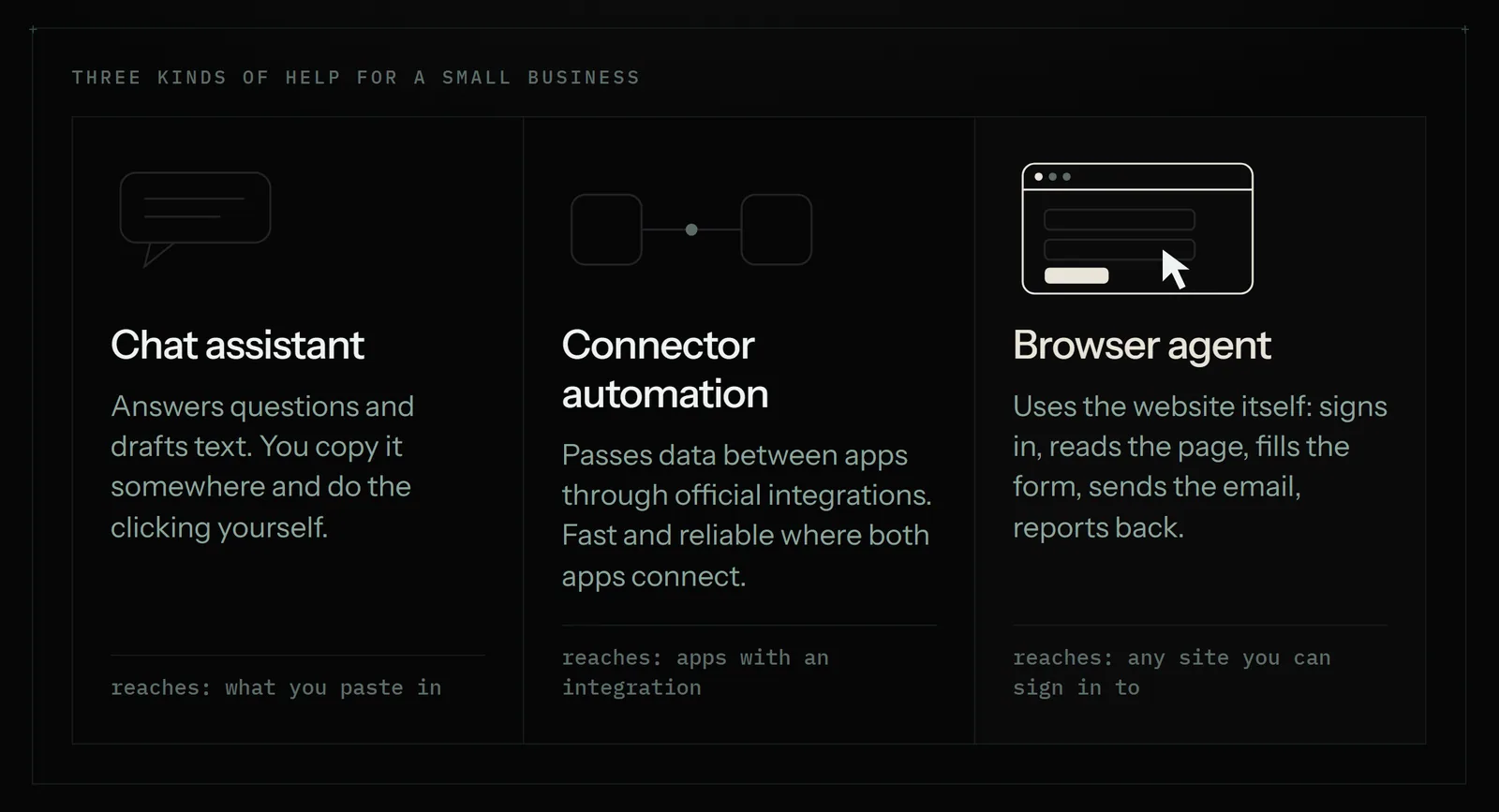
"AI agent" gets stuck on everything from chat widgets to sales software, so it helps to separate three different tools. They overlap, and plenty of businesses use more than one.
- A chat assistant answers questions and drafts text. You still copy the answer somewhere and do the clicking.
- Connector automation (Zapier, Make, n8n) passes data between apps through their official integrations: "when a form is submitted, add a row to this sheet". It is fast and reliable, but only works where both apps have an integration, and someone has to build each workflow.
- A browser agent uses websites the way you do. It opens the page, signs in, reads what's there, fills in the form, sends the email and writes down what it did. It works on sites that have no integration at all, and you set it up by describing the job in plain English.
| Chat assistant | Connector automation | Browser agent | |
|---|---|---|---|
| What it does | Answers and drafts text | Moves data between connected apps | Does the clicking and typing on websites |
| What it can reach | What you paste into it | Apps with an official integration | Any site you can sign in to |
| Setup | None | Build a workflow, step by step | Describe the job, or show it once |
| Where it struggles | Can't act in your accounts by itself | Portals and marketplaces with no integration | Slower than an API; some sites block bots |
| Best for | Writing and thinking | High-volume, app-to-app handoffs | The repetitive work that lives in a browser |
The honest summary: if two apps already integrate, a connector is usually the cheaper, faster way to link them. A browser agent earns its place on everything else, which for most small businesses is the larger pile.
15 jobs small businesses hand off first
The best first jobs share four traits. They repeat daily or weekly. They follow a rule you could write on a sticky note. They happen in a browser or an inbox. And a mistake is cheap to fix, or the agent asks before it acts. Each job below shows what you would type, and what you get back.
Inbox and paperwork
- Invoices into a spreadsheet. "Every Friday, find this week's invoices in my Gmail and add each one to my Invoices sheet: date, client, amount, due date." You get new rows in the sheet and a short note listing what was added.
- Unpaid invoice reminders. "Every Monday, check the Invoices sheet for anything more than 14 days overdue and send the client a polite reminder from my Outlook." You get a list of who was reminded, and nobody is emailed twice for the same invoice.
- A weekly numbers report. "Sign in to my shipping account and my payment dashboard every Monday morning and email me last week's totals." You get one email instead of four logins.
- Bookings onto the calendar. "When a booking confirmation lands in my inbox, put it on my Google Calendar with the client's name and phone number." You get calendar entries that match the emails.
- Attachments filed in the right place. "Save every supplier invoice PDF from my inbox into the Drive folder for that supplier." You get a tidy Drive and a list of what was filed.
Selling online
- The morning order check. "Check my Etsy orders each morning and tell me what needs shipping today." You get a short list before breakfast.
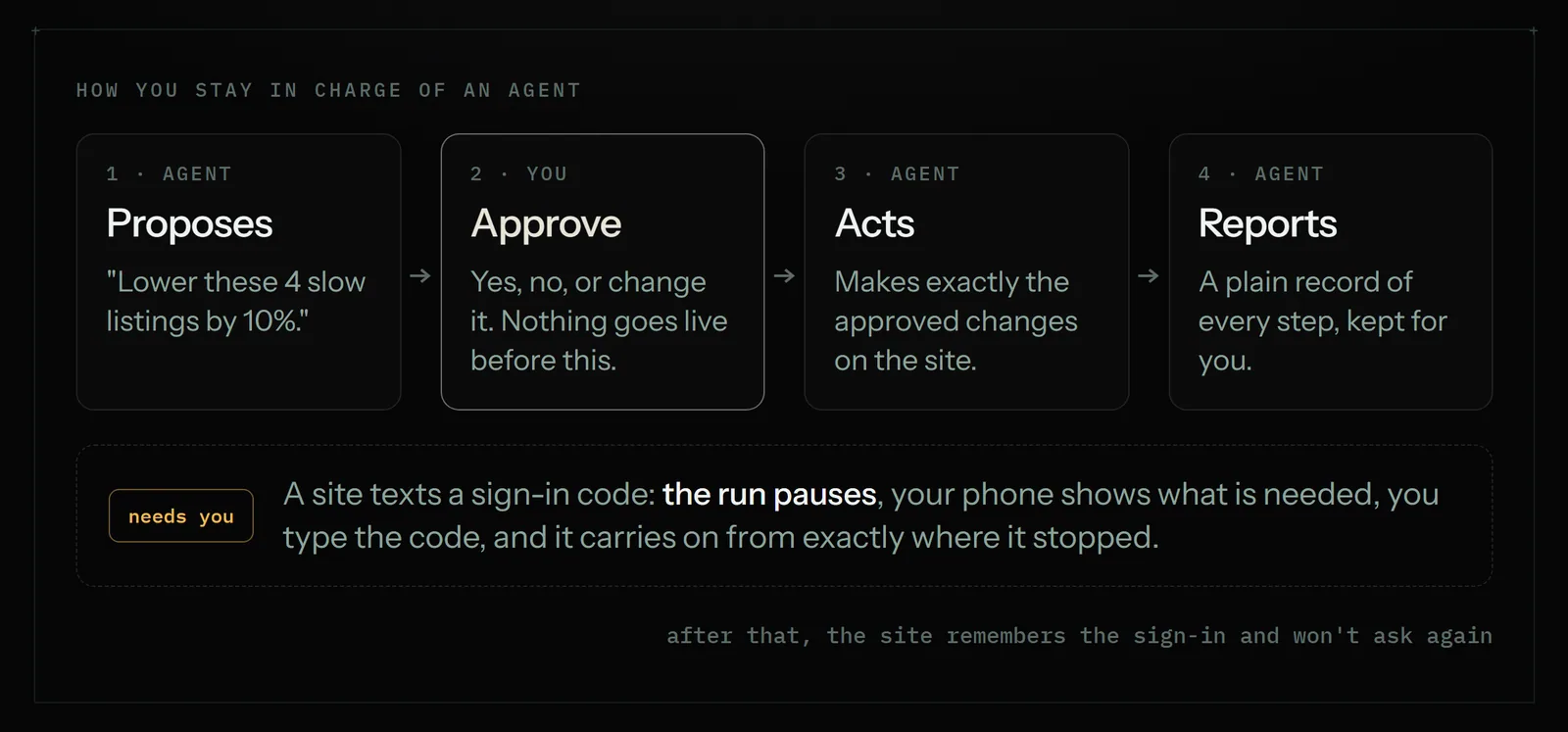
- Price and description updates, with your OK. "Lower the price on my slow-moving listings by 10%. Ask me before you change anything." The agent proposes the changes, and nothing changes on the live shop until you approve.
- Competitor price checks. "Every weekday at 7:30, check these five products on these three competitor sites, update my price sheet and email me if anything drops more than 10%." You get a current sheet and an alert only when something moved.
Marketing
- A weekly ads review. "Every Friday, look at my Google Ads and tell me what's wasting money." You get the search terms and campaigns worth cutting, in plain words.
- Keyword research and a draft campaign. "Find the search terms people use for mobile dog grooming in Tampa and draft a small campaign." The campaign is created paused, so nothing spends until you switch it on.
- Useful replies on X and Reddit. "Reply to five new posts in my niche every morning. Sound like me. Never spam." You get replies within sensible daily limits, and a record of each one.
- Launch and directory listings. "List my product on 20 startup directories, a couple a day." You get a running list of where it's listed, and no directory gets the same submission twice.
Websites with no integration
- Copying between a portal and your sheet. "Log in to my supplier portal each morning, copy any new order statuses into my Orders sheet and tell me which are delayed." This is the job connectors can't do when the portal has no API.
- Filling the same form, many times. "For each row in this sheet, fill in the warranty registration form on the manufacturer's site." You get each row marked done or flagged with the reason it failed.
- Watching a page for you. "Watch this product page and tell me when it's back in stock." The agent checks on a schedule and only messages you when the answer changes.
Notice what all fifteen have in common: you could explain any of them to a new assistant in under a minute. That's the test. If you can't explain the rule, the agent can't follow it either.
4 jobs to keep for yourself
An agent should take the repetition, not the responsibility. These four stay with you, or at least behind your approval.
- Anything that moves money. Refunds, supplier payments, payroll and switching ad spend on. Let the agent prepare the list or the draft campaign, and press the button yourself.
- Legal and tax declarations. Filings, contracts and anything you sign. An agent can gather the documents into a folder; the declaration is yours.
- Upset customers. A complaint, a dispute or a refund argument needs a person who can bend the rules. Have the agent flag these to you rather than answer them.
- Taste and strategy. What to sell, what to charge, what your brand sounds like. An agent can report the numbers. Deciding what they mean is the part of the business that is actually yours.
Two habits keep you in control of everything else. First, ask for approval on anything that goes live: an Astari can propose a change and wait for your yes. Second, keep two-factor sign-in on. When a site texts you a code, the run pauses and asks you for it on your phone, then carries on from exactly where it stopped. It doesn't ask again on that site once the sign-in is remembered.
How to set up your first agent
Setting one up takes about as long as explaining the job to a person.
- Pick one job from the list above. Choose the one you dread most each week, as long as it isn't one of the four you keep.
- Describe it in plain English. Write it the way you would brief a new assistant: where to go, what to look for, what to do with it, and when to ask you. Or do the task once while the agent watches, and it learns the steps.
- Give it access. Save the logins it needs, or connect Gmail, Outlook, Google Sheets, Docs, Calendar and Drive directly. Passwords are locked in your browser before they are stored, and are only unlocked at the moment they are typed into the website's own sign-in box. The AI never sees them. How connections work.
- Run it once and watch. You can watch any run live, from your phone if you like, and read a plain record of every step afterward.
- Put it on a schedule. Every weekday at 7:30, every Friday afternoon, three times a day. Scheduling explained.
The full walkthrough is in Your first Astari, and takes about five minutes.
Where it runs: cloud, Chrome, Windows or Android
Where the agent works matters more than it sounds, because it decides whether your computer has to stay on.
- In the cloud. Most jobs run on Astarii's own computers, so yours can be closed or asleep. This is the right place for anything scheduled.
- In your own Chrome or Brave. The extension runs jobs in the browser you already use, with your own logins and your own internet connection.
- On your Windows PC. The desktop app can use programs on your computer, not just websites, for jobs like editing a batch of photos the way you showed it.
- On your phone. The Android app lets you watch a run live, answer an Astari's questions and approve changes while you're away from your desk.
One account covers all four. See the apps for the downloads.
What it costs, next to a VA or your own time
An agent is priced by the minutes it spends working, not by the hour of someone's day. A virtual assistant is priced by their time. Here is how the options compare for the narrow, repetitive work in this guide.
| Option | Typical cost | Good at | Not good at |
|---|---|---|---|
| Doing it yourself | Your evenings | Knowing exactly what you want | Doing it at 7:30 every weekday |
| Freelance virtual assistant | About $10 to $20 an hour on Upwork, more for experienced help | Judgment, phone calls, messy one-off tasks | Being cheap for 15-minute daily chores |
| Connector automation | Free to start, then a monthly plan by task volume | Fast app-to-app handoffs | Sites with no integration |
| Astarii | $29.99, $49.99 or $99.99 a month; 3 free runs to try | Repetitive browser and inbox work on a schedule | Decisions that need a person |
A worked example. A 15-minute job every weekday is about 330 minutes a month. The Pro plan at $29.99 includes 900 cloud minutes, about 15 hours of an agent working, plus 800 minutes in your own browser. So one daily job uses about a third of the plan, and the rest covers a weekly report, the invoice sweep and a few one-off errands. Runs are billed by their real length, rounded up to the minute, and a run that finishes in 4 minutes costs 4.
A good virtual assistant is still worth hiring for work that needs judgment. The two aren't rivals: plenty of owners give the agent the clockwork tasks and give their assistant the work that needs a person. Full plan details are on the pricing page.
A sensible first week
Start small. The owners who get the most from an agent hand over one job, check it, then add the next.
- Day 1: pick one job and write the instruction. Sign up and use one of your 3 free runs to try it.
- Day 2: run it again and read the record of what it did. Tighten the instruction where it guessed.
- Day 3: put it on a schedule.
- Day 5: check the week's results. If it was right every time, pick the second job. If it wasn't, the fix is almost always a clearer instruction.
By the end of the month the inbox sweep, the order check and the Friday report run without you, and the time they took goes back to the parts of the business only you can do.
Say it to an Astari
These are instructions you can give an Astari, word for word. It does the work in a browser, on a schedule if you want one, and asks you before anything goes live.
Questions
What can an AI agent actually do for a small business?
It does multi-step work on websites and in your inbox: signing in to accounts, reading what's there, filling in forms, sending emails, updating spreadsheets and reporting back. The best uses are jobs that repeat daily or weekly and follow a clear rule, such as logging invoices, checking orders or monitoring competitor prices.
What's the difference between an AI agent and a chatbot?
A chatbot answers questions and drafts text, and you still do the clicking. An agent takes the action itself: it opens the website, signs in, fills in the form and tells you what it did. Many businesses use both, the chatbot for writing and the agent for the repetitive work.
How much does an AI agent cost for a small business?
Astarii plans are $29.99, $49.99 and $99.99 a month, measured in minutes of an agent working. The Pro plan includes 900 cloud minutes, about 15 hours, plus 800 minutes in your own browser. Every new account gets 3 free runs of up to 15 minutes each, with no card needed.
Is it safe to give an AI agent my passwords?
With Astarii, a saved password is locked in your browser before it is stored and is only unlocked at the moment it is typed into the website's own sign-in box, so the AI never sees it and it never appears in any record. When a site sends a two-factor code, the run pauses and asks you for it.
Do I need to code or build Zapier-style workflows?
No. You describe the job in plain English, the way you would explain it to a new assistant, or you do it once while the agent watches. There are no scripts or workflow builders. If two apps already integrate, a connector tool can still be a good, cheap way to link them.
Can an AI agent keep working when my laptop is closed?
Yes, if it runs in the cloud. Most Astarii jobs run on Astarii's own computers, so yours can be closed or asleep, and scheduled jobs run on time either way. Jobs you assign to your own Chrome or Windows PC need that machine to be on.
Will an AI agent change my prices, ads or emails without asking?
Only if you let it. You can tell an Astari to propose changes and wait for your approval. The Etsy Manager proposes every change to your live shop first, and the Google Ads Manager creates campaigns paused, so nothing spends until you switch it on.
Is an AI agent cheaper than a virtual assistant?
For narrow, repetitive browser work, usually. Upwork puts typical virtual assistant rates at about $10 to $20 an hour, while one Astarii plan covers many scheduled jobs. A good assistant is still the better choice for work that needs judgment, phone calls or a personal touch, and many owners use both.
filed under AI agents explained