How to Automate Data Entry Between Websites and Google Sheets (No Code)
The free Sheets formula, a connector, a scraper or an agent that clicks: which one fits depends on the website, not the spreadsheet.

To automate data entry from a website into Google Sheets without code, match the tool to the site. Public tables: Sheets' free IMPORTHTML formula. Apps with an integration: a connector like Zapier. Portals behind a login, or pages you must click through: a browser agent such as Astarii, which signs in, copies only new rows on a schedule and reports back. Plans start at $29.99 a month.
Most small-business data entry isn't hard. It's the same twelve clicks every morning: sign in to the supplier portal, find the new orders, copy the order number, the date, the status and the total, paste them into the sheet, repeat. It takes twenty minutes on a good day and an hour when the portal is slow.
This guide covers the four ways to get that copying off your plate without writing code: a free formula built into Google Sheets, a connector tool like Zapier, a scraping tool, and a browser agent that does the clicking for you. Each one fits a different kind of website, so the first step is working out which kind you have. If you're new to agents, the guide to AI agents for small business covers the basics, and your first Astari takes about five minutes.
First, which kind of website is the data on?
Every data entry job falls into one of three buckets, and the bucket decides the tool.
- A public page with a table or list. A price list, a public directory, a rates page. No sign-in, and the data is already on the page when it loads.
- An app with an official integration. A form tool, a store platform, an email marketing tool. If the app is listed in Zapier or Make with the trigger you need, the data can move app to app without a browser at all.
- Everything else. A supplier or wholesaler portal behind a login, a marketplace dashboard, a government or shipping site, a page where you have to click a date filter or open each order before the details appear. This is usually the biggest pile, and it's the one people end up doing by hand.
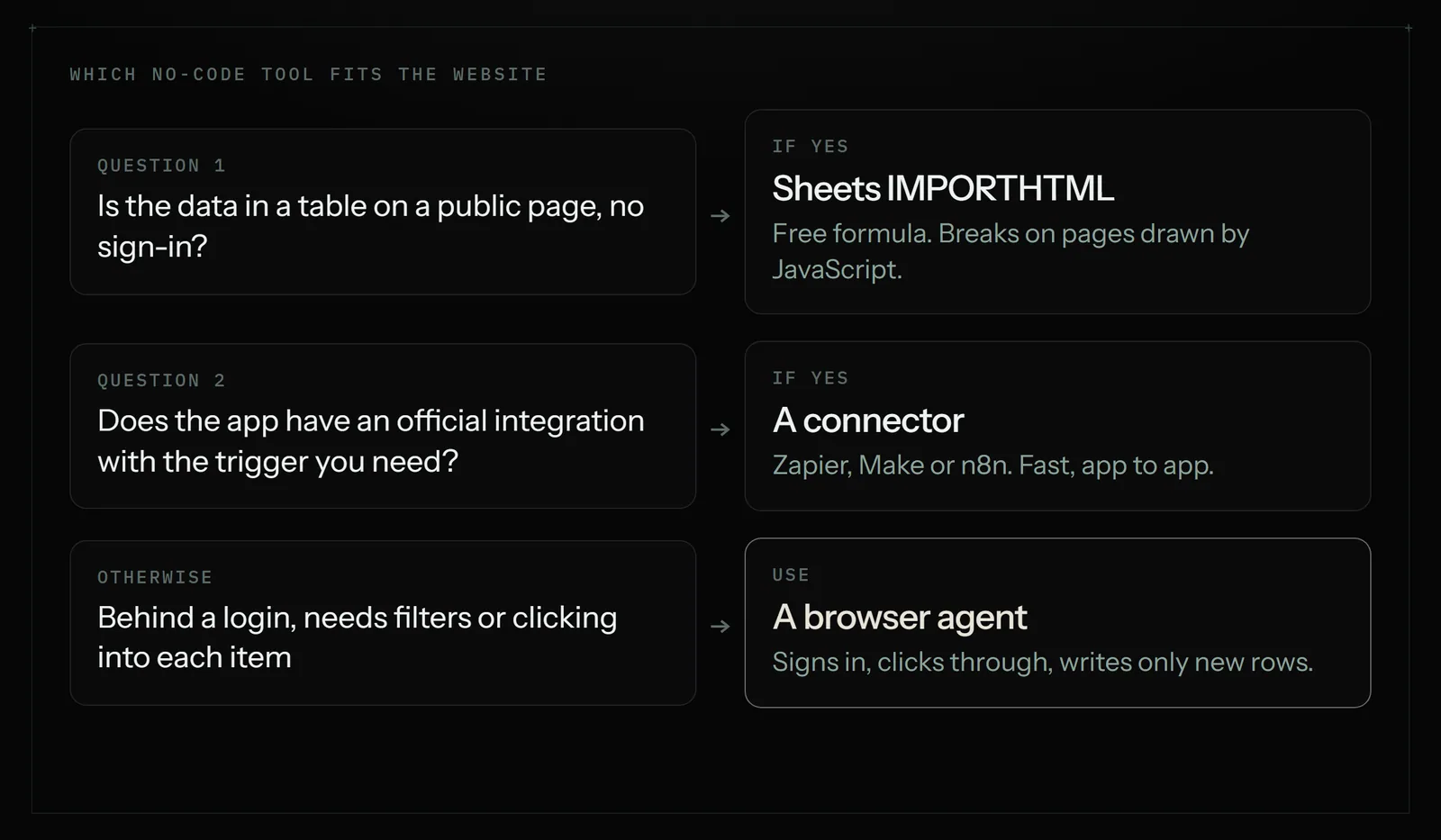
Be honest about the bucket before you pay for anything. A free formula handles the first bucket fine, and a connector handles the second faster and more cheaply than an agent would.
The four no-code options, side by side
| Sheets IMPORTHTML / IMPORTXML | Connector (Zapier, Make) | Scraper (Browse AI and similar) | Browser agent (Astarii) | |
|---|---|---|---|---|
| Works on | Public pages whose data is in the page source | Apps with an official integration | Pages you train it on, including some behind a login | Any site you can sign in to and click through |
| Setup | Type a formula | Build a trigger and action steps | Point and click to mark the fields | Describe the job in plain English, or show it once |
| Clicks, filters, forms | No | No (no browser involved) | Limited | Yes |
| Where it breaks | Pages built by JavaScript; usage limits | Apps with no integration | Layout changes; multi-step portals | Slower than an API; some sites refuse automated browsers |
| Typical cost | Free | Free tier; paid from about $20/month billed yearly | Free tier; paid from about $19/month billed yearly | 3 free runs; plans from $29.99/month |
Prices for Zapier and Browse AI come from published pricing guides checked in October 2026 and move with usage, so check the vendor's own page at the volume you need.
Option 1: Google Sheets' own import formulas (free)
Google Sheets can pull a table straight off a public web page. Paste the page's address into cell A1, then in an empty cell type:
=IMPORTHTML(A1, "table", 1)
That fetches the first table on the page and spills it into the sheet. IMPORTXML does the same for any element you can describe with an XPath, such as every product name on a list page. Google refreshes these automatically.
Where it falls short. The formula reads the page the way the server first sends it, so anything a site draws with JavaScript after loading usually comes back empty. It can't sign in, so it can't reach a portal. It can't click "Next page" or set a date filter. And Google limits how much traffic import formulas can make across the spreadsheets you own; push it and you'll see a loading error asking you to use fewer of them. For a public price list you check once a day, though, it's hard to beat free.
Option 2: A connector like Zapier or Make
If the data starts in an app that already integrates with Google Sheets, a connector is the right tool. "When a new order comes in, add a row to my Orders sheet" takes a few minutes to set up and then runs on every new order, within seconds, with no browser involved. Zapier lists thousands of integrations and Make and n8n are close alternatives.
Where it falls short. A connector can only move data an app chooses to share through its integration. Your wholesaler's portal, the marketplace that has no public API for small sellers, the shipping site that only shows status after you sign in: none of these appear as a trigger. You also build and maintain each workflow yourself, step by step, and tasks are metered, so high volume costs more.
Option 3: A point-and-click scraper
Scraping tools such as Browse AI let you open a page, click the fields you want, and save that as a "robot" that extracts them on a schedule into a sheet. They're good at watching many similar pages: product listings, job boards, a competitor's catalogue.
Where it falls short. A scraper reads. It's built around extracting fields from a page it was trained on, so a job that needs judgment ("open each order and copy the tracking number only if it shipped") or a portal that takes several steps to reach the data gets awkward quickly. When the site changes its layout, you retrain. Credits are metered, and harder sites cost more per run.
Option 4: A browser agent that does the clicking
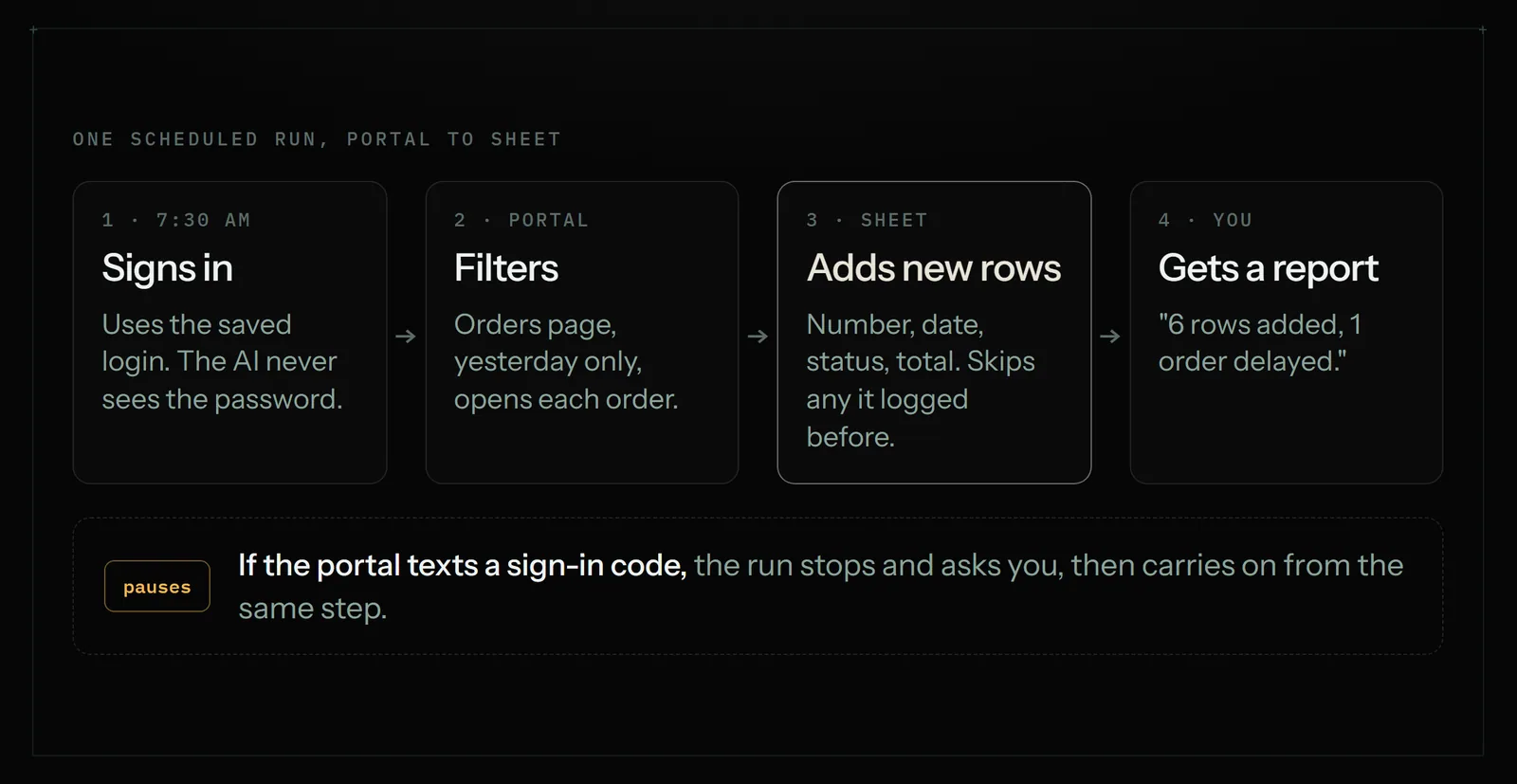
A browser agent works through the website the same way you do. It opens the page, signs in with a saved login, sets the filter, opens each order, reads what it needs, and writes the rows into your sheet. Then it tells you what it added. With Astarii, the setup is a sentence:
That's the whole setup. An Astari can work inside Google Sheets directly through a connection, so it adds rows to the real sheet rather than handing you a file to paste. If describing the steps is awkward, you can do the job once while it watches and it picks up the pattern.
Three details matter most for data entry specifically:
- It never enters the same item twice. A scheduled Astari keeps task memory, so tomorrow's run skips the orders it already logged today. Duplicate rows are the usual way homemade copy-paste systems go wrong.
- It works with your computer off. Runs happen in Astarii's own cloud browser on the schedule you set, such as every weekday at 7:30 or every Friday.
- It stops and asks rather than guessing. If the portal texts a sign-in code, the run pauses, asks you for it, and carries on from where it stopped.
Where it falls short. An agent is slower than an API. For thousands of rows an hour from an app that integrates, a connector wins. Some websites refuse automated browsers outright, and when that happens the run stops and says so rather than retrying forever. And for a one-off copy of a single page, doing it by hand is faster than writing the instructions.
How to set up website-to-Sheets data entry with an agent
- Make the sheet first. Create the tab with the exact column headers you want, in order: Order number, Date, Status, Total. An agent writes cleaner rows into a sheet that already has headers than into an empty one.
- Write the job like a brief to a new assistant. Say where to go, what to filter, which fields to copy, and what counts as new. Say how many, too. "Yesterday's orders" is a clear stopping point; "all the orders" is not.
- Save the sign-in. Attach an identity with the portal login saved. Astarii encrypts saved passwords in your browser before they're stored, and the AI never sees them. Skipping this step is the usual reason a first run stops at a login page.
- Connect Google Sheets. Connect your Google account so the Astari can write to the sheet directly.
- Run it once and watch. The first run shows the browser live and every step as it happens. Check the rows it added against the portal.
- Fix the brief, not the agent. If something's off, read the transcript, find the step that went wrong, and say that thing specifically in the job. "Copy the total including shipping" beats "be more careful".
- Put it on a schedule. Once a run does what you wanted, set it to every weekday or every Friday and leave it alone. See scheduling for the options.
Data entry jobs worth handing off first
The best candidates repeat at least weekly, have a clear rule for what counts as new, and are cheap to fix if a row is wrong. A few that fit most small businesses:
- Supplier or wholesaler orders from a portal into an Orders sheet, with delayed ones flagged.
- Invoices from Gmail or Outlook into an Invoices sheet: date, client, amount, due date.
- Competitor prices from a handful of product pages into a price sheet, with an email when something drops.
- Leads from a directory or listing site into a prospects sheet, never logging the same business twice.
- The reverse direction: taking each row of a sheet and typing it into a web form that has no import button, such as a portal that only accepts one entry at a time.
Keep the judgment calls. If a field needs a decision that you'd struggle to write as a rule, such as which supplier to reorder from, have the agent copy the facts and leave the decision column for you.
What it costs next to doing it yourself
Price the job in minutes. Say the portal copy takes you 20 minutes every weekday. That's roughly 7 hours a month of your own time.
On Astarii, minutes are the run's real length, rounded up to the minute. An agent working through the same portal might take a similar amount of time, but it isn't your time, and it happens before you're up. The Pro plan is $29.99 a month and includes 900 cloud minutes, about 15 hours, plus 800 minutes in your own browser, shared across all your jobs. Every new account gets 3 free runs of up to 15 minutes each with no card, which is enough to test one real data entry job end to end. Full details are on the pricing page.
If the free Sheets formula or a connector you already pay for covers the job, use that instead. The agent is for the portals and the clicking those tools can't reach.
Common mistakes that cause bad rows
- No definition of "new". Without one, a run either copies everything again or misses items. Use a date filter, a status, or let task memory track what's done.
- Vague field names. "Copy the amount" on a page with a subtotal, tax and total will pick one. Name the exact label on the page.
- Mixed date formats. Tell it the format you want in the sheet, such as YYYY-MM-DD, so sorting works.
- Letting it overwrite. Ask for new rows at the bottom, not edits to existing rows, until you trust the job.
- Skipping the first watched run. Five minutes watching the first run saves a month of quietly wrong data.
Where to go next
Pick the one copy-paste job you dread most, check which bucket its website falls into, and try the matching tool this week. If it's a portal or anything that needs clicking, describe it to an Astari and watch the first run: your first Astari walks through it. For more jobs that suit an agent, see 15 jobs small businesses hand off first, and for where Astarii runs (cloud, Chrome, Windows, Android), see the apps page.
Say it to an Astari
These are instructions you can give an Astari, word for word. It does the work in a browser, on a schedule if you want one, and asks you before anything goes live.
Questions
How do I automatically pull data from a website into Google Sheets?
For a public page whose data is in a table, use the free IMPORTHTML or IMPORTXML formula in Google Sheets. If the page needs a sign-in, a date filter or clicking into each item, the formula can't reach it, and you need a scraper or a browser agent that works through the site the way you do.
Can I automate data entry without coding?
Yes. Sheets formulas, connector tools like Zapier and Make, point-and-click scrapers and browser agents all work without code. With a browser agent such as Astarii, you describe the job in plain English, or do it once while it watches, and it runs on a schedule.
Why does IMPORTXML return empty or an error?
Usually because the site draws its content with JavaScript after the page loads, and the formula only reads the page as the server first sends it. Pages behind a sign-in also come back empty. Heavy use can trigger Google's import usage limits, which show a loading error.
Can Zapier copy data from a website that has no integration?
Not by itself. Zapier and Make move data between apps through official integrations, so a supplier portal or dashboard with no integration won't appear as a trigger. That's the gap a browser agent fills. Where an integration does exist, the connector is usually faster and cheaper.
Can an automation sign in to a portal and copy my orders into a sheet?
A browser agent can. Astarii signs in with a saved login, opens the orders page, copies the fields you name into your Google Sheet and emails you a summary. Saved passwords are encrypted in your browser before they're stored and are never shown to the AI. If the site texts a code, the run pauses and asks you.
How do I stop duplicate rows when data entry runs every day?
Define what counts as new, such as yesterday's date or a status, and ask for new rows only. A scheduled Astari also keeps task memory, so it never logs the same item twice across runs.
Does the computer need to be on for scheduled data entry?
Not with a cloud run. Astarii runs scheduled jobs in its own cloud browser, so your laptop can be closed. Jobs you assign to your own Chrome or Windows PC need that machine to be on.
How much does it cost to automate data entry?
Sheets import formulas are free. Connector and scraper tools have free tiers, with paid plans from roughly $19 to $20 a month billed yearly. Astarii gives 3 free runs of up to 15 minutes with no card, then plans at $29.99, $49.99 or $99.99 a month, measured in minutes of run time.
filed under Admin and paperwork