How to Get Invoices From Gmail Into a Google Sheet Every Friday
A free Gmail filter, a script, a connector, a parser or an agent that does the whole Friday job: which one fits depends on what your invoice emails look like.

To get invoices from Gmail into a Google Sheet every week, label them with a Gmail filter, then automate the copying. Apps Script is free but needs code. Zapier, Make or an email parser suit invoices attached to emails. A browser agent such as Astarii also follows "View invoice" links into supplier portals, adds only new rows every Friday and emails a summary. Plans start at $29.99 a month.
Friday afternoon, most owners do the same small job. Search the inbox for "invoice", open each email, copy the supplier, the date, the amount and the due date into a sheet, drag the PDF into a Drive folder, and hope nothing slipped past because the subject line said "Your statement" instead. Ten invoices take fifteen minutes. Forty take an hour, and the hour is always the one you didn't have.
This guide shows five ways to get those invoices from Gmail into a Google Sheet on a weekly schedule, from a free Gmail filter to a tool that does the whole job and emails you a summary. They suit different inboxes, so it's worth picking on purpose. If agents are new to you, start with the guide to AI agents for small business. If you already know you want one, your first Astari takes about five minutes to set up.
Step zero: decide what the sheet holds
Every method below works better when the sheet is settled first. Changing columns after three months of rows is where most invoice trackers fall apart. A plain layout that covers both bills you receive and invoices you send:
| Column | Example | Why it's there |
|---|---|---|
| Received | 2026-10-09 | The email's date, so you can filter by week |
| From | Northside Packaging | Supplier or client name, not the email address |
| Invoice number | INV-20417 | The key that stops duplicates |
| Amount | 412.50 | A number with no currency sign, so totals work |
| Due date | 2026-10-23 | Drives your "due this week" view |
| Status | Unpaid | Unpaid, Paid or Query; you change it by hand |
| File | Drive link | Where the PDF went, so nobody hunts the inbox again |
| Email link | Gmail link | One click back to the original message |
Two habits make the sheet trustworthy. Store amounts as plain numbers, and treat the invoice number as the thing that makes a row unique. If a supplier resends the same invoice, the number tells you it's a copy rather than a second bill.
Five ways to do it, side by side
The right tool depends on two things: how varied your invoice emails are, and whether the invoice is actually in the email or behind a "View invoice" link to a supplier's portal.
| Gmail filter + manual copy | Apps Script | Connector (Zapier, Make, n8n) | Email parser (Parseur and similar) | Browser agent (Astarii) | |
|---|---|---|---|---|---|
| Setup | Two minutes | Write or paste code | Build trigger and action steps | Train a template per sender, or use its AI | Describe the job in plain English, or show it once |
| Handles many layouts | You do the reading | Only what you code for | With an AI step added | Yes, that's its job | Yes |
| Follows "View invoice" links into a portal | You do it | No | No | No | Yes, with a saved login |
| Weekly schedule | No | Yes (time trigger) | Yes | Runs as mail arrives | Yes, e.g. every Friday |
| Typical cost | Free | Free | Free tiers; Zapier paid from about $20/month billed yearly | Free tier; paid from about $39/month | 3 free runs; plans from $29.99/month |
Prices come from published pricing guides checked in October 2026 and move with volume, so check the vendor's own page at the number of invoices you actually get.
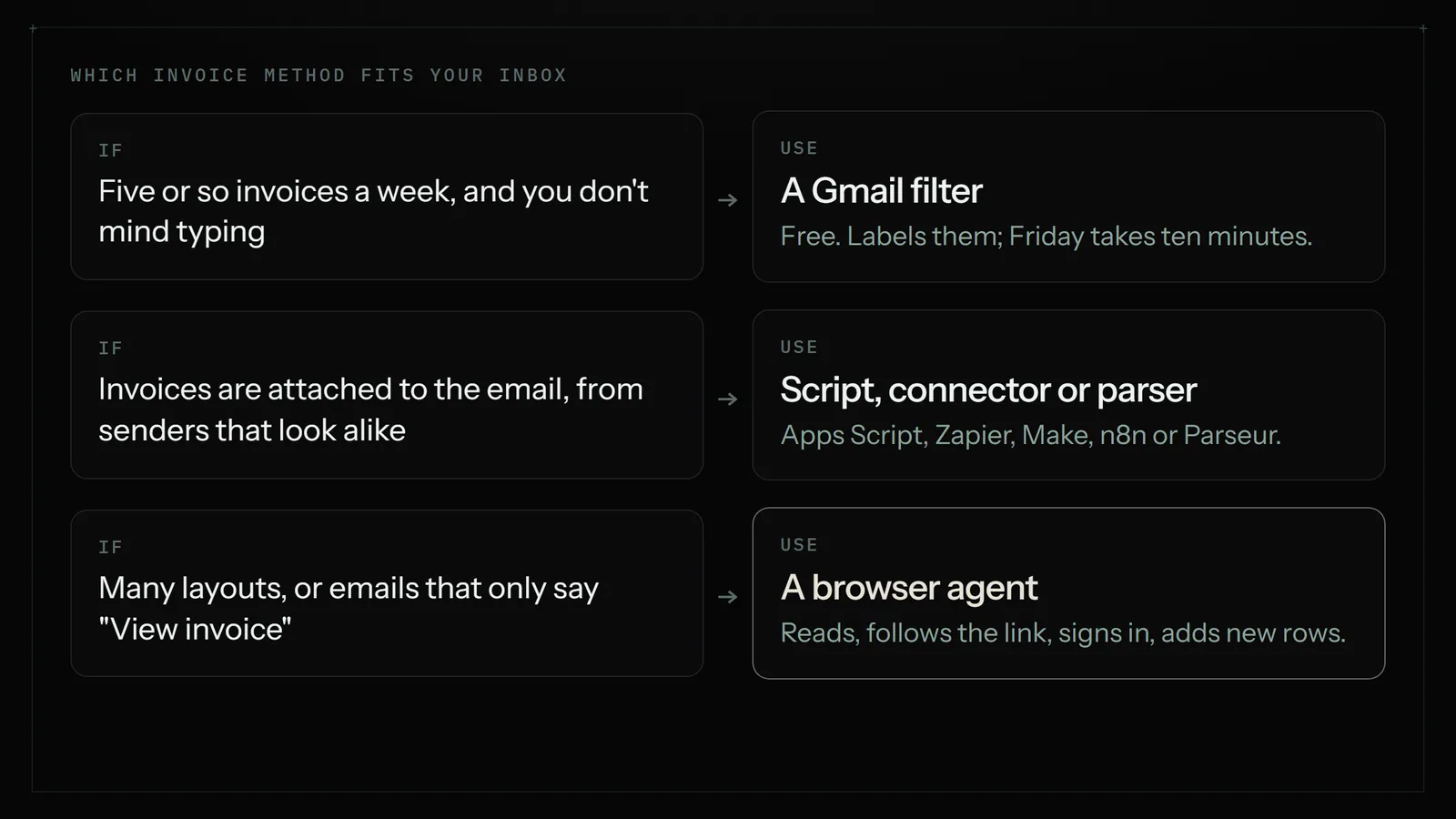
Method 1: A Gmail filter and ten minutes on Friday (free)
Before automating anything, make the job smaller. Gmail's search operators find most invoices in one query. Try this in the search bar:
newer_than:7d (invoice OR receipt OR statement OR "amount due") has:attachment
That finds the last week's emails with an attachment and one of those words. Add filename:pdf to narrow it to PDFs, or -from:me to leave out invoices you sent yourself. Once the search catches the right emails, click the filter icon and choose "Create filter" to apply a label such as Invoices to everything that matches from now on.
Now Friday is: open the label, copy each one across, archive. It's still manual, but it's ten focused minutes rather than an hour of searching. For a business with five invoices a week, that may be all you need, and it costs nothing.
Where it falls short. You're still the one typing. And the filter only catches what the words catch: a supplier who sends "Your October statement is ready" with no attachment slips through.
Method 2: Google Apps Script (free, needs code)
Apps Script is the programming tool built into Google Sheets (Extensions, then Apps Script). A short script can search Gmail for the label above, pull the sender, date and subject of each message, save attachments to a Drive folder and append rows to the sheet. A time-driven trigger runs it every Friday.
It's free, and it's the right answer if you or someone on your team is comfortable editing code. The limits are worth knowing:
- It reads what you tell it to. Getting the amount and due date out of the body means writing a pattern for each supplier's layout. When a supplier redesigns their email, the pattern breaks quietly.
- It can't open a supplier's portal. If the email only says "View your invoice", the script sees the link, not the invoice.
- Google caps it. Each run has a time limit, and free accounts have lower daily quotas than paid Google Workspace accounts. A weekly invoice job rarely hits them, but a big first backfill can.
Method 3: A connector like Zapier, Make or n8n
Connectors move data between apps through official integrations. The usual recipe: "When a new email arrives in Gmail with the label Invoices, save the attachment to Drive and add a row to my sheet." n8n and Make both publish ready-made templates for exactly this, and some add an AI step that reads the email and fills the amount and due date fields.
This is a good fit when the job is truly app to app and the invoice is in the email. It runs as each email arrives rather than once a week, which some owners prefer. The weak spots:
- Building and fixing is on you. Each step needs setting up, and when something fails at step four you're the one opening the run history.
- Tasks add up. Paid plans count each step that runs, so a three-step workflow over forty invoices is 120 tasks a week.
- No browser. A connector can't sign in to a supplier portal and click "Download invoice".
Method 4: An email parser
Parsers such as Parseur, and Google Sheets add-ons such as cloudHQ's Export Emails to Sheets, are built for one thing: reading emails and attachments and turning them into rows. You forward invoices to a special address, or point the tool at a label, and it extracts invoice number, date and total into Sheets.
If your volume is high and your invoices are all PDFs attached to emails, a parser is hard to beat on accuracy per dollar. Parseur, for example, has a small free tier and paid plans listed from about $39 a month. Where it stops: a parser extracts data. It won't sign in anywhere, chase a missing invoice, or email you "three bills are due before Wednesday".
Method 5: An AI agent that does the whole Friday job
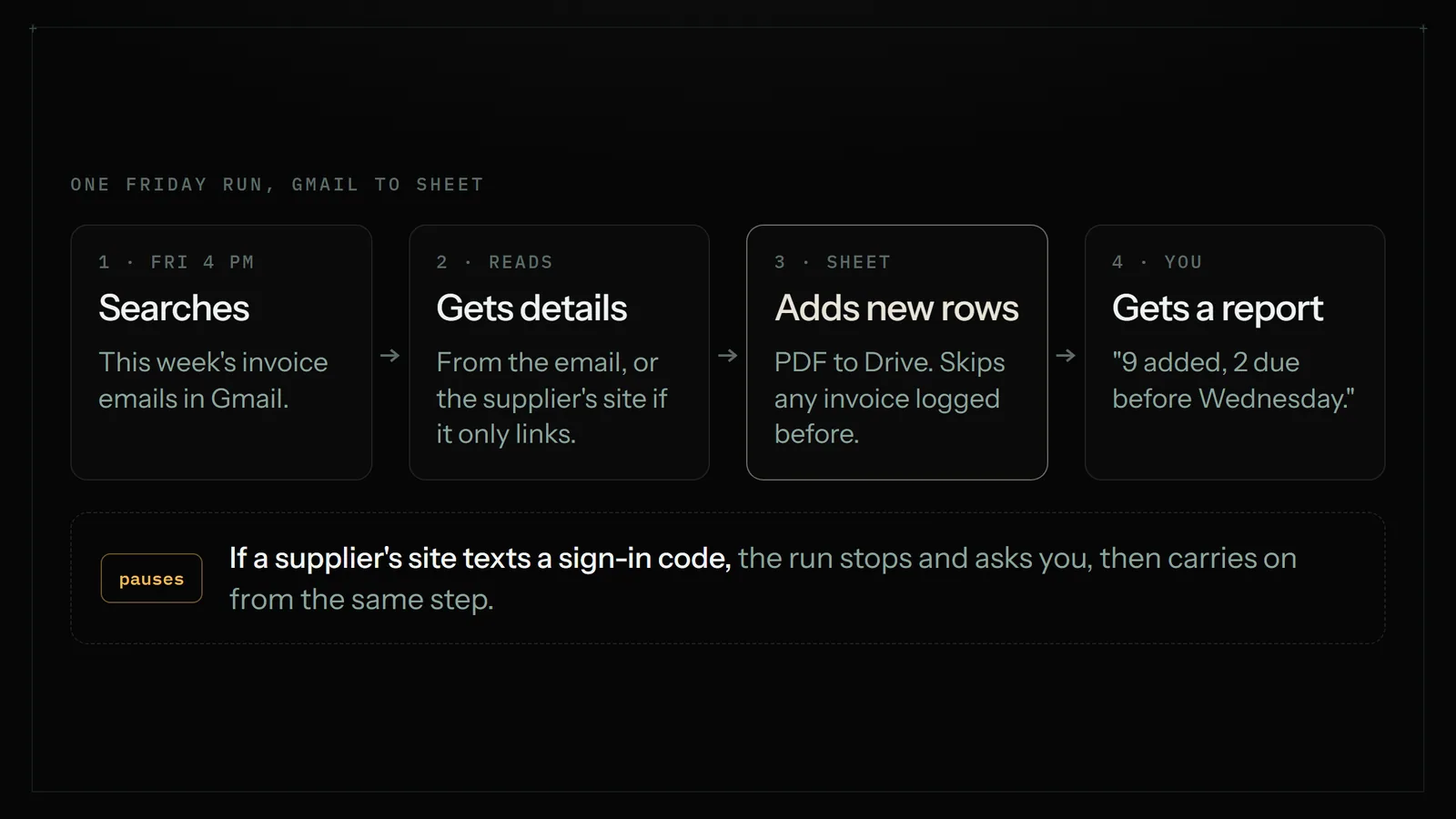
A browser agent works through the job the way you would. Astarii connects to Gmail and Google Sheets and Drive directly, and works in a real browser for everything else. You describe the job in one paragraph:
"Every Friday at 4pm, find this week's invoices in my Gmail and add each one to my Invoices sheet: date, from, invoice number, amount, due date. Save any attached PDF to my Invoices folder in Drive and put the link in the File column. If an email only links to the supplier's site, sign in and get the details from there. Email me a summary with anything due in the next 7 days."
Then it runs every Friday, in Astarii's cloud browser, so your laptop can be closed. A few things make this practical rather than risky:
- It never logs the same invoice twice. A scheduled Astari keeps task memory across runs, so an invoice added last Friday is skipped this Friday, even if the email is still sitting in your inbox.
- Portal invoices work. For suppliers whose emails only say "View invoice", it signs in with a saved login and reads the invoice page. Saved passwords are encrypted in your browser before they're stored and are never shown to the AI.
- It stops and asks. If a supplier's site texts a sign-in code, the run pauses and asks you for it, then carries on from the same step.
- It reports back. You get "9 invoices added, 2 due before Wednesday, 1 email I couldn't match" rather than a silent spreadsheet.
Where it isn't the right pick. If all your invoices are PDF attachments from the same three suppliers, a connector or parser does it faster and cheaper. An agent takes real minutes per run, and those minutes count against your plan. It also shouldn't pay anything for you. Logging and reminding are its job; moving money stays with you.
Setting up the Friday job in Astarii, step by step
- Make the sheet. Create the columns from the table above in a sheet called Invoices. Add a Drive folder called Invoices too.
- Connect Gmail, Sheets and Drive. In Astarii, connect your Google account so it can work inside those apps directly. Outlook works the same way if your invoices land there. See how connections work.
- Save supplier logins, if any. Only for suppliers whose emails link to a portal. Identities and sign-ins covers how logins are stored.
- Describe the job. Paste the paragraph above and edit the column names to match yours. Say what counts as an invoice in your inbox ("anything from these 12 senders, plus anything with 'invoice' in the subject").
- Run it once on last week. Watch what it adds. Fix the instruction where it guessed wrong, such as "amounts are always the total including tax".
- Put it on a schedule. Every Friday at 4pm is the classic. Scheduling explains the options.
- Read the first three summaries. After that, most owners just skim the "due soon" line.
What it costs, with real numbers
Take a shop that gets about 25 invoices a week. By hand, at a minute and a half each plus searching, that's roughly 45 minutes every Friday, or about three hours a month.
- Gmail filter: free, and cuts the searching. You still spend around 30 minutes a week typing.
- Apps Script: free to run. The cost is the time to write it and fix it when a supplier's email changes.
- Connector or parser: free tiers may cover small volumes. Paid plans start around $20 to $39 a month depending on tool and volume.
- Astarii: 3 free runs of up to 15 minutes each, no card, to test it on your real inbox. After that, Pro is $29.99 a month with 900 cloud minutes. Minutes are the run's real length rounded up, so a Friday run that takes 12 minutes uses 12 of them, about 52 a month, which leaves most of the pool for other jobs. Full details on the pricing page.
Run length depends on how many emails and portals are involved, so treat the 12 minutes as an example and check your own first few runs.
Once the sheet exists, make it work
The sheet is the boring part. What you do with it is the useful part:
- A "due this week" view. A filter on Status = Unpaid and Due date within 7 days. If an Astari is writing the rows, it can put that list in the Friday email for you.
- A monthly total by supplier. A pivot table on From and Amount shows who you're spending with, which is the first thing your bookkeeper asks.
- Reminders for invoices you sent. If the sheet tracks invoices you issued, the same Astari can draft a polite reminder for anything 7 days overdue and send it, or leave it for your approval.
- A clean hand-off at tax time. Every row links to its PDF in Drive and its original email.
If invoices aren't your only copying job, the same approach covers portals and dashboards: see how to automate data entry between websites and Google Sheets.
A quick checklist before you automate
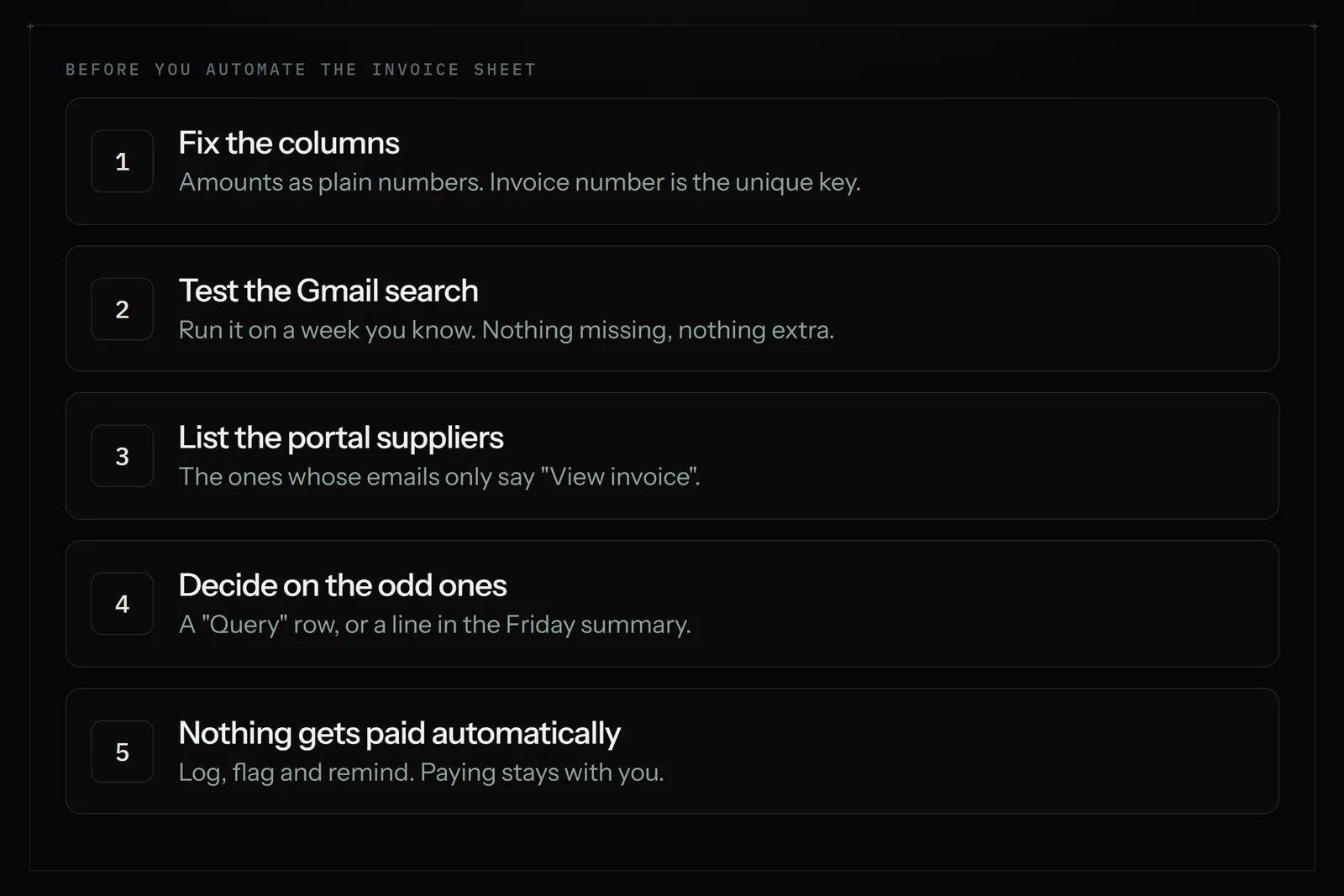
- Columns fixed, amounts as plain numbers, invoice number as the unique key.
- A Gmail search that catches last week's invoices with nothing missing. Test it on a week you know.
- A list of suppliers whose invoices live behind a portal link.
- A decision on what happens to an email that can't be matched: a "Query" row, or a line in the summary.
- A rule that nothing gets paid automatically.
Ready to try it on your own inbox? Astarii gives you 3 free runs with no card. Start here, or get the Chrome extension and the Windows and Android apps on the apps page.
Say it to an Astari
These are instructions you can give an Astari, word for word. It does the work in a browser, on a schedule if you want one, and asks you before anything goes live.
Questions
How do I automatically export invoices from Gmail to Google Sheets?
Label invoice emails with a Gmail filter, then use a tool to copy each one into the sheet on a schedule. Apps Script does it free with code; Zapier, Make, n8n and email parsers do it without code; a browser agent such as Astarii does it from a plain-English instruction and also handles invoices that live behind a supplier portal link.
How do I find all invoices in Gmail?
Search with operators, for example newer_than:7d (invoice OR receipt OR statement) has:attachment. Add filename:pdf to narrow it to PDFs. Once the search is right, use Create filter to label matching emails automatically from then on.
Can Zapier extract invoice data from Gmail into Google Sheets?
Yes, for invoices that arrive in the email or as an attachment. A Zap can trigger on a labelled email, save the attachment to Drive and add a row. Pulling the amount and due date from varied layouts usually needs an AI or parser step, and paid plans count every step that runs.
What if the email only has a View invoice link?
Filters, scripts, connectors and parsers only see the link. A browser agent can follow it: Astarii signs in to the supplier's site with a saved login and reads the invoice there. Saved passwords are encrypted in your browser before they're stored and are never shown to the AI.
How do I stop the same invoice being added twice?
Use the invoice number as the unique key and only add rows whose number isn't already in the sheet. A scheduled Astari keeps task memory across runs, so it never logs the same invoice twice even if the email is still in your inbox.
Does my computer need to be on for a Friday invoice run?
Not with a cloud run. Astarii runs scheduled jobs in its own cloud browser, so your laptop can be closed. Apps Script and connectors also run on their own servers.
Can it pay the invoices too?
It shouldn't, and this guide doesn't recommend it. Let the automation log invoices, flag what's due and draft reminders for ones you sent. Keep paying bills as a step you do yourself.
How much does it cost to automate invoices from Gmail to Sheets?
A Gmail filter and Apps Script are free. Connector and parser tools have free tiers, with paid plans from roughly $20 to $39 a month. Astarii gives 3 free runs of up to 15 minutes with no card, then plans at $29.99, $49.99 or $99.99 a month, measured in minutes of run time.
filed under Admin and paperwork