ChatGPT Agent Mode Is Gone: What Small Businesses Can Use for Scheduled Browser Work Now
ChatGPT agent mode is gone, split into ChatGPT Work and a cloud browser. For one-off research that is fine. For the same browser job every weekday, it is worth knowing your options.

ChatGPT agent mode was retired in 2026. OpenAI now points users to ChatGPT Work and its cloud browser, plus scheduled tasks, which allow 5 active tasks on Plus. That suits one-off research and documents. For repeated jobs on sites behind a login, a scheduled browser agent such as Astarii, from $29.99 a month, or a connector tool like Zapier fits better.
If you had a ChatGPT agent checking a supplier portal every Monday or pulling numbers from a dashboard every morning, you probably found out the same way everyone else did: the option was gone. OpenAI's help page for ChatGPT agent now opens with a short notice saying the agent is no longer available and pointing people to ChatGPT Work and its cloud browser instead. There was not much warning, and the old help page still carries instructions for a feature you can't open.
This post explains what replaced agent mode, what the new setup does well, where it gets awkward for the repeated, scheduled browser jobs a small business actually runs, and which tools fit those jobs now. It names the honest choices, including the cases where staying inside ChatGPT is the right call. If AI agents are new to you, start with the guide to AI agents for small business. If you already know you need a job on a timetable, the Astarii scheduling docs show how that works.
What happened to ChatGPT agent mode
ChatGPT agent arrived in July 2025. It folded OpenAI's earlier Operator browser tool and deep research into one mode that could open websites, click, fill in forms and hand control back to you for a sign-in. For a lot of owners it was the first time a chat assistant did something rather than describe it.
In 2026 OpenAI split that idea in two. ChatGPT Work handles longer, multi-step tasks and finished deliverables: research, documents, spreadsheets. Cloud browser is the browsing half, a browser that runs on a separate computer in OpenAI's cloud and is used by Work when a task needs a website. The agent's help article now says it is no longer available and sends people to those two. Users noticed the menu option disappear over the summer; reports of the exact date vary, so the safest thing to say is that it was retired in mid-2026.
What replaced it: Work, cloud browser and scheduled tasks
Three pieces now cover what agent mode used to do. Here is what each one is, from OpenAI's own help pages.
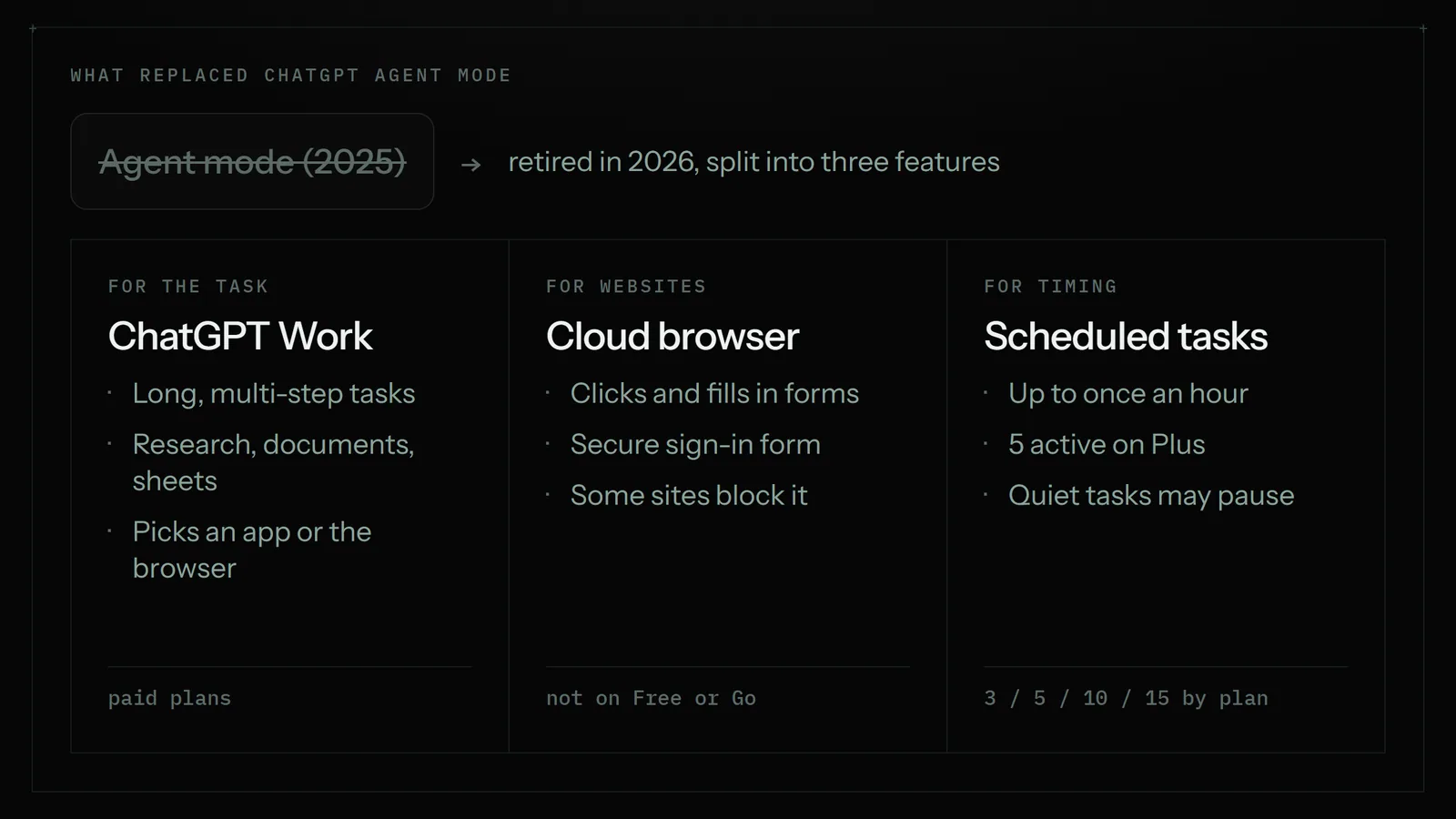
- ChatGPT Work is where you start a long task. You describe the outcome, and ChatGPT decides whether to use a connected app, the cloud browser or both.
- Cloud browser reads pages, clicks buttons and fills in forms on supported public and signed-in websites. When it reaches a supported sign-in page it pauses and asks you to sign in through a secure form; OpenAI says the model never sees the username and password you type there. The signed-in session can carry over to later tasks until it expires. If it gets stuck, it asks you to take over the browser from your phone or computer. It asks for confirmation before payments, bookings and similar commitments. It is on paid plans in supported regions, not Free or Go.
- Scheduled tasks run one-off or recurring jobs and can watch for changes. On paid plans a recurring task can run as often as once an hour at an exact time. Plus accounts can have 5 active tasks, Business and Edu 10, Pro and Enterprise 15. Event-triggered tasks run in Work and can react to Gmail, Slack or GitHub activity.
That is a capable set. It is also a different shape from the old agent, and the differences matter most when a job has to run on its own, on a timetable, for months.
Where the new setup pinches for repeated business work
None of these are complaints about quality. They are the practical limits an owner runs into when a browser job has to happen every weekday without anyone opening ChatGPT.
- Sites can say no. OpenAI's help page is upfront that some websites block automated browser agents, so a task can fail on a site that works fine in your own browser. Any cloud-based browser agent has this problem, Astarii's cloud browser included. The difference is what else you can fall back on.
- Your own browser isn't in the loop. Cloud browser has its own sessions and doesn't use the accounts already signed in on your device. That's good for safety. It also means a portal that dislikes new devices, or texts a code on every new sign-in, will keep asking.
- Task slots are limited. Five active tasks on Plus goes quickly once you have an order check, a price check, an invoice sweep, a weekly report and a lead list.
- Quiet tasks can pause. OpenAI notes that inactive tasks may pause automatically. A job you set and forget is exactly the kind you stop looking at.
- Memory of what's done is up to you. A monitoring task can use what it saw on earlier runs, but for jobs like "email each new lead once" or "add only new invoices", you need to spell out how it should avoid repeats and check that it does.
For a one-off job ("find three quotes for a new printer and put them in a table") none of this matters, and ChatGPT Work is a strong choice. For the same ten clicks every morning, it's worth comparing the alternatives.
Your options now, side by side
Most small businesses end up choosing between four kinds of tool for this work. Prices were checked in October 2026 against each vendor's pricing page and recent pricing guides; month-to-month prices are higher where a vendor quotes an annual rate.
| ChatGPT Work + cloud browser | Zapier or Make | Scheduled browser agent (Astarii) | A virtual assistant | |
|---|---|---|---|---|
| What it is | Chat assistant with its own cloud browser | Connectors that pass data between apps with an API | An AI helper that works websites in a real browser on a schedule | A remote person |
| Websites with no integration | Yes, where the site allows it | No, only apps they connect to | Yes: in the cloud, in your own Chrome or Brave, or on your Windows PC | Yes |
| Runs on a timetable | Yes; up to hourly on paid plans, 5 active tasks on Plus | Yes, on triggers and schedules | Yes, e.g. every weekday at 7:30, with your computer off | During their hours |
| Avoids doing the same item twice | You describe how in the task | Built into how triggers work | Task memory stops repeats | Depends on the person |
| Sign-in codes | Pauses for a secure sign-in form | Not applicable (API connections) | Pauses and asks you, then carries on | Has to ask you |
| Best for | One-off research and finished documents | High-volume app-to-app data with integrations | Repeated work on sites behind a login | Calls, care and judgment |
| Starting price | Plus $20/month; Pro from $100/month | Zapier Professional $19.99/month billed annually; Make Core $9/month billed annually | $29.99/month; 3 free runs, no card | About $10 to $39+ an hour |
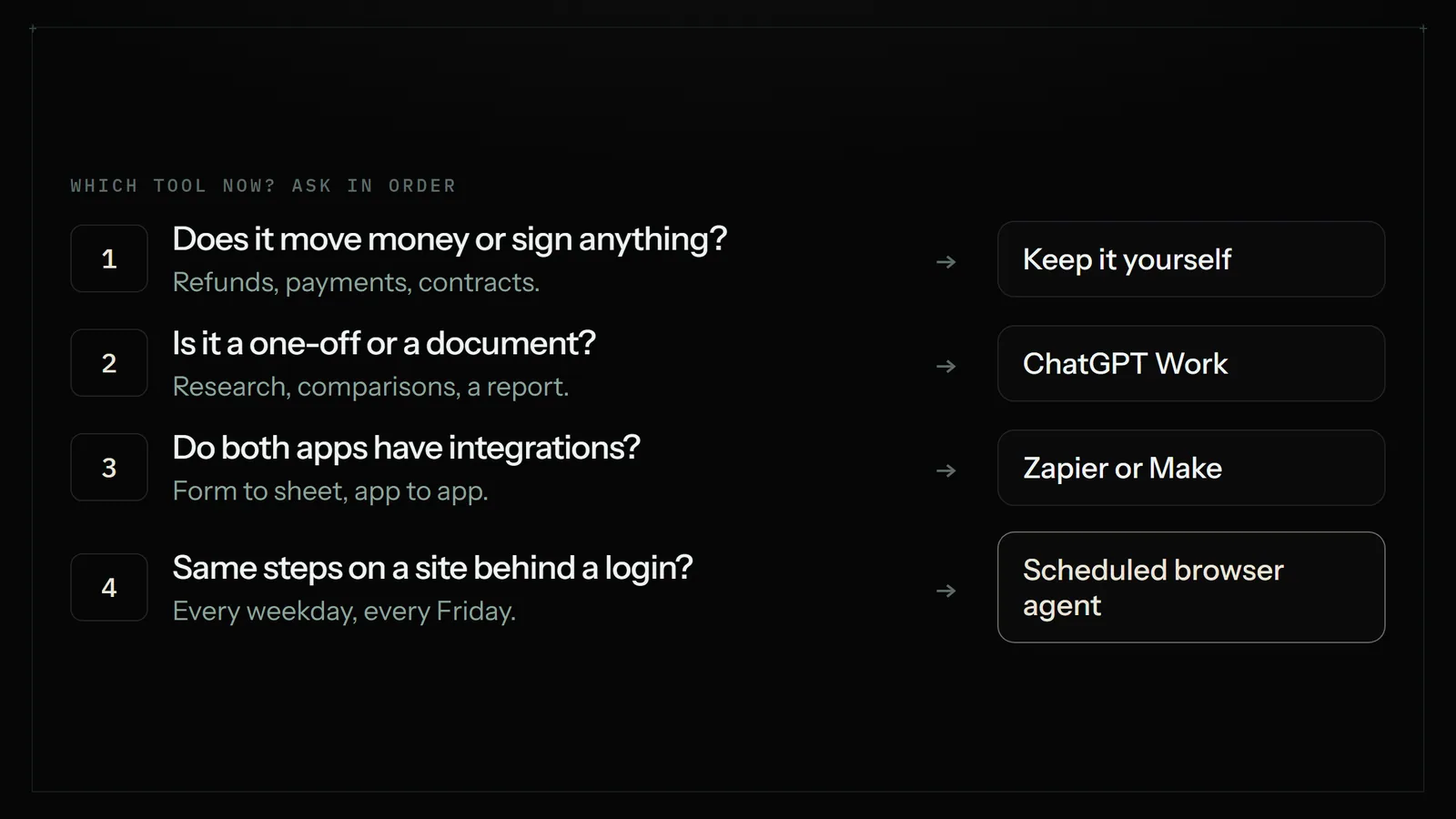
A fair reading of that table: if you already pay for ChatGPT and your job is occasional, use what you have. If your job moves data between two apps that both have integrations, a connector tool is cheaper per task and very reliable. The gap the old agent mode filled, and the one that's widest now, is the repeated job on a website that has no integration and sits behind your login.
When ChatGPT Work is still the better pick
It would be odd to tell a ChatGPT subscriber to buy another tool for everything. Stay in ChatGPT Work when:
- The job is a one-off: compare suppliers, research a market, draft a proposal with sources.
- The output is a document, spreadsheet or summary rather than a change on a website.
- You want to watch and steer as it goes, and taking over the browser for a minute is fine.
- Your recurring jobs fit in your plan's task slots and you are happy to check on them.
- The trigger is a new Gmail message, a Slack message or GitHub activity, which event-triggered tasks handle directly.
ChatGPT also has a very good general model, a huge set of connected apps and a price most people already pay. Those are real strengths.
When a scheduled browser agent fits better
An Astari, Astarii's word for one of its AI helpers, is built for the other kind of job: the same steps on the same sites, on a schedule, for months. Here is what that means in practice, in the product's own terms.
- Schedules that don't need you. Every weekday at 7:30, three times a day, every Friday. Cloud runs work with your laptop closed.
- Task memory. A scheduled Astari never does the same item twice: it never re-emails a lead or re-applies to a job.
- Three places to run. Astarii's own cloud browser, your own Chrome or Brave through the extension, or your Windows PC through the desktop app. If a site is fussy about cloud browsers, the run can happen in a browser you already use. There is an Android app too, and one account covers all of them.
- It stops and asks. When a site texts a code or something needs a decision, the run pauses, asks you, then carries on from where it stopped.
- Passwords stay hidden. Saved passwords are encrypted in your browser before they are stored and are never shown to the AI.
- Approvals on live accounts. The Etsy Manager proposes every change to your live shop and makes it only when you approve. Campaigns the Google Ads Manager drafts start paused, so nothing spends until you turn it on.
- Your ChatGPT plan still counts. An Astari can think with your own ChatGPT plan if you link it, so you aren't throwing away what you pay for.
Where it falls short: it isn't the tool for long research reports, it can't make phone calls, and cloud runs face the same site-blocking problem every cloud browser does. It is priced by minutes of run time, so a long, slow job costs more than a short one.
How to move an old agent-mode job in 20 minutes
If you had a recurring job that used to run in agent mode, here's a tidy way to rebuild it, whichever tool you pick.
- Write the job down as steps. Which site, which page, what to read, where the result goes, and what "done" looks like. If you saved the old prompt, start there.
- Mark the risky step. Anything that sends money, changes a live listing or emails a customer should wait for your approval. Say so in the instruction.
- Say how to avoid repeats. "Only rows not already in the sheet", "only orders after the last one in the log". With an Astari, task memory handles this, but it still helps to say what counts as the same item.
- Run it once while you watch. Sign in when it asks. Check the result against what you would have done by hand.
- Then schedule it. Pick the time, choose where the report goes (an email or a sheet), and read the first week's reports before you stop checking.
The rebuild is a good moment to drop jobs you no longer need. Most owners find one or two tasks they were running out of habit.
A worked example: one shop's Monday morning
A small online shop used agent mode for three weekly jobs: check two supplier portals for back-in-stock items, copy last week's orders into a sheet, and list any customer emails asking about delivery. Here is how those jobs land now.
| Job | Good fit | Why |
|---|---|---|
| Supplier portals, back-in-stock check | Scheduled browser agent | Two logins, no integration, same steps weekly, report by email |
| Last week's orders into a sheet | Connector tool, or the agent if the shop platform has no integration | If an integration exists, a connector is cheap and reliable |
| Delivery questions in the inbox | ChatGPT event-triggered task, or the agent with Gmail connected | Gmail is supported directly by both |
| Quarterly supplier comparison | ChatGPT Work | One-off research with a finished table at the end |
Most of the time the answer isn't one tool. It's the cheapest tool that can do each job reliably, and a short list of jobs you keep for yourself: refunds, payments, contracts and anything a customer is upset about.
Getting started
If you want to try a scheduled browser agent on one of your old agent-mode jobs, Astarii gives you 3 free runs of up to 15 minutes each with no card. Describe the job in plain English or show it once, then put it on a schedule. The first Astari guide walks through the first run, and connections covers Gmail, Outlook, Sheets, Docs, Calendar and Drive. Plans are on the pricing page.
Related reading: automating data entry between websites and Google Sheets, getting invoices from Gmail into a sheet every Friday and virtual assistant vs AI agent.
Say it to an Astari
These are instructions you can give an Astari, word for word. It does the work in a browser, on a schedule if you want one, and asks you before anything goes live.
Questions
What happened to ChatGPT agent mode?
OpenAI retired it in 2026. Its help page now says ChatGPT agent is no longer available and points to ChatGPT Work for long, multi-step tasks and to cloud browser for web tasks. Reports of the exact date vary; users noticed it disappear over the summer.
What replaced ChatGPT agent?
Two features. ChatGPT Work handles longer tasks and finished deliverables, and cloud browser is a browser on a separate cloud computer that Work uses for websites, including signed-in ones. Scheduled tasks can run jobs on a timetable.
Can ChatGPT still log into websites for me?
Yes, on supported sites. Cloud browser pauses at a sign-in page and asks you to sign in through a secure form; OpenAI says the model does not see those credentials. Some websites block automated browsers, so it will not work everywhere.
How many scheduled tasks can I have in ChatGPT?
Per OpenAI, 3 active tasks on Free and Go, 5 on Plus, 10 on Business and Edu, and 15 on Pro and Enterprise. Paid plans can run a recurring task up to once an hour, and inactive tasks may pause automatically.
What is the best alternative to ChatGPT agent mode for a small business?
It depends on the job. Keep one-off research in ChatGPT Work. Use Zapier or Make when both apps have integrations. For the same steps on a website behind a login every day or week, a scheduled browser agent such as Astarii fits best.
Is Astarii a replacement for ChatGPT?
No. Astarii does scheduled online work in a real browser: signing in, filling in forms, updating sheets and reporting back. It can think with your own ChatGPT plan if you link it, so many people use both.
How much does a scheduled browser agent cost?
Astarii plans are $29.99, $49.99 or $99.99 a month, measured in minutes of run time, and there are 3 free runs of up to 15 minutes each with no card. ChatGPT Plus is $20 a month and Zapier Professional starts at $19.99 a month billed annually.
Will an AI agent make changes to my accounts without asking?
With Astarii, the Etsy Manager proposes every change to your live shop first, Google Ads drafts start paused, and runs pause to ask you when a site needs a code or a decision. ChatGPT cloud browser also asks before payments and bookings.
- OpenAI Help Center: ChatGPT agent
- OpenAI Help Center: Using cloud browser in ChatGPT
- OpenAI Help Center: Scheduled tasks in ChatGPT
- OpenAI Developer Community: Agent Mode was removed with no real replacement
- DataCamp: ChatGPT Agent, a guide with five practical examples
- ChatGPT pricing
- Zapier pricing
- Make pricing
filed under AI agents explained