Google Ads for Small Business: A Starter Campaign an AI Drafts (and Leaves Paused Until You Approve)
Google Ads makes it quick to start spending and slower to learn what you are spending on. Here is a small, tight starter campaign, and a way to get it built without anything going live until you say so.

Google Ads suits a small business when people already search for what you sell and a customer is worth several clicks. In 2026 Search clicks average $5.42 and leads $66.69. Start with one Search campaign: one goal, one area, 10 to 20 buying keywords and negatives. An AI such as Astarii can draft it, paused until you approve.
Most small-business owners have the same fear about Google Ads: you set something up on a Tuesday night, forget to check it, and by Friday it has spent a few hundred dollars on clicks from people who were never going to buy. The fear is reasonable. Google makes it quick to start spending and slower to learn what you are spending on.
This guide is a starter plan for a small business with a small budget: what Google Ads costs in 2026, which campaign type to start with, how to build one tight Search campaign, and how to review it in the first month. It also shows a safer way to get the setup done, where an AI drafts the campaign and leaves it paused until you have read it. The Astarii Google Ads Manager works that way. If AI agents are new to you, the guide to AI agents for small business covers the basics first.
Is Google Ads worth it for a small business?
It can be, when three things are true. People already search for what you sell. A customer is worth enough that a few clicks per sale still leave a profit. And you, or something working for you, will look at the results every week. If any of those are missing, the money usually goes faster than the customers arrive.
Google Ads works best for intent. Someone typing "emergency plumber near me" or "custom wedding invitations" wants to buy now, and a Search ad puts you in front of them at that moment. It works worse for things nobody searches for yet, such as a new product category you are inventing. For those, social posts, a mailing list and word of mouth do more for less.
What Google Ads costs in 2026
You set the budget, and Google charges per click on Search campaigns. The real question is what a click and a lead cost in your field. The most widely used yardstick is the WordStream and LocaliQ benchmark report. Its 2026 edition looked at more than 13,000 Search campaigns run between April 2025 and March 2026 and found an average cost per click of $5.42 and an average cost per lead of $66.69 across industries. Legal services and other high-value trades sit far above that; arts, entertainment and pet businesses sit below it.
Two budget rules matter more than any benchmark, because they decide what lands on your card. From Google's own help pages:
- A day can cost up to twice your daily budget. Google lets most campaigns spend up to 2 times the average daily budget on a busy day, then spends less on quiet days.
- The month is capped at 30.4 times the daily budget. A $20-a-day campaign will not be billed more than $608 for the month. That cap is the number to plan around.
Here is what that means at a few starter budgets, using the 2026 averages. Your own numbers will differ, often by a lot, so treat this as a sense of scale, not a forecast.
| Daily budget | Monthly cap (x30.4) | Clicks at $5.42 average | Leads at $66.69 average |
|---|---|---|---|
| $10 | $304 | About 56 | About 4 or 5 |
| $20 | $608 | About 112 | About 9 |
| $35 | $1,064 | About 196 | About 16 |
| $50 | $1,520 | About 280 | About 23 |
The useful exercise is to run this backwards. If a new customer is worth $400 to you and one lead in four becomes a customer, a lead is worth $100. At an average of $66.69 per lead you have room. If a customer is worth $60, Search ads at average costs will lose money, and you need a cheaper keyword niche or a different channel.
Which campaign type to start with
Google offers several campaign types. For a first campaign on a small budget, the choice is really between two.
- Smart campaigns are the simple option. You give Google a few keyword themes (Google suggests 7 to 10 at most), an ad and a budget, and Google picks the actual searches and manages bids. Reporting is a simplified dashboard. It is fast to set up, and you give up most of the control.
- Search campaigns make you choose keywords, match types, ad groups and a bid strategy yourself. You get full reports down to the search terms people typed. It takes longer to set up, and it is the type that lets a small budget stay on the searches that actually pay.
Performance Max and Display campaigns spread your budget across YouTube, Gmail, Maps and other sites. They can work once you have conversion data. On day one, with $20 a day, they mostly spread a small budget thin. Start with Search.
One 2026 change to know about: Google moved many Search campaigns onto AI Max for Search in September, which lets Google match your ads to searches beyond your keywords and rewrite parts of your ad text. Google's own announcement covers the upgrade. If you want a small campaign to stay on a short keyword list, check those settings in each campaign rather than assuming the defaults suit you.
A starter Search campaign, step by step
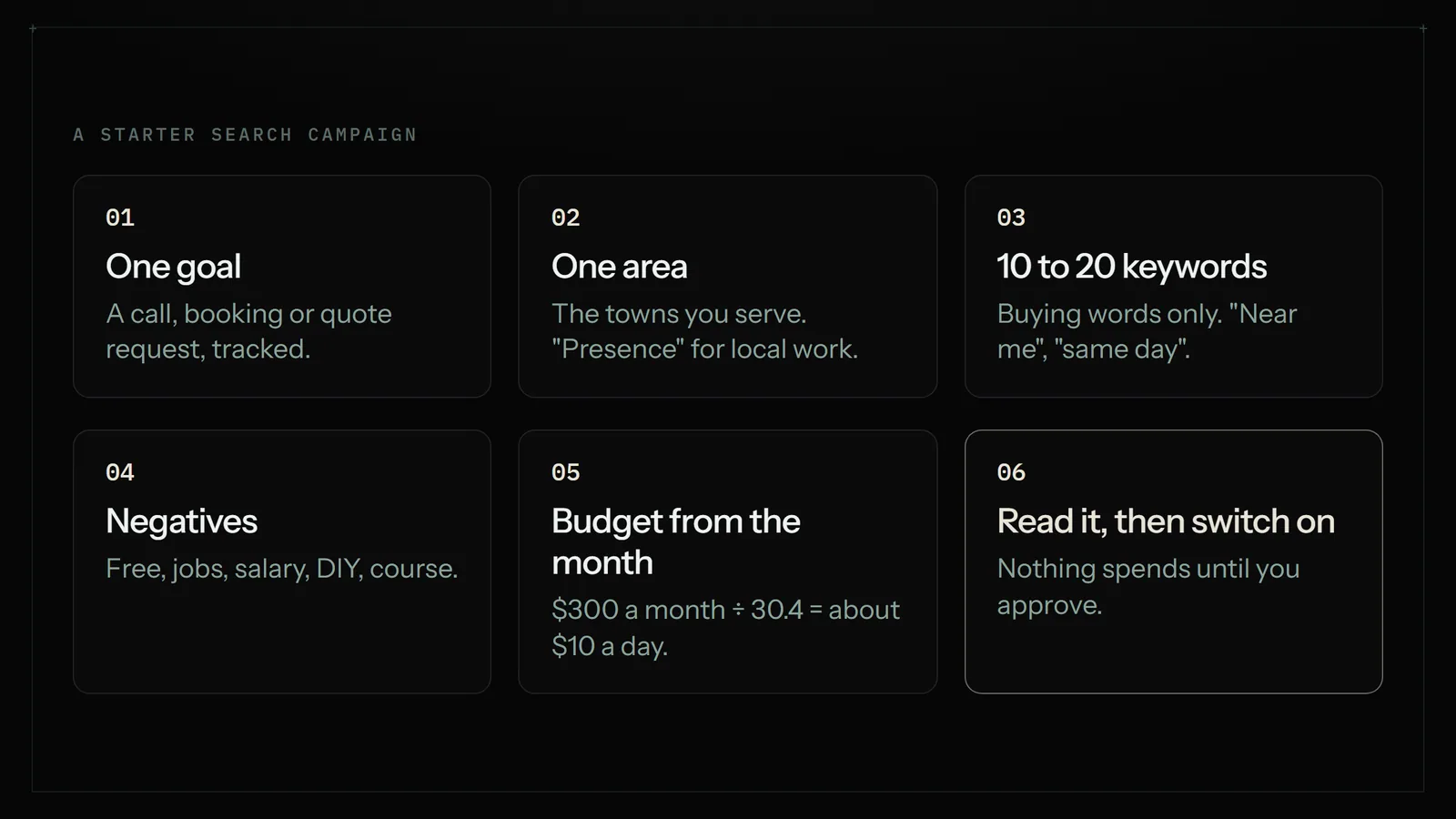
- Pick one goal you can count. A call, a booking, a quote request or a sale. Set up conversion tracking for that one action before you launch, or you will be judging the campaign on clicks, which tells you little.
- Pick one area. Target the towns or radius you actually serve. Google's default location option, "Presence or interest", also shows ads to people who are merely interested in your area. A plumber who only works locally usually wants the "Presence" option instead: people who are in, or regularly in, the area.
- Write 10 to 20 keywords that mean "I want to buy". "Emergency plumber [town]", "furnace repair near me", "same day furnace repair". Leave out research words like "how to", "DIY", "free" and "jobs".
- Add negative keywords on day one. "Free", "jobs", "salary", "course", "DIY", "used", and any service you don't offer. This list saves more money than any bid trick.
- Write two or three ads per ad group. Say what you do, where, and one reason to pick you. Send people to the page that matches the search, not your home page.
- Set the budget from the monthly number you can afford to lose while learning. Divide it by 30.4. If you can risk $300 this month, that is a $10 daily budget.
- Read the whole thing before it goes live. Keywords, negatives, locations, ad text, budget and the AI Max and auto-asset settings. This is the step most people skip.
Why "drafted and paused" is the safer way to set it up
Every step above is work, and most of it is the same work every time: looking up keywords, grouping them, writing ad variants, filling in the same forms in Google Ads. That is a good job to hand off. Spending your money is not. The safe split is to let something else do the drafting and keep the "go live" decision for yourself.
That is how the Astarii Google Ads Manager is built. You connect your own Google Ads account. It reads how your current ads are doing, researches keywords inside your account, and drafts campaigns and ad copy. Everything it creates starts paused, so nothing spends until you turn it on. You read the draft, change what you don't like, and switch it on when you are happy.
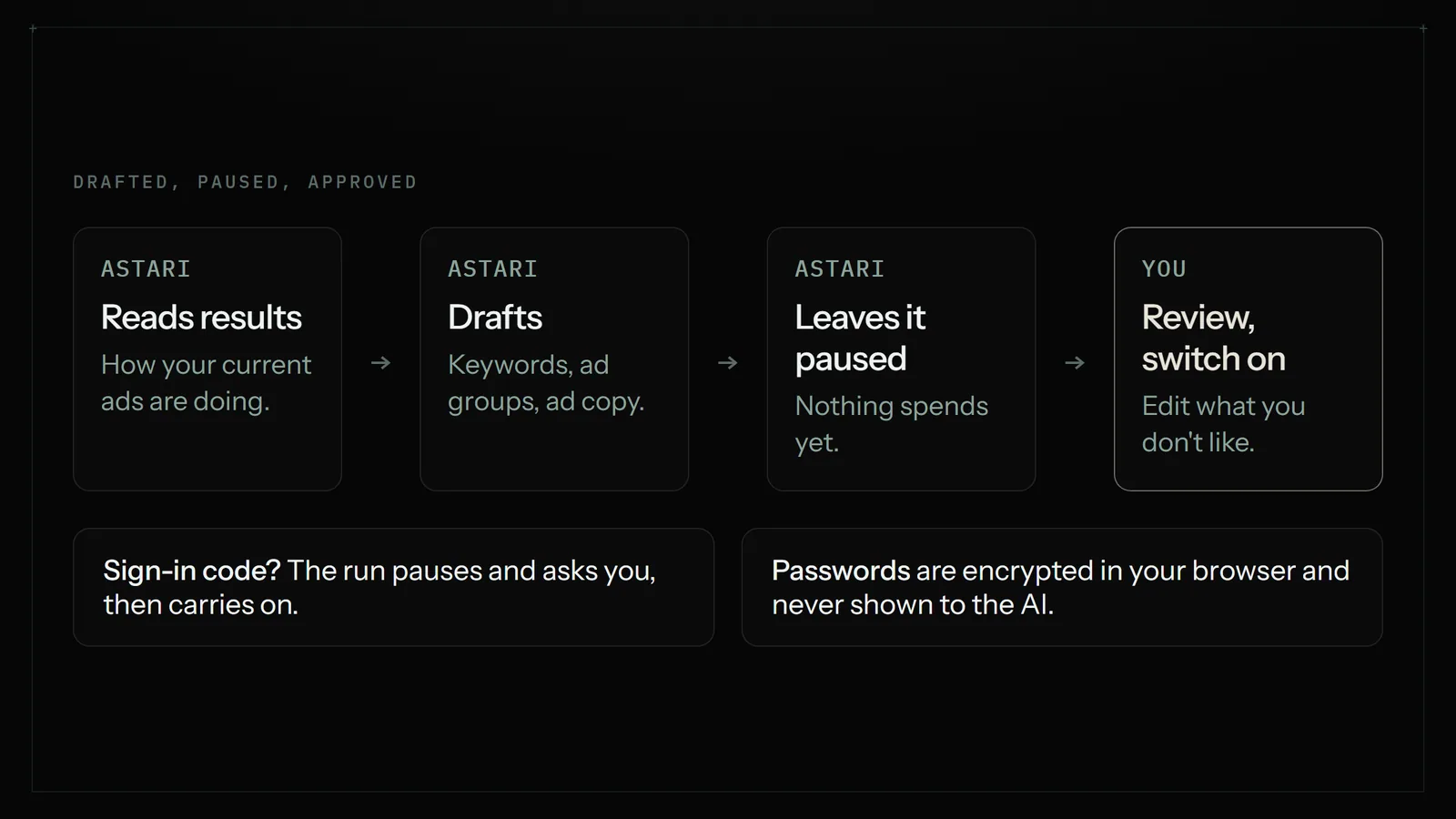
A few things it does not do, so you know where the edges are. It does not turn your campaigns on for you. It does not promise results: Google Ads costs vary by industry, area and week, and a good draft still needs a person who knows the business to say yes. And if your Google account asks for a sign-in code during a run, the run pauses and asks you for it, then carries on from where it stopped. Saved passwords are encrypted in your browser before they are stored and are never shown to the AI.
Your options for getting a first campaign built
There are four realistic ways to get a starter campaign running. Each one is right for somebody.
| Option | What it costs (on top of ad spend) | Control | Best for | Watch out for |
|---|---|---|---|---|
| Do it yourself in Google Ads | Your time | Full | Owners with a few spare evenings who want to learn it | The setup screens default to broad reach; easy to miss a setting |
| Google Smart campaign | Nothing extra | Low | The quickest possible start, very simple offers | Little say over which searches you pay for |
| Agency or freelancer | A monthly management fee | Theirs, with reports to you | Bigger budgets, competitive fields, owners with no time at all | Fees can outweigh a small ad budget; ask how often they review |
| An AI agent that drafts (Astarii) | From $29.99 a month for the whole account | Full: it drafts, you switch on | Small budgets, owners who want the work done but the decisions kept | You still need to read the draft and the weekly numbers |
An agency earns its fee when the budget is large or the field is crowded, because a good one brings judgment the other options don't have. If you spend $300 a month on ads, a management fee can cost more than the ads. Doing it yourself is the cheapest and teaches you the most, if you have the evenings. The Astarii plan is not only for Google Ads, either: the same minutes cover the other jobs an Astari does, such as invoices into a sheet or a morning order check. See pricing for what each plan includes.
The first 30 days: what to check each week
A new campaign needs a few weeks before the numbers mean much. What it needs in the meantime is a weekly look at the right three or four things.
- Week 1: search terms. Open the search terms report and read what people actually typed. Add anything irrelevant as a negative keyword. This is the single most useful ten minutes in Google Ads.
- Week 2: spend against the plan. Is it on track for the monthly cap you chose? Are any keywords taking most of the money without a single conversion?
- Week 3: ads and landing pages. Which ad gets clicked more? Do people who click do anything on the page? A page that loads slowly on a phone wastes every click you pay for.
- Week 4: cost per lead. Divide spend by conversions and compare it with what a lead is worth to you. Keep, cut or adjust.
The weekly look is also a job you can hand off. An Astari on a schedule can read the account every Monday morning and email you a short summary: spend, conversions and the search terms that cost the most. The scheduling docs show how a weekly run is set up, and connections covers linking Gmail so the report lands in your inbox.
Common mistakes that waste a small budget
- No conversion tracking. Without it, Google optimizes for clicks, and you can't tell a good week from a bad one.
- Keywords that are too broad. "Plumber" alone pulls in job seekers and DIY researchers. "Emergency plumber [town]" does not.
- No negatives. Free, jobs, salary and DIY searches can eat a third of a small budget.
- Sending every click to the home page. The page should match the search.
- Running Display or Performance Max first. A small budget spread across every Google surface rarely shows you what works.
- Changing everything every day. Give a change a week before you judge it.
- Setting it and forgetting it. The cheapest fix in Google Ads is looking at it once a week.
When Google Ads is the wrong tool
Be honest with yourself about these. If your customer is worth less than a few average clicks, if nobody searches for what you sell, or if you can't take on more work this month, ads will not help. A local business with no reviews often gets more from asking ten happy customers for a Google review than from $300 of clicks. A handmade seller on Etsy may do better with Etsy's own ads, which run inside the marketplace where the buyers already are. And if you already have an agency you trust and the numbers work, there is no reason to change.
If Google Ads does fit, the plan is short. One goal, one area, a tight keyword list with negatives, a budget you set from the monthly cap, and a draft you read before it spends. You can try an Astari with 3 free runs of up to 15 minutes each, no card needed, from the Astarii home page. For more on what to hand off and what to keep, read the guide to AI agents for small business or the comparison of a virtual assistant and an AI agent.
Say it to an Astari
These are instructions you can give an Astari, word for word. It does the work in a browser, on a schedule if you want one, and asks you before anything goes live.
Questions
Is Google Ads worth it for a small business?
It is when people already search for what you sell, a customer is worth several times the cost of a lead, and someone checks the results weekly. If nobody searches for your product yet, or a customer is worth less than a few clicks, other channels usually do more.
How much does Google Ads cost for a small business?
You set the budget. The WordStream and LocaliQ 2026 benchmarks put the average Search click at $5.42 and the average lead at $66.69, with big differences by industry. A $20 daily budget is capped at $608 for the month.
Can Google spend more than my daily budget?
Yes, on a single day. Google lets most campaigns spend up to twice the average daily budget on busy days, but the month is capped at 30.4 times the daily budget, so the monthly total stays where you planned it.
Should I use a Smart campaign or a Search campaign?
Smart campaigns are quicker to set up but let Google pick the searches and bids, with simple reports. Search campaigns take longer and give you control over keywords, negatives and search term reports, which usually matters more on a small budget.
What is a good daily budget to start Google Ads?
Start from the monthly amount you can afford to lose while learning, then divide by 30.4. If that is $300, use about $10 a day. Give the campaign three to four weeks before judging it on cost per lead.
Can AI set up my Google Ads campaign?
Yes. The Astarii Google Ads Manager reads how your ads are doing, researches keywords in your own account and drafts campaigns and ad copy. Everything it creates starts paused, so nothing spends until you review it and turn it on.
Will an AI agent spend my ad budget without asking?
Not with Astarii. Every campaign it drafts starts paused, and only you switch it on. Runs also pause and ask you when Google wants a sign-in code, and saved passwords are never shown to the AI.
Should I hire an agency for Google Ads instead?
An agency is worth its fee on larger budgets and crowded fields, where judgment matters. On a few hundred dollars a month of ad spend, a management fee can cost more than the ads, so doing it yourself or with a drafting tool often makes more sense.
- WordStream: 2026 Google Ads benchmarks
- Google Ads Help: About average daily budgets
- Google Ads Help: Why daily costs might exceed your average daily budget
- Google Ads Help: About advanced location options
- Google Ads Help: Compare Smart campaigns with other campaign types
- Google Ads Help: About keyword themes in Smart campaigns
- Google: We're upgrading Dynamic Search Ads to AI Max
filed under Marketing