n8n vs Zapier vs Make for Non-Developers (and the Jobs None of Them Do)
Three tools, one job: move data between your apps without code. Zapier is the easiest, Make is the cheapest per step, and n8n charges per run or runs free on your own server. Here is how to choose, what a real job costs on each, and what none of them can reach.

For non-developers, Zapier is the easiest to learn and has the most apps, from $19.99 a month billed yearly, but it charges per step. Make is cheaper per step, about $9 a month for 10,000 credits, with a steeper first hour. n8n charges per whole run, from $20 a month, or is free to self-host. None of them works on websites with no integration.
You have a job that repeats: a new order comes in, it goes into a spreadsheet, someone gets a message, a customer gets an email. Somebody told you to automate it, and three names keep coming up: Zapier, Make and n8n. All three move data between apps without code. They differ in how hard they are to learn, how they charge you, and who has to look after them.
This guide compares them for people who don't write code: what each one is good at, what a real small-business job costs on each, and which to pick. It also covers the jobs none of them can do, because some work lives on websites that have no integration at all, and that's where a browser agent such as Astarii fits instead. If automation is new to you, the guide to AI agents for small business is a good place to start.
The short version
All three tools do the same basic thing. You pick a trigger ("when a new row appears in this sheet") and one or more actions ("send this email, then add a contact"). The tool watches for the trigger and runs the actions, day and night, through each app's official integration. None of them opens a website and clicks through it the way you would.
- Zapier is the easiest to learn and connects to the most apps (its pricing page mentions more than 9,000). You pay per task, so it gets expensive at high volume.
- Make is a visual canvas where you drag modules and draw the paths between them. It's cheaper per step and better at branching logic, with a steeper first hour.
- n8n is the most technical. It charges per whole workflow run, not per step, and you can host it yourself for free. It suits people who are comfortable with a bit of technical setup, or who have someone who is.
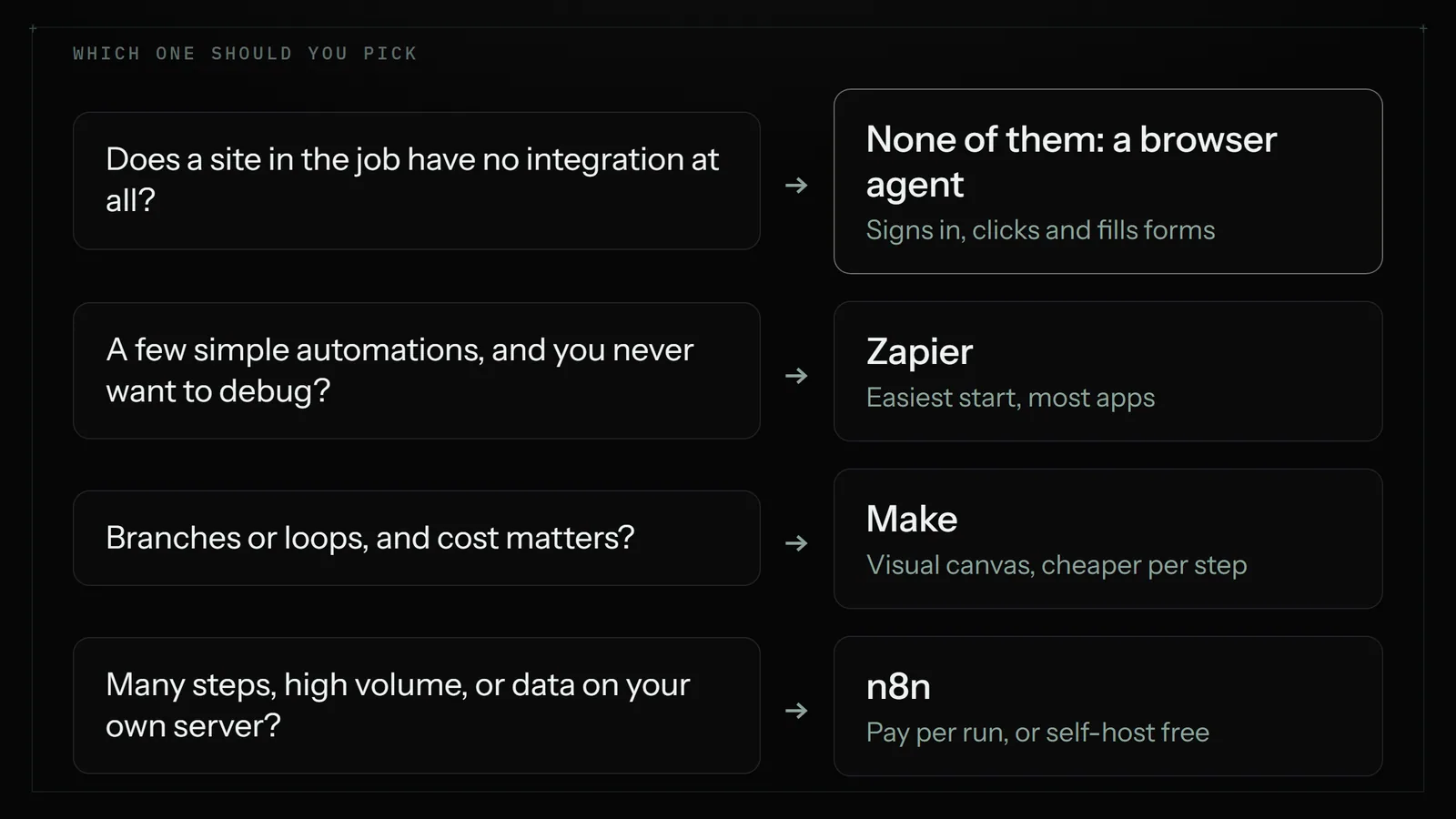
If you never want to think about the tool again, pick Zapier. If you have branching logic and care about cost, pick Make. If your workflows have many steps and you, or someone you trust, can run a server, pick n8n.
Zapier vs Make vs n8n side by side
Prices below were checked on each vendor's pricing page on 24 October 2026, except where marked. All three change their plans often, so check before you buy.
| Zapier | Make | n8n | |
|---|---|---|---|
| What you pay for | Tasks: each action step that runs | Credits: most module actions use 1 | Executions: one per full workflow run, however many steps |
| Free plan | 100 tasks a month, two-step Zaps only | 1,000 credits a month | Self-hosted Community Edition (you pay for the server) |
| Entry paid plan | Professional from $19.99/mo billed yearly, $29.99 monthly | Core about $9/mo billed yearly for 10,000 credits (third-party figure) | Starter $20/mo billed yearly for 2,500 executions |
| Next step up | Team from $69/mo billed yearly, $103.50 monthly | Pro and Teams plans | Pro $50/mo billed yearly for 10,000 executions |
| Learning curve | Lowest: fill-in-the-blanks steps | Medium: visual canvas with routers | Highest: nodes, data mapping, some JSON |
| Hosting | Zapier's cloud only | Make's cloud only | n8n's cloud, or your own server |
| Best for | A few simple automations you set and forget | Branching workflows on a budget | Long workflows, high volume, keeping data in-house |
Zapier: the easiest start, the highest bill at volume
Zapier's strength is that a non-technical person can build a working automation in ten minutes. You choose an app, choose the event, sign in, and map fields from one step into the next with dropdowns. Its app directory is the largest of the three, so if you use a niche booking tool or an industry CRM, Zapier is the most likely to have it.
The catch is the meter. Zapier counts a task every time an action step runs. A Zap with one trigger and four actions uses four tasks per run. Run it 500 times a month and that's 2,000 tasks. The free plan gives you 100 tasks a month and only two-step Zaps (one trigger, one action), which is enough to test the idea but not to run a business process. Professional starts at $19.99 a month billed yearly or $29.99 month to month, and the price rises as you move the task slider up. Zapier now bills AI steps and code steps out of the same task pool, so a Zap that calls a more powerful AI model can use more than one task per step.
Choose Zapier when you have a handful of automations, each runs a few hundred times a month or less, and you value never having to debug anything. Plenty of small businesses stay on Zapier for years for exactly that reason.
Make: more control for less money
Make (once called Integromat) shows your workflow as a canvas of round modules joined by lines. You can split a path with a router ("if the order is over $200, do this; otherwise do that"), loop over a list of items, and combine data from several apps before you act on it. For workflows with real logic in them, the canvas is easier to follow than a long list of Zapier steps.
Make bills in credits. Its pricing page says most actions use one credit, that reading, searching, creating, updating and transforming data all count, and that routers and error handlers are free. The free plan includes 1,000 credits a month. Make's page didn't show plan prices to our headless checker today. Latenode, which read it in September 2026, reports Core at $9 a month billed yearly, or $10.59 monthly, for 10,000 credits. Zapier's own guide to Make quotes $12. Either way, it's usually several times cheaper per step than Zapier.
The trap is loops. If a scenario reads a list of 20 items and then does three things to each one, that's 60 credits for one run, not 4. Make's pricing page warns that one run can use anywhere from two credits to thousands. Build a test run, look at the credit count it reports, and multiply by how often it will run.
Choose Make when your workflow has conditions or loops, you want to see the whole thing on one screen, and you're willing to spend an evening learning the canvas.
n8n: pay per run, or host it yourself
n8n looks like Make at first glance, with nodes joined on a canvas, but it is built for people who are comfortable with a bit of technical detail. You'll see data as JSON, you can drop in a code step, and you can call any web service with an HTTP request node even if n8n has no ready-made integration for it.
Its pricing is the most generous for long workflows. n8n charges per execution, meaning one complete run of a workflow, whether it has 3 steps or 30. Its pricing page lists Starter at $20 a month billed yearly for 2,500 executions and Pro at $50 a month billed yearly for 10,000, with yearly billing saving 17%. Every plan includes unlimited users and workflows. Note the cloud Starter plan caps a single run at 5 minutes.
The other route is the free Community Edition, which you install on your own server. The software costs nothing and executions are unlimited, but you pay for the server, about $5 to $10 a month for a small one according to Sliplane, and you are now responsible for updates, backups and security. For a non-developer, that is a real job, not a footnote. If nobody on your team has run a server before, start on n8n's cloud plan or pick Make.
Choose n8n when your workflows have many steps or run thousands of times a month, you want customer data to stay on a server you control, or you already have a technical person who likes it.
A worked example: 300 orders a month
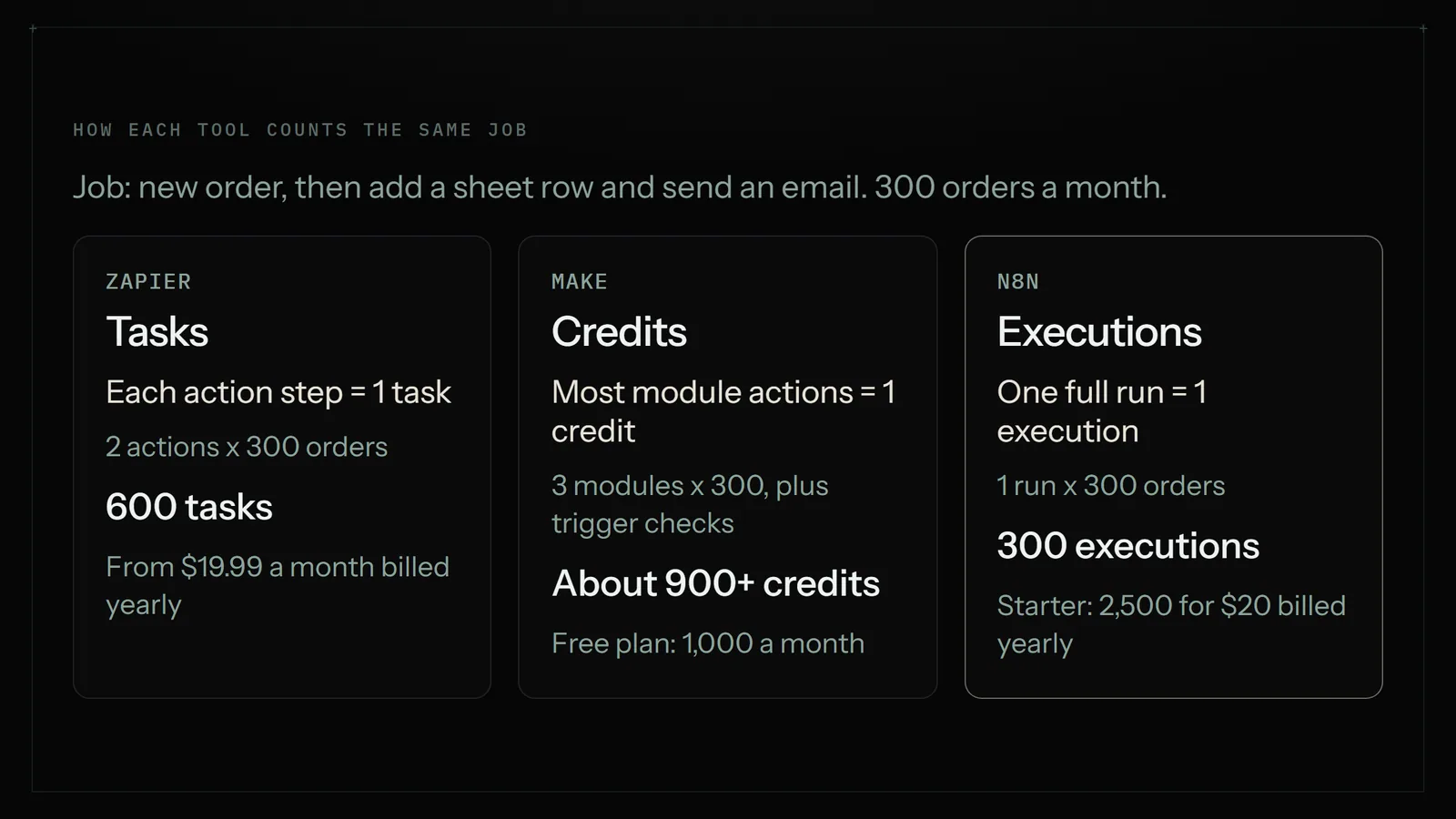
Here is one ordinary job priced on all three. When a new order arrives in your shop app, add a row to the Orders sheet, then email the customer a thank-you note. That's one trigger and two actions. You get 300 orders a month.
- Zapier: 2 tasks per order (the trigger is free, the two actions count), so 600 tasks a month. That fits the entry Professional tier, which third-party guides put at 750 tasks: $19.99 a month billed yearly, $29.99 monthly. Add a third action and you're at 900 tasks and the next tier up.
- Make: about 3 credits per order (reading the order, writing the row, sending the email), roughly 900 a month, plus a credit each time the trigger checks for new orders. That's near the edge of the free 1,000 credits, and well inside Core's 10,000.
- n8n: 300 executions a month, comfortably inside Starter's 2,500 at $20 a month billed yearly, or free on a self-hosted server.
At this size, all three are cheap and the deciding factor is which one you'll actually finish building. At 3,000 orders a month with a trigger and five actions each, the gap opens up: about 15,000 Zapier tasks, about 18,000 Make credits plus trigger checks, and still only 3,000 n8n executions. That's when the pricing model matters more than the interface.
How to pick in five minutes
- List the apps in the job. Search each tool's app directory for every one. If an app is missing from one tool, that tool is out, unless you can call its API yourself (n8n and Make can, but that's developer work).
- Count the steps and the runs. Steps per run times runs per month gives you a rough Zapier task count. Make will be similar or a little higher. n8n is just the run count.
- Be honest about your patience. If you'll give up after one confusing screen, Zapier. If you like seeing the whole flow and can spend an evening learning, Make. If you enjoy tinkering, n8n.
- Decide who maintains it. Cloud tools fix themselves. A self-hosted n8n server is yours to update and back up.
- Build the smallest version first. All three have free plans or trials. Build one real workflow, run it for a week, then look at the usage counter before you commit to a yearly plan.
The jobs none of them do
Every tool in this comparison works through integrations: official connections the app maker built, or an API you call yourself. That covers a lot of modern software. It doesn't cover the websites many small businesses actually spend their afternoons on:
- A supplier or wholesaler portal where you sign in and download invoices or check stock.
- A county, state or industry website where you fill in the same form every month.
- Competitor shops and marketplace listings you check for prices.
- Any site that only shows the information after you sign in and click through three pages.
If the site has no integration and no public API, Zapier, Make and n8n can't reach it in a way a non-developer can set up. Developers can bolt on scraping services or browser-control code, but that's exactly the kind of work this article assumes you don't want to do.
That's the job a browser agent does. An Astari opens websites in a real browser, signs in with saved logins, reads pages, clicks, types, fills in forms and uploads files, then updates your Google Sheet and emails you what it did. You describe the job in plain English, or show it once, and pick a schedule such as every weekday at 7:30 or every Friday. Runs happen in Astarii's cloud browser, so your laptop can be closed. When a site texts a sign-in code, the run pauses and asks you, then carries on. Saved passwords are encrypted in your browser before they're stored and are never shown to the AI. The full list of what it can do is in the guide to your first Astari.
For a longer look at that split, read Zapier vs an AI browser agent, and for website-to-sheet jobs specifically, how to automate data entry between websites and Google Sheets.
Where a browser agent is the wrong pick
An agent is not a cheaper Zapier, and it would be a poor swap for most connector jobs.
- Speed. A Zap or n8n workflow with an instant trigger runs in seconds. A browser agent loads and reads pages, so a run takes minutes. If a new lead must reach your CRM the moment the form is sent, use a connector.
- Volume. Astarii is priced in minutes of run time: Pro is $29.99 a month for 900 cloud minutes plus 800 browser minutes. That's plenty for a daily portal check or a weekly report, and the wrong tool for 3,000 order rows a month that an integration could pass along for pennies.
- Pure app-to-app work. If both apps already have integrations, a connector is simpler, faster and cheaper. Use it.
The common setup for a small team is both: a connector for the high-volume pipes between apps, and an agent for the handful of jobs on websites with no integration, or the jobs that need some reading, such as replying to emails that ask about pricing.
What a sensible stack costs
For a three-person shop with a few app-to-app automations and two or three website jobs a week, a realistic monthly bill looks like this:
- Connector: Make Core at about $9 to $11, n8n Starter at $20 billed yearly, or Zapier Professional at $19.99 to $29.99.
- Browser agent: Astarii Pro at $29.99 for the portal, form and price-check jobs. The free trial gives you 3 runs of up to 15 minutes each, with no card.
That's roughly $40 to $60 a month, against several hours a week of copying and pasting. Start with whichever job costs you the most time, automate that one, and add the next only when the first has run cleanly for two weeks.
Next step: pick the one job you repeat most. If every app in it has an integration, build it in Zapier, Make or n8n using the five-minute check above. If it lives on a website with no integration, try it as an Astari: see plans and the free trial, or browse the extension, Windows and Android apps.
Say it to an Astari
These are instructions you can give an Astari, word for word. It does the work in a browser, on a schedule if you want one, and asks you before anything goes live.
Questions
Is n8n better than Zapier?
For long workflows and high volume, n8n is usually cheaper because it charges per whole run, not per step, and it can be self-hosted free. For a non-developer who wants something working in ten minutes with the widest choice of apps, Zapier is easier. Better depends on who builds and maintains it.
Is n8n free?
The Community Edition is free and has unlimited executions, but you install it on your own server, which costs about $5 to $10 a month, and you handle updates and backups. n8n's hosted cloud plans start at $20 a month billed yearly for 2,500 executions.
Is Make cheaper than Zapier?
Usually, per step. Make's free plan includes 1,000 credits a month and Core is reported at about $9 a month billed yearly for 10,000 credits. Zapier Professional starts at $19.99 a month billed yearly. Make's loops can multiply credits quickly, so check a test run's usage.
Which is easiest for a beginner: Zapier, Make or n8n?
Zapier. You pick an app, pick an event and map fields with dropdowns. Make's visual canvas takes an evening to learn but handles branching well. n8n is the most technical, with JSON data and code steps, especially if you host it yourself.
How does Zapier count tasks?
Zapier counts a task each time an action step runs. A Zap with one trigger and three actions uses three tasks per run. AI steps and code steps now draw from the same task pool and can use more than one task each.
What is a credit in Make?
A credit is Make's billing unit. Most module actions, such as reading, creating or updating data, use one credit. Routers and error handlers are free. Some AI features use more. A single run can use two credits or thousands, depending on loops.
Can Zapier, Make or n8n log into a website and fill in a form?
Not in a way a non-developer can set up. They work through app integrations and APIs. For sites with no integration, such as supplier portals or government forms, a browser agent like Astarii signs in with saved logins, fills in the form and reports back.
Should I use an AI agent instead of Zapier or Make?
Not for app-to-app jobs. A connector is faster and cheaper there. Use a browser agent for work on websites with no integration or jobs that need some reading. Many small teams run a connector and an agent side by side.
filed under Tools compared