How to Automate Repetitive Tasks in Your Browser: A 30-Minute Audit for Small Businesses
Each repeated job is small, so none ever feels worth fixing. Together they can eat hours a week. This audit finds them in 30 minutes and matches each to the cheapest tool that does it.

To automate repetitive tasks, first spend 30 minutes listing what you repeated last week from your browser history and sent mail, then score each job by minutes per week. Give the top five the cheapest tool that works: a template or formula, a free macro recorder, a connector like Zapier, or an AI browser agent such as Astarii, from $29.99 a month, for sites that need sign-ins.
Most small-business owners know they repeat themselves online. Few know exactly where the hours go. You check the same three order pages every morning, copy the same totals into the same sheet every Friday, and type the same reply to the same question four times a week. Each job is small, so none of them ever feels worth fixing.
Added up, they are worth fixing. In American Express's SME Business Barometer, published in July 2026, 1,000 UK small-business owners estimated they spend an average of 11 hours a week on admin and finance tasks, about six working days a month. Not all of that can be automated, but a surprising share of it is the same clicks in the same browser tabs.
This guide is a 30-minute audit you can do today. It ends with a short list of jobs, each matched to the cheapest tool that can do it, from a free text shortcut to a scheduled AI helper such as an Astari. If AI agents are new to you, the guide to AI agents for small business covers the basics.
Why audit first instead of buying a tool
The usual mistake runs in the other direction. Someone hears about an automation tool, signs up, and then looks for something to automate with it. The tool decides the job. A week later the subscription is still running and the busywork is still there, because the job that actually ate your Tuesday was one the tool couldn't touch.
An audit flips that. You list the work first, put a rough number on it, and only then pick a tool for each job. Three things come out of it:
- A number. "About 4 hours a week" is a budget. It tells you whether a $10 tool, a $30 one or a part-time person is worth it.
- A shortlist. Usually three to five jobs account for most of the repeated time. Those are the only ones worth automating this month.
- A keep list. Some repeated jobs should stay with you. Writing them down stops you from handing off something you'll regret.
The 30-minute audit, step by step
You need a notepad or a blank spreadsheet, your browser history and your sent mail. Set a timer. The point is a rough picture, not a perfect one.
Minutes 0 to 10: list what you repeated last week
Open your browser history (in Chrome, press Ctrl+H on Windows or Cmd+Y on a Mac) and scroll back through the last seven days. Then skim your sent mail for the same week. Every time you see a site or a kind of email that shows up more than once, write one line for it. Use plain verbs: "check new Etsy orders", "copy supplier invoice totals into the Invoices sheet", "reply to 'do you ship to Canada?'".
Don't judge anything yet. Twelve to twenty lines is normal for a small shop. Include the dull ones. The dull ones are usually the point.
Minutes 10 to 20: score each line
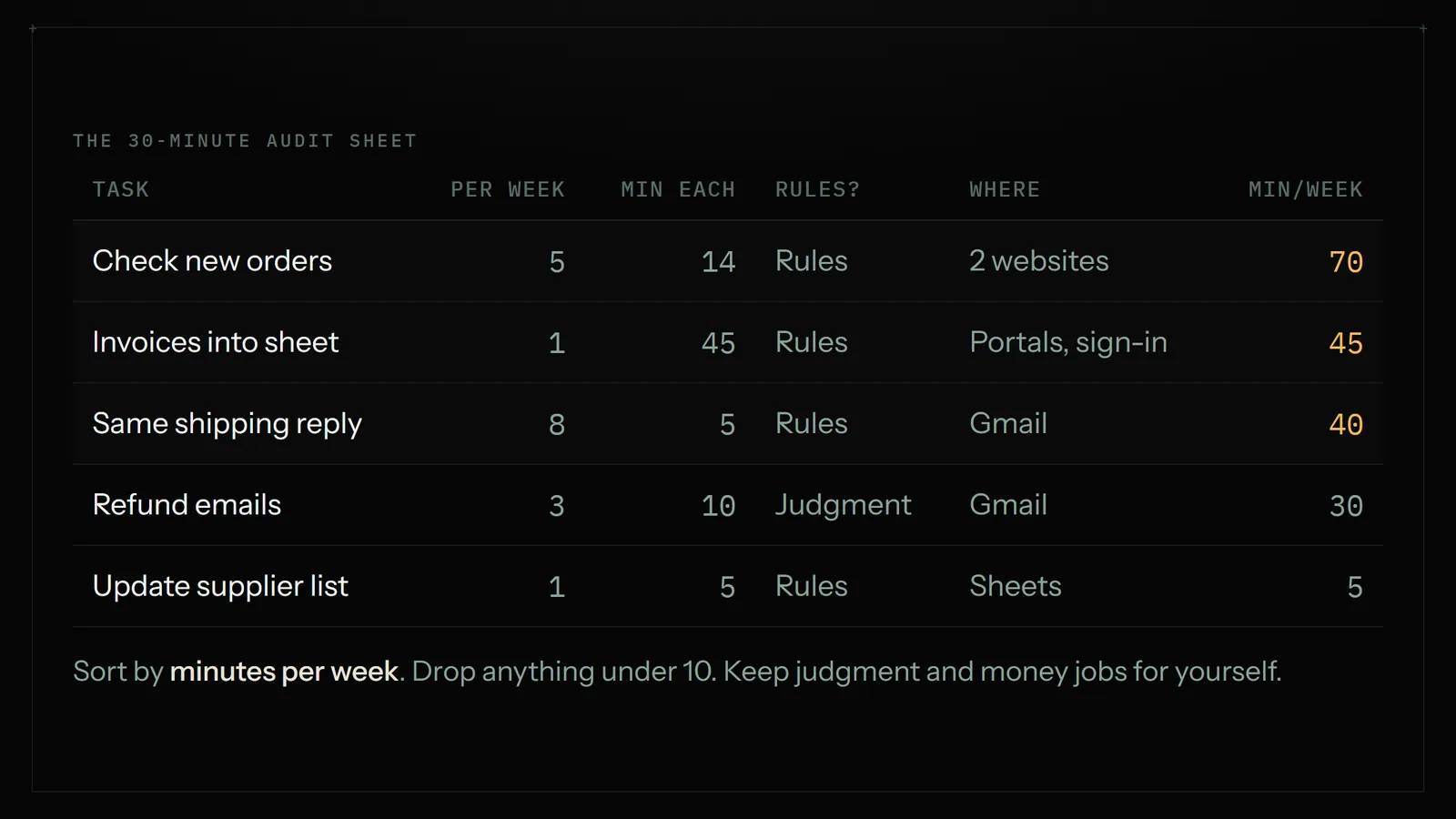
Add four columns next to each line and fill them in quickly:
- How often. Times per week. Daily is 5 or 7, weekly is 1.
- Minutes each time. Your honest guess, rounded.
- Rules or judgment? Could you write the steps down so a new hire follows them exactly? That's rules. Do you have to read and decide each time? That's judgment.
- Where it lives. In one app, between apps that have integrations (Gmail and Sheets, Shopify and your email list), or on a website with no integration (a supplier portal, a county permit site, a marketplace dashboard).
Multiply the first two to get minutes per week. Anything under 10 minutes a week drops off the list unless it's error-prone. Sort the rest from most minutes to least.
Minutes 20 to 30: pick a tool for the top five
Take the five biggest rows and give each one the simplest tool that can do it. The next section is the ladder to choose from. Write the tool next to the task, plus one line for what "done" looks like ("new orders listed in an email by 8am"). That line becomes your instruction later.
The tool ladder: cheapest fix first
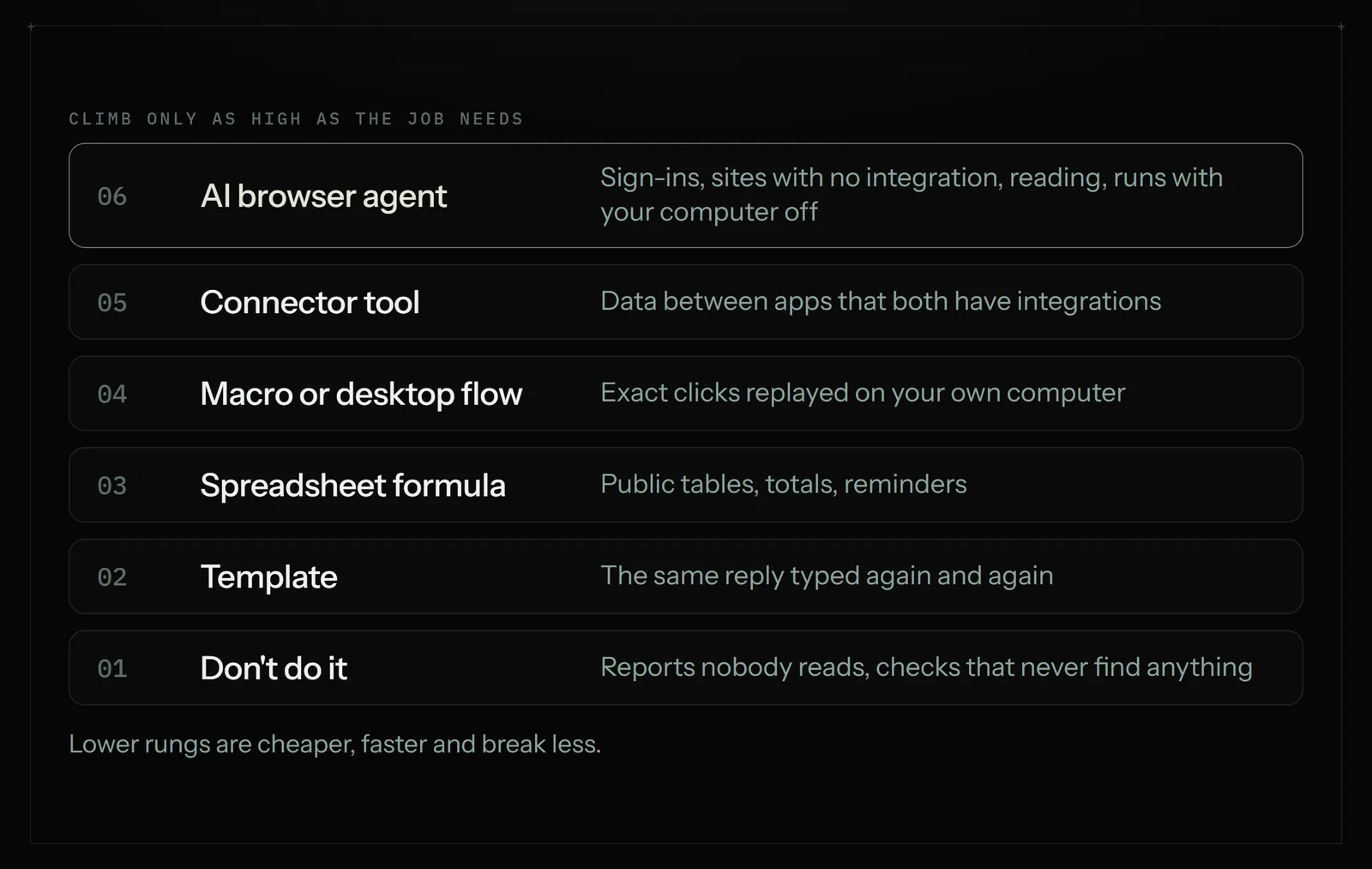
Climb only as high as the job needs. Lower rungs are cheaper, faster and break less.
| Rung | Good for | Cost | Where it stops |
|---|---|---|---|
| Don't do it | Reports nobody reads, checks that never find anything | Free | Only works if the job truly doesn't matter |
| Templates and text shortcuts | The same reply typed again and again | Free (Gmail templates, saved replies) | You still read each email and press send |
| Spreadsheet formulas | Pulling a public table into Sheets, totals, reminders | Free | No sign-ins, no clicking |
| Browser macro recorder | Replaying exact clicks on one page you control | Free (UI.Vision, open source) | Breaks when the page layout changes; your computer must be on |
| Desktop automation | Clicks across Windows programs and the browser | Free to download (Power Automate for desktop) | Takes setup time; runs on your PC |
| Connector tool | Moving data between apps that have integrations | Zapier from $19.99/mo billed annually | Sites with no integration; anything that needs reading |
| AI browser agent | Websites with no integration, sign-ins, light reading, schedules | Astarii from $29.99/mo (3 free runs) | Minutes per run, not seconds; not for money or legal calls |
| A person | Phone calls, customer care, real judgment | Hourly | Cost, and the hours you spend managing |
A few notes on the middle rungs, because they are the ones people skip:
Macro recorders such as UI.Vision record your clicks once and replay them. The browser extension is open source and free for personal and commercial use. They are great for a page you control that rarely changes. They are fragile on sites that redesign, and they replay exactly what you did, so they can't cope with "only the new ones" unless you build that logic yourself.
Power Automate for desktop is Microsoft's recorder and flow builder for Windows. Microsoft has offered it to Windows users at no additional cost since 2021, and it records both browser and desktop actions. It is the strongest free option if you live on a Windows PC, with a learning curve to match. Runs happen on your machine, so the machine has to be on.
Connector tools like Zapier, Make and n8n are the right answer when every app in the job has an integration. They are fast and cheap per action. We compared them with a browser agent in detail in Zapier vs an AI browser agent.
When a browser agent is the right rung
An AI browser agent earns its price on a specific kind of job. Look at your top five rows and check for these signs:
- The work sits on a website with no integration. Supplier portals, marketplace dashboards, government forms, a competitor's product pages.
- It needs a sign-in. An Astari signs in with saved logins. The passwords are encrypted in your browser before they are stored and are never shown to the AI.
- It needs light reading. "Reply to anyone asking about pricing" means telling a pricing question from a complaint. Rules-only tools can't.
- It should run while you're away. Astarii runs in the cloud on its own browser, so a 7:30am check happens with your laptop closed. It can also run in your own Chrome or Brave through the extension, or on a Windows PC through the desktop app.
- It must not repeat itself. Task memory means a scheduled Astari doesn't handle the same item twice: it won't re-email a lead or re-add an invoice that's already in the sheet.
You describe the job in plain English, or show it once, then pick a schedule such as every weekday at 7:30 or every Friday. If a site texts a sign-in code or something needs a decision, the run pauses and asks you, then carries on from where it stopped. Scheduling is covered in the scheduling docs.
When it isn't
Be honest with your list. A browser agent is the wrong rung when:
- A free formula or a Gmail template already does it.
- Every app has an integration and the job must happen in seconds. A connector is faster and cheaper.
- The job moves money, signs something legal, or settles a dispute with a customer. Keep those. An agent can prepare the numbers and stop before the button.
- It happens twice a year. Writing the instruction takes longer than doing it.
A worked example: a two-person candle shop
Here is what a finished audit looks like for a made-up shop that sells candles on Etsy and its own site, buys wax and jars from two suppliers, and runs a small Google Ads campaign. The owner spent 30 minutes on the steps above and came out with this:
| Task | Min/week | Type | Rung picked |
|---|---|---|---|
| Check new Etsy and site orders each morning | 70 | Rules, two sites | Browser agent, weekdays 7:30 |
| Copy supplier invoices into the Costs sheet | 45 | Rules, portals with sign-in | Browser agent, Fridays |
| Answer "do you ship to Canada?" | 40 | Rules | Gmail template |
| Check two competitors' prices | 30 | Rules, public sites | Browser agent, Mondays |
| New site customers into the email list | 25 | Rules, both apps integrated | Connector |
| Read the weekly Google Ads numbers | 20 | Reading | Browser agent, Mondays |
| Refund and damaged-order emails | 30 | Judgment, money | Keep |
That is about 4 hours a week of repeated work. One job went to a free template, one to a connector, one stays with the owner, and four went to a browser agent. Those four come to roughly 165 minutes of human time a week. An agent's runs take their own minutes too, so the owner set them up on the free trial first (3 runs of up to 15 minutes each, no card) to see how long each one really takes before choosing a plan. On Astarii, Pro is $29.99 a month with 900 cloud minutes, and minutes are a run's real length rounded up.
For the ads job, the shop uses the ready-made Google Ads Manager, which reads how the ads are doing and drafts campaigns and ad copy. Anything it creates starts paused, so nothing spends until the owner turns it on. For Etsy, the Etsy Manager can update prices and descriptions, but every change to the live shop is proposed first. Our Etsy bulk-edit guide covers that in detail.

Your first week after the audit
Don't automate all five jobs on day one. Do it in this order:
- Day 1: the free fixes. Set up the templates and formulas. Delete the reports nobody reads. This alone often clears an hour a week.
- Day 2: the biggest agent job. Write the instruction from your "done looks like" line. Run it once while you watch. Check every row it added.
- Day 3: schedule it. Once a run is right, set the schedule. Ask for a short report at the end so you can see what it did.
- Days 4 and 5: the next two jobs. Same pattern: run once, check, then schedule.
- End of week: check the minutes. Compare what you saved with what the runs used. Keep what pays, drop what doesn't.
Write instructions the way you'd brief a careful new hire: which sites, which sheet, what counts as new, what to skip, and when to stop and ask. "Stop and ask me before you press submit" is a perfectly good line to include.
Redo the audit every quarter
Businesses drift. A new supplier adds a portal, a marketplace changes its dashboard, a seasonal rush doubles the order checks. Thirty minutes every three months keeps the list honest. Look for jobs that crept back to you, scheduled runs that no longer find anything, and new jobs that cleared the 10-minutes-a-week bar.
If you want to try the top job on your list now, set up your first Astari and use the 3 free runs. Plans and minute pools are on the pricing page.
Say it to an Astari
These are instructions you can give an Astari, word for word. It does the work in a browser, on a schedule if you want one, and asks you before anything goes live.
Questions
How do I find out which tasks to automate?
Open your browser history and sent mail for the last week and write one line for every site or email you repeated. Score each by times per week and minutes each time, mark it rules or judgment, and note where it lives. Automate the top three to five by minutes per week.
What is the easiest way to automate repetitive tasks in Chrome?
For the same reply typed over and over, use Gmail templates. For replaying exact clicks on one page, a free macro recorder such as UI.Vision works. For jobs across several sites with sign-ins that should run on a schedule, an AI browser agent that takes plain-English instructions is easier than building a macro.
Can I automate repetitive tasks for free?
Often, yes. Templates, spreadsheet formulas, the open-source UI.Vision extension and Microsoft's Power Automate for desktop cost nothing. They run on your own computer and need some setup. Paid tools earn their price when jobs need sign-ins, several sites, reading, or must run with your computer off.
Which tasks should a small business not automate?
Keep anything that moves money, such as refunds and payments, legal or tax declarations, sensitive customer disputes, and taste or strategy calls. An agent can prepare the numbers or a draft and stop before the final button, but the decision should stay with you.
What is the difference between a macro recorder and an AI agent?
A macro recorder replays the exact clicks you recorded, so it breaks when a page changes and can't decide what is new. An AI browser agent reads the page each time, follows a plain-English instruction, and can skip items it has already handled. It is slower per run and costs more.
Do I need Zapier to automate tasks?
Only when the job moves data between apps that have integrations, such as new site customers into an email list. Zapier starts at $19.99 a month billed annually. It can't sign in to a supplier portal or click through a website with no integration; that is where a browser agent fits.
How much time can automation save a small business?
It depends on your list, which is why the audit comes first. In American Express's 2026 barometer, UK small-business owners estimated 11 hours a week on admin and finance tasks. A typical audit finds a few hours of rules-based browser work that can be handed off.
Is it safe to let an AI agent sign in to my accounts?
With Astarii, saved passwords are encrypted in your browser before they are stored and are never shown to the AI. When a site texts a sign-in code, the run pauses and asks you. Changes to a live Etsy shop are proposed first, and ad campaigns start paused.
- Retail Times: Amex SME Barometer, owners spend 11 hours a week on admin (July 2026)
- UI.Vision RPA on GitHub (open source, free for personal and commercial use)
- Windows Blogs: Power Automate Desktop for Windows 10 at no additional cost (2021)
- Microsoft Learn: Record desktop flows
- Zapier pricing
- Astarii product facts (llms.txt)
filed under Admin and paperwork