How to Update Etsy Prices and Descriptions Without Opening Every Listing
Changing prices or a paragraph across a hundred Etsy listings shouldn't take an afternoon. Here are the three ways to do it, what each costs, and which one fits your kind of change.

To update many Etsy listings at once, use Shop Manager's free Editing options when every listing gets the same change, such as prices up 8%. Use a paid tool like Vela, from about $29.95 a month, for large catalogues and CSVs. Use an AI helper such as the Astarii Etsy Manager when each listing needs its own change; it proposes every edit for your approval first.
You have 140 listings, your material costs went up, and every price needs to move. Or your shipping times changed and the same paragraph in 80 descriptions is now wrong. Opening each listing, scrolling to the field, editing, saving and moving to the next one is an afternoon gone, and it is the kind of work where you make a typo on listing 63 and never notice.
There are three ways to avoid that: Etsy's own bulk editor, a paid bulk-edit tool, and an AI helper that reads your listings and proposes the changes for you to approve. This guide shows when each one fits, step by step, with what they cost and where each one falls short. The Astarii Etsy Manager is the third option; if AI helpers are new to you, the guide to AI agents for small business covers the basics.
The three ways to change many Etsy listings at once
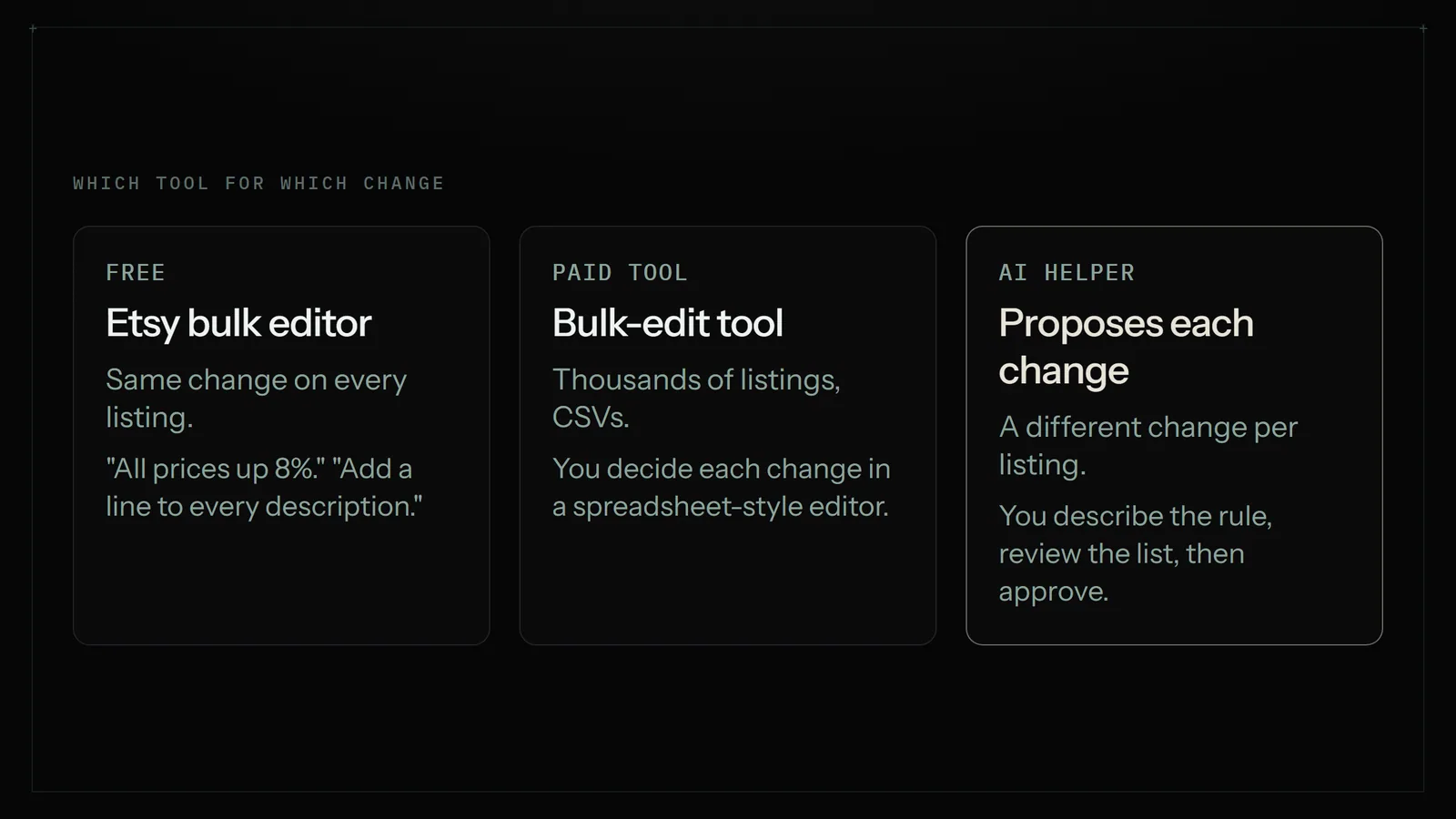
Each approach answers a different shape of job. The question to ask is whether every listing gets the same change, or each listing needs its own change.
- Etsy's built-in bulk editor is free and already in your Shop Manager. It applies one rule to the listings you select: raise prices by 8%, add a line to every description, replace a word in titles.
- A bulk-edit tool such as Vela or Listadum connects to your shop and gives you a spreadsheet-style editor, filters, CSV import and export, and more fields than Etsy's own tool. Most are paid monthly.
- An AI helper reads each listing and works out what that listing needs, then shows you the list of proposed changes before anything goes live. It suits changes that need a bit of thought per listing, such as "rewrite the care section of every candle description to mention the new wick" or "price every large print at $4 above its small version".
Option 1: Etsy's built-in bulk editor (free)
Start here. If the change is the same for every listing, Etsy's own tool is free, fast and has no extra account to manage. According to Etsy's help centre, you can bulk edit titles, tags, descriptions, prices, personalisation, production partners, renewal options, delivery profiles and sections.
How to bulk edit prices on Etsy
- Open Shop Manager, then Listings.
- Tick the listings you want to change, or tick the box at the top to select the whole page.
- Click Editing options and choose to edit prices.
- Pick the change, such as raising prices by a set amount or by a percentage.
- Read the preview. Etsy shows the new prices before you apply them, and you can round them to tidier numbers.
- Apply.
How to bulk edit descriptions and titles
The same Editing options menu covers titles and descriptions. The useful moves are adding text to the start or end, and finding and replacing a phrase. Find and replace only changes listings where the phrase actually appears, which is a good thing: it won't paste "Ships in 3 days" into a listing that never mentioned shipping.
Where Etsy's own tool runs out
- One rule for all. It can raise every selected price by 10%. It can't price each print relative to its own size, or rewrite each description differently.
- No undo. A wrong find-and-replace has to be fixed by another find-and-replace, or by hand.
- Variations and photos. Vendor guides say bulk edits to variations beyond price, and to main photos, aren't supported.
- Batches. A shop with 600 listings repeats the job six times.
Option 2: A bulk-edit tool (Vela, Listadum and similar)
Bulk-edit tools connect to your Etsy shop and let you edit many listings in one screen, with filters ("all listings in the Prints section"), CSV import and export, and sometimes scheduled updates. If you manage thousands of listings, or already plan changes in a spreadsheet, this is the strongest option. Vela, the best known, used to be free; comparison pages that checked it in 2026 list plans from $29.95 a month for shops up to 500 listings, with a 7-day trial. Check its own pricing page before you sign up, since the figures come from competitors' comparisons.
The trade-off: you are still the one deciding every change. The tool makes applying 500 edits quick, but if each listing needs its own wording, you are still writing 500 bits of wording, just in a spreadsheet instead of Etsy's editor.
SEO tools are a different category. eRank, for example, is a keyword and listing-audit tool, with paid plans at $5.99, $9.99 and $29.99 a month on its pricing page and a free tier. It tells you which words to put in titles and tags; it doesn't make the change across your shop for you. Many sellers pair a research tool with one of the editing options here.
Option 3: An AI helper that proposes the changes
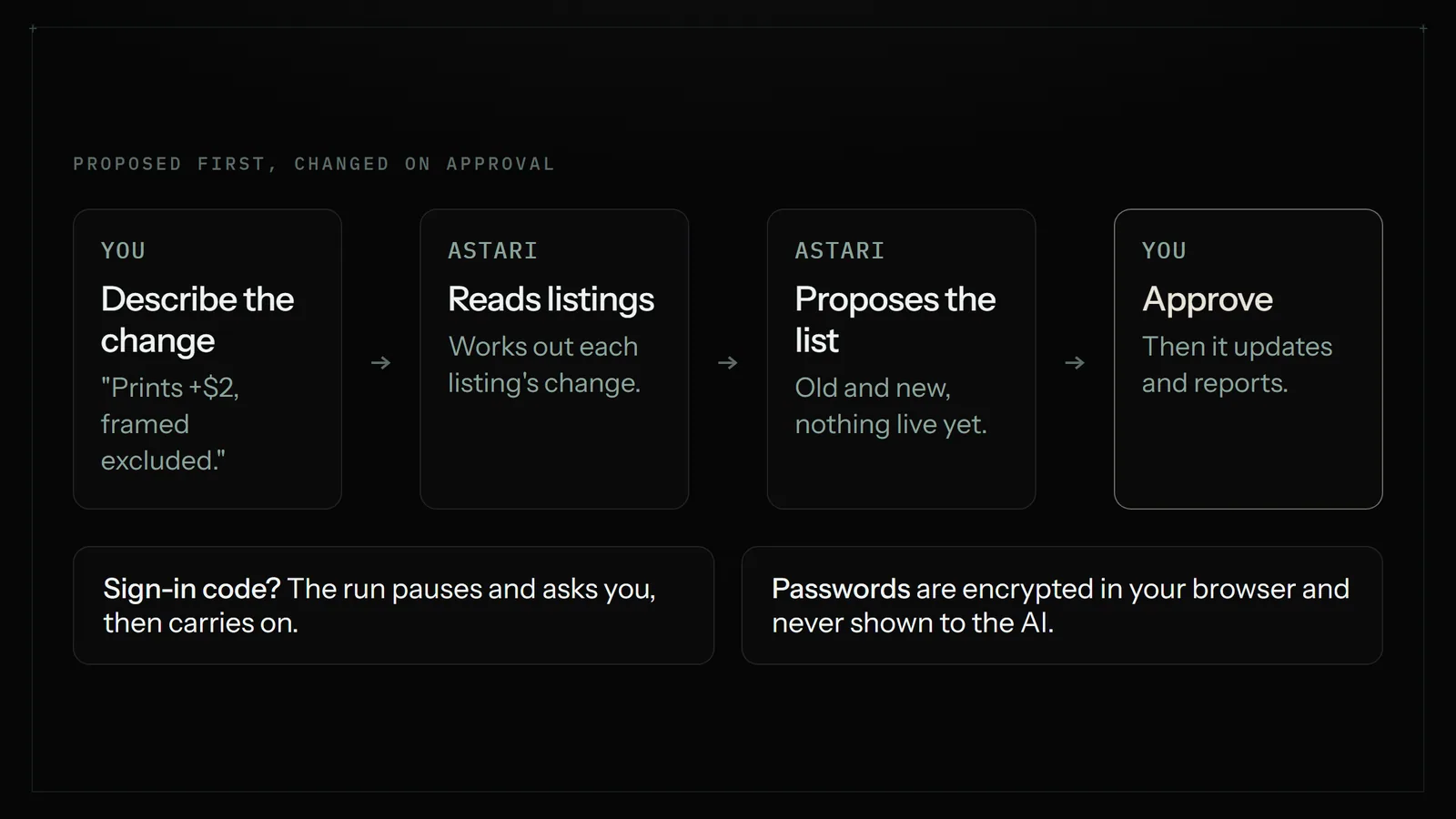
An AI helper works the other way round. You describe the outcome in plain English, it reads your listings, works out the change for each one, and shows you the list. Nothing on the live shop changes until you approve.
That is how the Astarii Etsy Manager works. It reads your orders and listings, answers questions about them, and can update prices and descriptions. Every change to your live shop is proposed first and made only when you approve it. You talk to it the way you'd brief a helper:
- "Raise every listing in the Wedding section by 6%, rounded to the nearest .99, and show me the old and new price for each."
- "Find every description that still says 'ships in 1-2 days' and change it to 'ships in 3-5 days'. List them first."
- "Which of my listings are priced under $12 and haven't sold this year?"
The last one is the quiet advantage. Before you change anything, you can ask questions about your own shop and get an answer from the listings and orders themselves, which is often what decides the change.
A worked example: a price rise across 140 listings
Say you sell art prints in three sizes, and paper and ink went up. You want small prints up $1, medium up $2, large up $3, all ending in .50. In Etsy's editor that is three separate passes, one per size, and only works if each size is its own listing or section. With a bulk tool, you export a CSV, write a formula, check it, and import it. With an AI helper you type the rule once:
"For every print listing, raise the price by $1 for small, $2 for medium and $3 for large, ending in .50. Show me the list before you change anything."
You get back a list of 140 listings with old and new prices. You spot that two listings are framed prints that shouldn't move, say so, and the Astari takes them out. Then you approve and it makes the changes. That review step is the part that matters: it is where you catch the mistake that a find-and-replace would have shipped.
Where an AI helper is the wrong pick
- A simple same-for-all change. Adding 5% to everything is quicker in Etsy's own editor, and free.
- Bulk photos, variations or new listings. The Etsy Manager's stated jobs are reading orders and listings and updating prices and descriptions. For photos, variations or creating listings in bulk, use Etsy's tools or a bulk-edit tool.
- Thousands of listings changed every week from a supplier feed. That is a CSV job, and a dedicated bulk tool built around CSVs will do it better.
Side by side: which one should you use?
| Etsy bulk editor | Bulk-edit tool (e.g. Vela) | AI helper (Astarii Etsy Manager) | |
|---|---|---|---|
| Cost | Free | From about $29.95/month (Vela, per 2026 comparisons) | From $29.99/month (Pro); 3 free runs to try |
| Best for | The same change on every listing | Large catalogues, CSV workflows | A different change per listing, written in plain English |
| Fields | Titles, tags, descriptions, prices, delivery profiles, sections and more | Titles, descriptions, prices, tags, photos | Prices and descriptions |
| Who decides each change | You set one rule | You, cell by cell or by formula | The AI drafts each one; you approve the list |
| Review before it goes live | Price preview | Depends on the tool | Always: every change is proposed first |
| Undo | None reported | Some tools keep history | Nothing changes until you approve |
| Answers questions about your shop | No | Filters and reports | Yes, from your listings and orders |
Five rules for a safe bulk edit, whatever tool you use
- Write the change down first. "All prints +$2, framed excluded" is a rule you can check. "Bump prices a bit" isn't.
- Keep a copy. Export your listings, or at least note the current prices of the listings you're changing.
- Test on five. Run the change on a handful of listings and look at them as a buyer would, on your phone.
- Read the preview or the proposed list. Every option here shows you something before it commits. That is the only point where a mistake is free.
- Check your sale and coupon prices afterwards. A price rise during a running sale changes what buyers see in two places.
Editing a listing doesn't cost a listing fee on Etsy; the $0.20 fee is charged when you create or renew a listing, so you can tidy descriptions as often as you like.
How to try the AI route
Sign up at astarii.ai; the free trial is 3 runs of up to 15 minutes each, with no card. Pick the Etsy Manager from the ready-made Astarii, sign in to your shop, and start with a question rather than a change: "Which of my listings mention 'free shipping' in the description?" Once the answers look right, ask for your first proposed change. If a site asks for a sign-in code, the run pauses and asks you, then carries on, and saved passwords are encrypted in your browser and never shown to the AI. The first-Astari guide walks through setup, and pricing lists the plans if you keep going.
If your shop work spills into spreadsheets, the guide to automating data entry between websites and Google Sheets covers the next step, and the virtual assistant vs AI agent comparison helps if you're deciding between hiring help and handing jobs to software.
Say it to an Astari
These are instructions you can give an Astari, word for word. It does the work in a browser, on a schedule if you want one, and asks you before anything goes live.
Questions
Can you bulk edit listings on Etsy?
Yes. In Shop Manager, open Listings, tick the listings and click Editing options. Etsy's help centre lists titles, tags, descriptions, prices, personalisation, production partners, renewal options, delivery profiles and sections as bulk-editable.
How do I change all my prices on Etsy at once?
Select the listings in Shop Manager, choose Editing options, then edit prices. You can raise prices by a set amount or a percentage, preview the new prices, round them, and apply. Large shops work in batches.
Can I undo a bulk edit on Etsy?
Seller-tool guides report there is no undo for Etsy's bulk edits. Export your listings or note the current values first, and test the change on a few listings before running it on the whole shop.
Does editing an Etsy listing cost a fee?
No. The $0.20 listing fee is charged when you create or renew a listing, not when you edit one, so you can change prices and descriptions as often as you need.
How do I bulk edit Etsy descriptions?
Use Editing options in Shop Manager to add text to the start or end of descriptions, or to find and replace a phrase. For a different change in each description, a bulk-edit tool or an AI helper that drafts each one is quicker.
Is Vela still free for Etsy sellers?
No. Comparison pages that checked it in 2026 list paid plans from $29.95 a month for shops up to 500 listings, with a 7-day trial. Check Vela's own pricing page before signing up.
Can AI update my Etsy listings without me checking?
Not with the Astarii Etsy Manager. It reads your orders and listings and can update prices and descriptions, but every change to the live shop is proposed first and made only when you approve it.
What can't the Astarii Etsy Manager do?
Its stated jobs are reading orders and listings, answering questions about them, and updating prices and descriptions. For bulk photo, variation or new-listing work, use Etsy's own tools or a dedicated bulk-edit tool.
filed under Online selling