Auto-Apply to Jobs Without Spamming: How to Apply Widely and Never Twice
Auto-apply tools can send hundreds of applications a day. Here is how to apply widely without duplicates, guessed answers or banned accounts, and what the main tools cost.

To auto-apply to jobs without spamming, keep one job log, write fit rules (titles, pay, deal-breakers, one application per company a month), and approve forms yourself for the first two weeks. Aim automation at employers' careers pages; Indeed and LinkedIn ban bots. Tools range from free autofill to $999 a year; Astarii starts at $29.99 a month.
Auto-apply tools promise hundreds of applications while you sleep. Some deliver that number. The trouble is what the number does to you: duplicate applications to the same company, answers you never saw on forms with your name on them, and accounts flagged on sites that ban bots. Recruiters notice, and they remember names.
You can apply widely without any of that. This guide covers what "auto-apply" means in practice, what the main tools cost (prices read on their own pages on November 8, 2026), the site rules that apply, and a setup that keeps volume high and duplicates at zero. If you want a helper that does the repetitive part on a schedule, the Astarii Job Hunter is one option, and the guide to AI agents for small business explains how that kind of helper works.
What "auto-apply" actually means
Three quite different products use the same words. Knowing which one you're buying matters more than any feature list.
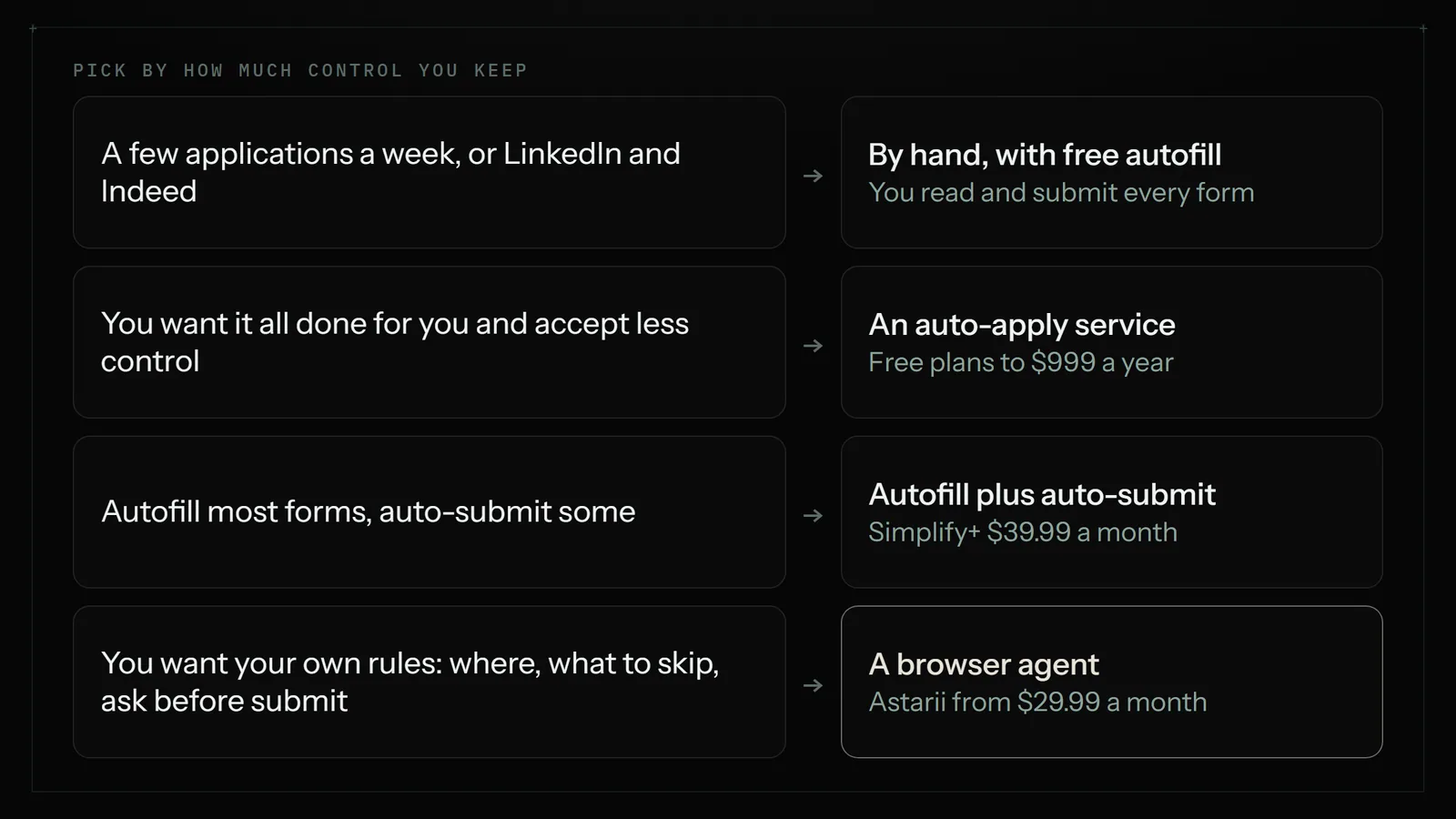
- Autofill extensions. A browser extension fills the application form in front of you from your saved profile. You read it and click submit. Simplify's free Copilot works this way, and its help center says plainly that you review and submit.
- Auto-apply services. You set filters once, and the service finds matching postings and submits applications for you, often in large daily numbers. LoopCV, JobCopilot and LazyApply sell this. Simplify sells it too, as a paid option called Autopilot.
- Browser agents you instruct. General-purpose AI helpers that work in a real browser. You describe the job in plain English, including where to look, what to skip and when to stop and ask. Astarii is one of these, and its Job Hunter is a ready-made setup for job searching.
The first keeps you in control and saves typing. The second saves the most time and takes the most control away. The third sits in between: more setup than a service, but you decide the rules, including "ask me before you submit".
Does auto-applying work?
Lots of people are trying it. In Greenhouse's 2025 Workforce and Hiring Report, 22% of candidates said they use bots to apply to roles automatically, rising to 31% for Gen Z. That's the best survey figure I found on how common it is.
Whether it works is murkier. Every vendor publishes interview-rate claims, and I found no independent study that compares auto-applied candidates with people who applied by hand. So treat "10x more interviews" headlines as marketing.
The practical reasoning goes like this. An application that fits the posting and answers its questions correctly is worth sending, whoever clicked the button. A generic one sent to a job you don't qualify for was never going to work, and sending three hundred of them doesn't change the odds of each. If anything, it adds a new risk: the same recruiter seeing your name on six unsuitable roles in a week.
The rules on job sites
This is the part most auto-apply marketing skips. Two big sites have explicit rules:
- Indeed's terms prohibit using automation, scripts or bots to automate the Indeed Apply process outside its official vendors and tools.
- LinkedIn's User Agreement bars bots and other unauthorized automated methods of accessing its services.
Some auto-apply services name Indeed among the sites they apply on. That doesn't change Indeed's terms, and the account at risk is yours, not the vendor's. Read the current terms of any site before you automate it.
The practical setup is simple. Keep LinkedIn Easy Apply and Indeed Apply manual. Aim automation at employers' own careers pages, and use the big boards for reading and research only as far as their rules allow. When a posting on a board links to the employer's own application page, apply there.
A setup that never applies twice
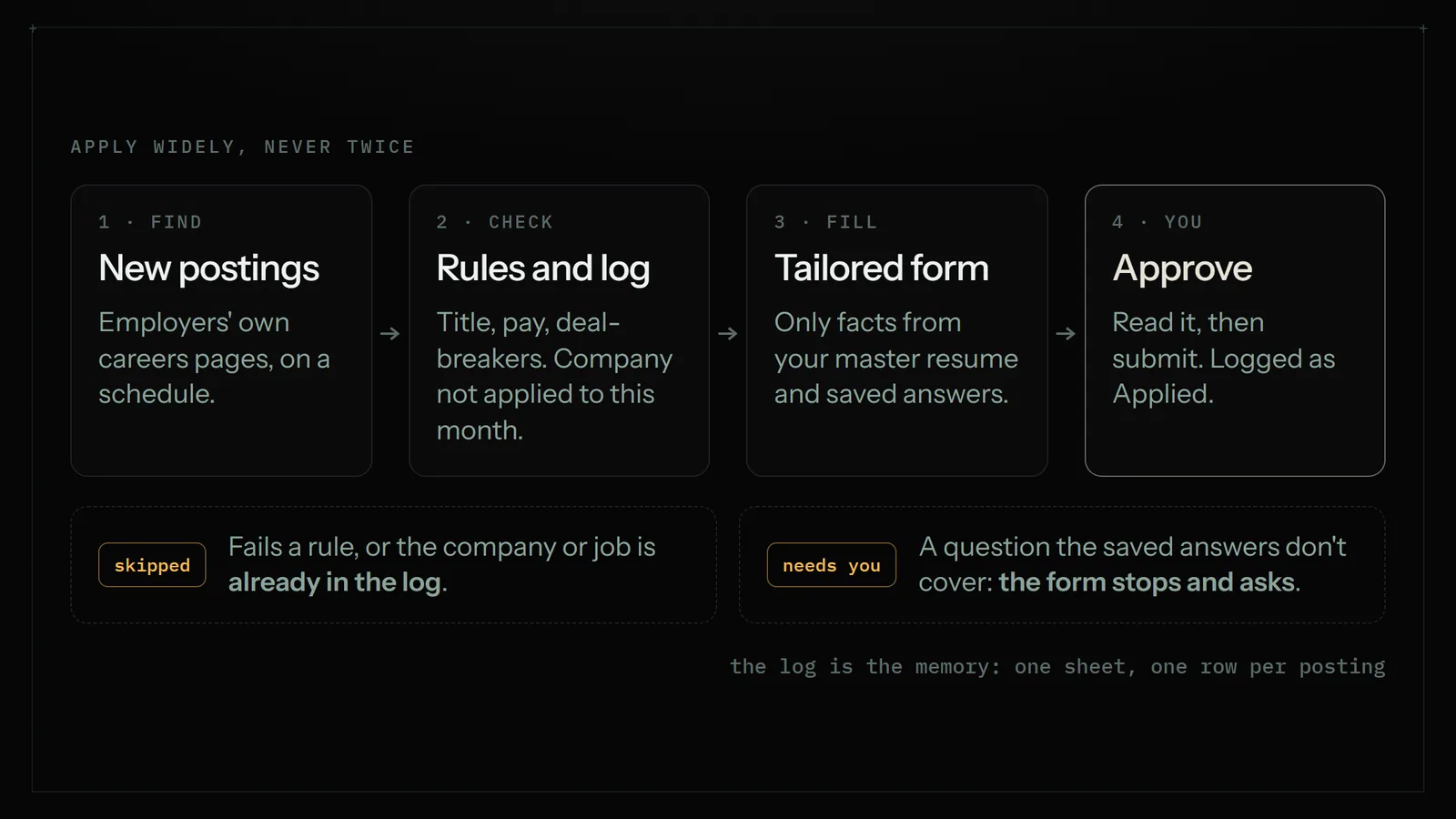
Whatever tool you use, the same five pieces keep auto-applying from turning into spam.
1. One job log
Make a Google Sheet with one row per posting: company, job title, link, where you found it, date found, status (Found, Ready, Applied, Skipped), date applied and notes. This is your memory. Before any application goes out, the company and title get checked against it. Duplicate applications nearly always come from having no single log, or from two tools that don't share one.
2. Written fit rules
Write down, in plain sentences, what a job must have to get an application. A sample set:
- Job titles: bookkeeper, accounts payable specialist, staff accountant.
- Location: remote in the US, or within 25 miles of home.
- Pay: at least $28 an hour or $58,000 a year when the posting shows pay.
- Deal-breakers: commission-only, unpaid trials, "must have CPA".
- One application per company per month, whatever the role.
The last rule does more against spam than any other. Recruiters at small and mid-size companies often handle several openings. One good application per company is fine; four in a week reads as a bot, because it is one.
3. A master resume and saved answers
Keep one master resume with everything you've done, and a short document of standard answers: work authorization, notice period, salary range, willingness to relocate. Most bad auto-applications come from forms answered with guesses. If the tool can only use what's in your documents, it can't invent a qualification. The guide to tailoring your resume to each job description covers the master resume and a 20-minute tailoring pass.
4. An approval step
For the first two weeks, nothing gets submitted until you've looked. The tool fills the form and stops; you read it and click. That's how you find out it answers "years of experience" wrongly before it does so forty times. After that, you can let low-risk forms go through and keep approval for anything with a free-text question.
5. A daily cap
Pick a number per day and hold it. Ten to twenty fitting applications a weekday is plenty for most searches; that's my rough figure, not a rule from any study. If your fit rules turn up fewer than that, that's useful information about your filters, not a reason to loosen them.
A worked example: one week
Here's how a week might run for a bookkeeper looking for remote work. The numbers are made up to show the flow.
- Monday, 7:30am. The search runs on employers' careers pages and finds 31 new postings. Fit rules drop 19 of them (pay too low, CPA required, on-site in another state). The log drops 3 more: two companies already applied to this month, one repost of a job from last week. 9 rows are marked Found.
- Monday, 8:00am. A tailored resume copy is made for each of the 9 from the master, with gaps noted ("posting asks for NetSuite; not in master").
- Monday evening. You spend 15 minutes on the 9 rows. You skip 2 (one gap matters, one company you don't like) and mark 7 Ready.
- Tuesday, 7:30am. The 7 applications are filled in. Two forms have a free-text question, so those stop for you. Five go through; you answer the two at lunch.
- Friday. A summary email lists 34 applications this week, zero duplicates, 6 skipped for gaps, and the replies that came in.
Thirty-four is far below the "hundreds a day" pitch. It's also 34 applications you would have sent anyway, done in about 15 minutes a day of your time instead of most of the day.
Auto-apply tools and what they cost
Prices below are from each company's own pricing or help page on November 8, 2026, unless noted. They change often, so check at checkout.
| Tool | Type | Price | Volume | Who submits |
|---|---|---|---|---|
| By hand | You | Free | Whatever you can face | You |
| Simplify Copilot | Autofill extension | Free | No limit on autofill | You |
| Simplify+ with Autopilot | Autofill plus auto-submit | $19.99 a week, $39.99 a month or $89.99 for 3 months | Weekly Autopilot credits | Autopilot, on supported jobs |
| LoopCV | Auto-apply service | Free plan; paid from €9.99 a month | Higher limits on paid plans | The service |
| JobCopilot | Auto-apply service | Premium from $0.93 a day, Elite from $1.05 a day | Up to 20 or 50 job matches a day | The service |
| LazyApply | Auto-apply service | $99, $149 or $999 a year | 15, 150 or 1,500 applications a day | The service |
| Astarii Job Hunter | Browser agent | Pro $29.99 a month (900 cloud minutes); 3 free runs to try | Set by your rules and minutes | The agent, or you if you tell it to ask first |
A few notes on reading that table:
- Daily caps aren't targets. LazyApply's top plan allows 1,500 applications a day. Very few searches have 1,500 fitting jobs in a month.
- JobCopilot shows per-day rates and sells weekly, monthly and quarterly plans, so the monthly total depends on the billing period you pick. Check it before you pay.
- Astarii is metered in run minutes, rounded up to the minute, rather than per application. How many applications fit in 900 minutes depends on how long each employer's form takes, so run a few and look at the minutes before you plan around a number.
Where Astarii fits, and where it doesn't
The Astarii Job Hunter finds new postings that fit, tailors your resume to each one, fills in the application and never applies to the same job twice. That last part comes from task memory: a scheduled Astari keeps track of what it has done, so it doesn't repeat an item. It runs in the cloud on a schedule, such as every weekday at 7:30, with your computer off. It can work in your Google Sheets, Docs and Drive directly, so the job log and resume copies live in your own files. When a site texts a sign-in code or something needs a decision, it pauses and asks you, then carries on. Saved passwords are encrypted in your browser before they're stored and are never shown to the AI. The first Astari guide shows the setup, and scheduling covers timing.
The difference from a service is that you write the rules in plain English, including the ones that keep you safe: skip LinkedIn and Indeed, one application per company a month, stop before the final submit. The trade-off is that you do write them, and you check the first runs.
It's not the right pick when:
- You want zero setup. A service like LoopCV or JobCopilot asks for filters and a resume and starts. You give up control over where and how it applies.
- Your search lives on LinkedIn or Indeed. Given their rules, keep those applications manual. A free autofill extension speeds up typing while you do.
- You send a handful a week. Fewer than about five a week, do it yourself with a free extension; it's cheaper and you'll know each application better.
- You're aiming at a few specific companies. Those need your own writing and, ideally, a real introduction. Automation adds nothing there.
Mistakes that turn auto-apply into spam
- Two tools, two logs. An extension and a service both applying, neither knowing what the other did. Pick one source of truth.
- Loose titles. "Accountant" matches "accountant manager, 10 years required". Use specific titles and deal-breakers.
- Unchecked answers. Salary, work authorization and start date filled from guesses. Keep a saved-answers document and stop on any question it doesn't cover.
- Applying to reposts. Many companies repost the same job. Match on company plus title, not just the link.
- Never reading the log. The Friday summary is where you notice that 40% of rejections come from one kind of role. Adjust the rules, not the volume.
- Ignoring the replies. Auto-applying makes the inbox the bottleneck. Give replies the time you saved on forms.
Where to start this week
- Make the job log sheet and write your fit rules in five lines.
- Write the saved-answers document and update your master resume.
- Pick one tool from the table, and only one.
- Run it for two weeks with approval on, ten to twenty applications a weekday.
- Read the Friday summary, tighten the rules, then decide whether to drop approval for simple forms.
If you want to try a browser agent for it, Astarii gives you 3 free runs of up to 15 minutes each with no card. See the pricing page for plans, the Job Hunter and other ready-made Astarii, or read whether it's safe to let an AI agent log into your accounts first.
Say it to an Astari
These are instructions you can give an Astari, word for word. It does the work in a browser, on a schedule if you want one, and asks you before anything goes live.
Questions
Is it OK to auto-apply to jobs?
It can be, if every application is one you would have sent by hand and you follow each site's rules. Indeed's terms prohibit automating Indeed Apply outside its official tools, and LinkedIn bars bots, so keep those manual and aim automation at employers' own careers pages.
Do auto-apply bots actually get interviews?
Some people report interviews, but I found no independent study comparing auto-applied candidates with people who applied by hand. An application that fits the posting is worth sending whoever clicks submit; a generic one to a job you don't qualify for rarely works at any volume.
How many jobs should I apply to per day?
Ten to twenty fitting applications a weekday is plenty for most searches. That is a rough figure, not a rule from a study. If your fit rules turn up fewer, tighten or rethink the search rather than loosening the rules to hit a number.
How do I avoid applying to the same job twice?
Keep one job log in a sheet and check company plus job title against it before every application, not just the link, because companies repost jobs. Don't run two tools that keep separate logs. A scheduled Astari uses task memory so it never re-applies to a job.
Can I get banned for using an auto-apply tool?
On sites that ban bots, yes, your account is at risk whichever tool you use. Indeed and LinkedIn both have rules against automated use. Employers' own careers pages don't usually have an account to ban, but repeated poor applications can still cost you with that company.
How much do auto-apply tools cost?
On November 8, 2026: Simplify Copilot autofill is free, and Simplify+ is $39.99 a month. LoopCV has a free plan and paid plans from 9.99 euros a month. JobCopilot starts at $0.93 a day. LazyApply is $99 to $999 a year. Astarii Pro is $29.99 a month.
Will recruiters know I used a bot?
They can spot the signs: several applications to one company in a week, answers that don't match the resume, and generic cover letters. Limit yourself to one application per company a month, use saved answers, and read forms with free-text questions before they go.
What is the difference between autofill and auto-apply?
Autofill fills in the form in front of you and you click submit. Auto-apply finds postings and submits for you. A browser agent such as Astarii sits in between: you set the rules in plain English, including asking you before it submits.
filed under Job hunting