Browser Automation Without Code: Recorders, Bot Builders and AI Browser Agents Compared
A recorder replays your clicks. A bot builder runs them on a timer. An AI browser agent works the clicks out for itself. Here is which one a small business needs, and what each costs.

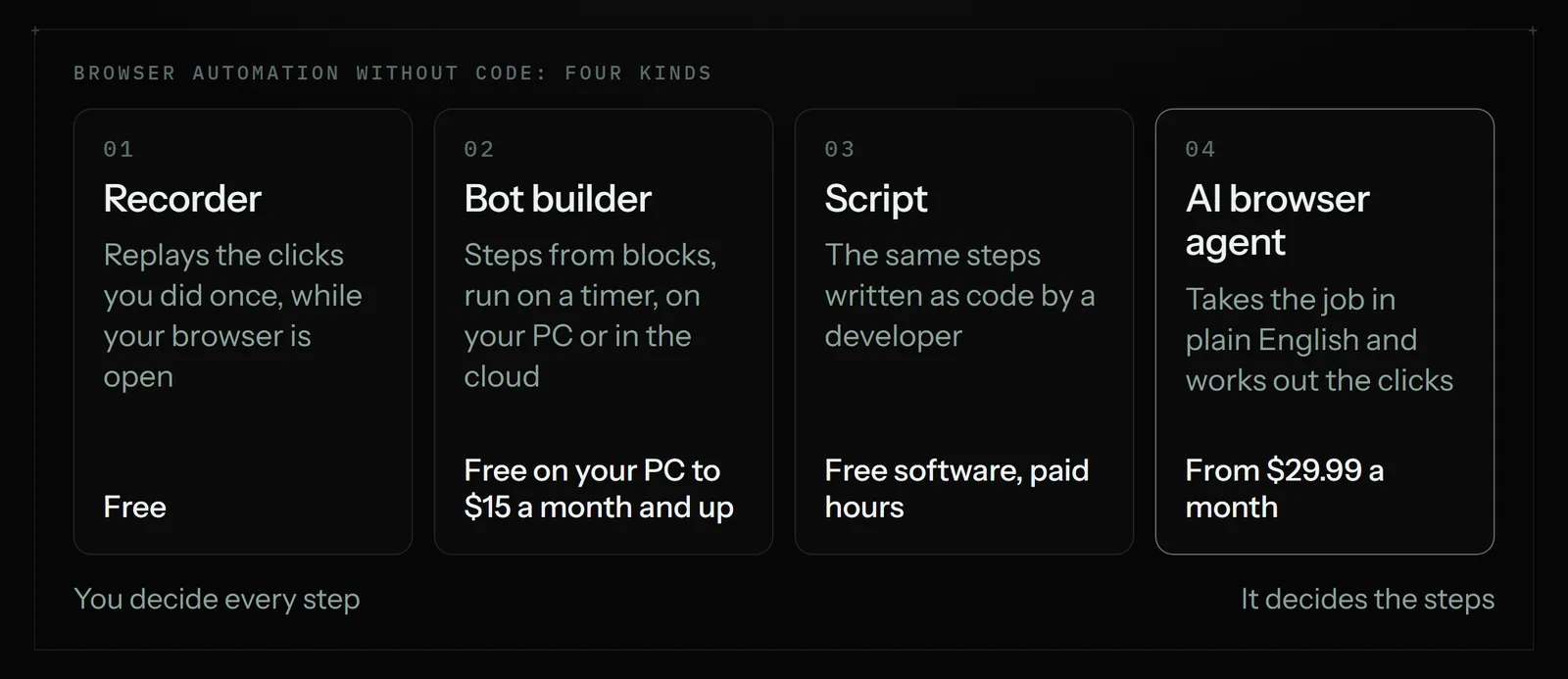
Browser automation without code comes in four kinds. Free recorders such as Chrome's Recorder, UI.Vision and Automa replay the same clicks while your computer is on. Power Automate (free on your PC) and Axiom (from $15 a month) run recorded steps on a timer. An AI browser agent such as Astarii, from $29.99 a month, takes the job in plain English and runs it in the cloud.
Most of the repetitive work in a small business happens in a browser tab: the same supplier portal every Monday, the same form for every new customer, the same three dashboards copied into a sheet on Friday. Browser automation is the name for getting software to do those clicks for you. Search for it and most of what comes back is written for software testers, with code samples in the first paragraph.
This guide is for owners who do not write code. It sorts browser automation into four kinds you can actually use, with prices read on the vendors' own pages in November 2026, and says plainly which kind suits which job. If your job lives on sites you sign into and you want it done on a schedule, setting up a first Astari takes a few minutes. For the wider list of jobs worth handing off, see the guide to AI agents for small business.
The short version
- The same few clicks, on your own computer, while you watch: a free recorder. Chrome has one built in, and UI.Vision and Automa are free extensions.
- A Windows office that already pays for Microsoft 365: Power Automate's desktop flows. Running them on your own PC is free; the Premium plan is $15 a user a month, paid yearly.
- A recorded job that should run in the cloud on a timer: a no-code bot builder such as Axiom, from $15 a month for 5 hours of runtime.
- You have a developer: scripts in Playwright or Selenium. Free, fast and exact, and they need someone to fix them when a page changes.
- A job you can describe but not easily record, on sites behind a login, on a schedule, with something done afterwards: an AI browser agent such as Astarii, from $29.99 a month.
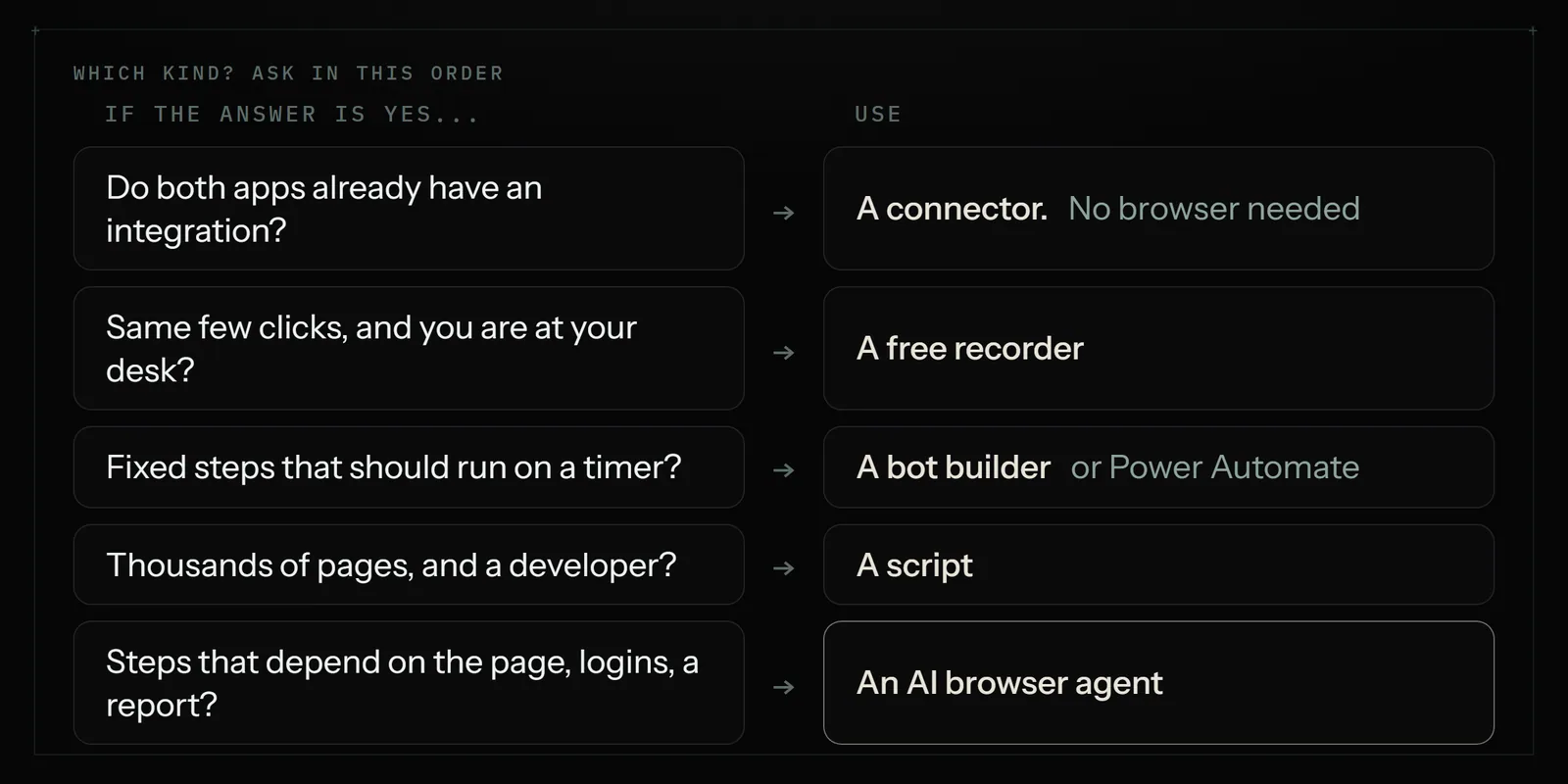
If every app in the job already has an integration, you may not need browser automation at all. A connector such as Zapier, from $19.99 a month billed yearly, moves data between apps without opening a page. Our Zapier vs browser agent comparison covers that split.
What browser automation is, in plain terms
Browser automation means software drives a web browser instead of you. It opens a page, finds a box, types into it, clicks a button, waits, reads what came back and moves to the next step. Everything you do with a mouse and keyboard in a browser can, in principle, be done this way.
The four kinds differ in one thing: who decides the steps.
- A recorder watches you do the job once and replays the same clicks. You decide every step by doing it.
- A bot builder lets you assemble steps from blocks ("open page", "click", "read table", "write to sheet") and run them on a timer, often in the vendor's cloud.
- A script is the same steps written as code. A developer decides every step and handles what happens when something goes wrong.
- An AI browser agent takes the job in plain English and works out the steps as it goes, reading the page the way a person would.
The first three are exact: they do what they were told, the same way, every time. That is a strength until the site moves a button. The fourth is flexible: it can cope with a changed page or an extra pop-up, and it costs more per run because it is reading and deciding as it goes.
The tools compared, with prices
Prices below were read on each vendor's pricing page on 21 November 2026, in US dollars. Check them again before you buy; several of these change often.
| Tool | Kind | Where it runs | Price | Best for |
|---|---|---|---|---|
| Chrome DevTools Recorder | Recorder | Your Chrome, while open | Free, built in | Replaying a short click path; handing a recording to a developer |
| UI.Vision | Recorder and macros | Your browser or PC | Free for personal and commercial use; PRO $299 a year | Form filling and repeated clicks on your own machine |
| Automa | Block builder extension | Your browser, while open | Free, open source | Small scheduled jobs in Chrome or Firefox |
| Power Automate (desktop flows) | Recorder and block builder | Your Windows PC | Free to run on your own PC; Premium $15 a user a month, paid yearly | Windows offices mixing browser and desktop apps |
| Axiom | No-code bot builder | Desktop or cloud | $15 a month (5 hours) to $250 (250 hours) | Recorded jobs that run on a timer in the cloud |
| Playwright or Selenium | Code library | Wherever a developer runs it | Free, open source | Large, exact jobs with a developer on hand |
| Astarii | AI browser agent | Cloud, your Chrome or Brave, or your Windows PC | Free trial of 3 runs; Pro $29.99 a month | Described jobs on sites you sign into, on a schedule, with a report |
Two notes on the table. Axiom bills by runtime hours, so a job that runs for ten minutes every weekday uses about 3.7 hours a month, which fits inside the $15 plan; my arithmetic, not Axiom's. Astarii bills by minutes too: Pro includes 900 cloud minutes plus 800 browser minutes a month, and each run is counted at its real length, rounded up to the minute.
Recorders: free, exact and fragile
A recorder is where most people should start, because it costs nothing and you find out in ten minutes whether the job is as simple as you think.
Chrome's own Recorder lives in the developer tools panel. You press record, do the clicks, stop, and replay. It is free and already installed. It is also built for web developers testing their own sites: it replays while Chrome is open on your machine, it does not run on a timer by itself, and it can export the recording as a script a developer can extend.
UI.Vision and Automa are extensions made for repeated work. Both can fill forms, click through pages and read text from a page. Automa lets you join steps as blocks and schedule a workflow; UI.Vision adds image and text recognition for pages that resist ordinary clicking. Both are free to start.
Where recorders break:
- A changed page. If the site renames a button or moves a menu, the replay clicks the wrong thing or stops. Expect to re-record now and then.
- Sign-in codes. A site that texts a code at login stops the replay until you type it.
- Anything that varies. "Reply to anyone asking about price" is not a click path. A recorder needs the same steps each time.
- Your computer has to be on. Most recorders run in your open browser. Close the laptop and the job waits.
If the job is ten identical clicks, a recorder is the right answer and you should not pay for more. Our 30-minute audit of repetitive tasks helps you find which of your jobs are that simple.
Bot builders and Power Automate: recorded jobs on a timer
The next step up keeps the exactness of a recorder and adds a schedule. You build the steps from blocks, often starting from a recording, and the tool runs them at set times.
Power Automate is Microsoft's. Its desktop flows can record and replay work in a browser and in Windows programs side by side, which matters if your job jumps between a website and a desktop accounting program. Microsoft's licensing page says the free licence covers building and running desktop flows on your own machine while you are signed in; sharing flows, premium connectors and unattended runs need a paid plan. Premium is $15 a user a month, paid yearly, and running a bot with nobody signed in is the Process plan at $150 a bot a month. It has a learning curve: it is a business tool with many options, and the first flow takes an afternoon.
Axiom is a no-code bot builder made for browser jobs. You assemble steps in a Chrome extension and run them from your desktop or in Axiom's cloud. Its plans are flat monthly prices by runtime: $15 for 5 hours, $50 for 30 hours, $150 for 100 hours and $250 for 250 hours. It suits jobs you can describe as a fixed list of steps that should run without you, such as copying a table from one site into a sheet every morning.
These tools still follow a fixed path. A bot builder can branch ("if this text appears, do that"), but you write every branch. When a page changes, you edit the bot.
Scripts: Playwright and Selenium
Playwright and Selenium are free, open-source libraries that developers use to drive browsers with code. They are what most testing teams use, and they are fast, exact and cheap to run at scale. If you have a developer on staff or on call, a short script is often the best answer for a large, stable job, such as checking 2,000 product pages a night.
They are not no-code. Someone writes the script, someone runs it on a server, and someone fixes it when a site changes or a login adds a code. For an owner without that person, the cost is not the software, which is free; it is the hours.
AI browser agents: describe the job, it works out the clicks
An AI browser agent takes an instruction in plain English, opens a real browser and works through the job the way a person would: it reads each page, decides what to click, types, waits, and checks the result before moving on. Because it reads rather than replays, a moved button or an unexpected pop-up does not stop it in the way it stops a recording.
Astarii is one of these. An Astari reads pages, clicks, types, uploads files and signs in with saved logins. You describe the job in plain English, or show it once. It can run in Astarii's own cloud browser with your computer off, in your own Chrome or Brave through the extension, or on your Windows PC through the desktop app. A few things matter for browser jobs in particular:
- Schedules such as every weekday at 7:30, three times a day, or every Friday. See scheduling.
- Task memory: a scheduled Astari never does the same item twice, so it will not re-enter a row it already entered or re-email someone it already emailed.
- Sign-in codes pause the run. When a site texts a code or something needs a decision, it asks you, then carries on from where it stopped.
- Passwords are not shown to the AI. Saved passwords are encrypted in your browser before they are stored. See identities and sign-ins.
- Connections to Gmail or Outlook, Google Sheets, Docs, Calendar and Drive, so the results land in your sheet and your inbox directly.
What a job looks like when you say it instead of record it
The clearest way to see the difference is to take one job and set it up both ways.
The job: every Monday, sign into a wholesale supplier's portal, open last week's orders, copy each order number, date and total into a Google Sheet, and email yourself the week's total.
With a recorder or bot builder: record the sign-in and the clicks to the orders page, add a block that reads the order table, add a block that writes rows to the sheet, add a block that sends the email, then set the timer. Add a branch for weeks with no orders. If the portal texts a code at sign-in, plan for a manual step. Re-record when the portal changes its menus.
With an AI browser agent: write the job as one instruction, connect the sheet and Gmail, save the portal login, and choose "every Monday at 8:00". The agent finds the orders page itself, skips orders already in the sheet, and pauses to ask if the portal sends a code.
Neither is wrong. The recorded version is cheaper per run and does exactly the same thing every week. The described version takes less setting up and copes with change. A good rule: if you can write the steps as a numbered list that never varies, record it. If the steps depend on what is on the page, describe it.
What each costs for a typical small job
Take a job that runs for about 10 minutes every weekday, so about 22 runs and 220 minutes a month. Estimates below are my arithmetic from the published prices, not quotes.
- Recorder (Chrome Recorder, UI.Vision, Automa): $0, as long as your computer is on and you are around for sign-in codes.
- Power Automate on your own PC: $0 for attended runs; $15 a user a month, paid yearly, once you need Premium features.
- Axiom: about 3.7 hours a month, inside the $15 plan.
- A developer's script: $0 for the software, plus their time to write it and fix it, plus somewhere to run it.
- Astarii Pro: $29.99 a month. 220 minutes fits well inside the 900 cloud minutes included, which leaves room for other jobs. Pro runs can last up to 45 minutes each.
On price alone, recorders and Axiom win this job. The question is what happens in week six, when the portal adds a pop-up, and who fixes it.
Which one fits which job
| Job | Pick | Why |
|---|---|---|
| Fill the same web form with your details a few times a week | Recorder or free autofill | Same steps every time; you are there anyway |
| Copy a public table into a sheet daily | Sheets formula or bot builder | Public, stable, no login |
| Move data between apps that have integrations | Zapier, Make or n8n | No browser needed |
| Thousands of product pages a night | A developer's script or a scraper | Volume and speed |
| Weekly numbers from three dashboards you sign into, emailed to you | AI browser agent | Logins, codes, a summary at the end |
| Supplier invoices from Gmail and a portal into a sheet every Friday | AI browser agent | Reads emails, follows links, skips rows already entered |
| Work that jumps between a website and a Windows program | Power Automate, or Astarii's desktop app | Both reach past the browser |
Where Astarii is not the right pick
- A short, fixed click path you do while at your desk. A free recorder does it for nothing.
- Very large volumes. Thousands of pages a night is a job for a script or a scraper. See our AI web scraper comparison.
- Apps that already talk to each other. If both ends have an integration, a connector is cheaper and faster.
- Testing your own website. Playwright and Selenium are built for that and do it better.
- Sites whose terms forbid automated access. No tool makes that allowed. Read the terms of any site before you automate it.
Safety rules for any browser automation
Whatever kind you choose, it is signing in and clicking as you. A few rules keep that sensible:
- Start read-only. Have the first version collect and report, not change anything. Add the steps that submit or send only once you trust the output.
- Use a separate, limited login where the site allows it. A staff account with only the access the job needs.
- Keep two-factor on. A tool that pauses for codes is better than switching codes off.
- Keep banks and payments out of it. Money moves are worth the two minutes by hand.
- Check the first two weeks of runs. Most surprises show up early.
Our guide on letting an AI agent log into your accounts covers passwords, codes and approvals in more depth.
How to start this week
- Pick one job you did at least three times last week in the same browser tabs.
- Write the steps as a numbered list. If the list never changes, try a free recorder first and stop there if it works.
- If the list says "it depends", or the job needs a sign-in code, a schedule with your laptop shut, or an email at the end, describe it to an AI browser agent. Astarii's free trial gives you 3 runs of up to 15 minutes each, with no card needed.
- Run it by hand twice and compare the result with what you would have done.
- Then schedule it, and check the results once a week.
To set up the described version, start with your first Astari, connect your sheet and inbox in connections, and compare plans on the pricing page. For more jobs worth handing off, see the AI agents for small business guide and our list of 25 real tasks.
Say it to an Astari
These are instructions you can give an Astari, word for word. It does the work in a browser, on a schedule if you want one, and asks you before anything goes live.
Questions
What is browser automation?
Browser automation is software driving a web browser instead of you: opening pages, typing into boxes, clicking buttons and reading what comes back. It is used to fill forms, copy data into spreadsheets, check dashboards and test websites.
Can I automate my browser without coding?
Yes. Chrome has a free built-in Recorder, and free extensions such as UI.Vision and Automa record and replay clicks. Power Automate and Axiom let you build steps from blocks and run them on a timer. An AI browser agent such as Astarii takes the job in plain English.
What is the best free browser automation tool?
For a short, fixed click path on your own computer, UI.Vision or Automa, both free, or Chrome's own Recorder. On Windows, Power Automate's desktop flows are free to build and run on your own PC while you are signed in.
What is an AI browser agent?
An AI browser agent is software that takes a job in plain English, opens a real browser and works out the clicks itself by reading each page. Because it reads rather than replays, a moved button or a pop-up is less likely to stop it than a recording.
How much does browser automation cost?
On vendor pages read on 21 November 2026: Chrome Recorder, Automa, Playwright and Selenium are free; UI.Vision is free with a $299 a year PRO edition; Power Automate Premium is $15 a user a month, paid yearly; Axiom runs $15 to $250 a month by runtime; Astarii Pro is $29.99 a month.
Can browser automation run when my computer is off?
Only if it runs in the cloud. Most recorders and extensions need your browser open. Axiom's cloud runs and Astarii's cloud browser keep going with your laptop closed, and Power Automate needs its paid Process plan to run with nobody signed in.
What happens when a website asks for a sign-in code?
A recorded bot usually stops and waits for you. Astarii pauses the run and asks you for the code, then carries on from where it stopped. Keep two-factor on either way rather than switching it off for the tool.
When should I use Playwright or Selenium instead?
When you have a developer and the job is large and stable, such as checking thousands of pages a night, or when you are testing your own website. Both are free and exact, but someone has to write the script and fix it when a page changes.
filed under Tools compared