AI Tools for Small Business (2026): The Short List by Job and Budget
You do not need 50 AI tools. Most owners get the value from three or four, picked by the job that eats the most time. Here is the short list, with this week’s prices and where each tool is the wrong pick.

The AI tools a small business needs depend on the job. Start with one general assistant, ChatGPT Plus or Claude Pro at $20 a month. Add Canva Pro ($18) for graphics, Otter ($16.99) for call notes, Zapier or Make for app rules, and a browser agent such as Astarii ($29.99) for repeated work on sites you sign into. Most owners need three or four.
Most lists of AI tools for small business run to 30 or 50 names. You do not need 50. A typical owner gets most of the value from three or four tools, chosen by the job that eats the most time, and the rest is shelfware with a monthly charge.
This is the short list, sorted by job and by budget, with the price each tool charged this week (November 2026). Some prices come from the vendors' pages and some from recent pricing guides; the sources at the end say which. Astarii, which we make, is on the list for one job: repeated work on websites you sign into. For every other job, a different tool is the better pick and we name it. If you want the agent side in more depth, the guide to AI agents for small business and the round-up of AI agents by job go further. Astarii's plans and free runs are on the pricing page.
Pick by job, not by hype
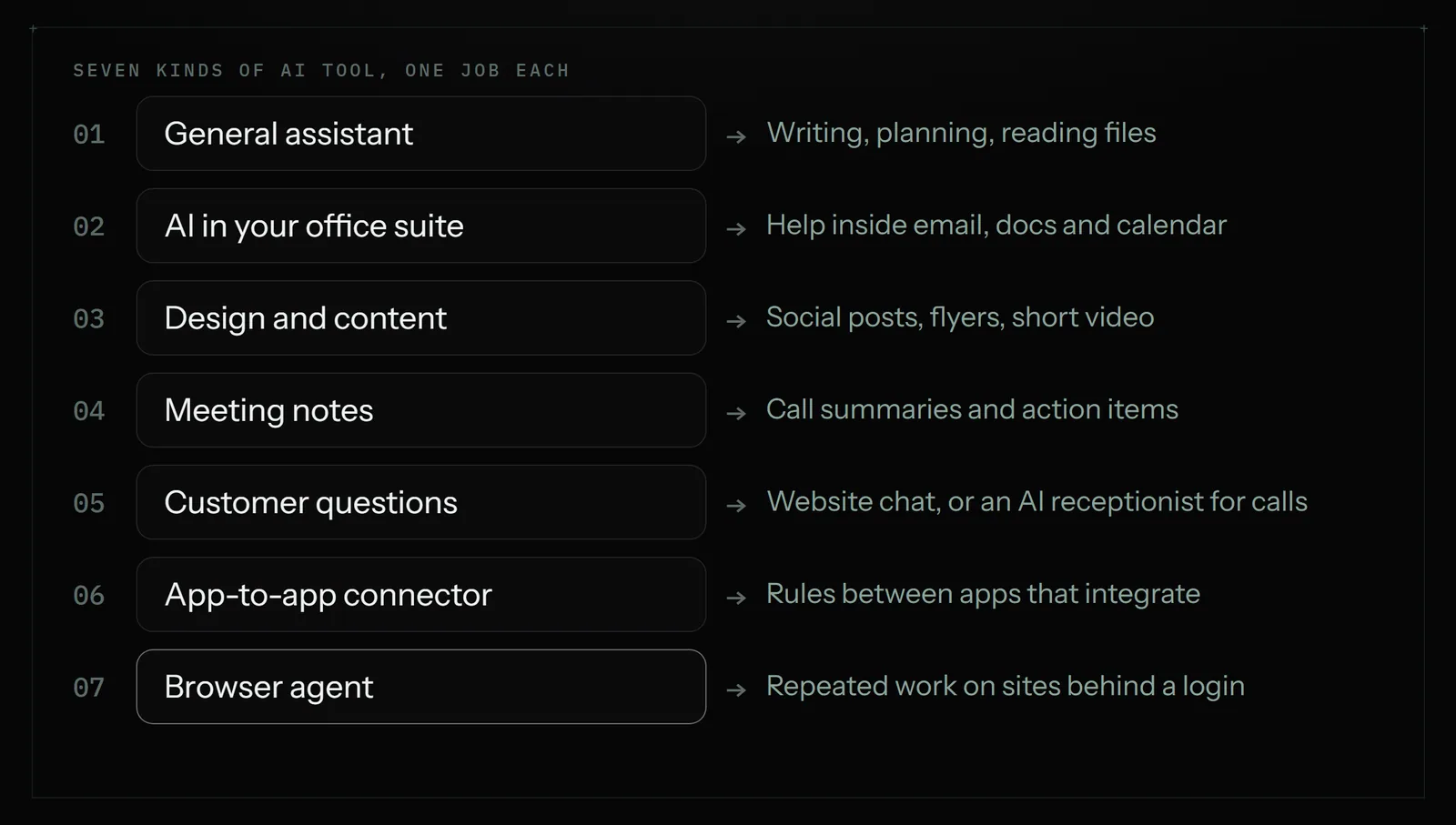
Before you buy anything, write down the three jobs you would most like gone. Be specific: "writing product descriptions", "the Friday invoice sheet", "answering the same five questions on the website", "notes from client calls". Then match each job to one kind of tool. AI tools for a small business fall into seven kinds:
- A general assistant (ChatGPT, Claude, Gemini). Writing, reading, planning and analysing files. The one tool almost everyone should have.
- AI built into your office suite (Gemini in Google Workspace, Microsoft 365 Copilot). The same kind of help, inside the email, documents and calendar you already pay for.
- Design and content (Canva and its AI features). Social posts, flyers, simple video.
- Meeting notes (Otter and similar). Records and summarises calls.
- Customer questions (Intercom Fin, Chatbase for the website; an AI receptionist such as Frontdesk for the phone).
- App-to-app automation (Zapier, Make, n8n). Rules that move data between apps that have integrations.
- A browser agent (Astarii). Repeated jobs on websites behind a login: signing in, filling forms, copying numbers into a sheet, on a schedule.
The mistake most owners make is buying from kind 1 to solve a kind 6 or 7 problem. A chat assistant writes the invoice reminder; it does not sign into your supplier portal every Friday. The reverse mistake costs money too: you do not need an agent to write a caption.
The short list, with prices
One tool per job, plus a runner-up where it matters. Prices are US dollars per month for one person unless stated, and they move often, so check the vendor's page before you pay.
| Job | Start with | Price (Nov 2026) | Skip it if |
|---|---|---|---|
| Writing, planning, reading files | ChatGPT Plus or Claude Pro | $20 each; both have free tiers | You only write a few emails a week (stay on free) |
| AI inside email and documents | Gemini in Google Workspace, or Microsoft 365 Copilot | Workspace Business Standard about $14 a user (yearly); Copilot Business add-on about $18 to $21 a user | You do not live in Gmail/Docs or Outlook/Word all day |
| Social graphics and flyers | Canva Pro | $18, or $144 a year | The free plan covers your weekly posts |
| Notes from calls | Otter Pro | $16.99, or about $8.33 billed yearly; free tier 300 minutes | You have fewer than a few calls a week |
| Website questions | Chatbase or Intercom Fin | Chatbase from $40; Fin $0.99 per resolved conversation plus seats | A good FAQ page would answer most of them |
| Answering the phone | Frontdesk (My AI Front Desk) | $99, or $79 billed yearly | Calls are rare, or every call needs you |
| Moving data between apps | Zapier or Make | Zapier free tier, Professional from $19.99; Make from $9 | A site in the job has no integration |
| Repeated work on sites you sign into | Astarii | $29.99 (Pro); 3 free runs, no card | Every app in the job already connects through Zapier or Make |
A note on the general assistants. ChatGPT Plus is $20 a month and ChatGPT Business, for two or more people, is about $25 a user billed monthly or $20 billed yearly. Claude Pro is also $20, and Claude's Team plan is reported at $25 a seat monthly. Pick one. Paying for both rarely earns its keep in a small business.
1. A general assistant: the tool everyone needs
If you buy one AI tool, make it a general assistant. It drafts product descriptions, rewrites an awkward email to a customer, turns a messy export into a summary, explains a contract clause in plain words and helps plan a promotion. ChatGPT is the default and the free tier is enough to find out whether you will use it daily. Claude is a strong alternative for long documents and writing. Gemini is already in front of you if your business runs on Google.
What it does not do: click. A chat assistant gives you the words and the plan, and you still copy, paste and press send. Some assistants now include a browser mode for one-off tasks, which is handy for research, but they are built for a person watching, not for the same job every Friday on a site that needs your login. Our guide to ChatGPT for small business covers where that line sits.
2. AI in the office suite you already pay for
If your email and files live in Google Workspace, Gemini now comes inside the plan: Business Standard is about $14 a user a month on a yearly commitment, and the price rose when Gemini was folded in. It drafts in Gmail, summarises long threads, writes in Docs and takes notes in Meet. On the Microsoft side, Microsoft 365 Copilot Business is an add-on to a Business plan, reported between about $18 and $21 a user a month depending on billing and promotions, with bundles of Business Standard plus Copilot listed near $23.50.
Worth it when you spend most of the day inside those apps. Not worth it as a second general assistant on top of ChatGPT for the same person. One or the other.
3 and 4. Design and meeting notes
Canva Pro, at $18 a month or $144 a year, is the easy pick for social posts, flyers, menus and short video. Its AI features remove backgrounds, resize a design for every platform and draft text. The free plan is generous, so upgrade only when you keep hitting the paywall on brand kits or background removal.
Otter Pro is $16.99 a month, or about $8.33 a month paid yearly, with 1,200 transcription minutes. It records calls, writes a summary and pulls out action items. If you run on Google Meet and pay for Workspace, try Gemini's Meet notes first, since you may already have them.
5. Customer questions: website and phone
A website chat tool answers visitors from your own pages and policies. Chatbase starts at $40 a month. Intercom Fin charges $0.99 for each conversation it resolves, plus Intercom seats, which suits shops with real support volume. Before either, write a proper FAQ page; many small sites do not get enough questions to need a bot.
Phones are a separate job. An AI receptionist such as Frontdesk answers calls, books appointments and takes messages, from $99 a month or $79 billed yearly. That is the right tool for a plumber or a salon that misses calls. Astarii does not answer phones, and nothing else on this list does either.
6 and 7. Automation: connectors and browser agents
This is where the hours are, and where the two kinds of tool get confused.
Connectors such as Zapier, Make and n8n move data between apps that have integrations. "When a form is filled in, add a row to the sheet and email me" is a perfect connector job: fast, cheap and reliable. Zapier has a free tier and paid plans from $19.99 a month billed yearly; Make starts at about $9. Our comparison of n8n, Zapier and Make goes through the trade-offs.
A browser agent does the jobs connectors cannot reach: websites with no integration, portals behind a login, pages you have to click through. An Astari opens websites, signs in with saved logins, fills in forms, sends emails, updates spreadsheets and reports what it did. You describe the job in plain English, or show it once, and it can run on a schedule in the cloud with your computer off. It connects to Gmail or Outlook, Google Sheets, Docs, Calendar and Drive. Saved passwords are encrypted in your browser and never shown to the AI, and when a site texts a sign-in code, the run pauses and asks you.
Some of the ready-made Astarii fit common small-business jobs: the Etsy Manager proposes price and description changes and makes them only when you approve; the Google Ads Manager drafts campaigns that start paused, so nothing spends until you turn it on. Plans are $29.99 (Pro), $49.99 (Max) and $99.99 (Ultra) a month, metered in minutes of run time, and the free trial is 3 runs of up to 15 minutes with no card.
Where Astarii is the wrong pick: if every app in the job already has a Zapier or Make integration, a connector is cheaper and faster. If the job is writing, use a general assistant. If it is phone calls, use a receptionist.
Three stacks by budget
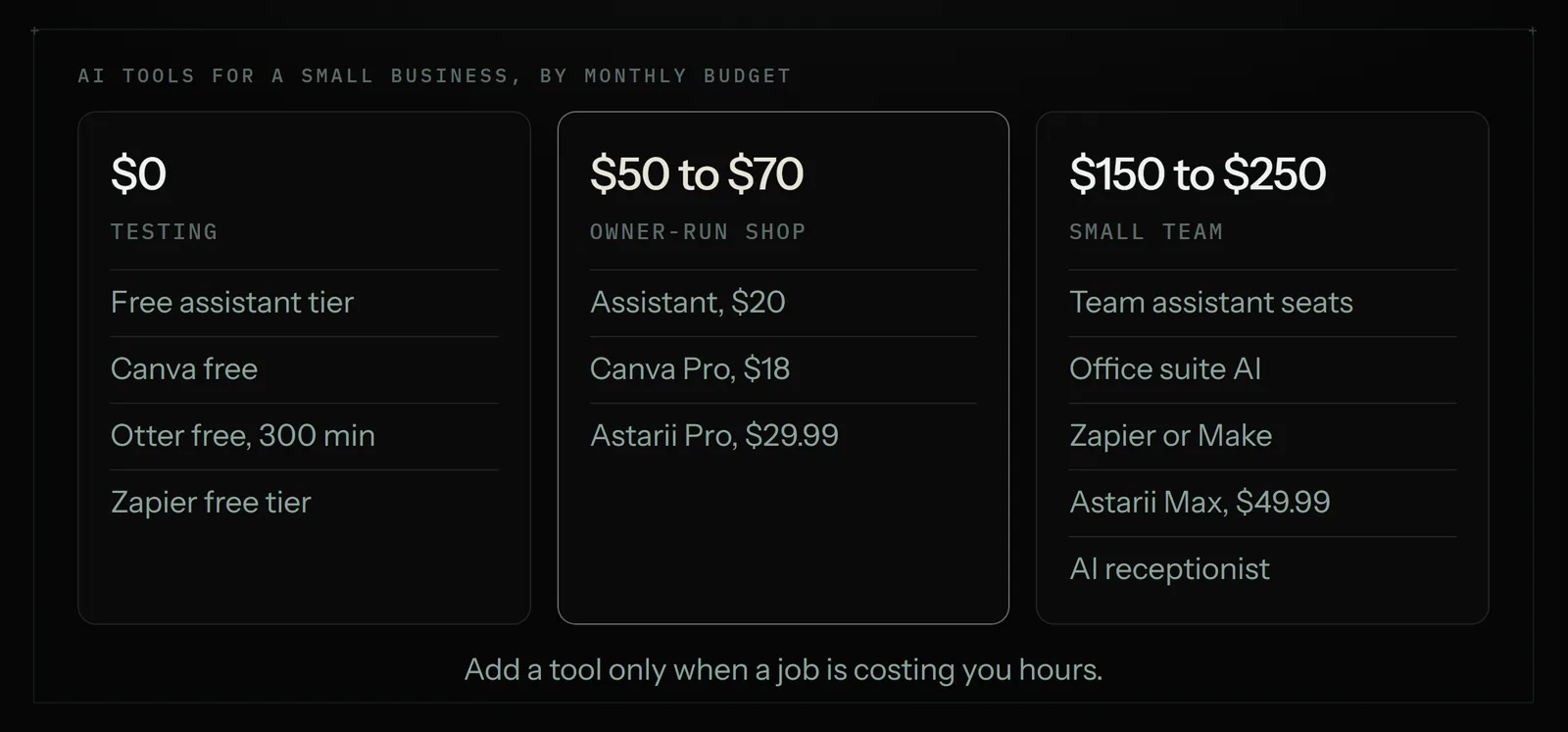
Here is how the list turns into a monthly bill. These assume one owner, maybe one helper.
$0 a month: the free stack
- ChatGPT, Claude or Gemini on the free tier for writing and planning.
- Canva free for graphics.
- Otter's free tier (300 minutes a month) for the occasional call.
- Zapier's free tier for one or two simple app rules.
Right for a business just starting, or an owner testing whether AI earns a place at all. You will hit limits within weeks if you use it daily; that is the signal to pay for the one tool you use most.
About $50 to $70 a month: the working stack
- ChatGPT Plus or Claude Pro: $20.
- Canva Pro: $18 (or $12 a month on the yearly plan).
- Astarii Pro for one or two repeated website jobs, such as the Friday invoice sheet and a morning order check: $29.99.
This is where most owner-run shops land. It covers words, pictures and the weekly busywork. Swap Astarii for Zapier if your repeated jobs only touch apps that connect.
About $150 to $250 a month: the team stack
- ChatGPT Business or Claude Team for two or three people: roughly $40 to $75.
- Workspace or Microsoft 365 with AI included or added, for the same people.
- Zapier or Make for app rules: $9 to $20.
- Astarii Max for several scheduled jobs, two runs at once: $49.99.
- Frontdesk if calls matter: $79 to $99.
Even at this level, the total sits well under the cost of a part-time hire. The virtual assistant vs AI agent comparison runs that maths in full.
A worked example: a three-person print shop
Take a small print and signage shop: the owner, one designer, one part-timer on the counter. Their three biggest time sinks were quote emails, the weekly supplier price check and Friday invoicing.
- Quote emails: ChatGPT Plus drafts replies from a short note ("A2 foam board, 20 copies, Thursday"). The owner edits and sends. Saves about 20 minutes a day.
- Supplier prices: two supplier portals need a login and neither has an integration. An Astari signs in every Monday at 7:00, logs prices for the five stock items in a sheet and emails the owner if anything rose more than 5%.
- Invoices: every Friday an Astari collects the week's supplier invoices from Gmail into the Invoices sheet and emails the total.
- Kept by people: phone orders, design taste, refunds and any payment. None of that goes to a tool.
Monthly cost: $20 for ChatGPT Plus and $29.99 for Astarii Pro, about $50. The designer already had Canva. They tried a website chatbot and dropped it after a month: fewer than three questions a day, all answered by a better FAQ page.

How to start without wasting a month
- List the three jobs that took the most time last week. Check your sent mail and browser history if you are not sure.
- Match each job to one kind of tool from the table above. If two jobs map to the same kind, you need one tool, not two.
- Use the free tier or trial for a week on real work. Astarii gives 3 runs of up to 15 minutes, no card. ChatGPT, Claude, Canva, Otter and Zapier all have free tiers.
- Keep approvals on for anything that goes live: prices, ads, emails to customers. Agents that propose first are easier to trust. Our guide to letting an AI agent log into your accounts covers passwords and two-factor codes.
- Cancel what you did not open after 30 days. A tool you forgot about is a tool you do not need.
What not to hand to any AI tool
Some jobs stay with you whatever the tool claims. Moving money, refunds and payments. Tax and legal declarations. Angry customers and disputes. Pricing strategy and design taste. AI tools are good at drafts and repetition; they are not accountable when something goes wrong, and you are. Use them to clear the busywork so you have time for those calls.
The bottom line
Start with a general assistant. Add the one tool that matches your most expensive repeated job. For rules between apps that connect, that is Zapier or Make. For repeated work on websites you sign into, it is a browser agent such as Astarii, from $29.99 a month, with 3 free runs and no card needed. Skip the rest until a job asks for it. For more examples of what to hand off, see 25 real tasks small businesses hand off.
Say it to an Astari
These are instructions you can give an Astari, word for word. It does the work in a browser, on a schedule if you want one, and asks you before anything goes live.
Questions
What are the best AI tools for a small business?
Start with one general assistant such as ChatGPT Plus or Claude Pro ($20 a month). Then add tools by job: Canva Pro for graphics, Otter for meeting notes, Chatbase or Intercom Fin for website questions, Frontdesk for phones, Zapier or Make for app rules, and a browser agent such as Astarii, from $29.99 a month, for repeated work on websites you sign into.
Are there free AI tools for small business?
Yes. ChatGPT, Claude and Gemini have free tiers, Canva has a free plan, Otter gives 300 transcription minutes a month free and Zapier has a free tier. Astarii offers 3 free runs of up to 15 minutes with no card. A free stack is enough to learn which tool you use daily.
How much should a small business spend on AI tools?
Most owner-run shops land at about $50 to $70 a month: a $20 assistant, Canva Pro at $18 and one automation tool such as Astarii Pro at $29.99. A team of three with phone and chat tools runs about $150 to $250 a month, still far below a part-time hire.
Do I need both ChatGPT and Claude?
Rarely. Both cost $20 a month for one person and cover the same jobs: writing, reading files and planning. Pick the one you prefer after a week on the free tiers. If your business runs on Google Workspace or Microsoft 365, the AI built into those may be enough on its own.
Can an AI tool do my repetitive online work, not just write about it?
A chat assistant writes the words; you still click. For repeated work between apps with integrations, use Zapier or Make. For work on websites with no integration, like supplier portals or shop dashboards behind a login, use a browser agent such as Astarii, which signs in, fills forms, updates sheets on a schedule and reports back.
Which AI tool answers the phone for a small business?
An AI receptionist such as Frontdesk (My AI Front Desk), from $99 a month or $79 billed yearly, answers calls, books appointments and takes messages. Chat assistants, connectors and browser agents, Astarii included, do not answer phones.
Is it safe to give an AI tool access to my business accounts?
Give each tool the least access it needs, keep two-factor sign-in on and require approval for anything that goes live. Astarii encrypts saved passwords in your browser and never shows them to the AI, pauses for sign-in codes, proposes Etsy changes before making them and starts Google Ads drafts paused.
What should a small business not hand to AI tools?
Keep moving money, refunds, tax and legal declarations, customer disputes and pricing or design decisions with a person. AI tools are good at drafts and repeated steps, but they are not accountable when something goes wrong.
- Astarii product facts (llms.txt)
- ChatGPT pricing in 2026: Plus, Business seats (eesel)
- Claude Pro pricing in 2026 (eesel)
- Google Workspace pricing in 2026 and Gemini (Dupple)
- Microsoft 365 Copilot Business for small businesses (Microsoft 365 blog)
- Canva pricing explained (gravity.fast, read Nov 4 2026)
- Otter.ai pricing 2026 (Sonix)
- Chatbase pricing
- Intercom pricing (Fin AI Agent)
- Frontdesk (My AI Front Desk) pricing
- Zapier pricing
- Make pricing
filed under Tools compared