How to Tailor Your Resume to Every Job Description Without Spending All Night
Tailoring a resume takes an hour without a system and about 20 minutes with one. Here is the system, a worked example, what the tools cost, and the rules most auto-apply pitches leave out.

To tailor a resume, list the posting's five to eight must-haves, match each to proof from a master resume, then rewrite your summary, reorder bullets and skills, and use the posting's terms where they're true. Never change facts. It takes about 20 minutes by hand. Free checkers help; Astarii's Job Hunter, from $29.99 a month, automates volume.
Tailoring one resume properly takes about 20 minutes once you have a system. Without one, it takes an hour, and you stop doing it around application number six. Then you send the same file to everyone and wonder why nobody calls.
This guide gives you the system: a master resume, a seven-step pass you can time, a worked example, and honest prices for the tools that speed it up. It also covers the rules on automated applying, which most guides skip. If you would rather hand the repetitive part to software, the Astarii Job Hunter is one option, and the guide to AI agents for small business explains how that kind of helper works.
Does tailoring still matter in 2026?
Yes, though not for the reason you usually hear. The popular claim that software rejects 75% of resumes before a person sees them has no solid source behind it. The better evidence is messier.
Resume Genius surveyed 1,000 US hiring managers for its 2026 report. In that survey:
- 71% said their company uses an applicant tracking system (ATS).
- 49% personally review resumes and use the ATS to flag, rank or organize them.
- 37% let the ATS screen out applications on criteria they set.
- 42% named missing required skills or poor alignment with the job description as a top reason a resume gets filtered out. That was the most common answer.
- 28% named generic or AI-heavy content, and another 28% named a lack of relevant keywords.
Enhancv asked a much smaller group, 25 US recruiters, and heard something milder: 92% said their ATS doesn't auto-reject for formatting, design or missing keywords. Only 8% used an AI fit score as a hard filter. The automatic cut they did describe was knockout questions, such as work authorization.
So don't tailor to beat a robot. Tailor so the reader can see in a few seconds that you meet the requirements. Keyword searches and match scores benefit from the same work.
What tailoring is, and what it isn't
Tailoring changes the order, the emphasis and the wording. It never changes the facts.
- Fair: moving your payroll experience to the top bullet because this job is mostly payroll.
- Fair: writing "accounts payable" where you had "paying suppliers", if that's what you did and what the posting calls it.
- Fair: cutting a bullet that this employer won't care about.
- Not fair: adding a software tool you have never opened, because the posting mentions it.
- Not fair: rounding up years of experience or changing a job title to match.
The test is simple. Could you talk about this line for two minutes in an interview? If not, it comes out, whoever wrote it.
Start with a master resume
The slow part of tailoring is remembering and rewriting what you did. A master resume removes it. It's a private document, as long as it needs to be, that nobody but you ever sees. It holds:
- Every job, with exact dates and your official title.
- Three or four versions of each important bullet, each angled differently: one on the numbers, one on the tools, one on the people.
- Every skill, tool and certification you could defend in an interview.
- Results with numbers, and where each number came from.
- Two or three short summaries written for the kinds of jobs you apply for.
Building it takes an evening, once. After that, tailoring is mostly picking from it. Keep it in Google Docs or Word, and save each tailored copy as a new file so the master stays whole.
The 20-minute tailoring pass
The times below are my estimate for someone with a master resume in hand. Your first few will run longer.
- Mark the must-haves (3 minutes). Read the posting once and list the five to eight things it won't budge on: required years, tools, certifications, core duties. Things under "nice to have" go on a second list.
- Note the exact words (2 minutes). Write down the posting's own terms. If it says "accounts receivable", don't rely on "collections". If it uses an acronym, include both forms once: "search engine optimization (SEO)".
- Match each must-have to your proof (3 minutes). Next to each item, name a bullet from your master. Where you have nothing, leave a gap. Two or more gaps on hard requirements is a signal to skip this job.
- Rewrite the summary (3 minutes). Two lines: who you are in the posting's terms, plus your strongest matching result. Skip adjectives such as "passionate" and "results-driven".
- Reorder the bullets and skills (4 minutes). Under each recent job, put the matching bullets first. Put the skills they asked for at the front of your skills list. Keep four or five bullets on the latest job and fewer on older ones.
- Cut (2 minutes). Remove anything that doesn't support this application. Older, unrelated jobs can shrink to a single line.
- Check and save (3 minutes). Read it aloud once, check dates and spelling, and save a text-based PDF or a Word file with your name and the company in the filename.
On file type, 53% of the hiring managers in the Resume Genius survey said text-based PDFs with no images or complex formatting work best with their ATS, and 43% said Word documents. Only 13% said layouts with images or heavy design work with theirs. If the posting asks for a specific format, use that one.
A worked example: one bookkeeping application
Say a posting for a part-time bookkeeper asks for QuickBooks Online, accounts payable and receivable, monthly bank reconciliations and experience with small retail businesses. The applicant has all four, but the general resume buries them. Here's what the pass changes. The person and the numbers are made up for illustration.
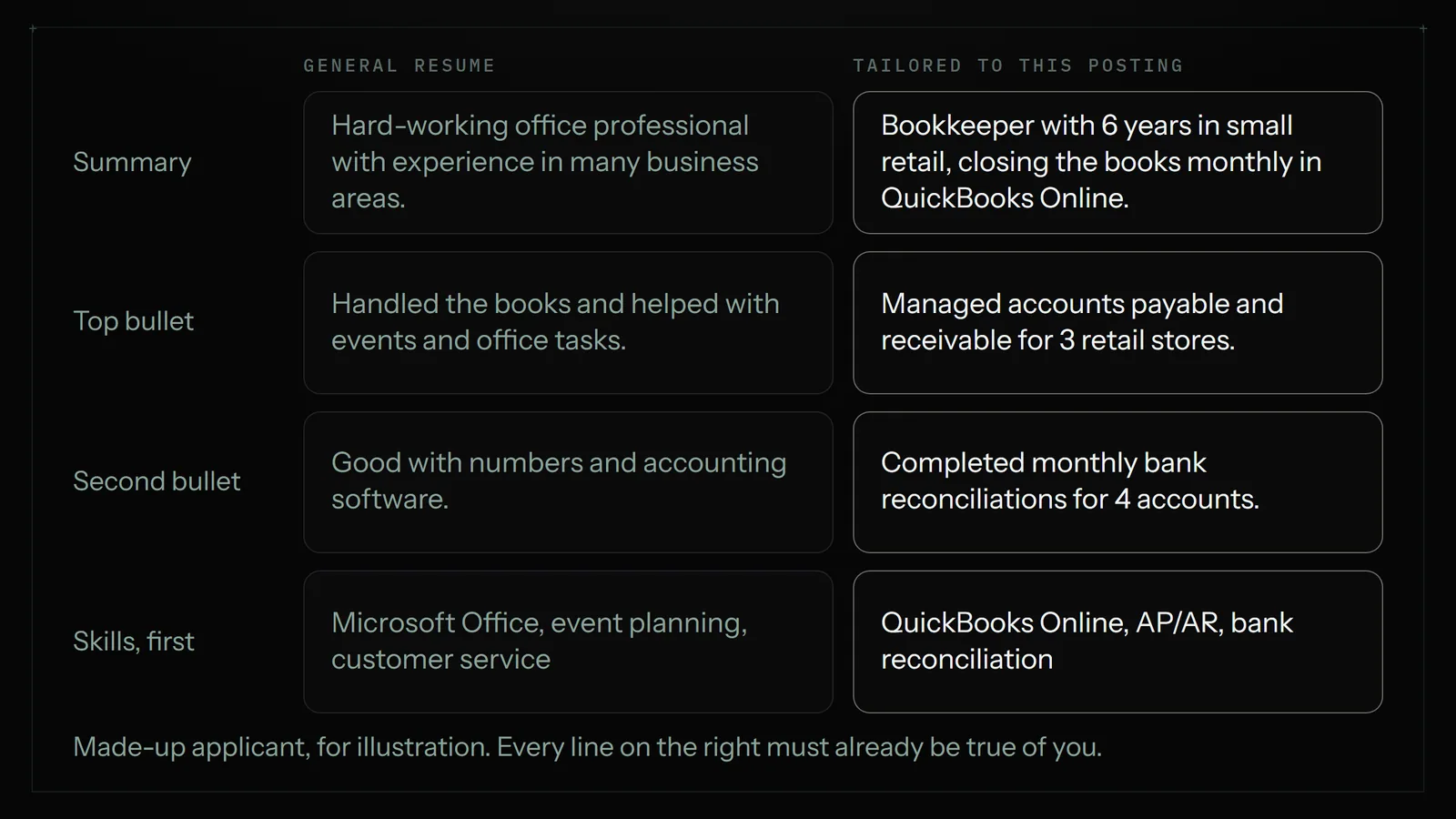
Nothing new was claimed. "Handled the books" was vague, so it became the specific tasks the applicant actually did. The result with a number moved to the top because a reader skims from there. Unrelated event work was cut to make room.
How much to tailor for each job
Not every application deserves the same effort. Sort each one before you start. These tiers are my rule of thumb, not research.
| The job | What you change | Rough time |
|---|---|---|
| A job you really want, with a strong fit | The full pass, a custom cover note, and a look for someone to contact at the company | 45 minutes |
| A good fit at a company you don't know well | The seven-step pass | 20 minutes |
| A decent fit, one of many similar postings | Summary, top bullets and skills order, starting from a saved version for that job type | 5 to 10 minutes |
| Two or more hard requirements missing | Nothing. Skip it, unless someone inside will refer you | 0 minutes |
Saved versions help a lot here. If you apply for two kinds of work, say bookkeeping and office management, keep one tailored base for each and adjust from there instead of starting at the master every time.
Tools that speed it up, with prices
Each tool suits a different part of the job. I checked these prices on November 7, 2026, on the vendors' own pages, except where noted. All of them can change.
| Tool | Best for | Price | What to watch |
|---|---|---|---|
| Word or Google Docs, by hand | A few applications a week | Free or what you already pay | Time is the only cost, and it's real |
| ChatGPT | Rewriting a summary or bullets from your own text | Free tier; Plus $20 a month | You paste every time. It can invent details, so check each line |
| Jobscan | Checking a resume against one posting and seeing a match score | Free with 5 scans a month; Premium $49.95 a month or $89.95 a quarter, per a third-party comparison checked in August 2026; confirm at checkout | A score is a guide. Don't stuff words to raise it |
| Teal | Keyword matching plus a job tracker | Free plan; Teal+ $13 per 7 days, $29 per 30 days or $79 per 90 days | It renews until you cancel, so cancel when the search ends |
| Rezi | AI writing inside a resume builder | Free plan with one resume; Pro $29 a month; $149 once for lifetime access | Check how the file exports before you commit |
| Kickresume | Design templates plus AI writing | Free plan; $24 a month, or $18 a month billed quarterly, or $8 a month billed yearly | Plain layouts are the safer pick for an ATS |
| Astarii Job Hunter | Finding postings, tailoring and filling applications on a schedule | 3 free runs; plans from $29.99 a month | More than you need if you only apply to a few jobs. Read the rules section below |
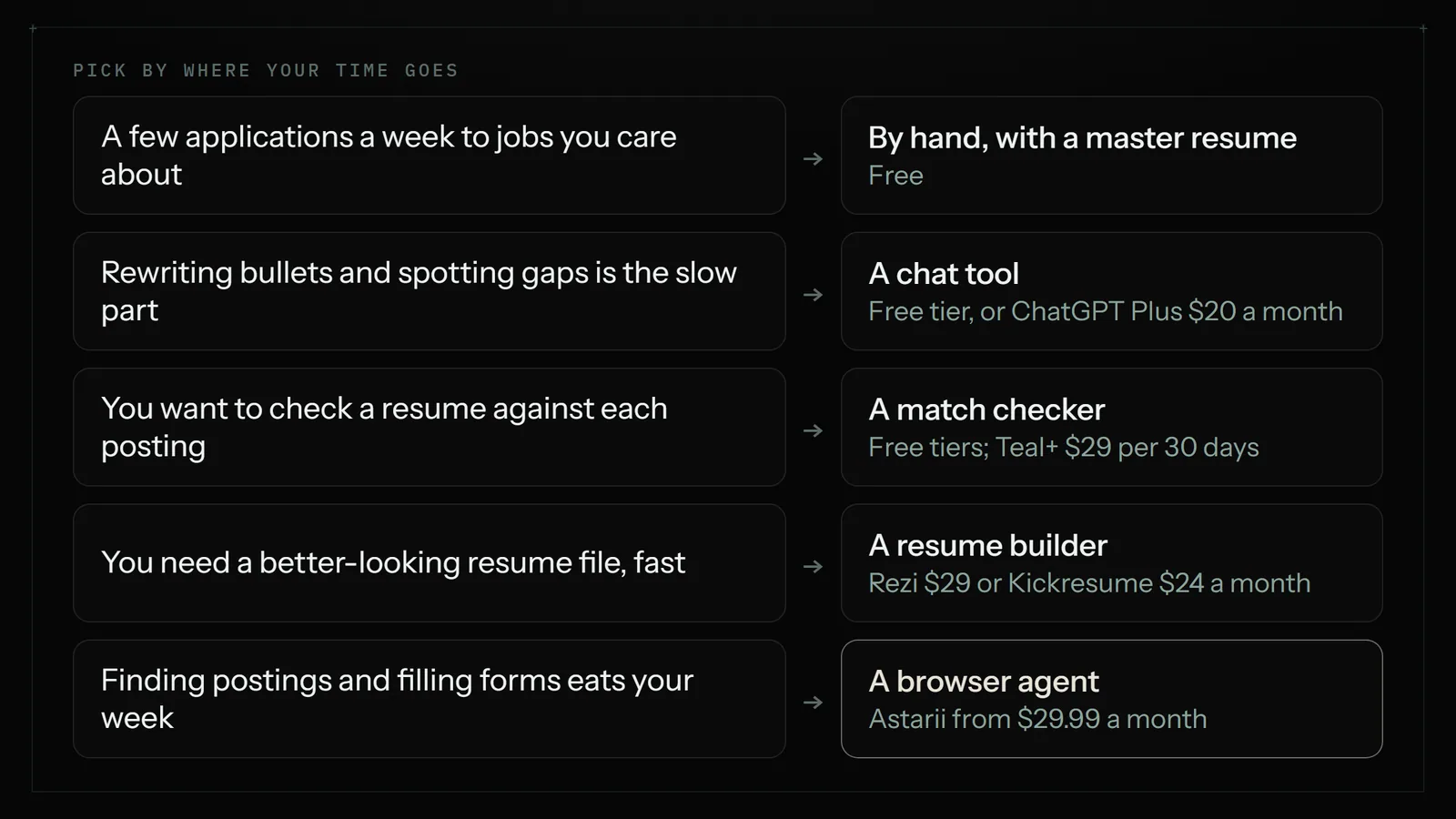
Most people should start with the free route. A master resume plus the free tier of ChatGPT, Jobscan or Teal covers a focused search of a few applications a week. Pay when volume makes the free limits annoying, then cancel when you're hired. For more on where chat tools stop, see what ChatGPT does well and where you need an agent that clicks.
Using AI without sounding like AI
AI is good at this job and bad at it in predictable ways. In the Resume Genius survey, 80% of hiring managers said they can often tell when a resume was written by AI, and 72% said heavy reliance on it makes a candidate seem less skilled. That's self-reported, and people overrate their own detection skills. Still, the giveaways they listed are worth avoiding: vague or inflated descriptions (41%) and buzzword-heavy writing (41%).
Five rules keep AI useful:
- Feed it your master resume and tell it to use only those facts. Say plainly: don't add tools, numbers, titles or duties I haven't listed.
- Ask for a gap list first. "Which requirements in this posting aren't shown in my resume?" is often more useful than the rewrite.
- Keep your numbers and specifics. "Reconciled 3 bank accounts monthly" survives any edit. "Dynamic financial professional" should not.
- Check every line against reality. Delete whatever you couldn't explain in an interview.
- Change the wording that doesn't sound like you. If you'd never say "spearheaded", don't let it stay.
Here's a prompt that works in any chat tool:
Automating the whole loop, and the rules that apply
Tailoring is only part of the time. There's also finding postings, tracking what you've sent, and retyping your history into every application form. A browser agent can take on that repetitive work. The Astarii Job Hunter finds new postings that fit, tailors your resume to each one, fills in the application and never applies to the same job twice. You describe the job in plain English and it can run on a schedule in the cloud, with your computer off. If a site texts a sign-in code or something needs a decision, it pauses and asks you. The first Astari guide shows the setup, and scheduling covers timing.
Now the part automated-apply marketing tends to leave out. Job sites have rules about this.
- Indeed's terms prohibit using automation, scripts or bots to automate the Indeed Apply process outside its official vendors and tools.
- LinkedIn's User Agreement bars bots and other unauthorized automated methods of accessing its services.
Breaking these rules can put your account at risk, and that risk is yours whichever tool you use. So read the current terms of any site you plan to automate. The practical choice is to aim automation at employers' own careers pages, keep your LinkedIn and Indeed applications manual, and use those sites for reading and research only as far as their rules allow. Tell the agent to ask before it submits anything, at least for the first couple of weeks.
Volume has its own problem. Sending hundreds of weak applications is exactly what recruiters have grown tired of. Set a narrow fit: job title, location, salary floor, deal-breakers. A dozen good applications will serve you better than a hundred poor ones. The guide to auto-applying without spamming covers a job log, fit rules and a daily cap that keep volume up without duplicates. And if you're nervous about signing an agent in to your accounts, read is it safe to let an AI agent log into your accounts. Astarii encrypts saved passwords in your browser before they're stored and never shows them to the AI, but no agent can be guaranteed against every risk, so use a limited setup.
Where Astarii isn't the right pick
- You send fewer than about five applications a week. That's my rough line. Do it by hand with a free checker. It's cheaper, and you'll know each application better.
- You're targeting a few dream companies. Those need your own writing and a real person to talk to. No tool will do that for you.
- Your search runs through LinkedIn Easy Apply or Indeed Apply. Given the rules above, keep those manual.
- You only want a resume file. Rezi, Teal or Kickresume are built for that and cost less to use for a month or two.
Mistakes that undo the work
- Copying the posting word for word. Use its terms for what you've done. Don't paste its sentences.
- Keyword stuffing. A match score can go up while a human reader's opinion goes down.
- Hiding keywords in white text. Don't. Parsed text and recruiter searches can expose it, and it ends trust on the spot.
- Tailoring only the skills list. Skills are claims. Bullets are the proof, so they need the attention too.
- Forgetting which version went where. Keep a sheet with company, date, link, the file you sent and the status. Otherwise an interview call catches you unprepared. The posting may be gone by then, so save a copy of it too.
- Sending an AI draft unread. One invented detail can sink the application or the interview.
Where to start tonight
Build your master resume first, because every other option depends on it. Then run the seven-step pass on one real posting and time it. If you're applying to a few jobs a week, that may be all you need.
If the volume is what's wearing you down, try the job on an agent: describe your search, have it ask before submitting, and read what it produces. Astarii's free trial is 3 runs of up to 15 minutes each, with no card, and paid plans start at $29.99 a month. If the output isn't better than your own, you've lost nothing, and your master resume still works. For other jobs worth handing off between contracts, see 25 real AI agent examples and the 30-minute repetitive task audit.
Say it to an Astari
These are instructions you can give an Astari, word for word. It does the work in a browser, on a schedule if you want one, and asks you before anything goes live.
Questions
How do I tailor my resume to a job description?
List the posting's five to eight must-have requirements and note its exact terms. Match each one to something you've really done, rewrite your two-line summary, put matching bullets and skills first, and cut what doesn't help. Change the order and wording, never the facts. With a master resume, this takes about 20 minutes.
Do I really need to tailor my resume for every job?
Not at the same depth. Do a full pass for jobs that fit well, adjust a saved version for similar postings, and skip jobs where you miss two or more hard requirements. In a 2026 Resume Genius survey, poor alignment with the job description was the most common filtering reason hiring managers named.
Do applicant tracking systems automatically reject resumes?
Sometimes, but less than often claimed. In Resume Genius's survey of 1,000 US hiring managers, 37% let an ATS screen out applications on criteria they set, while 49% review resumes personally and use it to organize them. A small Enhancv survey of 25 recruiters found auto-rejection on content was rare. Both companies sell resume tools.
Can I use ChatGPT to tailor my resume?
Yes, if you give it your full work history and tell it to use only those facts. Ask for a list of gaps first, then a draft. Check every line, because it can invent details, and replace wording that doesn't sound like you. In one 2026 survey, 80% of hiring managers said they can often spot AI-written resumes.
How many keywords should a tailored resume have?
There's no reliable magic number, and I'd distrust any tool that gives one as a rule. Use the posting's terms for its must-have skills wherever they truthfully describe your work, ideally inside bullets that show a result. Include an acronym and its full form once. Stop when it starts reading badly.
What is the best AI resume tailoring tool?
It depends on the job. Jobscan suits checking a resume against one posting (Premium $49.95 a month). Teal adds a job tracker (Teal+ $29 per 30 days). Rezi writes inside a builder ($29 a month, or $149 once). The free tiers cover a small search. For finding postings and filling applications too, Astarii starts at $29.99 a month.
Is it allowed to auto-apply to jobs on LinkedIn and Indeed?
Check each site's current terms, because automated applying often breaks them. Indeed's terms prohibit automating Indeed Apply outside its official vendors and tools, and LinkedIn's User Agreement bars bots and other unauthorized automated access. The safer approach is to apply by hand on those sites and aim any automation at employers' own careers pages.
Should a tailored resume be a PDF or a Word file?
Follow the posting if it specifies one. Otherwise, a text-based PDF with no images or complex formatting is a good default: 53% of hiring managers in Resume Genius's 2026 survey said that works best with their ATS, and 43% said Word documents. Only 13% said heavily designed layouts work with theirs.
- Resume Genius: 2026 Hiring Insights Report
- Enhancv: What Is an ATS? (survey of 25 US recruiters)
- Workplace Journal: A third of managers rely on ATS to screen out applications
- Indeed: Terms of Service
- LinkedIn: User Agreement
- Teal: Pricing
- Teal Help: Teal vs. Teal+
- Rezi: Pricing
- Kickresume: Pricing
- Jobscan: 10 Best AI Resume Builders in 2026 (free tier)
- Omid Saffari: Best AI Resume Builder in 2026 (Jobscan paid prices, verified August 2026)
- ChatGPT: Pricing
filed under Job hunting