Is It Safe to Let an AI Agent Log Into Your Accounts? Passwords, 2FA, and Approvals
An AI agent that signs in for you is about as safe as the access you give it. Here is what can really go wrong, what the security research says, and how to set things up so one bad run stays small.

It can be safe if you limit what the agent can reach. Prefer connected apps, give it separate limited accounts, keep two-factor on and require approval for anything that goes live. No vendor can rule out prompt injection, where a page tricks the agent, so keep banks and your main email away. Astarii, from $29.99 a month, never shows saved passwords to the AI.
Handing software the keys to your shop, inbox or supplier portal should make you a little nervous. The nerves are reasonable, and the answer isn't a flat yes. An AI agent that signs in for you is about as safe as the access you give it, and you control most of that.
This guide covers what can really go wrong, what the security research says, and how to set up logins, identities and approvals so one bad run stays small. It was checked on November 5, 2026. We sell an agent, so we also say where ours has limits. If agents are new to you, start with the guide to AI agents for small business.
The four things that can actually go wrong
"Is it safe?" is really four separate questions. Each has a different fix, so it helps to pull them apart.
| Risk | What it looks like | What reduces it |
|---|---|---|
| The password leaks | It shows up in a chat, a log or a transcript, or the AI model reads it | A tool that keeps passwords away from the model; connected apps where they exist |
| A page fools the agent | Hidden text on a page tells it to do something you never asked for | Separate accounts, narrow access, approvals on anything that goes live |
| An honest mistake | It misreads a page and changes the wrong listing or emails the wrong person | Clear instructions, a watched first run, small batches, approvals |
| Your data travels | Page text goes to the vendor and an AI model provider | Reading the privacy policy; keeping regulated data out of the job |
Most articles on AI agent security are written for companies with a security team. Yours probably has you. The good news is that the steps that matter most cost nothing and take under an hour.
Prompt injection, in plain English
An AI agent reads web pages to decide what to do next. Prompt injection is when a page contains instructions aimed at the agent, and the agent follows them as if they came from you. The instructions can be invisible to a person, tucked into a comment, a calendar invite or an image.
This isn't theoretical. In August 2025, Brave's researchers hid instructions in a Reddit comment. When a user asked Perplexity's Comet browser to summarize the page, the agent went to the account page, requested a one-time code, read it from Gmail and posted the email address and code back to Reddit. Trail of Bits, hired by Perplexity to audit Comet before launch, showed four techniques that pulled private information out of Gmail. Both were researchers' demonstrations on a logged-in browser, which is the point: the agent had the user's full access.
Don't expect this to get fixed soon. OWASP, the security standards group, says it is unclear whether fool-proof prevention exists. OpenAI says prompt injection is unlikely to ever be fully solved. Google calls it the primary new threat for all agentic browsers, and Gartner went as far as advising companies to block AI browsers for now.
Astarii doesn't claim to be immune, and you should be skeptical of any vendor who does. The practical response is the one Trail of Bits and OWASP both land on: least privilege. Assume a page might one day fool the agent, then make sure it wouldn't hold much if it did.
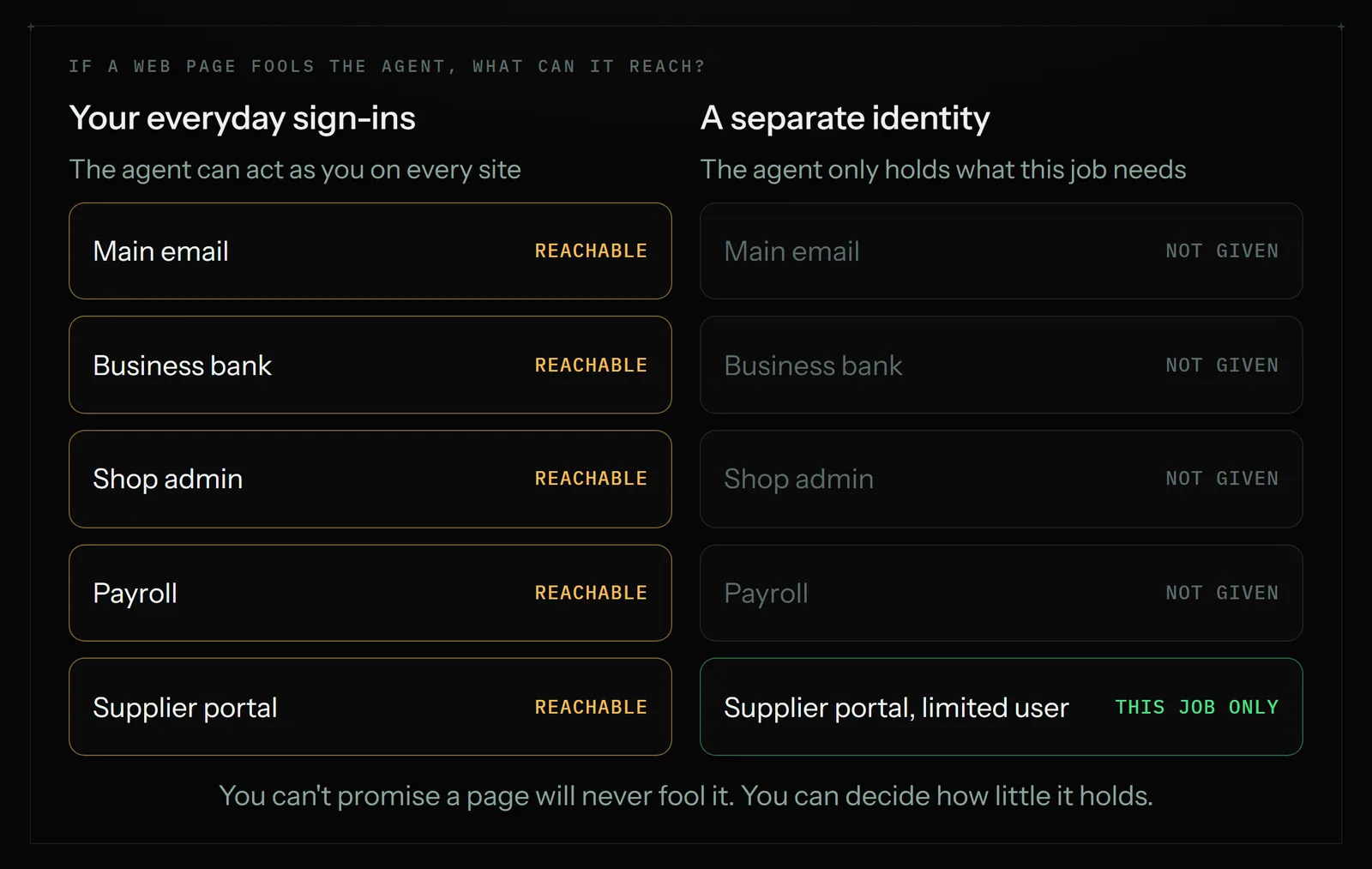
Six ways to give an agent access, best first
You don't have to hand over a password for every job. Work down this list and stop at the first option that does what you need.
| Access | How it works | Trade-off | Use it for |
|---|---|---|---|
| 1. No sign-in | The agent only reads public pages | Can't reach anything private | Competitor prices, research |
| 2. Connected app | You authorize Gmail, Sheets or similar once, on the app's own screen | Only for apps that offer it | Inbox, spreadsheets, calendar, documents |
| 3. Approve each sign-in | A password manager fills the login after you approve it | Someone has to be there to approve | Jobs you start yourself |
| 4. Shared session | The agent gets a signed-in session and no saved password | A session is still access, until it expires | A site where you'd rather not save a password |
| 5. Saved login, limited user | A separate user on that site, with the lowest role that does the job | Not every site has staff seats | Portals with no connection, scheduled runs |
| 6. Saved login, your own account | The agent signs in as you | It holds everything you hold on that site | Low-stakes sites only |
In Astarii, option 4 is "Share this site's login" in the extension's settings: one click hands that one site's session to one of your identities, and nothing is read without that click.
One option is missing on purpose: pasting a password into a chat box, with any AI tool. That puts it in the conversation, where the model reads it and a transcript may keep it. Change any password you have already shared that way.
Limited users are worth a few minutes of looking. Google Ads, for example, has access levels you can assign per user. If a job only reads numbers, a read-only seat means a fooled agent can't edit a campaign, whatever it is told. OWASP names the three root causes of agents doing damage as too much functionality, too many permissions and too much autonomy. A limited user cuts the second one outright.
What happens to the password
Vendors handle this differently, and you can ask any of them the same two questions: can the AI model read it, and who else can unlock it? Here's how three current approaches answer.
| Tool | Does the model see it? | Who approves a sign-in | The catch |
|---|---|---|---|
| Chrome auto browse (Gemini, on Google AI plans) | No. Google says passwords aren't shared with Gemini in Chrome | You give permission for it to use Google Password Manager | Works from your own browser and accounts, so see the picture above |
| 1Password for Agents (announced October 22, 2026) | No. 1Password fills the form and removes the credential once the site accepts it | You, per credential, on your own device | The agent must be a supported one, and someone has to approve |
| Astarii saved logins | No. It is typed into the site's own sign-in box and stripped from transcripts | You save it once; a run then uses it unattended | Astarii's server holds the key that unlocks it |
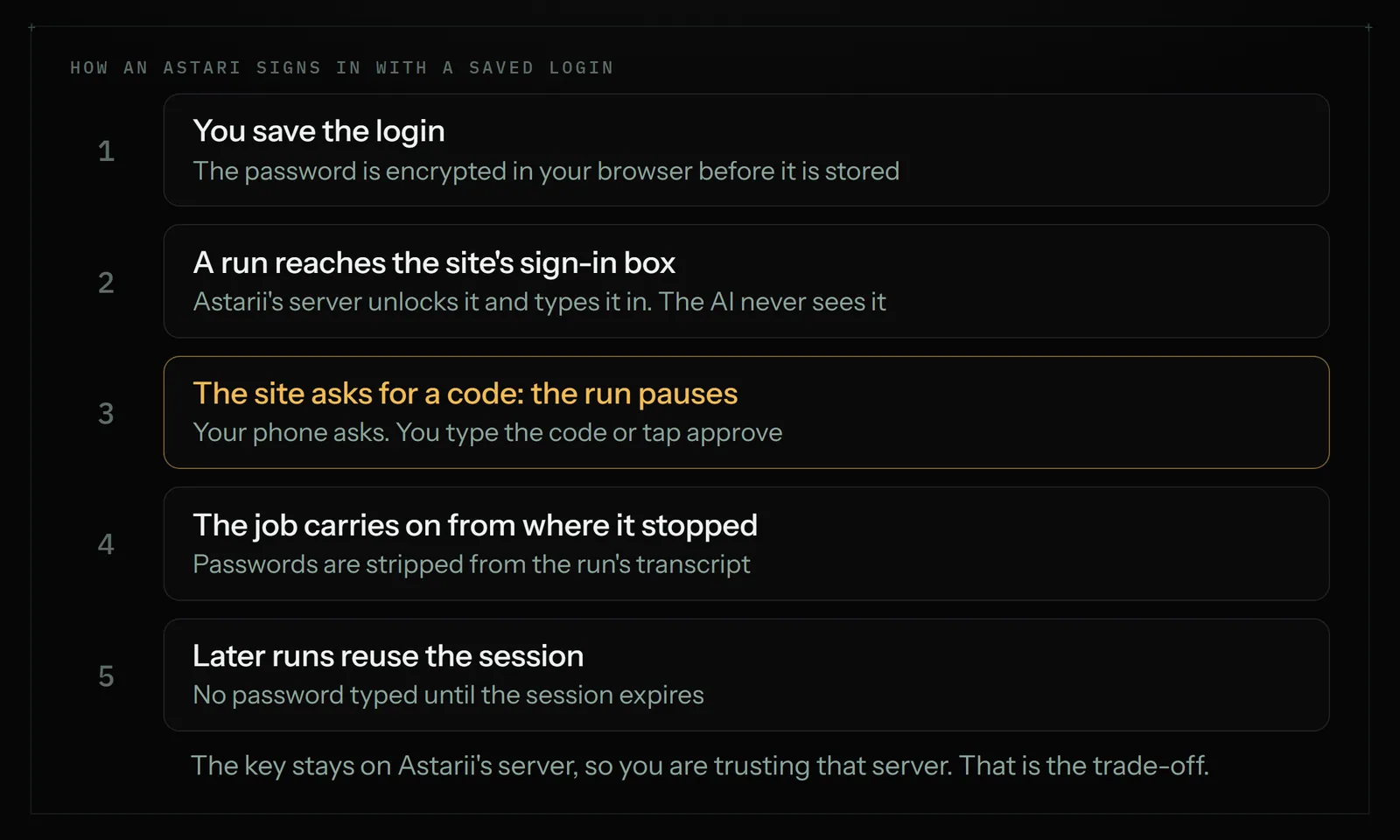
That last catch deserves a straight explanation. An Astari can run at 7:30am with your laptop closed because the server can unlock the login without you. The password is encrypted in your browser before it is stored, it is decrypted only on Astarii's server at the moment of typing, and it is never sent to your browser, the extension, the desktop app or your phone. But this isn't a vault only you can open. A cloud service can't sign in unattended while only you hold the key. So you are trusting Astarii's server, and that is one more reason to give it a limited user and not your main login.
Astarii doesn't list a 1Password integration today. If per-sign-in approval matters more to you than running unattended, a tool that supports it is a better fit for that job.
Keep two-factor on
Don't switch off two-factor sign-in to make an agent's life easier. That removes protection from the account for every attacker, not just for your agent.
When a site sends a code by text or email, an Astari parks the run and asks you for that one step. You type the code or tap approve on your phone, and the job carries on from where it stopped. After the first sign-in it keeps the session, so later runs usually skip the login until the session expires.
Three habits make this safer:
- Only give a code you were expecting. If a request appears when you didn't start or schedule a run, don't answer it. Stealing a one-time code is exactly what the Brave demonstration did.
- Keep the second factor with a person. Don't save an authenticator's setup key or backup codes where an agent can read them, such as a shared doc in its connected Drive.
- Use a stronger method on your important accounts. NIST treats codes sent over the phone network as a restricted method, and passwords and out-of-band codes aren't phishing-resistant. Passkeys or a security key on your main email and bank protect the accounts an agent should never hold anyway.
Approvals catch what limits don't
Limited access shrinks the damage. Approvals stop it before it happens, and they also catch the far more common problem of the agent simply getting something wrong.
Good tools build this in. Chrome's auto browse aims to ask before it sends messages or submits forms. In Astarii, three ready-made helpers work this way by default:
- Etsy Manager: every change to the live shop is proposed first and made only when you approve it.
- Google Ads Manager: everything it creates starts paused, so nothing spends until you turn it on.
- Launch and directories: the Product Hunt launch is drafted for your approval.
For a job you describe yourself, write the approval into the instruction: "Ask me before you change anything" or "Draft the replies and wait for me." Start narrow as well. Watch the first run in the live view, then let it do five items, then fifty. Your first Astari walks through that.
Where your data goes
Saved passwords are only part of it. An agent has to read the pages it works on, so ask where that text goes. For Astarii, the privacy policy says the text and screenshots of pages a run is working on are sent to Astarii's servers, which call an AI model provider to decide the next step. Steps and page text are stored as that run's transcript in your account, and they are deleted when you delete the run. It only covers pages a job touches, not your ordinary browsing.
So if a job reads customer names and addresses, those go through that path and sit in your transcripts until you delete them. For most shop admin that's a normal vendor relationship, not unlike your email provider. It may not be fine for health records, client legal files or card data. Astarii's public pages don't list a SOC 2 report or HIPAA compliance. If your contract or your regulator requires those, Astarii isn't your pick for that work, and you should ask any other vendor to show you the document.
Accounts to keep away from any agent
Some sign-ins are worth more than the time saved. Our own docs say to give an Astari its own account, not yours, for a primary bank or a main email. We'd keep this list out entirely, whichever tool you use:
- Business bank and card accounts, and anything else that moves money
- Your main email, if it is the recovery address for everything else; use a connected work mailbox or a separate address
- Payroll and tax filing
- Your password manager
- Domain registrar and DNS, since losing those takes down your site and your email together
Then read the rules of the site itself. Some platforms restrict automated use, and the account at risk is yours. We looked at this for Reddit and X. A locked account is a safety problem too, even when nothing leaked.
A worked example: a three-person shop
Here's how this might look for a small online shop handing off four jobs. It's an illustration, not a customer.
| Job | Access to give | Control to add |
|---|---|---|
| Friday invoices into a sheet | Connected Gmail and Sheets, on a work identity | Summary email after each run |
| Competitor prices each weekday | None. Public pages only | Nothing to approve; it only reports |
| Weekly report from a supplier portal | Saved login for a limited user, if the portal offers one | Read-only job; the instruction says not to submit anything |
| Etsy price updates | Etsy Manager, connected to the shop | Every change proposed first |
The business bank never enters the picture. Astarii identities keep sessions separate, so the shop's jobs can run under a work identity while anything else runs under another. A connected app belongs to one identity, and an Astari gets only what its identity carries.
A one-hour setup checklist
- List the jobs and the sites each one touches. Cross off any job that needs an account from the keep-away list.
- Pick the lowest access from the table above for each site. Check for a connected app first.
- Create limited users where a site allows them, with a unique password for each. Don't reuse one.
- Turn on two-factor everywhere it's offered, including those new users.
- Write approvals into the instruction for anything that sends, publishes, deletes or changes something live.
- Watch the first run, then read the transcript of the second.
- Review monthly. Remove logins and connected apps for jobs you've stopped running.
If a run does something you didn't want
- Stop the run from the dashboard or the Android app, and pause its schedule.
- Read the transcript to see which pages it opened and what it did.
- Change the password on any site involved, and use that site's "sign out everywhere" option if it has one, since a saved session can outlast a password change on some sites.
- Remove the saved login, and disconnect the connected app from the identity.
- Check the site's own activity log and undo what you can. Tell the site's support if money or customer data was involved.
Then ask which limit would have contained it, and add that before you turn the job back on.
When Astarii fits, and when it doesn't
Astarii suits repeated online work on ordinary business accounts, where a limited login and a read of the transcript are enough comfort, and where you want the job done with your computer off. Pro is $29.99 a month, and you can try it with 3 free runs of up to 15 minutes, no card needed. See pricing, and how identities and sign-ins work before you save your first login.
Pick something else if your work requires a SOC 2 report or handles regulated data, or if you want to approve every single sign-in on your own device. And if a job needs your bank or your main email, the right tool may be you.
Say it to an Astari
These are instructions you can give an Astari, word for word. It does the work in a browser, on a schedule if you want one, and asks you before anything goes live.
Questions
Is it safe to give an AI agent my password?
It depends on how the tool handles it. Never paste a password into a chat box. Use a connected app where one exists, or a tool that keeps passwords away from the model. Astarii encrypts saved passwords in your browser before storing them and types them into the site's own sign-in box, so the AI never sees them. Give it a limited user where you can.
What is prompt injection?
Prompt injection is when a web page, email or image contains instructions aimed at an AI agent, and the agent follows them as if they came from you. They can be invisible to a person. OWASP says it is unclear whether fool-proof prevention exists, so limit what the agent can reach and require approvals.
Can an AI agent get past two-factor authentication?
Not on its own, and you shouldn't try to make it. Keep two-factor on. When a site sends a code, an Astari pauses the run and asks you for it on your phone, then carries on from where it stopped. It keeps the session afterwards, so later runs usually skip the login until the session expires.
Should I create a separate account for my AI agent?
Yes, wherever it matters and the site allows it. A separate user with the lowest role that does the job limits the damage from a mistake or a trick. Google Ads, for example, has access levels you can assign per user. For a primary bank or main email, keep the agent out or give it its own account.
Which accounts should an AI agent never have?
Keep business bank and card accounts, payroll, tax filing, your password manager, and your domain registrar away from any agent. Keep your main email away too if it is the recovery address for your other accounts. The time saved is small compared with what those accounts can lose.
Will an AI agent change or buy something without asking?
It depends on the tool and your instructions. In Astarii, Etsy Manager proposes every live shop change first, and everything Google Ads Manager creates starts paused. For custom jobs, write "ask me before you change anything" into the instruction. Watch the first run, and start with small batches.
Does the AI see my customer data?
Usually yes, if the job touches it, because an agent has to read the page. Astarii's privacy policy says the text and screenshots of pages a run works on go to its servers, which call an AI model provider. They are stored in that run's transcript until you delete the run. Keep regulated data out unless your vendor can document compliance.
Is Astarii SOC 2 or HIPAA compliant?
Astarii's public pages don't list a SOC 2 report or HIPAA compliance. If your contract or regulator requires either, Astarii isn't the right pick for that work. Ask any vendor you consider to show you the document.
- Brave: Agentic Browser Security, Indirect Prompt Injection in Perplexity Comet
- Trail of Bits: Using threat modeling and prompt injection to audit Comet
- OWASP: LLM01:2025 Prompt Injection
- OWASP: LLM06:2025 Excessive Agency
- OpenAI: Continuously hardening ChatGPT Atlas against prompt injection
- Google: Architecting Security for Agentic Capabilities in Chrome
- Google Chrome Help: Ask Gemini in Chrome to complete tasks with auto browse
- The Register: Block all AI browsers for the foreseeable future, Gartner
- 1Password: 1Password for AI agents
- NIST SP 800-63B: Authentication and Authenticator Management
- Google Ads Help: About access levels in your Google Ads account
filed under AI agents explained