How to Automate Weekly Reports From Sites You Already Log Into
A weekly report is usually five sign-ins, a date picker and a spreadsheet every Monday. Here are four ways to automate it, cheapest first, and how to hand the whole thing to an agent when your numbers live behind logins with no integration.

To automate a weekly report, first use each site's own scheduled email, then Google's free Data Studio for anything with a connector. Use Zapier or Apps Script for apps with an integration. For sites you sign into that have no connector, a browser agent such as Astarii, from $29.99 a month, signs in, logs the numbers in a sheet and emails a summary.
Most small businesses already have a weekly report. It just lives in someone's Monday morning: sign into the shop, the ads account, the analytics dashboard and a supplier portal, copy five numbers into a sheet, work out what changed, and write a short email to yourself or a partner. It takes 30 to 60 minutes, and it is the same 30 to 60 minutes every week.
This guide shows four ways to automate it, cheapest first, and when each one fits. The last one, a browser agent, is what we make at Astarii, so it gets the most detail. It is also the only one of the four that works on sites with no integration and no export button. If you are new to agents, the guide to AI agents for small business covers the basics, and scheduling explains how weekly runs work.
What a weekly report actually involves
Before picking a tool, write down what you do by hand. Almost every small-business weekly report is the same five steps:
- Sign in to two to five sites: a store, an ads account, analytics, a bank or payments dashboard, a supplier or booking portal.
- Set the date range to last week, which on some sites means three clicks and a calendar picker.
- Copy the numbers: sales, orders, visits, ad spend, leads, open orders.
- Compare with the week before, usually in a spreadsheet.
- Write it up: a short email or message that says what went up, what went down and what needs a decision.
Steps 1 to 3 are where the time goes, and they are also where most automation tools stop working. A tool that needs an integration can only reach sites that offer one. Plenty of the sites a small business depends on, such as a wholesale supplier's portal, a local booking system or a marketplace seller dashboard, have no integration and no scheduled export. Someone has to sign in and look.
So the useful question is: for each number on your report, where does it live, and can a tool reach it without you?
Four ways to automate it, cheapest first
Work down this list. Use the first option that covers all your numbers, and only move down for the numbers it can't reach.
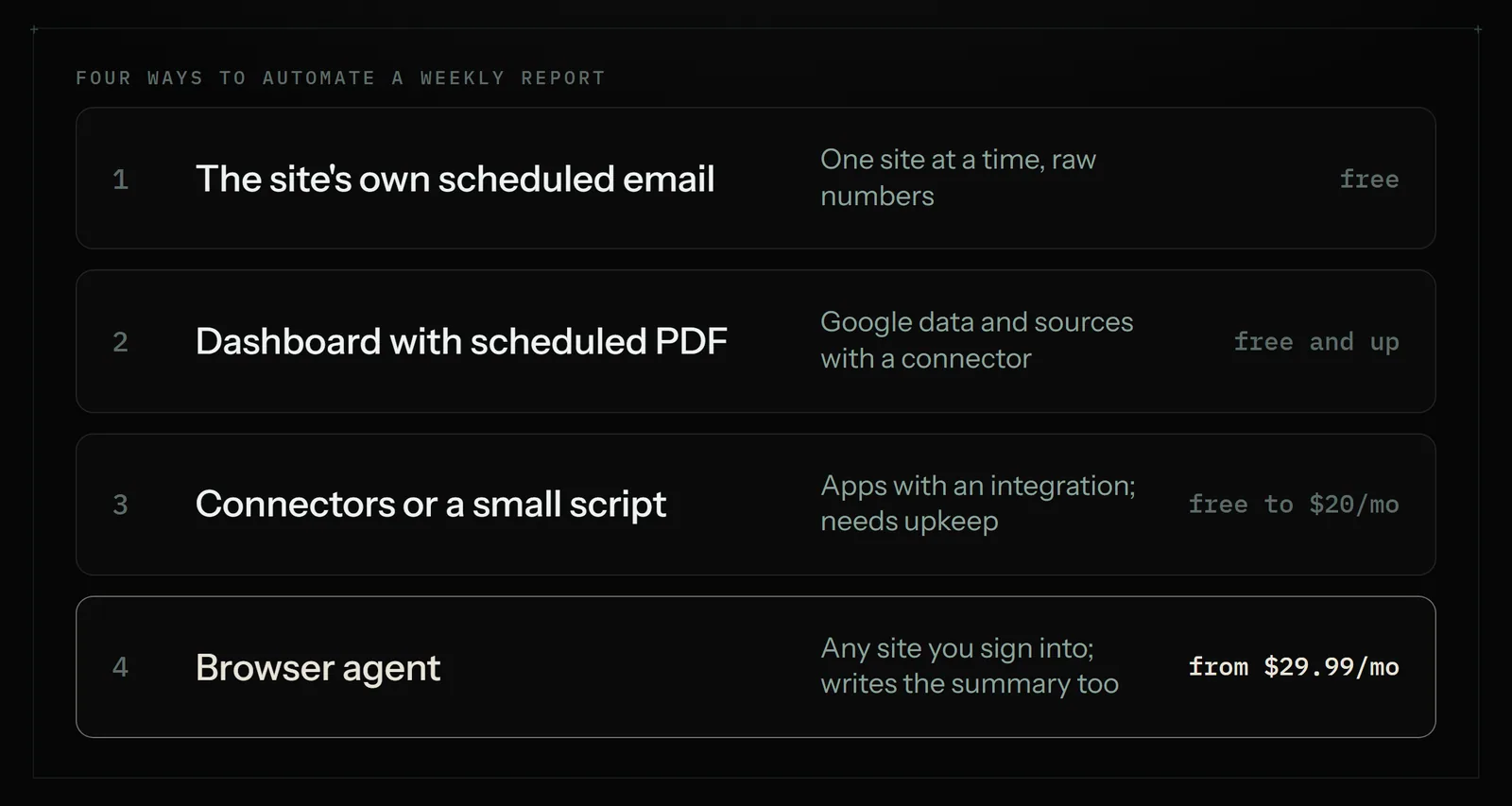
1. The site's own scheduled email
Many dashboards can already email you a summary. Check the settings of each tool on your list for "scheduled reports", "email digest" or "subscribe". If your store, ads account and analytics all send their own Monday email, you may not need anything else. The cost is zero and nothing can break except the site itself.
The catch: you get four separate emails in four layouts, none of them compared with your other numbers, and some sites don't offer this at all.
2. A dashboard tool with scheduled delivery
Google's free Data Studio (the tool called Looker Studio until 2026) connects to Google Analytics, Google Ads, Google Sheets and many other sources through connectors. Its scheduled delivery emails a PDF of a report to you and your team on a repeat you choose, such as every Monday. For anything Google already holds, this is the best free option, and the PDF looks tidy.
Paid reporting tools such as AgencyAnalytics go further with more connectors and client-ready layouts. AgencyAnalytics lists its pricing at about $20 per client a month on its calculator, which makes sense for an agency reporting to clients and is more than most single businesses need.
The catch: dashboard tools only show data a connector can reach. If one of your five numbers lives behind a login with no connector, it stays a manual step.
3. Connectors or a small script
Zapier, Make and n8n can copy data between apps on a schedule, for example adding last week's orders to a sheet every Monday. Zapier's Professional plan starts at $19.99 a month. If you are comfortable with a little code, Google Apps Script is free and its time-driven triggers can run a script at specific times or intervals, so a script can fill and email a Sheets report each week.
The catch is the same as above, plus upkeep. Connectors need the app to have an integration, and scripts break when a page or an API changes and nobody notices. There is more on choosing between them in n8n vs Zapier vs Make.
4. A browser agent for sites you log into
A browser agent works the way you do. It opens each site in a real browser, signs in with a saved login, sets the date range, reads the numbers, puts them in your sheet and writes the email. Because it doesn't need an integration, it can reach the supplier portal or booking system that options 2 and 3 can't.
Astarii does this on a schedule, in the cloud, so your computer can be off on Monday morning. It connects to Gmail or Outlook and Google Sheets directly, and pauses to ask you if a site texts a sign-in code. It costs more than a free dashboard and is slower than a connector, so use it for the numbers nothing else can reach, or when you want one tool to do the whole report, write-up included.
The four options side by side
| Option | Reaches | Writes the summary? | Setup | Typical cost |
|---|---|---|---|---|
| Site's own scheduled email | That one site | No, raw numbers per site | Minutes | Free |
| Data Studio scheduled PDF | Google data plus sources with a connector | No, charts only | An hour or two | Free |
| Paid reporting tool (e.g. AgencyAnalytics) | Many marketing sources with connectors | Partly, templates and notes | An afternoon | About $20 per client a month |
| Zapier or Apps Script | Apps with an integration or API | Only if you build it | An afternoon, plus upkeep | Zapier from $19.99 a month; Apps Script free |
| Browser agent (Astarii) | Any site you can sign into, plus Gmail, Outlook and Sheets | Yes, in plain English | Under an hour | From $29.99 a month; 3 free runs |
Many businesses end up mixing them: Data Studio for the Google numbers, and an agent for the two portals that have no connector, with the agent adding the Data Studio figures to its email.
How to set up a weekly report with a browser agent
Here is the whole setup with Astarii. It is the same for any report; only the sites change.
Step 1: Write the report spec
Open a Google Sheet and make a tab called Weekly. One column per number: Week starting, Sales, Orders, Visits, Ad spend, Open supplier orders. Underneath, in a note to yourself, write where each number lives and exactly which figure you mean ("Etsy, Stats, last 7 days, Orders", "supplier portal, Open orders count"). Being this precise is most of the work, and it is what makes the run reliable.
Step 2: Save the logins
Add a sign-in for each site on your list. In Astarii, saved passwords are encrypted in your browser before they are stored and are never shown to the AI. If a site sends a code by text or email when it signs in, the Astari pauses, asks you for it and carries on from where it stopped. Identities and sign-ins covers the details.
Step 3: Connect the apps
Connect Google Sheets so it can add the row, and Gmail or Outlook so it can send the email. Connections shows how; it takes a couple of minutes per app.
Step 4: Describe the job in plain English
Write the instruction the way you'd brief a new assistant. For example: "Every Monday at 8am, sign into the sites listed in my Weekly sheet, read last week's numbers, add one row to the Weekly tab, and email me the numbers with the change from the week before. Put anything that dropped more than 20% at the top." You can also show it once: do the report while it watches, then tell it to repeat that every week.
Step 5: Run it once and check
Run it now, while you watch, and compare its row with what you'd have copied yourself. If a number is wrong, the fix is almost always a more precise line in the spec ("the Orders figure, not Items sold"). One checked run is worth more than a long instruction.
Step 6: Put it on a schedule
Set it to run every Monday at 8am, or every Friday afternoon if you'd rather end the week with the numbers. Schedules run in the cloud, in Astarii's own browser, so your laptop can be closed. Task memory means each run adds only the new week's row and doesn't repeat one it has already done.
Split it into a team: one gathers, one writes
For a report that pulls from more than three or four sites, it helps to split the job. Several Astarii can hand work to each other, with one chat for the whole team. A common split:
- The gatherer signs into each site, reads the numbers and adds the row to the sheet. Its only job is accurate copying.
- The writer reads the new row next to the last few weeks, writes three or four plain sentences on what changed, and sends the email.
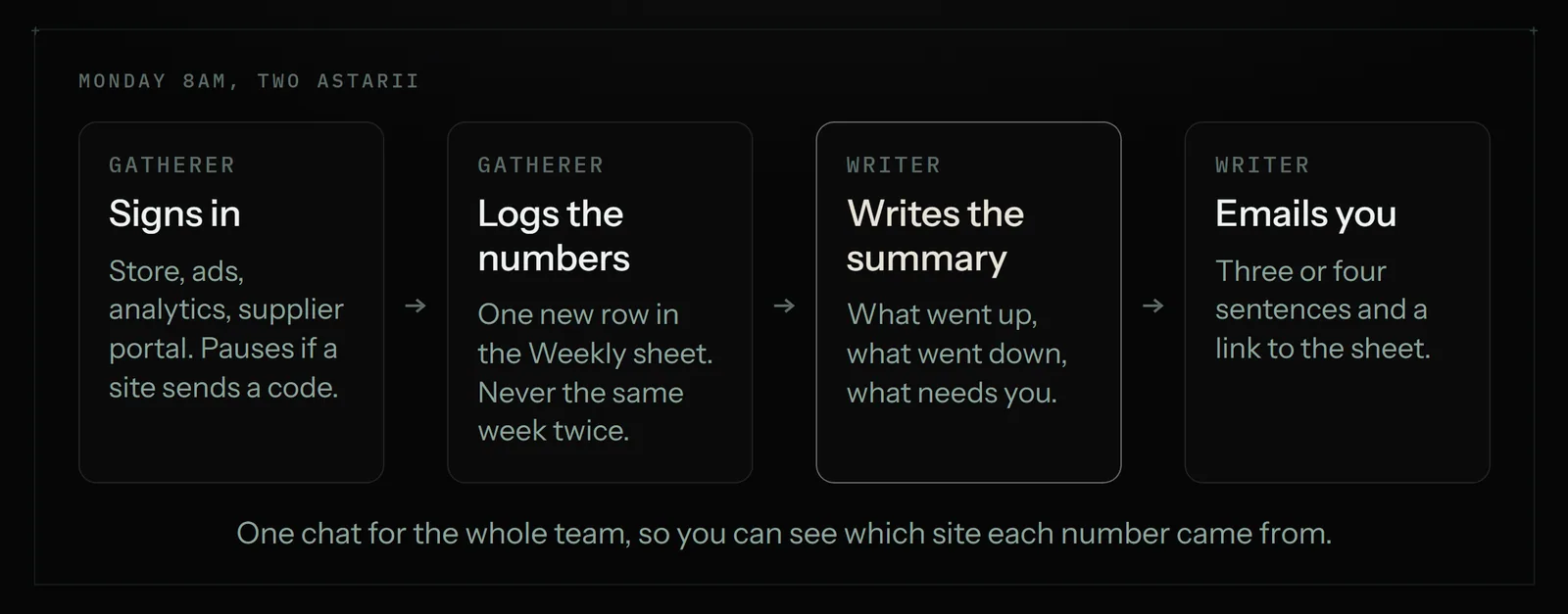
Splitting it makes problems easier to spot. If the email says sales fell 90%, you check the gatherer's row first, and you can see in one chat which site it read.
A worked example: a small online shop's Monday report
Take a two-person business that sells handmade candles on Etsy and wholesale to a few shops through a supplier-style ordering portal. Their Monday report has five numbers:
- Etsy orders and revenue last week, from Shop Manager.
- Google Ads spend and clicks, from the ads account.
- Website visits, from their analytics dashboard.
- Open wholesale orders, from the ordering portal (no integration, no export).
- Wax and jar stock, from their supplier's site, so they know when to reorder.
Done by hand, that is five sign-ins and about 40 minutes. With Data Studio alone they'd get the ads and analytics numbers, but not the portal or the supplier stock. With a browser agent, every number lands in one sheet and the Monday email reads something like: "Etsy orders 31, up from 24. Ad spend $82, clicks 210, about the same. Visits 1,140. 3 wholesale orders open, one due Thursday. Jar stock is under your reorder level of 200."
If a run like that takes around 10 minutes, four or five Mondays a month is about 50 cloud minutes, well inside the 900 cloud minutes in Astarii's Pro plan. The rest of the pool stays free for other jobs, such as moving invoices into a sheet every Friday or a weekday competitor price check.
For Etsy and Google Ads specifically, Astarii also has ready-made helpers. The Etsy Manager reads orders and listings and answers questions about them, and the Google Ads Manager reads how your ads are doing. Both can feed the same weekly report, and neither changes anything live without you: the Etsy Manager proposes every shop change for approval, and anything the Ads Manager creates starts paused.
What to put in the report (and what to leave out)
An automated report is only useful if you read it. Keep it short enough to read on a phone before your first coffee is finished.
- Three to six numbers. The ones you'd act on. If a number never changes a decision, drop it.
- The change from last week. A number on its own means little; "up 30%" gets attention.
- A "needs you" line. Anything below a threshold you set: low stock, an overdue order, ad spend over budget.
- A link to the sheet. The email is the summary; the sheet is the history. After a couple of months you can chart trends from it.
Leave out anything that needs judgment to measure, such as "how was customer mood this week". Those are worth five minutes of your own time, not a robot's guess.
When not to automate it this way
A browser agent is not the right pick for every report:
- Every number is already in Google tools. Use Data Studio's free scheduled delivery. It is free and fast.
- You need numbers by the minute. Live dashboards are a job for a dashboard tool, not a weekly run.
- It is your accounts. Bookkeeping and tax figures belong in your accounting software and with your bookkeeper. An agent can copy figures into a sheet, but don't let it be the source of truth for your books.
- The site's terms forbid automated access. Some do. Check before you automate, and keep that site as a manual step if so.
- The report is a one-off. If you only need it once, do it by hand. Automation pays off on the fourth week, not the first.
What it costs
The free options (each site's own email, Data Studio, Apps Script) cost nothing but setup time and upkeep. Zapier starts at $19.99 a month. Agency reporting tools run about $20 per client a month.
Astarii has 3 free runs of up to 15 minutes each with no card, which is enough to set up and check one weekly report. After that, plans are $29.99, $49.99 or $99.99 a month, metered by each run's real length. Pro includes 900 cloud minutes plus 800 browser minutes, and pools reset on the 1st. Full details are on the pricing page.
If your report is mostly copying from sites into a sheet, the guide to automating data entry between websites and Google Sheets covers the copying step in more depth, and the 30-minute repetitive task audit helps you find the next job to hand off once the report runs itself. To start, set up your first Astari and give it this week's report.
Say it to an Astari
These are instructions you can give an Astari, word for word. It does the work in a browser, on a schedule if you want one, and asks you before anything goes live.
Questions
How do I automate a weekly report?
List each number and where it lives. Use each site's own scheduled email where it exists, Data Studio's free scheduled PDF for Google and connector data, and Zapier or Apps Script for apps with an integration. For sites behind a login with no integration, a browser agent signs in, copies the numbers into a sheet and emails a summary on a schedule.
What is the best free tool for automated reporting?
For Google Analytics, Google Ads and Google Sheets data, Google's Data Studio (formerly Looker Studio) is free and can email a PDF of a report on a repeat schedule. Apps Script is also free if you can write a short script with a time-driven trigger.
Can I automate reports from websites that have no integration or export?
Yes, with a browser agent. Astarii opens the site in a real browser, signs in with a saved login, reads the figures and adds them to your Google Sheet. Connector tools and dashboard tools can only reach sites with an integration.
Is it safe to give an agent my logins for reporting?
With Astarii, saved passwords are encrypted in your browser before they are stored and are never shown to the AI. If a site sends a sign-in code, the Astari pauses and asks you for it, then carries on.
Can the report run when my computer is off?
Yes. Astarii schedules run in the cloud in its own browser, for example every Monday at 8am, so your laptop can be closed.
Can an AI write the summary as well as gather the numbers?
Yes. An Astari can compare the new row with earlier weeks and email a few plain sentences on what changed. For bigger reports, a team of Astarii can split the job: one gathers the numbers, another writes and sends the email.
How much does it cost to automate a weekly report?
Built-in emails, Data Studio and Apps Script are free. Zapier starts at $19.99 a month. Astarii has 3 free runs of up to 15 minutes each with no card, then plans at $29.99, $49.99 or $99.99 a month, metered by each run's real length.
When should I not use an agent for reporting?
When every number is already in Google tools (use Data Studio), when you need live minute-by-minute dashboards, for your official books and tax figures, for one-off reports, and on any site whose terms forbid automated access.
filed under Admin and paperwork