How to Do Keyword Research for Google Ads on a Small Budget
On a small ad budget, every keyword is a door you pay to keep open. Here is how to pick the few searches that bring buyers, write down the ones that don't, and check what people really typed once the money is moving.

To do keyword research for Google Ads on a small budget, start from the words customers use in your inbox, expand them in Google's free Keyword Planner set to your area, and keep only buying searches. Cut to 10 to 20 phrase or exact keywords, add negatives such as jobs, free and DIY, then check the search terms report every week.
Keyword research for Google Ads is not the same job as keyword research for a blog. For a blog, a big number is good news. For ads, every keyword is a door you pay to keep open, and on a small budget the wrong door costs you the month. This guide is about picking the few searches that bring buyers, writing down the ones that don't, and checking the real search terms once money starts moving. If you haven't set up an account yet, start with our starter campaign guide for Google Ads, then come back here for the keyword part.
Everything below can be done for free with Google's own tools. Near the end we cover the paid tools worth knowing, and where the Astarii Google Ads Manager fits: it researches keywords in your own account and drafts campaigns that start paused, so nothing spends until you switch it on.
Why ad keywords are a different job
Three things change when you are paying per click.
- Intent beats volume. "Plumber near me" with 50 searches a month in your town is worth more than "how to fix a leaky tap" with 5,000. The first person wants to hire someone today. The second wants a video.
- Your budget sets the size of the list. The 2026 WordStream and LocaliQ benchmarks put the average Search click at $5.42. At $15 a day that is two or three clicks. Spread across 80 keywords, no single keyword ever gets enough clicks to tell you anything.
- What you leave out matters as much as what you put in. Negative keywords stop your ads showing on searches you never wanted, and they are the cheapest money you will save all year.
So the goal on a small budget is a short list: 10 to 20 keywords with clear buying intent, grouped tightly, plus a longer list of negatives.
Before you open any tool: three numbers
Write these down first. They decide which keywords you can afford.
- What a customer is worth. The profit from a typical first job or order, not the revenue. If a new customer usually comes back, note that too.
- How many enquiries become customers. A rough guess is fine. If one in four calls books, write 25%.
- Your monthly ad budget. The amount you can afford to spend while you learn. Divide by 30.4 for the daily budget, which is how Google caps the month.
From those you get the most you can pay for a lead and still make money. Say a job brings $300 profit and one in four enquiries books. Each enquiry is worth about $75, so you can afford leads up to roughly $75 and still break even. If one in ten visitors enquires, that is a $7.50 ceiling per click. Any keyword whose top-of-page bid is well above your ceiling goes on a "later" list, not in the first campaign.
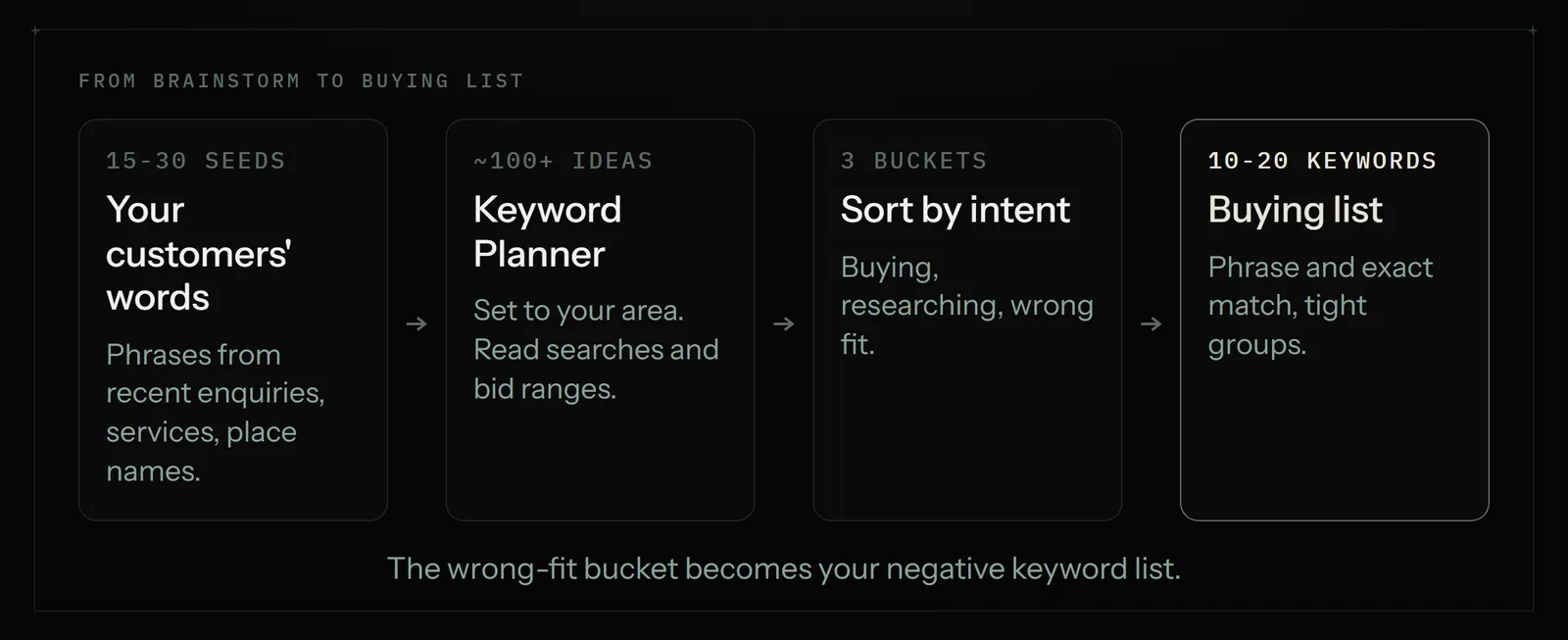
Keyword research for Google Ads, step by step
1. Start with your customers' words, not yours
The best seed list is already in your inbox. Open the last 20 enquiries, quotes and booking requests and copy the phrases people used. Customers say "boiler not working", owners say "heating system diagnostics". Add the services you actually want more of, your town or area names, and words like "near me", "cost", "same day" or "emergency" if they fit what you do. Aim for 15 to 30 seed phrases.
2. Expand the list in Keyword Planner
Google Keyword Planner is free with any Google Ads account; you do not need a live campaign to use it. Open it from Tools, then Planning, then Keyword Planner. It has two starting points:
- Discover new keywords: type a few seed phrases or your website address, and it suggests related searches.
- Get search volume and forecasts: paste your own list to see monthly searches, top-of-page bid ranges and a forecast of clicks and cost.
Set the location to the area you actually serve before you read any numbers. A national figure for "dog groomer" tells a groomer in one town almost nothing. Accounts that are not spending much often see search volume as a range, such as 100 to 1K, instead of an exact figure. That is fine for this job. You are sorting keywords into "worth testing" and "not", not forecasting to the click.
Look at two columns most: average monthly searches and the top-of-page bid range. The low and high bid give you a feel for what advertisers pay to appear at the top for that term. Compare the high end with the click ceiling you worked out above.
3. Sort every keyword by intent
This is the step most guides skip, and it is where a small budget is won or lost. Put each keyword into one of three buckets.
| Bucket | What the searcher wants | Example (a mobile dog groomer) | What to do |
|---|---|---|---|
| Buying | To hire or buy now | mobile dog grooming [town], dog groomer near me, dog grooming prices | Bid on these first |
| Researching | To compare or learn | how often should a dog be groomed, best dog shampoo | Leave for a blog post or later |
| Wrong fit | Something you don't sell | dog grooming jobs, grooming course, DIY grooming kit, free | Add as negative keywords |
A quick test for the buying bucket: if this person called you, could you take their money this week? If yes, it stays. Words like "price", "cost", "near me", "book", "hire", a service name plus a place, or "emergency" usually signal buying. Words like "how to", "ideas", "jobs", "salary", "course", "free" and "DIY" usually don't.
4. Look at the real results page
Before you commit, search your top five keywords on Google yourself, in a private window, from your area. You are checking two things. Are other local businesses advertising on it? If nobody is, either you've found a gap or nobody makes money on it. And do the results match what you sell? If "garden rooms" shows sheds and summer houses when you build insulated offices, you'll pay for a lot of wrong clicks.
5. Pick match types and group tightly
Google has three keyword match types. Broad match is the default and the widest: your ad can show on searches related to the keyword's meaning. Phrase match, written in quotation marks, shows on searches that include the meaning of your keyword. Exact match, in square brackets, shows on searches with the same meaning or intent, and gives you the most control.
On a small budget, most owners do best starting with phrase and exact match on their buying keywords. Broad match can work well, but Google's own guidance pairs it with Smart Bidding and conversion tracking, and it needs enough budget and data to learn. With two or three clicks a day, it is hard to give it either.
Then group the keywords so each ad group holds one service. "Emergency boiler repair" keywords go in one group with an ad about emergency boiler repair; "boiler servicing" keywords go in another. Three to five keywords per group is plenty. Tight groups mean the ad matches the search, which tends to help both clicks and cost.
6. Write the negative keyword list before you launch
Everything in your "wrong fit" bucket becomes a negative keyword. Add the usual suspects for your trade: jobs, careers, salary, training, course, free, DIY, how to, second hand, and any service or brand you don't offer.
One detail catches people out. Google's help pages say negative keywords don't match to close variants, so excluding "job" does not exclude "jobs". Add the singular, plural and common misspellings yourself.
7. Check the size of the list against the budget
Divide your daily budget by the typical top-of-page bid for your main keywords. That is roughly how many clicks a day you can buy. If it comes out at two or three, keep the campaign to one or two ad groups and your strongest 10 to 15 keywords. You can add more once you know which ones bring enquiries. Spreading a small budget thinly is the most common reason a first campaign "doesn't work".
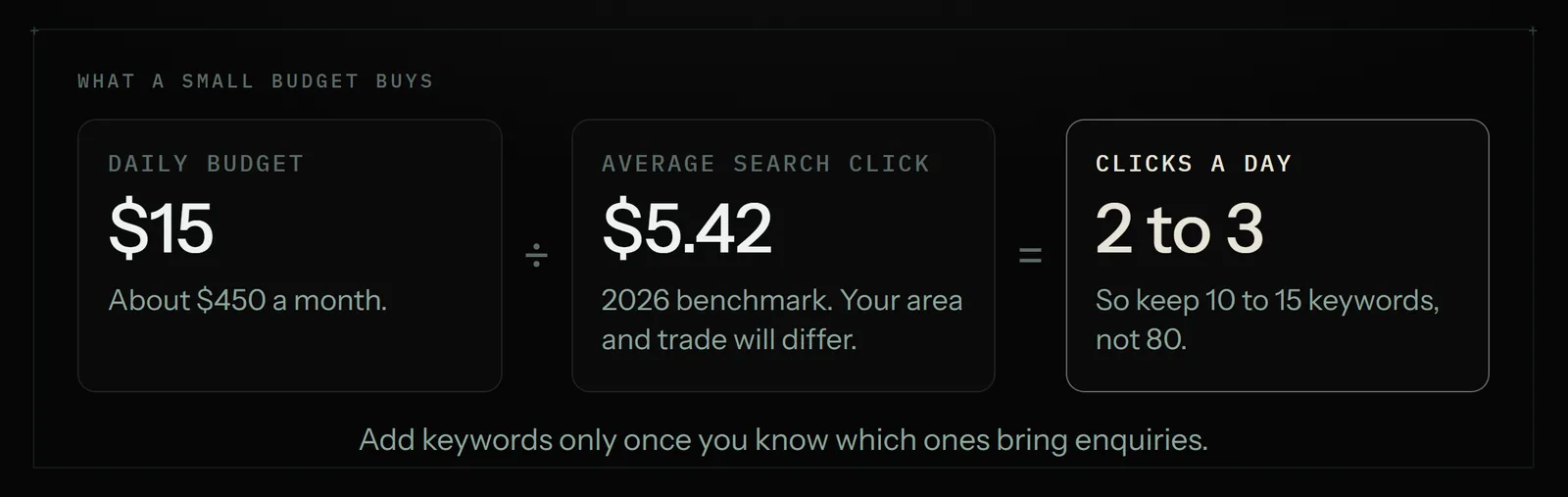
A worked example: a mobile dog groomer
Here is how the steps play out for a one-van mobile dog grooming business. The numbers are illustrative; your own Keyword Planner figures for your area are the ones to trust.
- The three numbers. A first groom brings about $60 profit, and most clients rebook, so the owner values a new client at $150. About one in three enquiries books, so an enquiry is worth $50. The budget is $450 a month, about $15 a day.
- Seeds from the inbox. "mobile dog groomer", "dog grooming at home", "groomer that comes to you", "nail trim for dogs", "puppy first groom", plus the six neighbourhoods served.
- Keyword Planner. Set to a 15-mile radius. It suggests about 120 ideas. Roughly 25 are clearly buying, 60 are researching ("how to groom a dog at home") and 35 are wrong fit ("dog grooming school", "grooming table").
- The cut. The owner keeps 14 buying keywords in two ad groups: "mobile dog grooming" and "dog nail trimming". Phrase and exact match only.
- Negatives. 40 terms, including school, course, jobs, job, salary, table, clippers, DIY, at home kit and the two big chain stores the owner doesn't want to compete with on price.
- After week one. The search terms report shows clicks on "cat grooming" and "dog grooming supplies". Both go on the negative list the same day.
After launch: the search terms report is your real research
Keyword Planner tells you what people might search. The search terms report tells you what they actually typed before clicking your ad. Open it once a week for the first month (it sits with the other reports in your Google Ads account) and do three things:
- Add every irrelevant search term as a negative keyword.
- Add any search term that brought an enquiry as its own phrase or exact keyword.
- Pause keywords that have spent more than your lead ceiling without a single enquiry.
Fifteen minutes a week on this report usually does more for a small account than any tool. It's also the part people forget once the campaign is running. If you'd rather get the numbers in your inbox each Monday, our guide to automating weekly reports shows how.
Keyword research tools for Google Ads, compared
You can do all of the above for free. Paid tools save time or add competitor data. Prices below were checked in November 2026, billed monthly.
| Tool | Price | Good for | Not so good for |
|---|---|---|---|
| Google Keyword Planner | Free with a Google Ads account | Local search volumes, bid ranges, forecasts | Ranges instead of exact numbers on low-spend accounts |
| Google Trends | Free | Seasonality and comparing two phrases | No volumes or bids |
| SpyFu Basic | $39 a month | Seeing which keywords competitors have bought | Smaller local businesses are often missing |
| Semrush Pro | $139.95 a month | Large keyword database, SEO and ads together | Expensive for one campaign |
| Astarii Google Ads Manager | From $29.99 a month (Pro plan) | Doing the research inside your own account and drafting the campaign, paused | No third-party competitor spend data |
If your main question is "what are my competitors bidding on?", SpyFu is the better pick. If you already pay for Semrush for SEO, use it. If you want the legwork done for you inside your own account, that is the job the Astarii Google Ads Manager does.
How the Astarii Google Ads Manager helps
The Google Ads Manager is one of the ready-made Astarii. It reads how your ads are doing, researches keywords in your account and drafts campaigns and ad copy. Everything it creates starts paused, so nothing spends until you review it and turn it on.
In practice that means you can hand it the steps above in plain English: your services, your area, your budget and your click ceiling. It works through Keyword Planner in your account, sorts the ideas, drafts the ad groups and the negative list, and leaves the campaign paused for you to read. If Google asks for a sign-in code, the run pauses and asks you, then carries on. Saved passwords are encrypted in your browser and never shown to the AI.
It can also run on a schedule, for example every Monday at 8am, to read last week's search terms and send you a short list of suggested negatives and new keywords. See scheduling for how that works. You still make the call on each change.
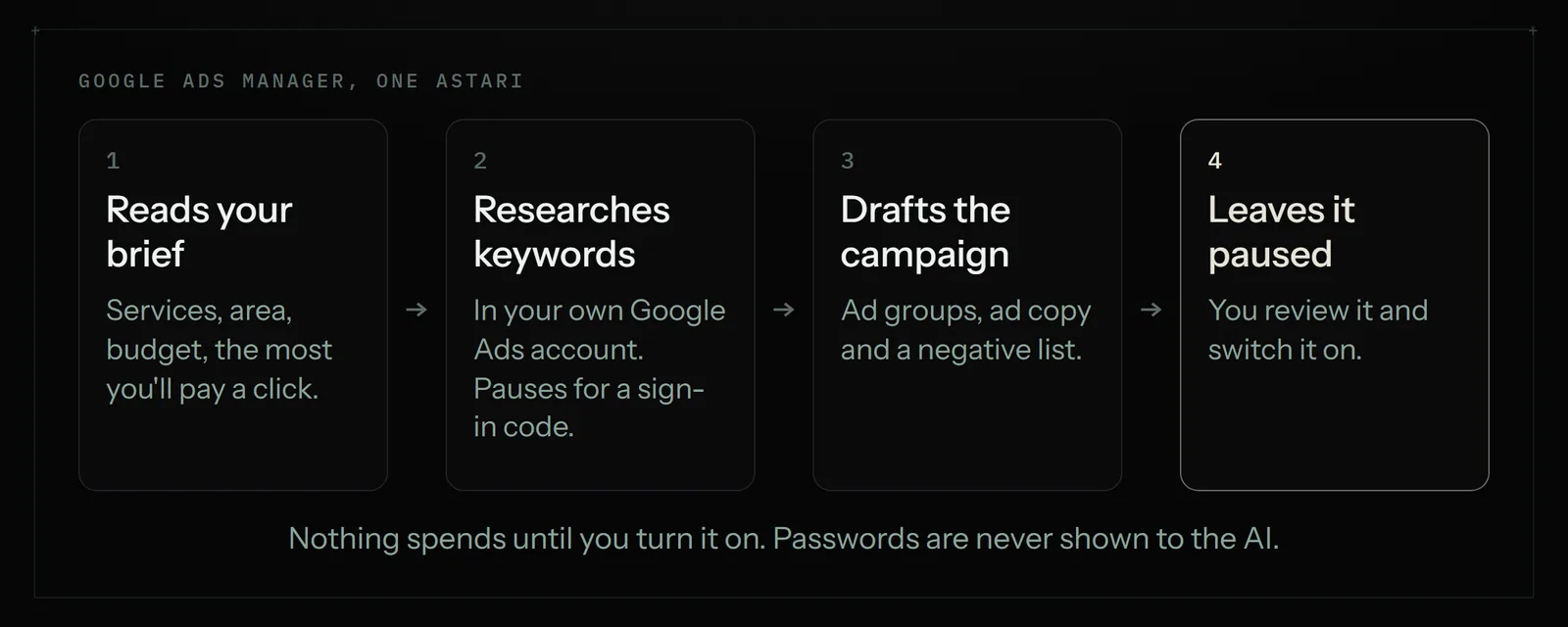
Where it is not the right pick: if you want competitor ad history across thousands of advertisers, a data tool like SpyFu or Semrush has that and Astarii doesn't. And if your whole account is three keywords you check once a month, you don't need help at all.
Mistakes that waste a small budget
- Too many keywords. Eighty keywords on $15 a day means none of them gets enough clicks to judge.
- Chasing volume. High-volume research terms bring readers, not buyers.
- Broad match with no data. Without conversion tracking and Smart Bidding, broad match on a small budget tends to wander.
- The wrong location. Reading national volumes for a local service, or leaving the campaign set to the whole country.
- No negatives on day one. "Jobs", "free" and "course" searches can eat a week's budget before you notice.
- Never opening the search terms report. Your best keyword ideas arrive after launch, from real searches.
Next steps
Do the three numbers, build your seed list from your inbox, and cut it down to 10 to 20 buying keywords with a negative list beside them. If you haven't built the campaign itself yet, our Google Ads guide for small business walks through a starter Search campaign. For other jobs worth handing off, see 15 jobs small businesses give to AI agents and 25 real AI agent examples.
To try the Google Ads Manager, start with 3 free runs, no card needed, or compare plans on the pricing page.
Say it to an Astari
These are instructions you can give an Astari, word for word. It does the work in a browser, on a schedule if you want one, and asks you before anything goes live.
Questions
How do I do keyword research for Google Ads for free?
Use Google Keyword Planner, which is free with any Google Ads account, and Google Trends. Start with phrases from your own customer enquiries, set the location to the area you serve, then sort the suggestions into buying, researching and wrong fit. After launch, the search terms report in your account is free too.
How many keywords should a small Google Ads campaign have?
On a budget of $10 to $20 a day, 10 to 20 keywords in one or two tightly grouped ad groups is usually enough. With only a few clicks a day, a longer list spreads the budget so thinly that no keyword gets enough clicks to judge.
Do I need to spend money to use Google Keyword Planner?
No. You need a Google Ads account, but you do not need a live campaign. Accounts with little or no spend often see search volumes as ranges, such as 100 to 1K, rather than exact numbers, which is still enough to sort keywords.
Which match type is best on a small budget?
Most small accounts do best starting with phrase and exact match on buying keywords. Broad match is the default and reaches the most searches, but it works best with conversion tracking, Smart Bidding and enough budget for Google to learn.
What negative keywords should every small business add?
Common ones are jobs, job, careers, salary, training, course, free, DIY, how to and second hand, plus any service you don't offer. Google says negatives don't match close variants, so add singular, plural and misspelled forms yourself.
How do I know what a keyword is worth paying for?
Work out what a customer is worth in profit, how many enquiries become customers and how many visitors enquire. That gives the most you can pay per click. Compare it with the top-of-page bid range in Keyword Planner and leave keywords well above it for later.
Is SpyFu or Semrush worth it for a small Google Ads account?
Only if you need competitor data. SpyFu Basic is $39 a month and shows keywords competitors have bought; Semrush Pro is $139.95 a month. For one local campaign, Keyword Planner and the search terms report usually cover it.
Can AI do Google Ads keyword research for me?
Yes. The Astarii Google Ads Manager researches keywords in your own Google Ads account and drafts campaigns and ad copy. Everything it creates starts paused, so nothing spends until you review it and switch it on. Plans start at $29.99 a month.
- WordStream: 2026 Google Ads benchmarks
- Google Ads Help: Use Keyword Planner
- Google Ads Help: Understand your Keyword Planner metrics
- Google Ads Help: About keyword matching options
- Google Ads Help: About negative keywords
- Google Ads Help: About the search terms report
- Google Ads Help: About average daily budgets
- Exploding Topics: What is Google Keyword Planner
- SpyFu: Semrush vs SpyFu
- SEO.com: Semrush pricing
filed under Marketing