AI Agent Examples: 25 Real Tasks Small Businesses Hand Off
Most AI agent examples online are about banks, retailers and thermostats. These 25 are the repeated online jobs a small business does by hand today, written the way you would say them, with what comes back and when a cheaper tool fits better.

Good AI agent examples for a small business are repeated online jobs with a clear finish line: invoices from Gmail into a sheet every Friday, a morning order check, competitor prices each weekday, a weekly numbers email from dashboards you log into, and the same web form filled row by row. Keep payments, phone calls and disputes for yourself.
Most lists of AI agent examples are written for large companies: a bank's fraud agent, a retailer's supply-chain planner, a thermostat used to explain textbook "reflex agents". None of that tells a three-person business what to hand off on Monday.
This list is the other kind. Every example below is a real, repeated online task a small business owner, Etsy seller or freelancer does by hand today, written the way you would say it to an agent, with what you get back. Where a cheaper tool or a person is the better pick, it says so. The examples use Astarii because that is what we make, so each one is something a first Astari can really do. For the wider picture, start with the guide to AI agents for small business.
What counts as an AI agent example
Google Cloud's definition is a good one to borrow: AI agents are software systems that pursue goals and complete tasks on behalf of users. The important word is "complete". A chatbot that writes a reply for you to paste is a helper. An agent opens the inbox, writes the reply, saves it as a draft and tells you it is there.
For a small business, that usually means three things happen without you:
- It goes somewhere. Your Gmail, a Google Sheet, a supplier portal, your Etsy shop, an ads account.
- It does several steps. Sign in, find the right items, read them, copy or change something, check its work.
- It reports back. A short email or chat message: what it did, what it skipped, what needs you.
Every example below passes that test. They are grouped by where the work happens, because that decides which tool fits.
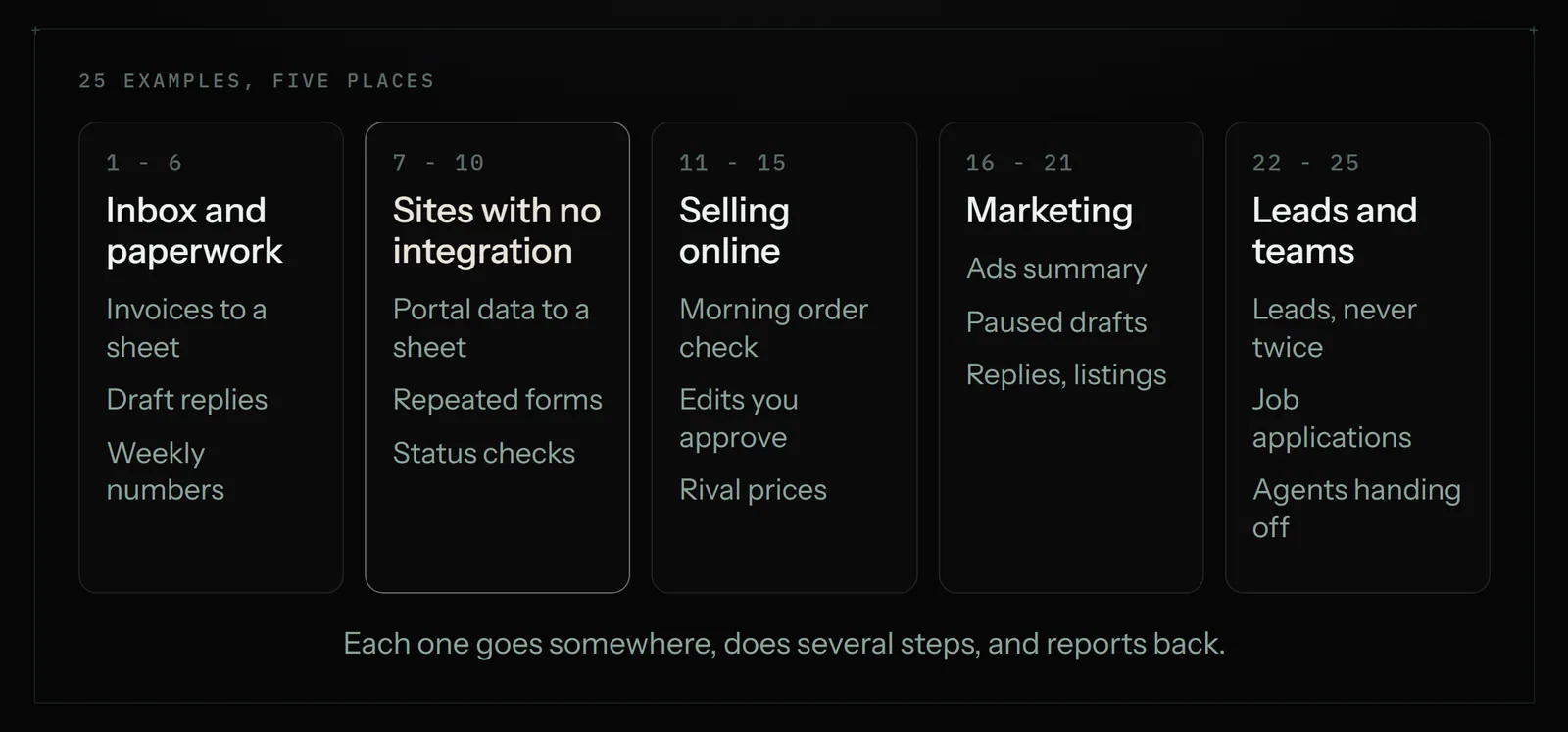
Inbox and paperwork (examples 1 to 6)
These are the jobs owners hand off first, because the finish line is obvious and the risk is low.
- Invoices from email into a sheet. "Every Friday, find this week's supplier invoices in Gmail and add one row each to my Invoices sheet: date, supplier, number, amount. Skip numbers already there." You get a summary email with the week's total. Full walk-through: invoices from Gmail into a Google Sheet.
- Draft replies to common questions. "Each morning, read new emails asking about prices or opening hours and save a reply to each as a draft, using my Answers doc." Nothing is sent. You read the drafts over coffee and press send on the good ones.
- Bookings onto the calendar. "Each morning, add yesterday's booking confirmations to my Google Calendar with the client's name and phone number in the notes." You get a calendar that matches your inbox without retyping.
- Attachments into the right folder. "File every attachment from my accountant into the Tax 2026 folder in Drive, named by date and sender." You get a tidy folder at year end.
- Unpaid invoice reminders. "Every Tuesday, check my Invoices sheet for anything more than 14 days overdue and email each client a polite reminder from my template." You get a list of who was reminded. If any reminder is awkward (a big client, a dispute), keep that one yourself.
- A weekly numbers email. "Every Monday at 8am, sign into the dashboards I saved logins for, pull last week's sales, visits and ad spend, and email me the three numbers with the change from the week before." You get one email instead of five tabs.
Websites with no integration (examples 7 to 10)
This is where an agent that uses a real browser earns its keep. Connector tools such as Zapier and Make need an integration for every app in the job. Plenty of the sites a small business depends on (supplier portals, wholesale catalogues, council and licensing sites, older booking systems) have none.
- Portal data into a sheet. "Sign into my wholesaler's portal, copy this week's new orders into my Orders sheet, and only add rows that aren't there yet." Step by step in automating data entry between websites and Google Sheets.
- The same form, row after row. "For each row in my Registrations sheet, fill in the event sign-up form on the venue's site and mark the row Done." You get a sheet that shows exactly which rows went through and which need you.
- Order and shipment status checks. "Every weekday at 7:30, check each open order on my supplier's site, update the Status column, and email me anything delayed." You hear about the late parcel before the customer does.
- Posting the same listing in several places. "Post my Saturday workshop on these four community event sites using the details in my Events doc, and send me the links." You get four live listings and a list of where they are.
If every app in a job does have an integration, a connector is usually cheaper and faster. We compared them honestly in Zapier vs an AI browser agent.
Selling online (examples 11 to 15)
Shop work is repetitive, but it touches the live shop, so the good examples keep you in charge of every change.
- A morning order check. "Every morning, tell me what sold overnight, which orders ship today, and any message from a buyer that needs me." The Astarii Etsy Manager reads orders and listings and answers questions about them. More shop tools in Etsy tools for sellers.
- Price and description updates you approve. "Raise prices 8% on every listing in the Mugs section and rewrite the first line of each description to mention gift wrapping." Every change to the live shop is proposed first and made only when you approve it. See updating Etsy prices without opening every listing.
- Questions about your own shop. "Which listings have had no sales in the last 90 days?" You get an answer from your real data, not a guess.
- Competitor prices on a schedule. "Every weekday at 7:30, check these 10 rival listings, log price, shipping and sale status in my sheet, and email me only what changed." Full setup in competitor price monitoring for small shops.
- New reviews in one place. "Every Sunday, copy any new reviews from my product pages into the Reviews tab with the date and star rating." You get one list to answer from and to quote on your site.
Marketing (examples 16 to 21)
Marketing jobs are where agents save the most hours and where limits matter most. Each one below has a brake built in.
- A weekly ads summary. "Every Monday, read how my Google Ads did last week and tell me in plain English what spent money without bringing customers." The Google Ads Manager reads your account's results.
- Keyword research and a draft campaign. "Research keywords for my bakery in Leeds and draft a starter Search campaign." Everything it creates starts paused, so nothing spends until you turn it on. The full approach is in Google Ads for small business.
- Useful replies on X. "Reply to people asking questions about sourdough in my voice, a few a day." It replies to real conversations within sensible limits. Why replies beat posts: getting followers on X as a small business.
- Helpful comments on Reddit. "Answer questions in r/Baking where I can help, and mention the shop only when someone asks." On Reddit it warms up a new account first. Read Reddit marketing without getting banned before you start, and check each community's rules.
- A Product Hunt launch draft. "Draft my Product Hunt launch from my landing page." It drafts the launch for your approval; you post it yourself. The checklist: how to launch on Product Hunt.
- Startup directory listings. "List my product on the directories in my sheet, a couple a day, and log the link for each." Our checked list is in startup directories to submit to.
Leads, hiring and team jobs (examples 22 to 25)
- A lead list that never repeats. "Every weekday, find five new wedding planners in Bristol from these directories, add them to my Leads sheet, and email each one my intro." Task memory means a scheduled Astari never re-emails a lead it has already contacted.
- Job applications for a freelancer between contracts. "Find new remote bookkeeping contracts that fit my profile, tailor my résumé to each, and apply." The Job Hunter never applies to the same job twice.
- Two agents handing work over. "One Astari gathers last week's numbers from my dashboards; a second writes the client update email from them." Several Astarii can hand work to each other, with one chat for the whole team.
- Notes into a document. "Every Friday, turn this week's client emails into a one-page summary per client in Google Docs." You get a running record you can share with a partner or an accountant.
The 25 at a glance
Here is the whole list with where each job runs, a sensible schedule, and the cheapest tool that would also do it. "Agent" means a browser agent such as Astarii.
| # | Job | Where it works | Schedule | Also doable with |
|---|---|---|---|---|
| 1 | Invoices into a sheet | Gmail, Sheets | Weekly | Zapier or an email parser, if invoices are attachments |
| 2 | Draft replies | Gmail, Docs | Daily | Gmail templates, by hand |
| 3 | Bookings to calendar | Gmail, Calendar | Daily | Zapier, if the booking tool has an integration |
| 4 | Attachments to Drive | Gmail, Drive | Daily | Zapier or Make |
| 5 | Overdue reminders | Sheets, Gmail | Weekly | Your invoicing software's built-in reminders |
| 6 | Weekly numbers email | Dashboards behind logins | Weekly | Agent only, unless every dashboard has an integration |
| 7 | Portal data into a sheet | Supplier portal, Sheets | Daily or weekly | Agent only, for portals with no integration |
| 8 | Repeated web form | Any website | Once per batch | A form-filler extension, for simple forms |
| 9 | Shipment status | Supplier or carrier site | Weekdays | Carrier email alerts |
| 10 | Listing on several sites | Community sites | Per event | By hand |
| 11 | Morning order check | Etsy | Daily | The Etsy app's notifications |
| 12 | Price and description edits | Etsy (approved first) | As needed | Shop Manager bulk edit, for one change on every listing |
| 13 | Questions about the shop | Etsy | As needed | Etsy stats, by hand |
| 14 | Competitor prices | Rival shops, Sheets | Weekdays 7:30 | A page-change alert tool |
| 15 | New reviews log | Product pages, Sheets | Weekly | By hand |
| 16 | Ads summary | Google Ads | Weekly | Google Ads email reports |
| 17 | Keywords and draft campaign | Google Ads (paused) | Once | Keyword Planner, by hand |
| 18 | Replies on X | X | Daily, limited | You, 15 minutes a day |
| 19 | Reddit comments | Daily, limited | You, after reading the rules | |
| 20 | Product Hunt draft | Product Hunt (you post) | Once | ChatGPT for the copy |
| 21 | Directory listings | Startup directories | A couple a day | A paid submission service |
| 22 | Lead list and intro | Directories, Sheets, Gmail | Weekdays | A bought list (not recommended) |
| 23 | Job applications | Job boards | Daily | By hand |
| 24 | Two-agent report | Dashboards, Gmail | Weekly | A virtual assistant |
| 25 | Client summaries | Gmail, Docs | Weekly | ChatGPT, if you paste the emails in |
The right-hand column is the honest part. If a cheaper tool does the job well, use it. An agent is worth paying for when the work crosses several sites, needs sign-ins, or needs a little reading and judgment that a fixed rule can't do.
Examples that are a bad fit
Some jobs look repetitive but shouldn't go to an agent, or shouldn't go without you watching:
- Moving money. Refunds, supplier payments, payroll, turning ad spend on. Let software prepare them; press the button yourself.
- Phone calls and visits. A browser agent works on websites and in your inbox. It can't take a call.
- Upset customers and disputes. A draft can help, but the reply should come from you.
- Legal and tax sign-offs. Declarations, contracts and filings carry your name. Read them yourself.
- One-off work. If you will do it once, doing it yourself is faster than describing it.
- Anything a site forbids. Some sites ban automated use in their terms. Check before you hand off a job on them.
The rest stays safe because of how an Astari is built. It pauses and asks you when a site texts a code or something needs a decision, then carries on from where it stopped. Saved passwords are encrypted in your browser before they are stored and are never shown to the AI. Shop changes wait for approval, and ad campaigns start paused.
How to pick your first three
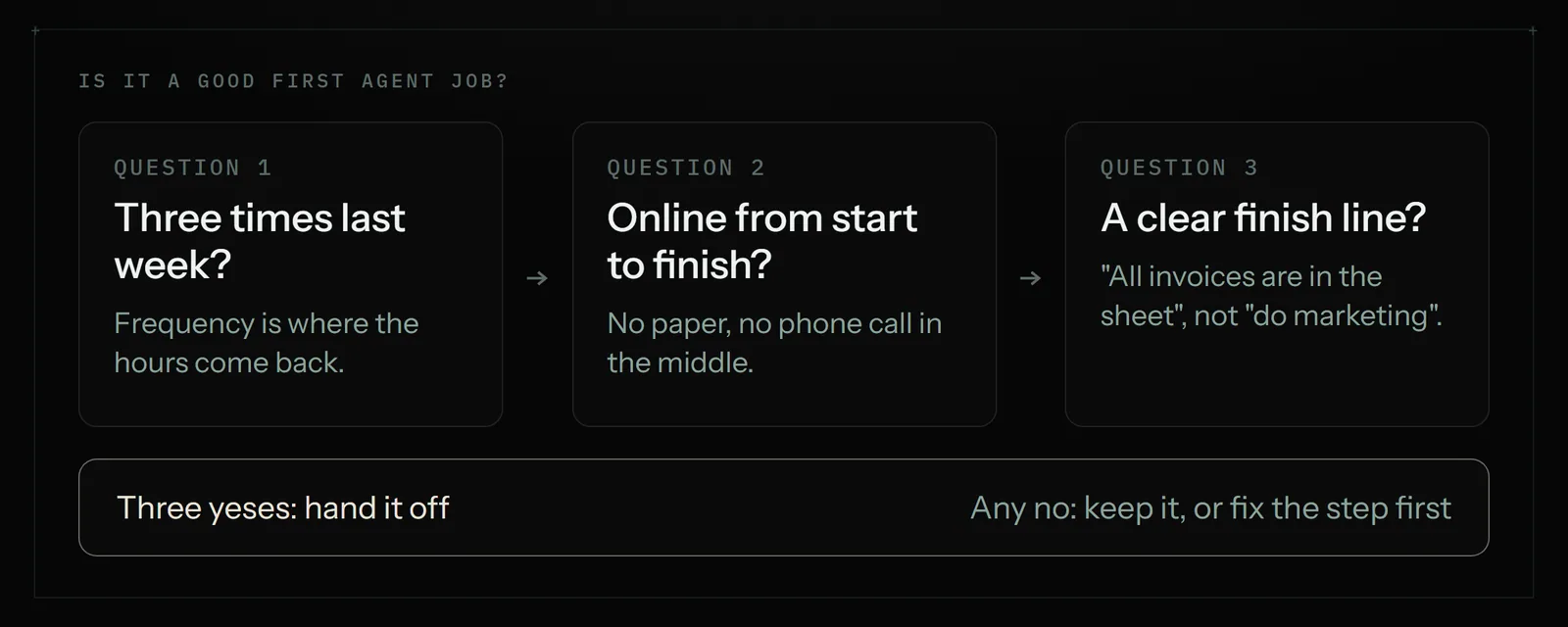
Run each candidate through three questions:
- Did you do it at least three times last week? Frequency is where the time comes back.
- Is it online, from start to finish? If any step happens on paper or on the phone, it isn't a full handoff.
- Can you say when it's done? "All of this week's invoices are in the sheet" is a finish line. "Make marketing better" is not.
Three yeses make a good first job. Most owners end up with examples 1, 6 and 9 or 11: invoices, a weekly numbers email, and a morning check. If you want a structured way to find yours, try the 30-minute repetitive-task audit.
Setting one up
With Astarii there is no code and nothing to install to start. You describe the job in plain English, or show it once. You connect Gmail or Outlook, Google Sheets, Docs, Calendar and Drive if the job needs them (connections), save the logins for any other sites (identities and sign-ins), and pick a schedule such as every weekday at 7:30 or every Friday (scheduling). Runs can happen in the cloud with your computer off, in your own Chrome or Brave through the extension, or on a Windows PC through the desktop app.
On cost: there are 3 free runs of up to 15 minutes each with no card. After that, Pro is $29.99 a month with 900 cloud minutes plus 800 browser minutes, Max is $49.99 and Ultra is $99.99, metered by each run's real length (pricing). As a rough guide, a job that takes 5 minutes a run, every weekday, uses about 110 minutes a month, well inside Pro's pool. If the work is mostly phone calls or customer care, a person is still the better buy; we compared the two in virtual assistant vs AI agent, and covered the "AI employee" pitch in AI employees explained.
The bottom line
The best AI agent examples for a small business aren't impressive. They are the dull jobs you did three times last week: invoices into a sheet, the morning order check, the Monday numbers, the same form for the fifth time. Pick three, keep money and judgment for yourself, and let the agent report back. To try one, set up your first Astari or browse the apps.
Say it to an Astari
These are instructions you can give an Astari, word for word. It does the work in a browser, on a schedule if you want one, and asks you before anything goes live.
Questions
What are some examples of AI agents for small business?
Common ones: copying invoices from Gmail into a Google Sheet every Friday, a morning Etsy order check, competitor prices logged each weekday, a weekly numbers email from dashboards you sign into, filling the same web form from rows in a sheet, and drafting replies to common questions for you to send.
What is the difference between an AI agent and a chatbot?
A chatbot writes an answer for you to copy somewhere. An agent completes the task: it opens the inbox or website, does the steps, checks its work and reports back. Google Cloud describes agents as software that pursues goals and completes tasks on behalf of users.
What tasks should a small business automate first?
Pick jobs you did at least three times last week, entirely online, with an obvious finish line. Invoices into a sheet, a weekly numbers email and a morning order or shipment check are the usual first three.
Can an AI agent work on websites without an integration?
A browser agent can. Astarii uses a real browser to open sites, sign in with saved logins, click, type and fill forms, so it works on supplier portals and older sites that connector tools such as Zapier cannot reach.
What should I not hand to an AI agent?
Moving money, phone calls, upset customers, legal and tax sign-offs, one-off jobs, and anything a site bans in its terms. Let software prepare drafts for those, and make the final call yourself.
Will an AI agent change my shop or ads without asking?
With Astarii, no. The Etsy Manager proposes every change to your live shop and makes it only when you approve, and everything the Google Ads Manager creates starts paused, so nothing spends until you turn it on.
How much does it cost to run these examples?
Astarii has 3 free runs of up to 15 minutes each with no card. Plans are 9.99, 9.99 and 9.99 a month, metered by each run's real length. Pro includes 900 cloud minutes plus 800 browser minutes.
Do I need to code to set up an AI agent?
No. With Astarii you describe the job in plain English or show it once, connect the apps it needs and pick a schedule. Nothing has to be installed to start.
filed under AI agents explained