Inventory Management Spreadsheet for a Small Shop: Layout, Formulas and How to Keep It Current
Most stock sheets die in week three, when the typing stops. Here is a four-tab layout with formulas to copy, two ways to set reorder points, and five ways to keep it current.

An inventory management spreadsheet for a small shop needs four tabs: Movements (every sale, delivery and breakage), Orders, Items with formulas for stock on hand and reorder points, and a Reorder list. Build it free in Google Sheets. Keep it current with weekly CSVs, a connector from $19.99 a month, or a scheduled helper such as Astarii from $29.99.
An inventory spreadsheet rarely fails because of its formulas. It fails because somebody has to type in every sale, every delivery and every broken mug, and by the third week nobody does. The sheet says 14, the shelf says 9, and you stop trusting it.
So this guide does two things. First, a layout you can build in Google Sheets in about an hour, with formulas to copy. Then the harder part: five ways to keep it current, from free to paid, with prices read on vendors' own pages on 24 November 2026. We make Astarii, an AI helper that can do some of that upkeep on a schedule, and we will say where it fits and where a proper inventory app is the better buy. For the wider list of jobs you can hand off, start with the guide to AI agents for small business.
The short version
- Use four tabs: Items, Movements, Orders and Reorder. You log things in two of them. The other figures calculate themselves.
- Never type a new stock number over the old one. Every change is a row in Movements, so you can always see why a figure is what it is.
- Give each item a reorder point, so the sheet tells you what to buy and when.
- Count a few items every week instead of everything once a year.
- Automate the typing only after the sheet works by hand for two weeks.
Is a spreadsheet enough for your shop?
Often, yes. A sheet is a good fit when you have up to a couple of hundred items, one or two places you sell, one stockroom, and one or two people touching the numbers. That is our rule of thumb, not a hard limit.
It stops being a good fit when two sales channels can sell the last unit at the same moment, when several people scan stock in and out all day, or when you need batch numbers and expiry dates. If that is you, skip to when to move to an inventory app.
Also check what you already own. If you sell through a point-of-sale system or a shop platform that tracks stock, let it be the master copy. Square's page says basic item management comes with its free plan, and Square Plus, at $49 a month per location, adds more inventory features. Running a second stock count in a sheet next to it just gives you two numbers to argue about.
The layout: four tabs
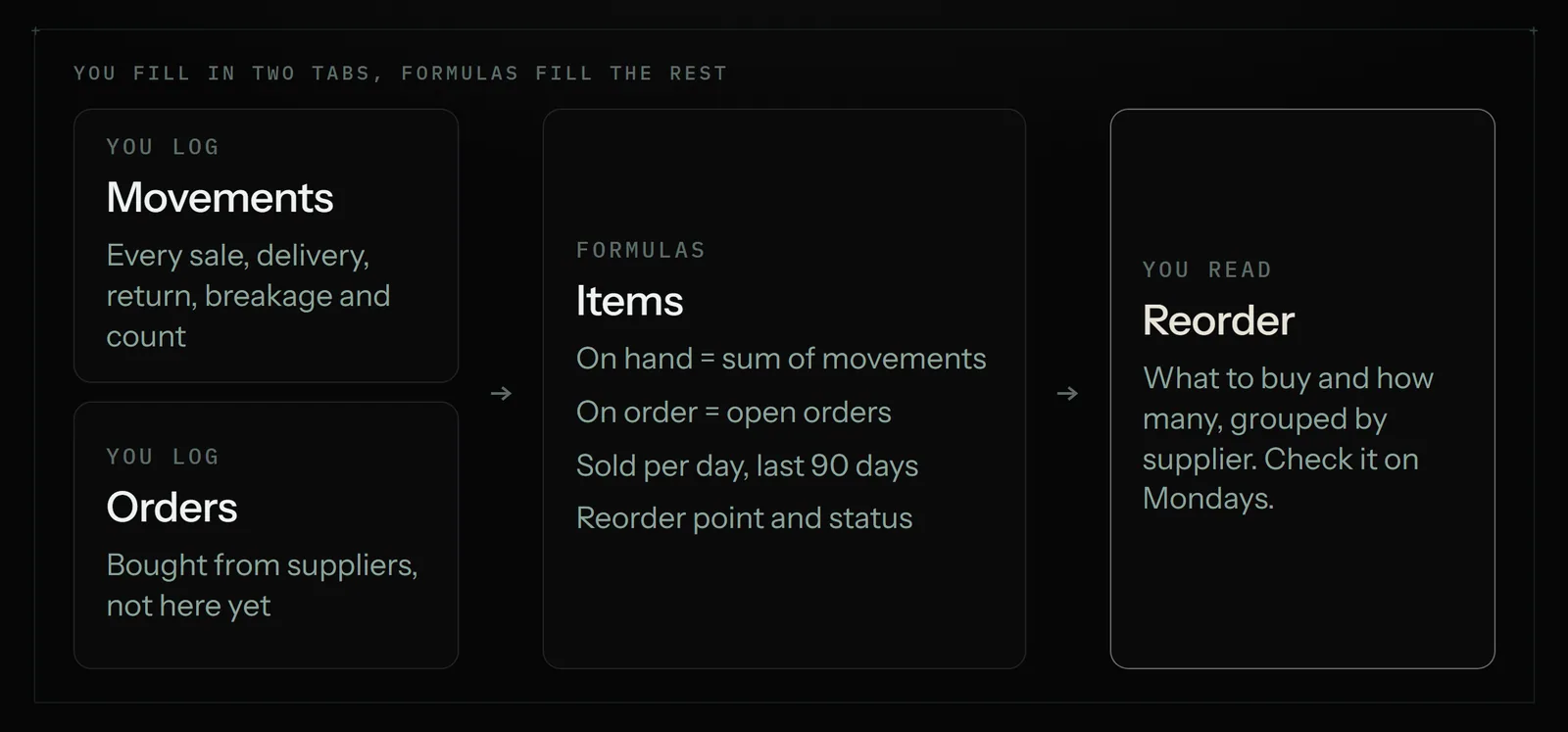
Tab 1: Movements
This is the log, and the most important tab. One row for every time stock goes up or down.
| Column | What goes in it | Example |
|---|---|---|
| A Date | The day it happened | 2026-11-24 |
| B SKU | Your item code, the same spelling every time | CND-08 |
| C Type | Dropdown: Opening, Sale, Received, Return, Damaged, Count | Sale |
| D Qty | Plus for in, minus for out | -2 |
| E Reference | Order or delivery number, so nothing is logged twice | Order 4471 |
| F Note | Anything odd | Gift order |
Two setup details save trouble later. Format the SKU column as plain text on every tab, or codes such as 0042 will lose their zeros. And make Type a dropdown (Data, then Data validation), because formulas treat "Sale" and "Sold" as different things.
Tab 2: Orders
What you have bought but not yet received. Columns: A date ordered, B SKU, C supplier, D quantity, E expected date, F status (Open or Received). When a delivery lands, change the status to Received and add a Received row to Movements for what actually arrived, which is not always what you ordered.
Tab 3: Items
One row per item. The first seven columns are facts you enter once.
| Column | What you type | Example |
|---|---|---|
| A SKU | Same code as in Movements | CND-08 |
| B Item | Name | Soy candle, 8 oz |
| C Supplier | Who you buy it from | Your candle supplier |
| D Unit cost | What you pay for one | 6.00 |
| E Lead days | Usual days from ordering to delivery | 10 |
| F Buffer days | Extra days of cover you want | 7 |
| G Pack size | How many come in a box; 1 if you can buy singles | 12 |
The other seven are formulas. Paste each into row 2 of its column:
- H On hand (everything in, minus everything out):
=SUMIFS(Movements!D:D,Movements!B:B, A2) - I On order (bought, not here yet):
=SUMIFS(Orders!D:D,Orders!B:B, A2, Orders!F:F, "Open") - J Sold per day (average over the last 90 days):
=SUMIFS(Movements!D:D,Movements!B:B, A2, Movements!C:C, "Sale", Movements!A:A, ">"&TODAY()-90)/-90 - K Reorder point (buy when you reach this):
=ROUNDUP(J2*(E2+F2),0) - L Status (OUT, REORDER or OK):
=IF(H2<=0,"OUT", IF(H2+I2<=K2, "REORDER", "OK")) - M Order qty (enough for delivery time plus 30 days, in full packs):
=IF(L2="OK",0, CEILING(MAX(0, J2*(E2+30)-H2-I2), G2)) - N Stock value (what the shelf cost you):
=H2*D2
Copy row 2 down for every item. One warning: the sold-per-day formula divides by 90, so an item you have only stocked for a month will look slower than it is. For new items, change both 90s (keep the minus sign) to the number of days it has been on sale.
Tab 4: Reorder
The only tab you need to read on a Monday. Put this in cell A2, with headings in row 1:
=QUERY(Items!A2:N,
It lists everything out of stock or due for reorder, grouped by supplier, with a suggested quantity. Items that are out but already on order still show, with the amount on order beside them, so you know to chase rather than buy again.
Reorder points: two ways to set them
The reorder point is the number that means "buy more now". Shopify's guide gives the standard formula: average sales rate times lead time, plus safety stock. The only real question is how big the safety stock should be.
- The lean way (used in the sheet above). Average daily sales times lead days plus a buffer you choose. Simple, and it ties up less cash.
- The cautious way. Shopify describes safety stock as maximum daily sales times maximum lead time, minus average daily sales times average lead time. Add that to average sales times average lead time and the averages cancel out. What is left is your busiest day times your slowest delivery.
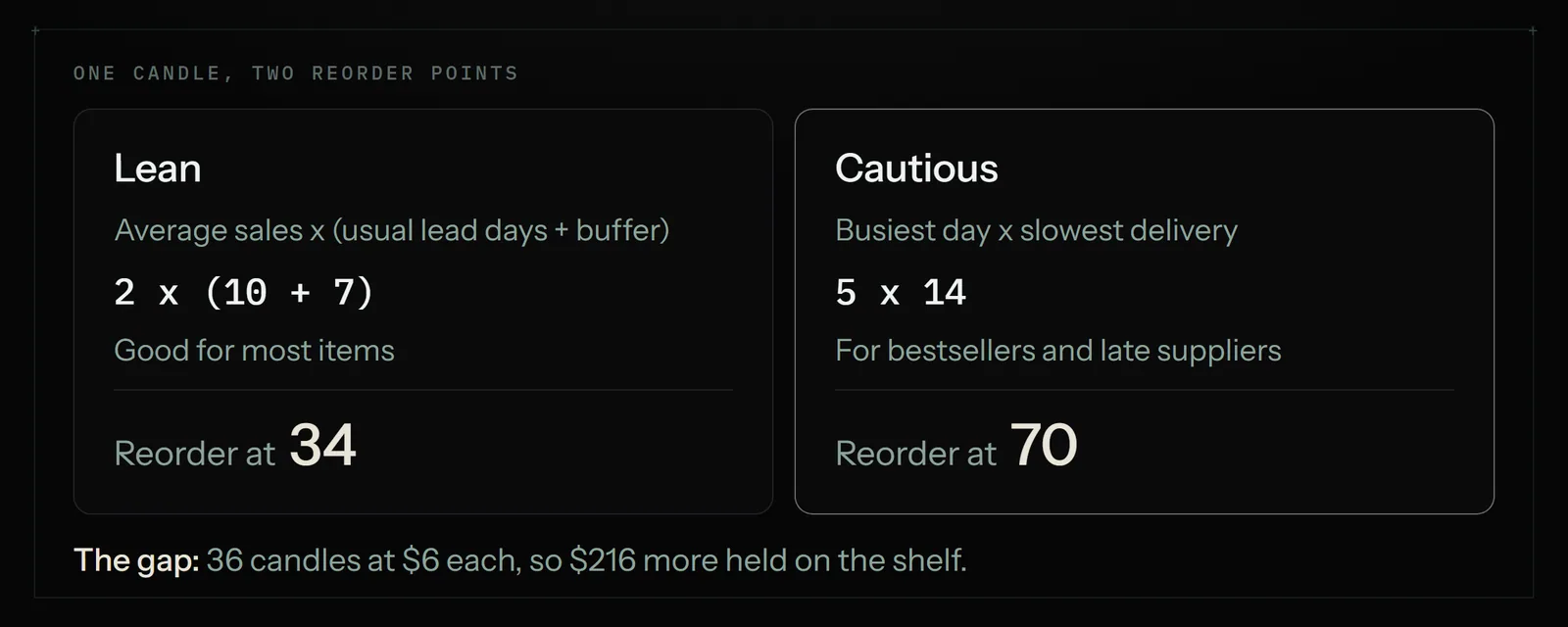
Here is the worked example. A candle sells 2 a day on average and 5 on its best day. The supplier usually takes 10 days and once took 14. Each candle costs $6, and they come in boxes of 12.
- Lean, with a 7-day buffer: 2 x (10 + 7) = reorder at 34.
- Cautious: 5 x 14 = reorder at 70.
- The difference: 36 candles, or $216 more sitting on a shelf.
With 28 on hand and none on order, the lean sheet says REORDER. The order quantity is 2 x (10 + 30) - 28 = 52, rounded up to full boxes of 12, so 60 candles for $360.
Use the cautious number for your bestsellers and for anything from a supplier who is often late: type it over the formula in column K, and raise the 30 in column M so the order takes you well past it. Use the lean number for everything else. Neither predicts a busy season, so raise the buffer before one. If your own item costs are shaky, the pricing guide with worked fee examples is a good place to fix them.
Counting: ten items a week
Every stock sheet drifts. Things break, get given away or get packed twice. A short weekly count catches it while you can still remember why.
- Pick ten items: a few bestsellers, and a few you have not counted for longest.
- Count the shelf without looking at the sheet first.
- If the numbers differ, add one Count row to Movements for the difference. If the sheet says 14 and you count 9, the row is -5.
- Write the reason in Note if you know it. Three "packed twice" notes in a month is a process problem, not a counting problem.
At ten a week, a 120-item shop gets round everything about four times a year. You may also need a full count for your books at year end; ask your accountant what they want and when.
Five ways to keep the sheet current
The sheet above needs two things logged: what sold and what arrived. Here is how to stop doing it all by hand.
| Way | Cost (24 Nov 2026) | Good for | Where it stops |
|---|---|---|---|
| 1. Weekly CSV paste | Free | A few dozen orders a week, if your shop platform exports orders | The sheet is up to a week behind; someone has to remember |
| 2. A Google Form on a phone | Free | Deliveries, breakages and counts, logged where they happen | Relies on people filling it in |
| 3. Connector such as Zapier | Free for 100 tasks a month; Professional from $19.99 | One sale in a supported app becomes one row | Sites and suppliers with no integration |
| 4. AI helper such as Astarii | From $29.99 a month after 3 free runs | Reading orders and supplier portals you sign into, and writing up a Monday reorder list | Runs at set times, not live; cannot count a shelf |
| 5. Inventory app | Sortly free for 100 items; Zoho Inventory from $29 billed annually | Scanning, several channels, several people | Moving in takes time; another subscription |
Google Sheets can also email you when a cell changes, through Tools, then Conditional notifications. Google's help page says it is only available to certain work or school accounts and does not send to non-Google addresses, so check whether you have it before you plan around it.
For the general version of this choice, see how to automate Google Sheets without code. If you sell on Etsy, the Etsy order spreadsheet guide covers getting orders into rows, which is exactly the feed Movements needs.
What an Astari can do here, step by step
Astarii has no built-in inventory feature. It works in your sheet and on the websites you already use, the way a part-time assistant would. A sensible setup for a small shop:
- Each weekday morning, read the new orders since the last run (through the Etsy Manager for an Etsy shop, or by signing into your shop's admin) and add one Sale row per item to Movements, with the order number as the reference. Scheduled Astarii remember what they handled, so an order is not logged twice.
- Once a week, sign into two or three supplier portals, look up the items on your Reorder tab, and note each one's price and whether it is in stock.
- Every Monday, email you the reorder list by supplier with the suggested quantities, and stop there. You place the order.
Saved passwords are encrypted in your browser and never shown to the AI. If a supplier site texts you a sign-in code, the run pauses, asks you, and carries on. Identities and sign-ins explains how to save a login. Some supplier terms forbid automated access, so check them first, and if a portal offers a stock email or a CSV, use that instead.
On minutes: a 10-minute run each weekday is about 220 a month, and a 15-minute supplier check each week about 65 more. That is roughly 285 of the 900 cloud minutes on the $29.99 Pro plan. These are our estimates; time your own first runs.
When to move to an inventory app
Move when the sheet costs you sales or sleep. Common signs: you have oversold the same item twice, two people edit the sheet at once, or you need barcodes, batches or several stockrooms.
- Sortly has a free plan for 100 unique items and one user. Advanced is $49 a month, or $24 a month billed yearly, for 500 items and two users. The product covers low stock alerts and barcodes; check which plan includes what you need.
- Zoho Inventory Standard is $29 a month billed annually, for 500 orders a month, 3 users and 2 locations.
- Square is the obvious pick if you already take payments with it: free for the basics, $49 a month per location for Plus.
- Stocksmith suits makers who need materials and recipes as well as finished stock. Its page points very low-volume, single-channel sellers to Pro from $20 a month.
Your four tabs are not wasted. The Items tab is most of what you would import into any of these.
Where Astarii is not the right pick
- You need live stock across channels. A morning run cannot stop two shops selling the last one at noon. Use an app that syncs.
- Your platform already tracks stock. Let it. A sheet beside it is extra work.
- You have 20 items and 30 orders a month. The free sheet and a weekly paste take minutes.
- Every app you use has a connector. Zapier is cheaper and faster for plain one-sale-one-row rules.
- You want someone to count shelves or place orders unseen. Counting needs hands, and spending should stay with you.
Build it this month
- Day 1: make the four tabs and enter your 20 best-selling items. Add one Opening row each from a real count.
- Days 2 to 7: log sales and deliveries by hand. You will find your missing SKUs.
- Week 2: add the remaining items, set lead and buffer days, and do your first ten-item count.
- Week 3: if the numbers match the shelf, automate the typing. Use the free routes first. If the typing lives on sites with no connector, Astarii's plans start at $29.99 a month, with 3 free runs and no card needed.
Related reading: checking rivals' prices on a schedule and moving data from websites into Google Sheets.
Say it to an Astari
These are instructions you can give an Astari, word for word. It does the work in a browser, on a schedule if you want one, and asks you before anything goes live.
Questions
How do I make an inventory spreadsheet in Google Sheets?
Make four tabs: Movements, Orders, Items and Reorder. Log every stock change as a row in Movements with a plus or minus quantity, then total it per item with SUMIFS on the Items tab. Add a reorder point and a status formula, and use QUERY to list whatever needs buying.
What columns should an inventory spreadsheet have?
For each item: SKU, name, supplier, unit cost, lead days, buffer days, pack size, on hand, on order, sold per day, reorder point, status, order quantity and stock value. Keep the log of changes on its own tab with date, SKU, type, quantity, reference and note.
What is the reorder point formula?
Reorder point = average daily sales x lead time in days + safety stock. If an item sells 2 a day, takes 10 days to arrive and you want 7 days of buffer, reorder at 2 x 17 = 34 units. In Google Sheets, with daily sales in J, lead days in E and buffer days in F: =ROUNDUP(J2*(E2+F2),0).
Is there a free inventory management spreadsheet template?
Yes, many, and you can build this one free by copying the columns and formulas in this guide into Google Sheets. A template does not solve the hard part, which is logging every sale and delivery, so decide how that will happen before you pick one.
Can Google Sheets send a low stock alert?
Sometimes. Google Sheets has conditional notifications under Tools, but Google says they are only available to certain work or school accounts and do not go to non-Google addresses. Otherwise use a Reorder tab you check weekly, an add-on, or a scheduled helper that emails you the list.
When should I stop using a spreadsheet for inventory?
When you oversell because two channels sell the same last unit, when several people edit stock at once, or when you need barcodes, batches or several stockrooms. Sortly is free for 100 items, and Zoho Inventory Standard is $29 a month billed annually (checked 24 November 2026).
Can AI keep my inventory spreadsheet up to date?
Partly. A helper such as Astarii, from $29.99 a month, can read new orders, add rows to your sheet on a schedule, check supplier portals you sign into and email a reorder list. It runs at set times rather than live, it cannot count your shelves, and you should place the orders yourself.
How often should a small shop count stock?
Ten items a week is a workable pace for a small shop. At that rate a 120-item shop checks everything about four times a year. Record any difference as its own row rather than typing over the total, and ask your accountant whether you also need a full count at year end.
filed under Online selling