Etsy Order Spreadsheet: Keep Orders, Fees, and Shipping in Google Sheets Automatically
Etsy tells you what you sold, not what you kept. Here are the columns and formulas for a sheet that shows profit on every order, and five ways to stop it going stale.

An Etsy order spreadsheet has one row per item sold: date, order number, item, sale price, shipping, Etsy fees, your costs and profit. Fill it free from Etsy's monthly CSV in Shop Manager. Zapier has no official Etsy integration, so for daily updates use an order-email parser or a browser agent such as Astarii, from $29.99 a month.
Etsy tells you what you sold. It doesn't tell you what you kept on each order after fees, postage and materials, in one place you can sort. That's why most sellers end up with a spreadsheet, and why most of those spreadsheets stop being updated around March.
This guide gives you the columns and formulas to build one in Google Sheets, then compares the ways to fill it: Etsy's free CSV, order emails and a parser, accounting tools, and an AI helper such as the Astarii Etsy Manager that reads new orders and adds the rows on a schedule. If AI helpers are new to you, the guide to AI agents for small business covers the basics.
What Etsy already gives you for free
Before you buy a template or a tool, know what's in Shop Manager. Etsy has two separate downloads, and they answer different questions.
- The order download. In Shop Manager, go to Settings, Options, then the Download Data tab. Under Orders, choose a CSV Type, a Month and a Year, then select Download CSV. The types are order items, orders, Etsy Payments sales and Etsy Payments deposits. Leave Month empty to get the whole year. Etsy says the file includes payment method, item price, item title and SKU numbers if you've added them.
- The monthly statement. In Shop Manager, go to Finances, Monthly statements, View all monthly statements, pick the month and select Generate CSV. Etsy emails you when the file is ready. Each statement holds all the activity in your Payment account for that month: sales, fees, taxes and deposits.
Use the order items file for your sheet, because it gives each item its own line. Keep the monthly statement as your check against what Etsy actually charged. For recent activity, the Payment account shows each order's fees and net earnings under Recent activities, going back 60 days.
The columns your Etsy spreadsheet needs
Three tabs are enough: Orders (one row per item sold), Costs (what each product costs you to make) and Monthly (totals and your check against the statement). Here's the Orders tab.
| Column | What goes in it | Where it comes from |
|---|---|---|
| A Order number | Etsy's order ID, your key for spotting duplicates | Order items CSV |
| B Date | Sale date, as a real date, not text | Order items CSV |
| C Item | Listing title | Order items CSV |
| D SKU | Your code, if you use them | Order items CSV |
| E Quantity | Units on this row | Order items CSV |
| F Item total | Price times quantity, after any discount | Order items CSV |
| G Shipping charged | What the buyer paid you for shipping | Order items CSV |
| H Sales tax | Tax collected, kept apart because it isn't income | Order items CSV |
| I Transaction fee | Formula, below | Calculated |
| J Processing fee | Formula, below | Calculated |
| K Listing fee | Formula, below | Calculated |
| L Offsite Ads fee | Only on orders Etsy charged it on | Payment account |
| M Materials | Quantity times your unit cost | Costs tab |
| N Postage paid | Label plus packing | Your label receipts |
| O Profit | Formula, below | Calculated |
Leave out buyer names and street addresses unless you need them. Etsy already holds them, and a shared sheet full of customer addresses is a liability with no upside for profit tracking.
The formulas, using current US fees
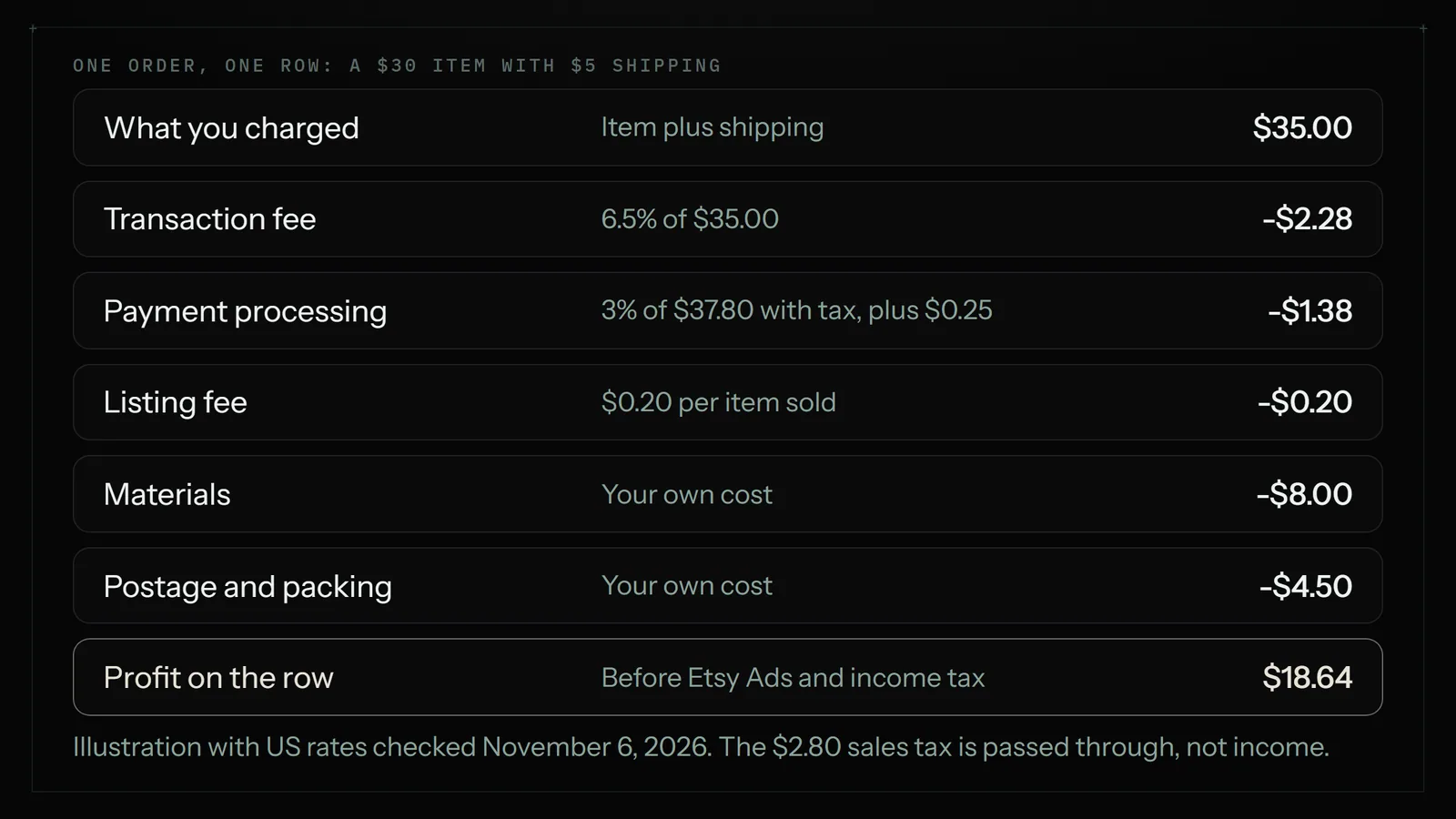
On Etsy's published US rates, the listing fee is $0.20, the transaction fee is 6.5% of the order including shipping and gift wrap, and Etsy Payments processing is 3% plus $0.25. Put these in row 2 and copy them down:
- Transaction fee (I2):
=ROUND((F2+G2)*0.065,2) - Processing fee (J2):
=ROUND((F2+G2+H2)*0.03+0.25,2) - Listing fee (K2):
=E2*0.2 - Materials (M2):
=E2*XLOOKUP(D2,Costs!A:A,Costs!B:B,0) - Profit (O2):
=F2+G2-I2-J2-K2-L2-M2-N2
The processing formula includes sales tax because seller guides report that Etsy charges processing on the full amount the buyer pays. Sellers outside the US pay different processing rates, and some countries add a regulatory operating fee, so swap in your own numbers from Etsy's fee page. An order with two items pays the $0.25 once, not twice, so multi-item orders will read a few cents high on this sheet. For most shops that's small enough to leave and catch at month end.
Don't forget Offsite Ads
Offsite Ads are the fee that surprises people. Etsy's help page says shops under $10,000 in sales over the past 365 days pay 15% on orders it attributes to those ads and can opt out, while shops at or above that level pay 12% and can't. On the order above, 15% of $35 is $5.25, which takes profit from $18.64 to $13.39. You can't predict which orders get charged, so column L has to come from the Payment account or the monthly statement. Etsy Ads, by contrast, are charged separately and aren't tied to one order, so put them on the Monthly tab.
The Monthly tab: why your sheet won't match your bank
Add up each month with =SUMIFS(Orders!O:O,Orders!B:B,">="&A2,Orders!B:B,"<"&EDATE(A2,1)), where A2 holds the first day of the month. Then compare your fee columns against the monthly statement. If they differ by more than a few dollars, trust the statement and find out why.
Don't expect any of it to match your deposits. Etsy says so itself: a deposit is what's available in your Payment account after fees, refunds and taxes, and it leaves out sales that haven't cleared. New sellers generally wait 14 days for funds, while established shops may see them the next business day. So a deposit often mixes sales from two periods. Shipping labels, Etsy Ads and listing fees come out of your balance when they're charged, whichever order they relate to. Track profit by sale date, and treat deposits as a cash question.
Refunds need one more step. Add a row with the order number and negative amounts, rather than editing the original. Your totals stay right, and you can still see what happened.
Five ways to keep it filled
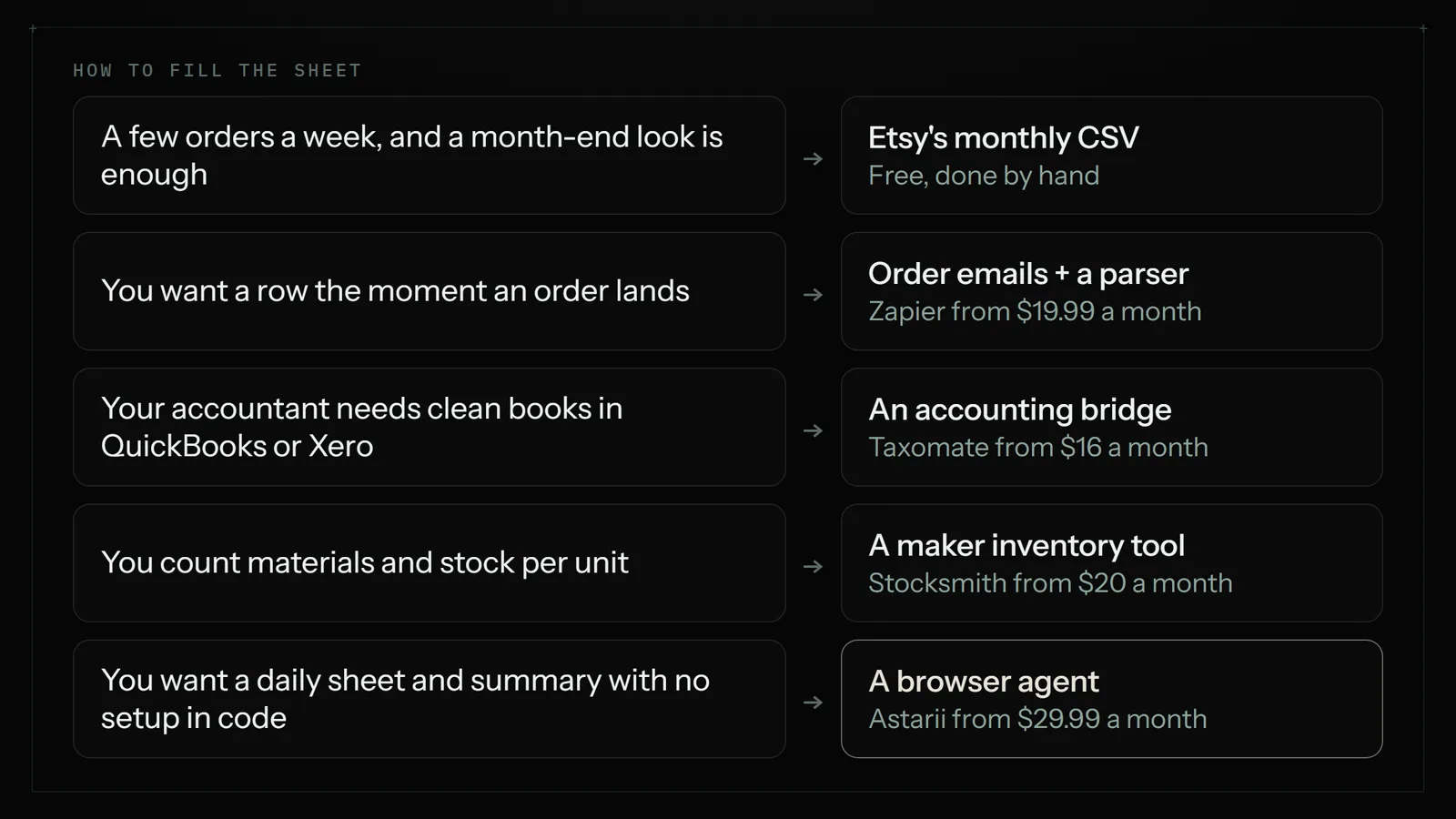
The sheet is the easy part. Keeping it current is where most of them die. Here's what each route costs and what it leaves you doing.
| Route | Price | How fresh | What it leaves to you |
|---|---|---|---|
| Etsy CSV import by hand | Free | When you remember | Download, import, clear duplicates |
| Order emails and a parser (Zapier) | From $19.99/mo billed yearly; free tier of 100 tasks | Minutes | Setup, fixing it when an email layout changes, fees |
| Accounting bridge (Taxomate) | From $16/mo billed yearly, up to 200 orders | Summaries in your books | Needs QuickBooks or Xero; not an order sheet |
| Maker inventory tool (Stocksmith) | Pro from $20/mo | Synced | Entering materials and recipes; bigger than a sheet |
| Browser agent (Astarii) | From $29.99/mo; 3 free runs, no card | Your schedule, such as every morning | Checking the first few runs, entering your own costs |
Route 1: the free CSV, once a month
- Download the order items CSV for last month from the Download Data tab.
- In Google Sheets, choose File, Import, Upload, then "Append to current sheet" on a raw data tab.
- Map the columns across to your Orders tab, or point your Orders tab at the raw tab with formulas.
- Select the raw data and use Data, Data cleanup, Remove duplicates on the order and item columns.
- Fill in postage and any Offsite Ads fees, then check the Monthly tab against your statement.
If you take a few orders a week and only look at numbers monthly, stop here. It costs nothing, and paying for automation would be silly. A one-time template from an Etsy seller saves you building the tabs, and one in our search results was on sale at $0.99, but you'd still do these same five steps.
Route 2: order emails and a parser
You might expect a simple Zapier connection here. There isn't one. Zapier's own page says Etsy hasn't built an integration, and points you to webhooks, code and its developer platform instead. The usual workaround, suggested in Zapier's community forum, is to have an email parser read Etsy's sale notification and create a sheet row from it.
It works, and a row appears soon after the sale. The limits are real, though. It only knows what's in the email, it won't give you fees, and a change to the email's layout can break it without warning. A developer can do better with Etsy's API, but that's a project, not an afternoon. For how connector tools compare with agents in general, see Zapier vs an AI browser agent.
Routes 3 and 4: accounting and inventory tools
If what you actually need is clean books for tax time, a spreadsheet may be the wrong tool. Taxomate and A2X send Etsy sales and fees into QuickBooks Online or Xero. Taxomate lists Starter at $16 a month billed yearly, or $19 month to month, for up to 200 orders a month; A2X prices by channel and order volume. Stocksmith, the new name for Craftybase, handles materials and cost of goods for makers, with its Pro plan from $20 a month and a 14-day trial. Both are better than any sheet at what they do. Neither gives you a simple row-per-order list you can sort and adapt, which is why plenty of sellers keep a sheet beside them.
Route 5: a browser agent that adds the rows
An AI helper does what you'd do by hand: it opens your shop, reads new orders, adds them to the sheet and tells you what changed. The Astarii Etsy Manager reads your orders and listings, and an Astari can connect to Google Sheets and Gmail and run on a schedule, in the cloud, with your computer off. Task memory means a scheduled Astari doesn't do the same item twice, so the duplicate row problem from the CSV route mostly goes away.
A few things worth knowing before you try it:
- Logging orders changes nothing in your shop. If you later ask it to change a price or description, every change to the live shop is proposed first and made only when you approve it.
- Your password stays out of it. Saved passwords are encrypted in your browser before storage and never shown to the AI. If Etsy asks for a sign-in code, the run pauses, asks you and carries on. The guide to letting an AI agent log into your accounts covers the risks that remain.
- It reads pages, so check its work. Compare the first week of rows with your own orders before you rely on it. Keep the monthly statement check whatever you use.
- It isn't always the right pick. Under about 20 orders a month, the free CSV is the better deal. For tax-ready books, use a bridge and your accountant. For per-unit materials and stock, use an inventory tool.
The same approach fits other paperwork too; getting invoices from Gmail into a sheet every Friday is the supplier-side version of this job, and automating data entry between websites and Google Sheets covers it more broadly.
Five mistakes that wreck an Etsy spreadsheet
- Counting sales tax as income. Etsy collects it and passes it on in many US states. Keep it in its own column and out of profit.
- Tracking by deposit date. You'll get months that look brilliant or terrible for no real reason.
- Forgetting costs outside the order. Etsy Ads, renewals and subscriptions like Etsy Plus belong on the Monthly tab. Otherwise your profit reads too high.
- Typing fee rates into every formula. Put rates on a Settings tab if you're comfortable with that, so a fee change means one edit instead of hunting through columns.
- Treating it as tax advice. Etsy itself recommends a local professional for shop finances and taxes. Your sheet is a working tool; show it to your accountant, and ask what they'd want added.
How to start this week
Build the three tabs, download last month's order items CSV and import it. Fill in costs for your top five products. Even one month will tell you which listings earn their keep, and it may change what you do next: if a best seller turns out to be thin, the guide to updating Etsy prices without opening every listing covers the fix, and Etsy tools for sellers, sorted by job covers the rest of the stack.
When the monthly chore starts getting skipped, try the automated route. Sign up at astarii.ai; the free trial is 3 runs of up to 15 minutes each, with no card. Start with one run on a single week of orders and compare it with Etsy. The first-Astari guide walks through setup and pricing lists the plans if you keep going.
Say it to an Astari
These are instructions you can give an Astari, word for word. It does the work in a browser, on a schedule if you want one, and asks you before anything goes live.
Questions
Does Etsy have a spreadsheet I can download?
Yes. In Shop Manager, go to Settings, Options, then the Download Data tab. Under Orders, pick order items, orders, Etsy Payments sales or Etsy Payments deposits, then a month and year, and select Download CSV. It opens in Google Sheets, Excel or Numbers. Leave Month empty for the whole year.
How do I keep track of my Etsy sales in a spreadsheet?
Use one row per item sold, with the order number, date, item, quantity, item total, shipping, sales tax, Etsy fees, your materials, postage and profit. Import Etsy's order items CSV monthly, or automate it. Then total each month by sale date and check your fee columns against Etsy's monthly statement.
How do I calculate Etsy fees in Google Sheets?
On US rates, the transaction fee is =ROUND((item+shipping)*0.065,2), processing is =ROUND((item+shipping+tax)*0.03+0.25,2), and the listing fee is $0.20 per item. Add Offsite Ads from your Payment account when charged. Sellers outside the US should use the rates on Etsy's fee page for their country.
Can Zapier send Etsy orders to Google Sheets?
Not through an official connection. Zapier's page says Etsy hasn't built an integration, and suggests webhooks, code or its developer platform. The common workaround is an email parser that reads Etsy's sale email and creates a row. It won't include fees, and it can break when the email layout changes.
Why doesn't my Etsy deposit match my spreadsheet?
Because a deposit isn't a month's sales. It's the amount available in your Payment account after fees, refunds and taxes, and it leaves out sales that haven't cleared yet. Etsy says new sellers generally wait 14 days. Track profit by sale date and use the monthly statement to check fees.
Is there a free Etsy spreadsheet template?
You can build one in Google Sheets for free using the columns and formulas in this guide. Paid templates sold on Etsy save you setting up the tabs, but most still need you to download and import your orders by hand, so a template alone doesn't solve the upkeep.
Can an AI agent update my Etsy spreadsheet automatically?
Yes. An AI browser agent such as the Astarii Etsy Manager can read your orders, add new ones to a Google Sheet on a schedule and email you a summary. Plans start at $29.99 a month after 3 free runs. Check the first week against Etsy; under about 20 orders a month, the free CSV is the better deal.
Do I need accounting software if I have an Etsy spreadsheet?
Not always. A sheet is enough to see profit per product in a small shop. As volume grows, or if your accountant wants clean books, a bridge such as Taxomate or A2X sends Etsy sales and fees into QuickBooks Online or Xero. Etsy recommends a local professional for tax questions.
- Etsy Help: How to Download a Spreadsheet of Your Sold Transactions
- Etsy Help: How to Calculate Your Etsy Payments Deposit Amount
- Etsy Help: Etsy Fee Basics
- Etsy Help: What are the Fees and Taxes for Selling on Etsy?
- Etsy Help: How to Manage Your Payment Account
- Etsy Help: How Etsy's Offsite Ads Work
- Etsy: How to sell on Etsy (US processing fee)
- Zapier: Etsy integrations
- Zapier Community: Etsy order to Google Spreadsheets row
- Zapier pricing
- Taxomate pricing
- A2X pricing
- Stocksmith (formerly Craftybase) pricing
filed under Online selling