AI Form Filler vs Browser Agent: Which Should Fill Your Business's Web Forms?
If you are at the keyboard, you need a form filler and it may cost nothing. If the job is forty forms behind a login and you would rather not be there, a filler only does the easy part. Here is how to tell which job you have.

A form filler types saved details into the form in front of you, and you still click submit. Chrome's autofill is free; Lightning Autofill costs $4.99 a month for unlimited use. A browser agent such as Astarii, from $29.99 a month, does the whole job: signs in, finds the form, works down a sheet and reports back.
Search for "AI form filler" and you get a mix of Chrome extensions, PDF apps, form builders and job application bots, all described with nearly the same words. They do different jobs. The useful question isn't which one is smartest. It's whether you will be sitting at the keyboard when the form gets filled.
This guide sorts the options by that question, with prices checked on November 4, 2026. It also says where a browser agent like an Astari is overkill, which is more often than you might expect from a company selling one. If agents are new to you, the guide to AI agents for small business covers the basics.
The real difference: who does the steps around the form
Typing is usually the smallest part of filling in a web form for your business. Take a supplier's portal. You find the row in your sheet, open the site, sign in, click through to the right page, type the fields, upload a document, submit, copy the confirmation number back to the sheet, then go again.
A form filler handles the typing. Everything before and after it stays with you. That is a good deal when you were going to be on the page anyway, such as one checkout, one registration or one job application you want to read before it goes.
A browser agent takes the list of steps. It opens a real browser, reads the page, signs in with a saved login, types, clicks, uploads, and reports what it did. Because it doesn't need you there, it can run on a schedule. The cost is that you pay more, it takes longer per form than a filler, and you have to write down what you want.
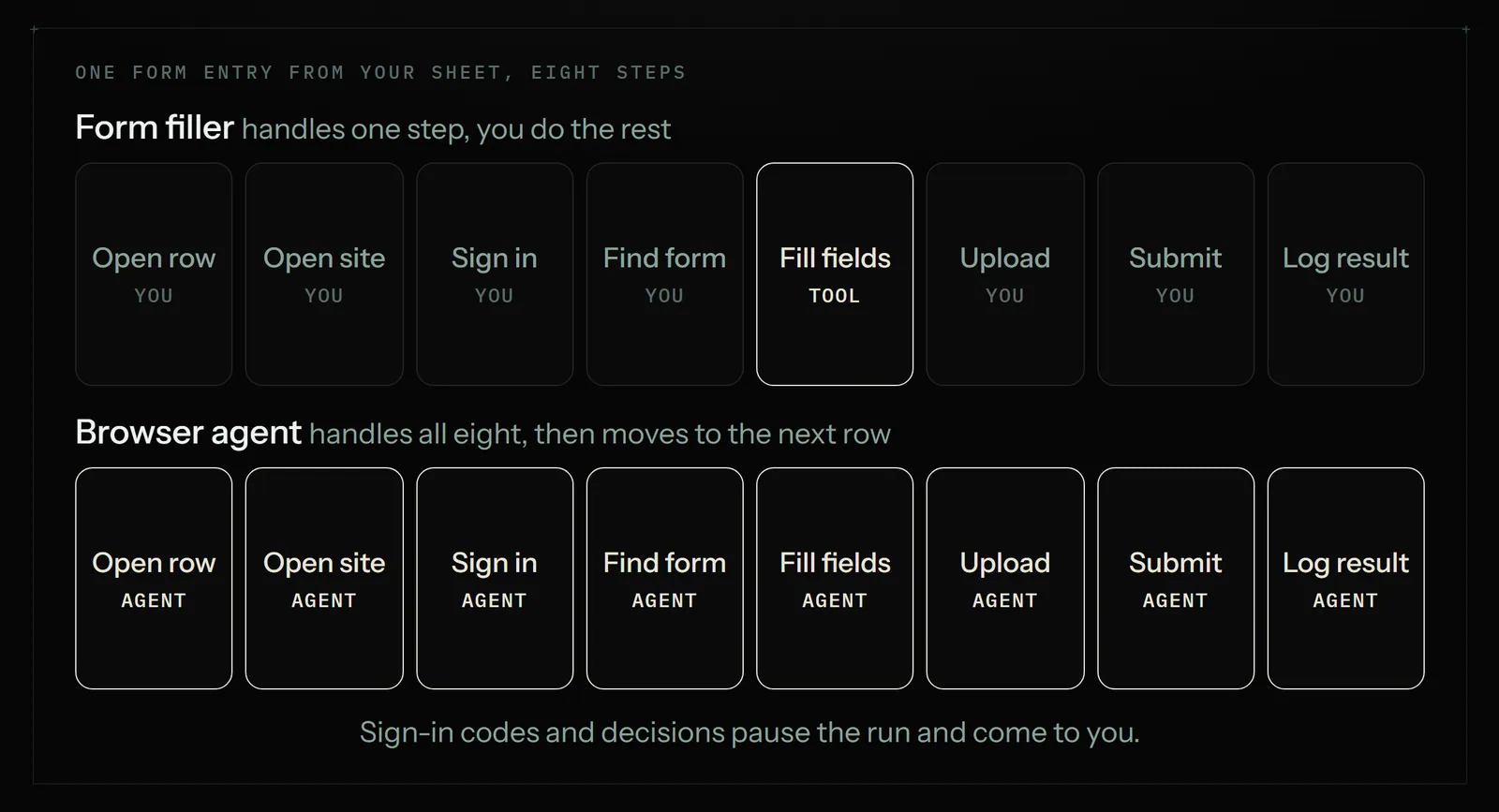
The two categories are starting to blur. FillApp, sold as an AI form filler, now describes itself as a browser agent with scheduled tasks. Chrome has its own agent feature, auto browse, on paid Google AI plans. So look at what the tool does on your form, whatever its label says.
The options, with prices
| Tool | Type | Price | You need to be there? | Best for |
|---|---|---|---|---|
| Chrome autofill | Built into the browser | Free | Yes | Your own name, address, card and logins |
| Lightning Autofill | Rules-based extension | Free for 10 executions a day; Plus $4.99/mo; Pro $9.99/mo | Mostly | The same forms, over and over, with fixed values |
| SimpleFill | Suggestion extension, no AI | Free; $5 or $10 one time | Yes | Fast manual filling from saved snippets |
| FillApp | AI extension and PDF editor | 20 free credits; $0.10 a credit; subscription from $14.99/mo | Usually | Fields that change from form to form |
| Instafill | AI PDF and Word filler | From $99/mo for 50 documents | Yes | Stacks of PDF forms |
| Zapier | App-to-app connector | Free for 100 tasks; from $19.99/mo billed yearly | No | Moving form data between apps that have integrations |
| Astarii | Browser agent | 3 free runs; $29.99, $49.99 or $99.99/mo | No | Whole jobs behind a login, on a schedule |
Prices came from each vendor's own page on the day of writing. They change, so check before you buy.
Start with what Chrome already does
Chrome's built-in autofill fills saved names, addresses, passwords and payment details, and it also has categories for identity documents and travel. It costs nothing and most owners have only half set it up. Spend ten minutes in Settings, under Autofill and passwords, adding your business address as its own entry, and you may solve the problem you came here with.
There is a newer layer called enhanced autofill. Google says it uses details from your Gmail, such as flights, vehicles and orders, to fill in forms. It is available in the US on desktop, Android and iOS for Gemini in Chrome users who are 18 or older and have opted into Personal Intelligence. If you are comfortable with that, it can save you from digging for order numbers. It is opt-in, and you can turn it off in Chrome's settings.
Chrome's auto browse goes further and handles multi-step tasks in the browser. Google lists it for Google AI Pro and Ultra users in the US and India, and Google's plans page shows Pro at $19.99 a month. If you already pay for that plan, try it on a one-off chore before buying anything else. For a recurring job from a sheet, see the agent section below.
When a form filler extension is the right answer
A form filler extension is the right buy when the form is the same each time and you don't mind being present.
- Rules-based fillers. Lightning Autofill lets you save a profile of values for a given form and run it when you land on the page. The free plan allows 10 executions a day. Plus removes the cap and adds cloud sync, including a connection to Google Sheets, for $4.99 a month. Pro adds JavaScript rules for $9.99. For a form you fill ten times a day, $4.99 is hard to argue with.
- Suggestion fillers. SimpleFill keeps your snippets locally in the browser and offers them as you type or from the right-click menu. It's a one-time $5 or $10, and it does not submit anything for you. It suits support staff and anyone pasting the same few details all day.
- AI fillers. FillApp and similar tools read each field's label and work out what goes in it, using documents and details you have given them. That helps when forms differ, such as grant applications or supplier sign-ups with their own wording. Pay-as-you-go pricing makes it cheap to test. Check every answer on a form that matters, because a plausible wrong value is harder to spot than a blank.
A filler starts to struggle when the work isn't only the fields. It won't remember which rows you finished, and most won't sign in, navigate and record a confirmation number while you are at lunch.
PDFs are a separate job
Many results for "AI form filler" are really about PDFs: W-9s, insurance claims, permits. A web form extension can't help there because the fields aren't on a web page. Use a tool built for it. Instafill fills PDF and Word forms from $99 a month for 50 documents, and FillApp includes an AI PDF editor. Astarii is not the pick for this. It works in browsers on websites, and if your stack of paper is PDFs, a PDF tool will be cheaper and better suited.
When a browser agent is worth it
An agent starts to earn its price when three things are true: the job repeats, it has steps on either side of the form, and the form has no import button or integration. Some real examples:
- Portal entry from a sheet. A distributor's site accepts one new item at a time. This is the reverse of the copying covered in our guide to automating data entry between websites and Google Sheets.
- Claims and returns. A customer email arrives with a photo, and the manufacturer's site wants the same details typed in and the photo uploaded.
- Directory listings. Each one of the startup directories has its own form, and you want a couple done a day. The Astarii launch and directories helper does this at that pace.
- Job applications. Every site asks slightly differently, and you never want to apply twice. The Job Hunter helper covers that one.
Three things in Astarii are built for this kind of work. Task memory means a scheduled Astari never does the same item twice, so Monday's rows don't get entered again on Tuesday. When a site texts a code or something needs a decision, the run pauses, asks you, then carries on from where it stopped. And it can run in the cloud with your computer off, or in your own Chrome or Brave through the extension if you'd rather watch it work on your machine.
Setup is plain English or showing it once. You'd write it the way you'd brief a person, and say how many: "10 rows per run" is better than "all of them". Watch the first run, read what it did, then give it a schedule. A form with an odd dropdown or a date in a fussy format will usually need one correction in the instructions. Say the specific thing: "dates as MM/DD/YYYY, and pick Other when the state isn't listed."
Do the math on your own form
Time yourself filling one form, including the sign-in and the copying back. Then use this as a rough guide. The figures here are an illustration, not a benchmark, so swap in your own.
Say a portal takes you 5 minutes per entry, and you do 40 a month. That's a little over 3 hours. A filler might cut the typing, perhaps 2 of the 5 minutes, which saves you about 80 minutes and costs $4.99. Sensible, but you are still there for 2 hours.
An agent takes the full 3 hours off your list. Astarii's Pro plan costs $29.99 a month and includes 900 cloud minutes plus 800 browser minutes. Runs can last up to 45 minutes each and minutes count real run length. If each entry takes the agent 3 minutes, 40 entries use 120 minutes, leaving plenty for other jobs. If you'd only use it for this one form at 10 entries a month, it's not worth it. Buy the filler.
Check for a connector before either
If the form belongs to an app with an integration, you may not need to fill anything in. Zapier has a free plan for 100 tasks a month and paid plans from $19.99 a month billed yearly ($29.99 billed monthly), and it passes data straight between apps. It is faster and more reliable than any browser tool when both ends are supported. Also look for a CSV import button on the site, because ten seconds of looking can save a month of tooling. We go through the split in Zapier vs an AI browser agent.
Forms to keep for yourself
Some forms are quick to fill and expensive to get wrong. Keep these with a person at the final click, whichever tool does the typing:
- Tax, legal and government filings where you sign a declaration that the contents are true.
- Anything that moves money, including payment forms and supplier orders over a set amount. Write a stop into the job: "stop before Place Order and ask me."
- One-off forms. Setting up an agent for a form you'll fill once takes longer than filling it. Our own docs say so.
- Sites that say no. Some sites refuse automated access, and some terms of service forbid it. Read them for accounts you can't afford to lose. If a site actively refuses, an Astari stops and tells you instead of retrying forever.
What to check before giving any tool your details
A form filler holds exactly the data you'd worry about, so a few minutes of checking is worth it.
- Where the data is kept. SimpleFill says it stores data locally. Tools with cloud sync don't. Neither is wrong, but you should know which you have.
- What the extension can read. Many fillers need access to every page you visit. Install only what you'll use, and remove what you stop using.
- Who sees the data. An AI filler has to send field labels and your details to a model to do its work. Read how that is handled before pasting in customer information.
- How passwords are handled. Astarii encrypts saved passwords and never shows them to the AI, and identities keep the logins for each brand or person separate. For anything you'd hate to see touched by mistake, give the Astari its own account instead of yours.
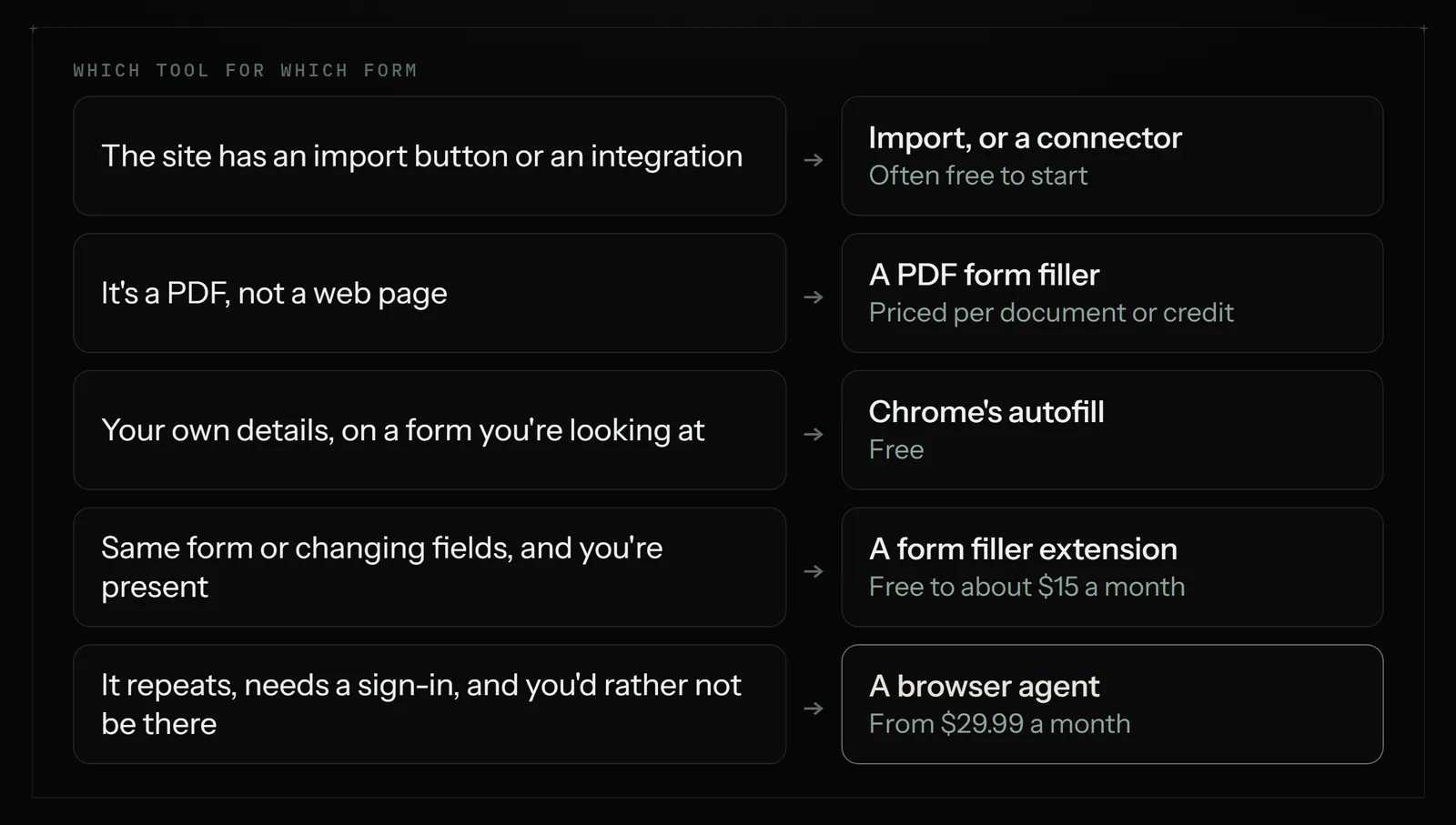
How to pick in five minutes
Go through these in order and stop at the first yes.
- Does the site have an import button, or an integration in Zapier? Use that.
- Is it a PDF? Use a PDF filler.
- Is it your own details on a form you're already looking at? Use Chrome's autofill.
- Is it the same form many times a day with you present? Use Lightning Autofill or SimpleFill.
- Do the fields change each time, with you present? Try FillApp's free credits.
- Does it repeat, involve a sign-in and steps around the form, and would you rather not be there? Try a browser agent.
For the last one, Astarii gives you 3 free runs of up to 15 minutes each, with no card, which is enough to test one real form from your sheet. You can see all the plans on the pricing page and start with your first Astari. For more ideas, the 30-minute task audit helps you find which forms are worth handing off.
Say it to an Astari
These are instructions you can give an Astari, word for word. It does the work in a browser, on a schedule if you want one, and asks you before anything goes live.
Questions
What is the best AI form filler?
It depends on the form. For your own name, address and card details, Chrome's built-in autofill is free and usually enough. For fields that change from form to form, try an AI filler such as FillApp, which offers 20 free credits. For PDFs, use a PDF tool such as Instafill. Test each on your real form before paying.
Is there a free form filler for Chrome?
Yes. Chrome's own autofill is free and fills saved names, addresses, passwords and payment details. Lightning Autofill has a free plan with 10 executions a day, and SimpleFill has a free plan with up to 5 saved form data items. Most small jobs never need a paid plan.
What is the difference between a form filler and a browser agent?
A form filler fills fields on the page you already opened. A browser agent handles the steps around the form as well: opening the site, signing in, finding the right page, filling it, uploading files, submitting, recording the result and moving to the next row. It can also run on a schedule while you are away.
Can an AI fill out web forms automatically from a Google Sheet?
Yes, with a browser agent. Astarii connects to Google Sheets, takes each row, types it into the site's form and can mark the row done. Lightning Autofill's Plus plan also connects to Google Sheets for its profile data, but it is built around filling forms rather than running the whole job unattended.
Can an AI form filler submit the form for me?
Most simple fillers leave the submit button to you, and that is usually what you want on a form you are reading anyway. A browser agent can press submit as part of the job. For anything sensitive, write a stop into the instructions so it pauses and asks you before the final click.
Is it safe to use a form filler with passwords?
Be careful with any small extension that asks for broad access to every page. SimpleFill says it stores data locally in your browser, and Chrome keeps passwords in Google Password Manager. AI fillers have to send form fields to a model, so read the privacy policy. Astarii encrypts saved passwords and never shows them to the AI.
Can a form filler handle PDF forms?
Browser autofill and most web form extensions do not work on PDF fields. Use a tool built for PDFs. Instafill starts at $99 a month for 50 documents, and FillApp includes an AI PDF editor. A browser agent is built for web pages, so it is the wrong first choice for a stack of PDFs.
How much does it cost to automate form filling?
Chrome's autofill is free. Lightning Autofill costs $4.99 a month and SimpleFill $5 to $10 once. FillApp costs $0.10 a credit or $14.99 a month. Astarii costs $29.99, $49.99 or $99.99 a month, metered in run minutes, with 3 free runs of up to 15 minutes each and no card needed.
filed under Tools compared