AI Lead Follow-Up: Reply to Every Enquiry the Same Day Without Living in Your Inbox
Most small businesses lose leads to a slow reply, not a better rival. Here is a five-touch follow-up schedule, what to say, which tools do each part and what they cost.

AI lead follow-up means software that logs each new enquiry, drafts a same-day reply and chases quiet leads two or three times, stopping when they answer. Free form auto-replies cover the first minute. CRMs such as HubSpot or Pipedrive run sequences from $39 to $90 a seat. Astarii, from $29.99 a month, reads enquiries from several places and asks before sending.
Most small businesses do not lose leads to a better competitor. They lose them to a slow reply. Someone fills in your contact form on Tuesday night, you see it Wednesday, mean to answer after lunch, and by Thursday they have booked whoever wrote back first. Nothing went wrong except the clock.
This guide is about fixing the clock without spending your day in your inbox. It covers what "AI lead follow-up" means in practice, a five-touch schedule that works for most service businesses and shops, the tools that do each part (with prices read on their own pages on 23 November 2026), and where an AI agent fits. We make Astarii, an AI agent that works in Gmail or Outlook, Google Sheets and the websites you sign into, so we will say plainly where it fits and where something cheaper or faster does the job better. If you want to try it on your own enquiries, scheduling an Astari is the page to start with. For the wider list of jobs worth handing off, see the guide to AI agents for small business.
Why the first reply matters most
The best-known study on this is old but has not been bettered. In 2011 Harvard Business Review published research on 1.25 million sales leads at 42 US companies. Firms that tried to reach a new lead within an hour were nearly seven times as likely to qualify it (have a real conversation with the decision maker) as firms that waited even one hour longer, and more than 60 times as likely as firms that waited a day or more.
The same authors audited 2,241 US companies by sending each a test web enquiry. 37% replied within an hour. 24% took more than a day. 23% never replied at all. Among those that did reply within 30 days, the average wait was 42 hours.
Two things follow for a small business. First, a same-day reply already puts you ahead of a large share of the market. Second, the reply does not have to be clever. It has to arrive, answer the question that was asked and offer one clear next step.
What "AI lead follow-up" actually covers
Vendors use the phrase for at least four different things. It helps to split them, because each is a different tool and a different price:
- The instant acknowledgement. An automatic "thanks, we got it, here is what happens next" the moment the form is sent. No AI needed; your form tool or inbox does it free.
- The real first reply. A human-sounding answer to what the person actually asked, with a price range, a slot or a question back. This is where most businesses are slow, and where an AI draft saves the most time.
- The chase. Two or three polite follow-ups to people who went quiet, then a close-out. Sequences in a CRM do this; so can a scheduled agent.
- The record. Every enquiry logged in one place with its status, so nothing sits in a thread forgotten. A spreadsheet is enough for most owners.
Some products also follow up by text message or phone. Astarii does not send texts or place calls; it works in email, spreadsheets, calendars and the browser. If your customers only answer texts, an SMS follow-up tool belongs on your list, and the AI receptionist vs AI agent guide covers the phone side.
A five-touch follow-up schedule
This is the schedule we suggest for enquiries from a website form, a marketplace message or an email. It is deliberately short. Past the fifth touch you are more likely to annoy someone than win them.
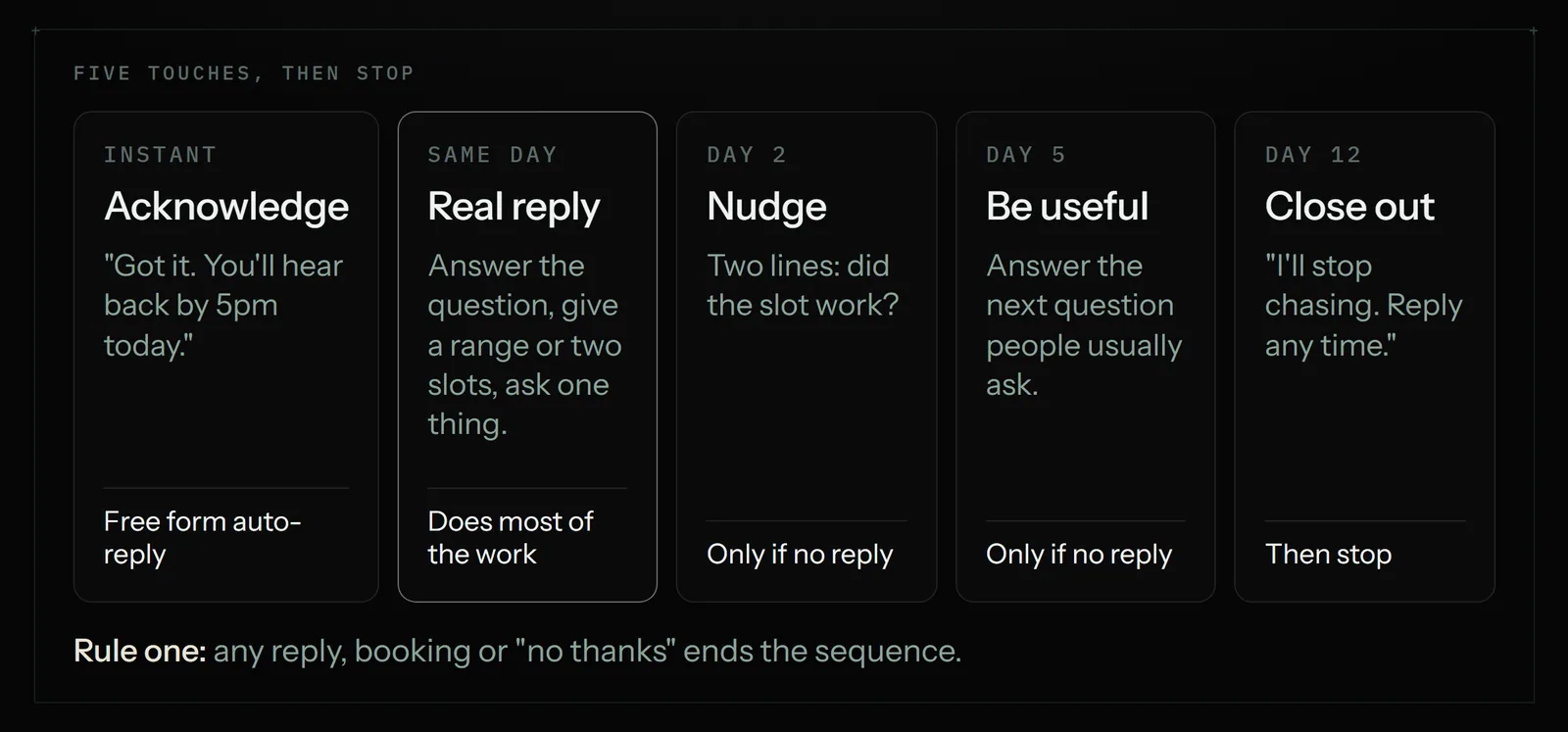
- Instant: acknowledgement. Automatic. Confirms you received it, says when they will hear back ("by 5pm today") and links to your prices or FAQ.
- Same day: the real reply. Answers their question, gives a range or two time slots, and asks one question that moves it forward. This is the one to get out within hours, not days.
- Day 2: the nudge. Two lines. "Did the Thursday slot work, or would next week be better?"
- Day 5: something useful. A short answer to the question most people ask next, a photo of a similar job, or what is included.
- Day 12: the close-out. "I'll stop chasing so I don't clutter your inbox. If you still want this, reply any time and I'll pick it up." These get a surprising number of replies.
Stop the moment they reply, book or say no. That rule matters more than the timing, and it is the part simple autoresponders get wrong: they keep sending after the customer has already answered.
The tools, and what each costs
Prices below were read on each vendor's own pricing page on 23 November 2026 and are US dollars. Several charge per seat (per person using it), which adds up quickly for a team.
| Option | Price | Best at | Weak spot |
|---|---|---|---|
| Form auto-reply plus Gmail or Outlook templates | Free | The instant acknowledgement, and fast manual replies from saved text | You still write and send every real reply and every chase |
| HubSpot Sales Hub | Starter from about $20 a seat a month; sequences are on Professional, from $90 a seat | Proper sequences that stop when the lead replies, with a full CRM | Expensive per seat once you need sequences; a lot of software for a two-person shop |
| Pipedrive | Growth $39 a seat a month billed yearly (email sync and automations start here) | A sales pipeline with automated follow-up emails | Built for sales teams with a pipeline; per seat |
| Follow Up Boss (real estate) | Grow $69 a user a month, or $58 billed yearly | Real estate agents and teams, with lead routing and texting | Real estate only |
| Zapier | Professional from $19.99 a month (free plan: 100 tasks) | Instant rules between apps that have an integration, such as form to sheet to email | Pure rules; struggles with reading a messy enquiry or a site with no integration |
| Astarii (AI agent) | From $29.99 a month, not per seat | Reading enquiries from several places, logging them, drafting replies and chasing on a schedule | Runs on a schedule, not in seconds; no texts or calls |
The honest reading of that table: if you already pay for a CRM with sequences, use them. If all your leads arrive through one form and you only need the instant acknowledgement plus a reminder to yourself, the free route or a Zapier rule is enough. An agent earns its place when enquiries arrive in several places (your inbox, a marketplace's messages, a booking site's dashboard), when each one needs reading before you can reply, or when the "where is this lead up to" sheet is the part that never gets done.
How an AI agent handles it, step by step
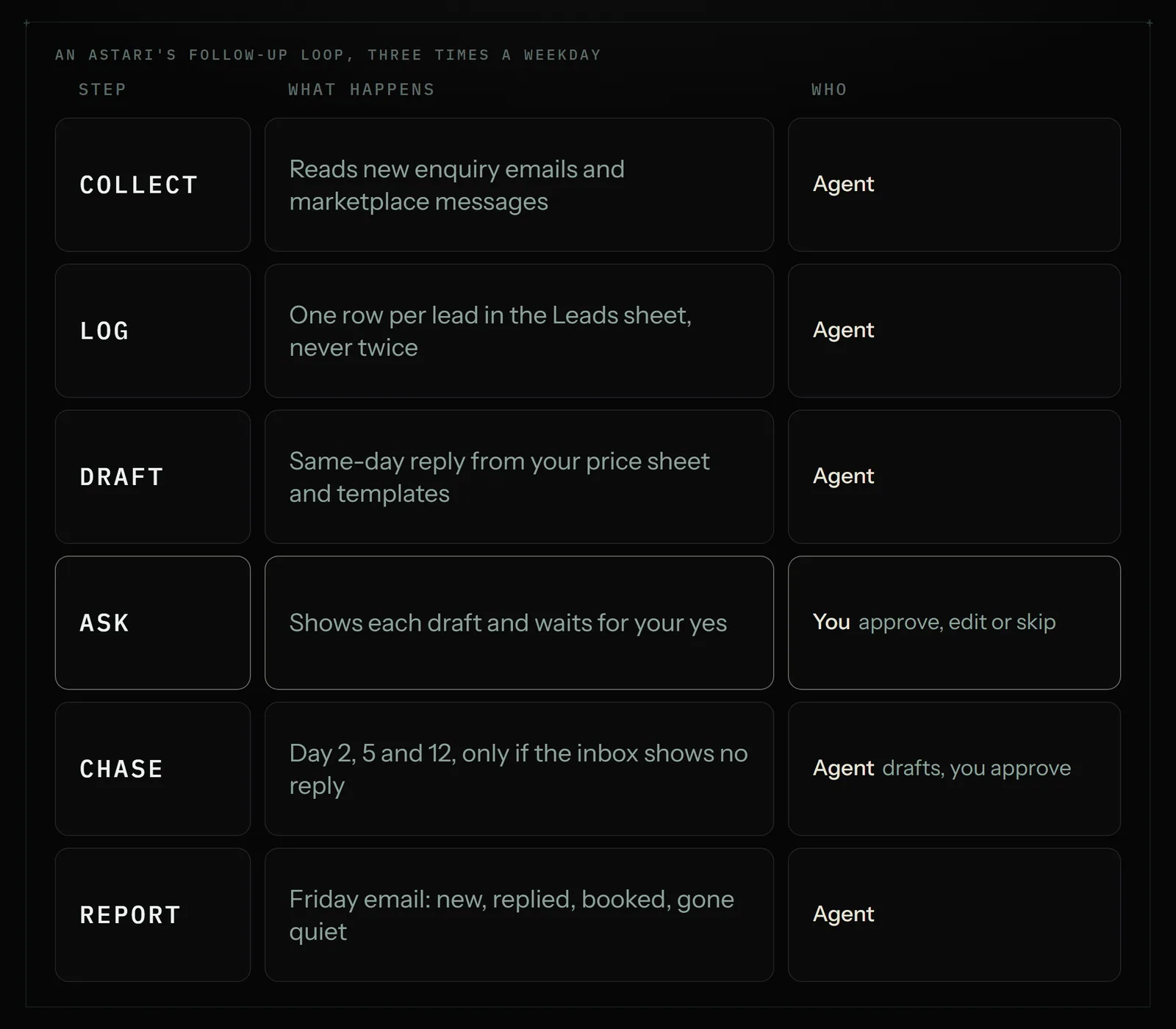
Here is the same job set up with an Astari for a small landscaping business that gets enquiries by email and through a quotes marketplace it signs into. The owner describes it once in plain English; the Astari runs it on a schedule.
- Collect. Three times each weekday (Astarii can run on a schedule such as "three times a day"), it reads new enquiry emails and signs into the marketplace to check new messages.
- Log. Each new enquiry becomes one row in a Leads sheet: date, name, contact, what they want, where it came from, status. Task memory means it never logs the same enquiry twice or emails the same person twice for the same step.
- Draft. For each new lead it drafts the same-day reply from your price sheet and your saved reply templates.
- Ask. It shows you the drafts and asks before sending. You approve, edit or skip each one. Most owners keep this step for good; some drop it for the simple nudges after a few weeks.
- Chase. On later runs it checks the sheet for leads due a day-2, day-5 or day-12 touch, checks the inbox for a reply first, and only drafts a chase if there is none.
- Report. On Friday it emails you a short summary: new leads, replied, booked, gone quiet.
Two limits to set expectations. A scheduled Astari replies within hours, not seconds, so keep the free instant acknowledgement switched on in your form tool. And it works from what you give it: if your prices depend on a site visit, the draft should offer a visit, not invent a number. Setting up the Gmail or Outlook side is covered in Connections.
A worked example: one week of enquiries
Say a two-person business gets 25 enquiries a week across email and one marketplace. By hand, at about 6 minutes to read, reply and log each one, plus 3 minutes for each of roughly 40 chases, that is about 4.5 hours a week, and in practice the chases are the part that slips.
With a scheduled agent drafting and the owner approving, the owner's part drops to reviewing drafts: perhaps 1 minute each for 25 first replies and a few seconds for each chase, so roughly 40 to 50 minutes a week. The agent's runs at, say, 10 minutes each, three times a weekday, use about 150 cloud minutes a week, or roughly 650 a month, inside the 900 cloud minutes on Astarii's $29.99 Pro plan. These are our estimates for illustration; your times will differ, so time a week of your own first.
What to say: four short templates
Keep follow-ups short and specific. These work as starting points for an agent's drafts or your own saved replies.
- Same-day reply: "Hi Sam, thanks for asking about the backyard. Jobs like this usually run $400 to $650 depending on access. I can come and look on Thursday at 10 or Friday at 2. Which suits?"
- Day 2: "Hi Sam, just checking the Thursday or Friday visit works. Happy to suggest another day."
- Day 5: "Hi Sam, one thing people often ask: we take all the green waste away, so there's no dumpster to rent. The offer of a visit stands."
- Day 12: "Hi Sam, I'll stop following up so I'm not filling your inbox. If you'd still like the yard done, just reply and I'll pick it up."
The prices and offer in these are examples, not advice for your trade. For a different job with the same shape, unpaid invoices, see five invoice reminder templates.
Where Astarii is not the right pick
- You need a reply in under a minute. Use your form tool's auto-reply, a CRM with instant sequences or a Zapier rule. A scheduled agent runs at set times.
- Your customers want texts or calls. Astarii does not send SMS or place calls. Use an SMS follow-up tool or an AI receptionist.
- You already pay for HubSpot, Pipedrive or Follow Up Boss with sequences. Use what you have. An agent only helps there for enquiries that arrive somewhere the CRM cannot see.
- Cold outreach to bought lists. Follow-up here means people who asked you first. Cold email has its own rules; see automating lead generation without buying a list.
- High-stakes or sensitive replies. Complaints, legal questions and anything where tone decides the outcome should come from you.
Four rules that keep follow-up from turning into spam
- Stop on any reply. Check the inbox before every chase. A "no thanks" ends it.
- Five touches at most, over about two weeks, then close out politely.
- Approve before sending until you trust the drafts. Astarii pauses and asks you when something needs a decision, then carries on.
- Follow up only people who asked. If a follow-up turns into a newsletter or offers, US CAN-SPAM rules apply to that commercial email, including a working way to opt out.
How to start this week
- Switch on the instant acknowledgement in your form tool or inbox today. It is free and covers the first minute.
- Write your same-day reply and the three chases as saved templates.
- Start a Leads sheet with the columns above and log this week's enquiries by hand, so you know your real numbers.
- If the reading, logging and chasing is still the part that slips, hand it to a scheduled tool: a CRM sequence if you have one, or an Astari if your leads come from several places. Astarii's plans start at $29.99 a month, with a free trial of 3 runs and no card needed.
Related reading: AI email assistants compared and 25 real tasks small businesses hand off.
Say it to an Astari
These are instructions you can give an Astari, word for word. It does the work in a browser, on a schedule if you want one, and asks you before anything goes live.
Questions
What is AI lead follow-up?
Software that does the follow-up work on new enquiries: logging each lead, drafting a reply to what they asked, chasing people who go quiet and stopping when they answer. Some tools also text or call; others, such as Astarii, work only in email, spreadsheets and websites.
How fast should I follow up with a new lead?
Within an hour if you can, and the same day at the latest. In a 2011 Harvard Business Review study of 1.25 million leads, firms that tried to reach a lead within an hour were nearly seven times as likely to qualify it as firms that waited longer.
How many times should I follow up with a lead?
Four or five touches over about two weeks: an instant acknowledgement, a real reply the same day, a nudge on day 2, something useful on day 5 and a polite close-out on day 12. Stop as soon as they reply, book or say no.
What is the cheapest way to automate lead follow-up?
Turn on your form tool's free auto-reply and save your replies as Gmail or Outlook templates. Zapier's free plan (100 tasks a month) can log form entries to a sheet. Paid sequences start around $39 a seat a month in Pipedrive Growth, billed yearly.
Does HubSpot Starter include email sequences?
No. On HubSpot's pricing page on 23 November 2026, sequences are part of Sales Hub Professional, from $90 a seat a month. Starter, from about $20 a seat billed monthly, can only trigger sequences through workflows.
Can Astarii send follow-up texts?
No. Astarii does not send text messages or place phone calls. It works in Gmail or Outlook, Google Sheets, Docs, Calendar and Drive, and on websites you sign into, such as a quotes marketplace.
Will an AI follow-up tool send emails without asking me?
That depends on the tool and your settings. With Astarii you can tell it to show you each draft and ask before sending; it pauses for your decision, then carries on. Keep approvals on until the drafts are reliably right.
Is automated follow-up the same as cold email?
No. Follow-up goes to people who contacted you first. Cold email goes to people who did not, and carries more rules. If a follow-up turns into offers or a newsletter, US CAN-SPAM rules apply, including a working opt-out.
filed under AI agents explained