AI Receptionist vs AI Agent: Which One Does a Small Business Need?
An AI receptionist answers the phone. An AI agent does the online work after the call. Here is which one your business needs, what each costs, and how the two work together.

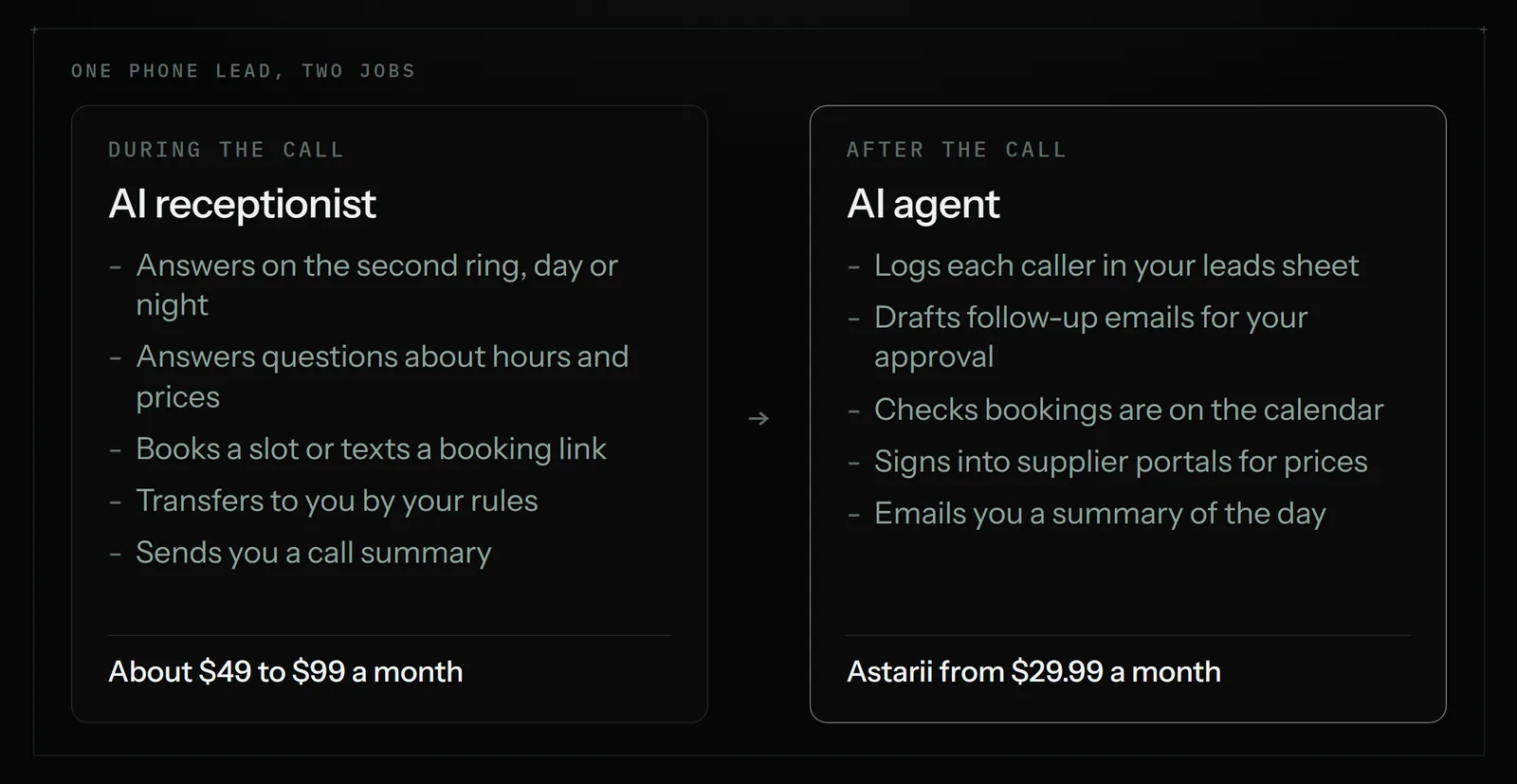
An AI receptionist answers your business phone: it greets callers, answers questions, books appointments and sends you a summary, from about $49 to $99 a month. An AI agent such as Astarii, from $29.99 a month, does the online work after the call: logging leads, follow-up emails, calendar and portal work. It does not answer phones. Many service businesses use both.
Search for "AI receptionist" and you get vendor pages and round-ups that all start from the same idea: an AI that answers your phone. That is a real and useful product. It is also only half of what a missed call costs you. The other half is what happens after the call: the quote nobody sent, the booking that never reached the calendar, the lead that sat in a text thread until Monday.
This guide separates the two jobs. An AI receptionist answers the phone. An AI agent does the online work around it. Prices below were read on the vendors' own pricing pages on 22 November 2026. We make Astarii, which is an AI agent and does not answer phones, so this is a "which tool for which job" guide, not a pitch. If the follow-up side is your problem, setting up a first Astari takes a few minutes. For the wider list of jobs worth handing off, see the guide to AI agents for small business.
The short version
- You lose jobs because nobody picks up: you need an AI receptionist. Plans start around $49 to $99 a month (Rosie, Goodcall, Frontdesk), and Smith.ai has a free tier of 25 calls a month.
- Callers need a person, or the calls are delicate: a human answering service such as Ruby, from $250 a month for 50 minutes, or Smith.ai's live receptionists.
- Calls get answered, but the follow-up is late or forgotten: you need an AI agent. Astarii starts at $29.99 a month and works in Gmail or Outlook, Google Sheets, Calendar and the websites you sign into.
- Both: many service businesses end up with one of each. The receptionist takes the call and sends a summary; the agent reads the summaries on a schedule and does the paperwork.
What an AI receptionist does
An AI receptionist is a voice AI that answers your business number. You forward calls to it (all of them, only after hours, or only when you don't pick up), give it your hours, services, prices and rules, and it talks to callers in a natural voice. The vendors read for this guide list the same core jobs:
- Answer every call, day and night, including several at once.
- Answer common questions: hours, areas served, rough prices, what to bring.
- Take a message, or ask your intake questions and capture the answers.
- Book an appointment, or text the caller a booking link.
- Transfer to you when the caller asks for a person or the call meets your rules.
- Send you a summary after the call. Most send it by text; many also email it or log it in their own dashboard or CRM.
Its strength is the live conversation. It picks up on the second ring at 9pm on a Sunday and does not put anyone on hold. For a plumber under a sink or a hairdresser mid-cut, that alone can pay for the plan.
Its limit is everything off the call. A receptionist can book into the calendar it is connected to and text a link, but it does not sign into your supplier portal, build the quote in your invoicing tool, update your job sheet or chase the customer who went quiet. Some plans connect to a CRM or to Zapier, which helps, but the follow-up is still a separate job.
What an AI agent does
An AI agent does multi-step online work. Astarii, for example, opens websites, signs in, fills in forms, sends emails, updates spreadsheets and reports what it did. You describe the job in plain English, or show it once, and it can run on a schedule (every weekday at 7:30, three times a day, every Friday) in the cloud with your computer off. It connects directly to Gmail or Outlook, Google Sheets, Docs, Calendar and Drive.
Two details matter for phone follow-up. Task memory means a scheduled Astari never does the same item twice, so it will not log the same caller twice or email the same lead twice. And when a site texts a sign-in code or something needs your decision, it pauses and asks you, then carries on from where it stopped.
What it does not do: answer or place phone calls, or talk to anyone live. If your problem is the ringing phone, an agent is the wrong tool. Our AI agent vs chatbot guide covers the other common mix-up, between agents and website chat bots.
Side by side: receptionist, answering service, agent
| AI receptionist | Human answering service | AI agent (Astarii) | |
|---|---|---|---|
| Main job | Answer calls live | Answer calls live, with a person | Online work: email, sheets, calendar, websites |
| Works on | Your phone number | Your phone number | Your inbox, sheets and sites you sign into |
| When it runs | Whenever a call comes in | Staffed hours (often 24/7) | On demand or on a schedule |
| Typical starting price | $49 to $99 a month; Smith.ai free for 25 calls | Ruby from $250 a month for 50 minutes | $29.99 a month (Pro) |
| Billed by | Minutes, calls or unique callers | Receptionist minutes | Minutes of run time |
| Good at | Never missing a call, booking, FAQs | Empathy, awkward or sensitive calls | Logging, follow-up emails, portal work, reports |
| Not for | Work off the call | Cheap volume | Phone calls of any kind |
AI receptionist prices, November 2026
All prices are US dollars a month, read on each vendor's pricing page on 22 November 2026. They change often; check before you buy.
| Service | Entry plan | What the entry plan includes | Next step up |
|---|---|---|---|
| Rosie (AI) | $49 | 250 minutes, message taking, booking links by text, spam detection, 7-day trial | Scale $149, Growth $299 |
| Goodcall (AI) | $79 | 100 unique callers (about 150 calls), then 79 cents each | Growth $129 (500 callers), Scale $299 |
| Frontdesk, My AI Front Desk (AI) | $99, or $79 billed yearly | 200 voice minutes plus chat, text messages and a simple CRM; no contract | Higher plans for API access |
| Smith.ai AI Receptionist | Free | 25 calls a month, then $3 a call | Pro $150 for 75 calls ($2 a call) |
| Ruby (human receptionists) | $250 | 50 receptionist minutes | $395 (100 min), $720 (200 min), $1,725 (500 min) |
Note the different units. Rosie and Frontdesk count minutes, Goodcall counts unique callers, Smith.ai counts calls and Ruby counts receptionist minutes. Before you compare, pull last month's call log and work out how many calls you had and how long they ran.
A worked example. Say you get 80 calls a month averaging 3 minutes, so 240 minutes. Rosie's $49 plan (250 minutes) covers it. Goodcall's $79 Starter covers it if those calls come from 100 or fewer people. Frontdesk's $99 plan includes 200 voice minutes, so you would run a little over. Smith.ai's Pro plan covers 75 calls for $150, so about $160 with five extra calls at $2. A human service at Ruby needs more than the 200-minute plan at $720. These are our estimates from the published plans, not quotes.
Which one you need: five questions
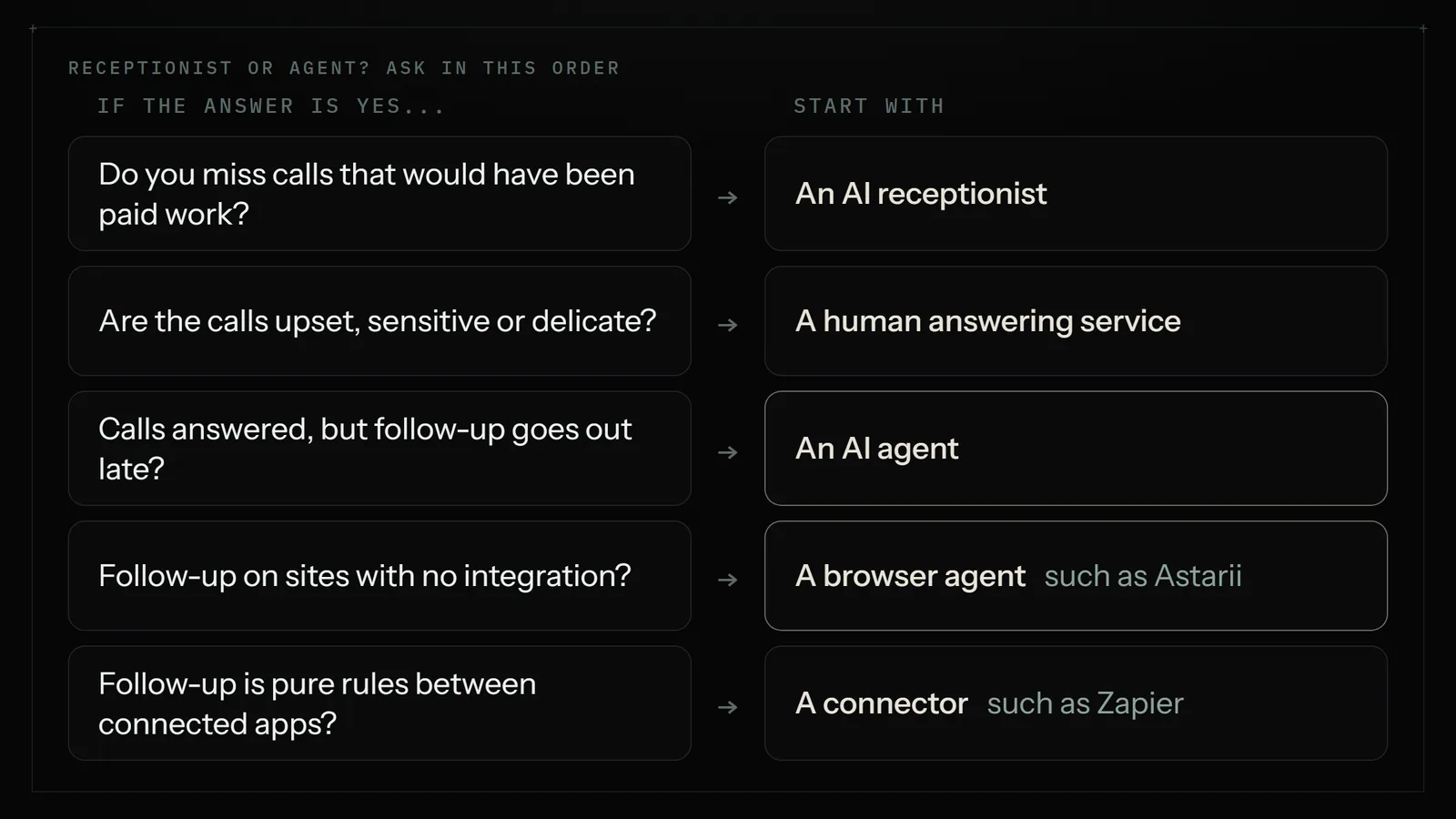
- Do you miss calls that would have been paid work? Check your missed-call list for one week. If the answer is yes, start with a receptionist. Nothing else on this page fixes that.
- Are the calls delicate? Upset customers, medical or legal intake, anything where tone matters. A human answering service, or a receptionist that transfers to you quickly, is the safer choice.
- Are calls answered, but leads go cold afterwards? If quotes go out days late or callers never get the follow-up you promised, the bottleneck is online work, and that is an agent's job. Our lead follow-up guide has a five-touch schedule and templates for that part.
- Does the follow-up involve sites with no integration? A supplier portal for stock and prices, a booking site with no connector, a government form. A receptionist's Zapier hook will not reach those; a browser agent can sign in and do the steps.
- Is the follow-up pure rules between apps that already connect? "When a call summary arrives, add a row." A connector such as Zapier may be enough, and cheaper. Our Zapier vs browser agent comparison covers that line.
Using both: one call, start to finish
Here is how the two fit together for a small heating and plumbing business with one van and a part-time office manager.
- 2:40pm, the call. A customer rings about a boiler that keeps cutting out. The owner is on a job. The AI receptionist answers, asks the intake questions (address, boiler age, is there heating at all), offers the next free slot and sends a booking link by text. It emails a call summary to the office inbox.
- 6:00pm, the agent's scheduled run. An Astari reads the day's call summaries in Gmail, adds each new caller to the Leads sheet with the address, problem and whether they booked, and skips anyone already logged.
- Same run, the follow-up. For callers who did not book, it drafts a short follow-up email from your template. For callers who did, it checks the booking is on Google Calendar and adds the address to the event.
- Same run, the parts check. For the boiler job, it signs into the supplier's trade portal, checks the price and stock of the usual part, and notes it on the lead's row.
- 6:15pm, the report. You get one email: four new callers, two booked, two follow-ups waiting for your approval, one part in stock at the usual price.
Neither tool could do the whole thing. The receptionist cannot sign into the trade portal; the agent cannot answer the phone at 2:40pm. The one thing to check before you set this up: make sure your receptionist emails its call summaries (or saves them somewhere the agent can read), not only texts them to your phone.
What the pair costs a month
For the business above, with 80 calls a month at about 3 minutes each:
| Setup | Monthly cost | What you get |
|---|---|---|
| Receptionist only (Rosie Professional) | $49 | Every call answered, summaries by text or email |
| Agent only (Astarii Pro) | $29.99 | Follow-up, logging and reports; calls still go to voicemail |
| Receptionist + agent | About $79 | Calls answered and followed up the same evening |
| Human answering service (Ruby) | $720 and up | People on the phone; follow-up still yours |
| Part-time office help, 20 hours a week | Roughly $1,700 | A person for calls and paperwork, during their hours |
A 15-minute daily follow-up run on weekdays uses about 330 minutes a month, inside the 900 cloud minutes on Astarii Pro. The part-time figure is the rough estimate from our AI employees guide; your local rates will differ. For how a person compares with software for the rest of the list, see virtual assistant vs AI agent.
Where Astarii is not the pick
- Answering or making phone calls. Astarii does not do either. Use a receptionist, an answering service or a person.
- Live replies in seconds. An Astari runs when you ask or on a schedule, not the moment a call ends. If a caller needs a reply within a minute, the receptionist's own text follow-up is the right tool.
- Text messages to customers. Astarii's product facts list email, not SMS. Leave texting to the receptionist or your phone system.
- A follow-up that is pure rules between connected apps. If every step is "summary arrives, add row", a connector does it for less.
- Very few calls. At five calls a week, a phone that forwards to voicemail and ten minutes each evening may be all you need.
Four rules before you put AI on your phone or your follow-up
- Test it on yourself first. Call the receptionist from your own phone with awkward questions: a price you don't publish, an angry tone, a strong accent, a request for something you don't do. Fix its instructions before real customers reach it.
- Answering is not the same as calling out. The receptionists here mostly answer calls that come in. If you want AI to place calls, US rules apply: in February 2024 the FCC confirmed that AI-generated voices count as "artificial" voices under the TCPA, so outbound AI calls generally need the same prior consent as other prerecorded calls.
- Approve before anything goes out. For the first weeks, have the agent draft follow-up emails for you to approve rather than send them. Astarii pauses and asks when something needs a decision; use that.
- Keep money and disputes human. Refunds, payments and complaints stay with you, on the phone and in email. Neither tool should make those calls alone.
How to start
The instructions further down this page are follow-up jobs you can give an Astari word for word, once your receptionist emails its call summaries. Schedules are set as described in the scheduling docs, and Gmail, Sheets and Calendar connect as described in connections.
- Pull one week of missed calls and one week of late follow-ups. Whichever list is longer tells you which tool to buy first.
- If it is calls, trial a receptionist on your own number (Rosie has a 7-day trial, Smith.ai a free tier) and route only after-hours calls to it at first.
- If it is follow-up, start an Astari on one job, such as logging call summaries into a sheet each evening. The free trial gives 3 runs of up to 15 minutes, no card needed, and plans start at $29.99 a month.
- Add the second tool only when the first is running cleanly.
For the full field of AI tools by job, including phones, see best AI agents for small business and the AI personal assistant guide. To set up the follow-up side, start with your first Astari.
Say it to an Astari
These are instructions you can give an Astari, word for word. It does the work in a browser, on a schedule if you want one, and asks you before anything goes live.
Questions
What is an AI receptionist?
An AI receptionist is a voice AI that answers your business phone number. It greets callers, answers common questions from the details you give it, takes messages, books appointments or texts a booking link, transfers calls to you by your rules and sends you a summary after each call.
How much does an AI receptionist cost?
On vendor pages read on 22 November 2026: Rosie from $49 a month for 250 minutes, Goodcall from $79 for 100 unique callers, Frontdesk $99 a month (or $79 billed yearly) with 200 voice minutes, and Smith.ai free for 25 calls a month, then $150 for 75 calls. Human services such as Ruby start at $250 for 50 minutes.
What is the difference between an AI receptionist and an AI agent?
A receptionist works on your phone line and talks to callers live. An AI agent works in your inbox, spreadsheets, calendar and the websites you sign into, and does multi-step online jobs on a schedule. One takes the call; the other does the paperwork after it.
Can Astarii answer my business phone?
No. Astarii does not answer or place phone calls. It works in a browser and in Gmail or Outlook, Google Sheets, Docs, Calendar and Drive. For calls, use an AI receptionist, an answering service or a person.
Is an AI receptionist better than a human answering service?
For volume, after-hours coverage and price, usually yes: AI plans start under $100 a month, against $250 for 50 minutes at Ruby. For upset customers, sensitive intake or calls where tone matters, a person is still the safer choice. Some services, such as Smith.ai, offer both.
Do I need both an AI receptionist and an AI agent?
Only if both jobs hurt. If you miss paid calls, start with a receptionist. If calls are answered but quotes and follow-ups go out late, start with an agent. A service business with both problems can run the pair for about $79 a month.
Can an AI make outbound calls to my customers?
Some tools can, but US rules apply. In February 2024 the FCC confirmed that AI-generated voices count as artificial voices under the TCPA, so outbound AI calls generally need the same prior consent as other prerecorded calls. Answering calls that come in is a different matter.
How do I test an AI receptionist before using it?
Forward only your own test calls first. Ring it with an unpublished price question, an angry tone and a request for something you do not offer, and check the summary it sends. Then route after-hours calls only, and widen it once the summaries look right.
- Rosie: AI answering service pricing
- Goodcall: pricing
- My AI Front Desk (Frontdesk): pricing
- Smith.ai: AI Receptionist pricing
- Ruby: plans and pricing
- FCC: FCC makes AI-generated voices in robocalls illegal (declaratory ruling, February 2024)
- Orrick: Did the FCC really ban AI-generated voice calls? No, but restrictions apply
filed under AI agents explained