AI Email Assistant for Small Business: Drafts, Sorting and Follow-Ups Compared
An AI email assistant drafts replies, sorts your inbox or chases quiet threads. Most are good at one of the three. Here is which kind does what, what each costs, what Gmail and Outlook already do for free, and where an agent that does the work behind the email fits.

An AI email assistant drafts replies, sorts mail or chases follow-ups. Start with free Gmail or Outlook filters and templates. Sorters such as SaneBox cost about $7 a month, and draft assistants such as Fyxer or Superhuman about $25 to $30 a user. For emails that set off other work, a doing agent such as Astarii, from $29.99 a month, fits.
An AI email assistant does one or more of three jobs: it drafts replies, it sorts what comes in, or it chases threads that went quiet. Most products are good at one of the three and sold as if they did all of them. A small business owner who buys the wrong one pays $30 a month for a tidier inbox when the real problem was the forty replies still waiting.
This guide compares the kinds of AI email assistant by job, with prices as reported this week (November 2026), what Gmail and Outlook already do for free, and a plain section on where each kind stops. Astarii, which we make, is not an inbox app. It is an agent that connects to Gmail or Outlook and does the work an email asks for, so it appears here as one option among six, and for pure inbox tidying we point you elsewhere. If agents are new to you, start with the guide to AI agents for small business.
The three jobs, and a fourth nobody advertises
Estimates of time spent on email vary with who is counting. One Microsoft study of business software users put it at 8.8 hours a week; an Email Tool Tester survey put the average nearer 5. Either way it is most of a working day, and it splits into different kinds of work:
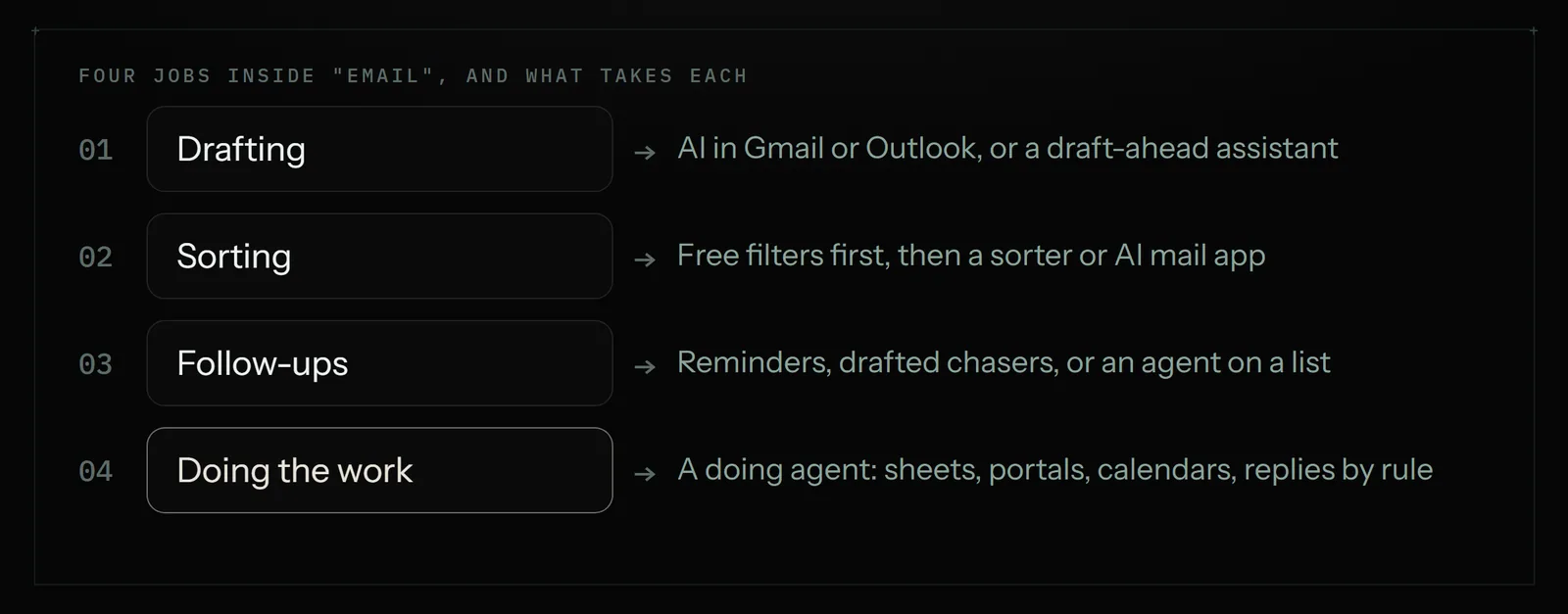
- Drafting. Writing the reply. The assistant reads the thread and proposes an answer, ideally in your tone and with your facts.
- Sorting. Deciding what matters. The assistant moves newsletters, receipts and cold pitches out of the way and puts customers and money at the top.
- Follow-ups. Remembering. The assistant notices you sent a quote nine days ago and nobody answered, and reminds you or drafts the nudge.
The fourth job is the one that eats the most time and that inbox tools mostly skip: doing what the email asks. A supplier invoice has to reach the bookkeeping sheet. A booking request has to reach the calendar. A customer asking "where is my order" needs someone to sign into the shop and look. Drafting a polite reply is the small part. The work behind the reply is the large part.
AI email assistants compared
Prices below are what each tool charged or was reported to charge this week. Most come from recent pricing guides, not the vendors' own pages, and several guides disagree with each other; the sources at the end list them. Treat every number as "about" and check the vendor's page before you buy.
| Kind | Examples | Reported price (Nov 2026) | Best at | Stops at |
|---|---|---|---|---|
| Free inbox features | Gmail filters, labels and templates; Outlook rules and Quick Steps | $0 | Fixed sorting rules, saved replies | Anything that needs reading for meaning |
| AI built into your mail | Gemini in Gmail, Copilot in Outlook | Google Workspace Business Starter about $7 a user a month yearly; Copilot Business about $21 a user a month on top of a Microsoft 365 Business plan | Summaries and drafts without a new app | Drafts one message at a time, when you ask |
| Sorter | SaneBox | About $7, $12 or $36 a month by plan, less on yearly billing; 14-day trial | Getting low-value mail out of the inbox | Does not write replies |
| AI mail app | Superhuman, Shortwave | Superhuman Starter $30 a user monthly or $25 yearly; Shortwave has a free tier, paid plans reported from about $18 | Speed for people who live in email | You move to a new mail app; work outside the inbox stays yours |
| Draft-ahead assistant | Fyxer | Reported $30 a user monthly or $22.50 yearly; guides say plans changed in September 2026 | Replies waiting as drafts before you open the thread | Drafts only; you review and send |
| Doing agent | Astarii, Lindy | Astarii from $29.99 a month, 3 free runs; Lindy from $29.99 (read 11-12) | The work an email asks for: sheets, portals, calendars, replies by rule | Not an inbox app; no live sorting as mail arrives |
A chat assistant such as ChatGPT Plus ($20 a month) also drafts a fine reply if you paste the thread in. For five tricky emails a week, that is all the "AI email assistant" many owners need. The ChatGPT for small business guide covers where that stops.
Start with what Gmail and Outlook do for free
Before paying for anything, spend 30 minutes on the features you already have. They are rules, not AI, and rules are fast, free and predictable.
- Filters and rules. In Gmail, a filter can label, archive or forward anything from a sender or containing a phrase. In Outlook, rules do the same. One filter per noisy sender (marketplace notifications, payment receipts, newsletters) clears a surprising share of the inbox.
- Templates. Gmail's templates and Outlook's Quick Parts or My Templates save a reply you send often: opening hours, price list, returns policy. Two clicks instead of two minutes.
- Suggested text. Gmail's Smart Compose and Smart Reply finish sentences and offer one-line answers on free accounts. They are basic, and they cost nothing.
- Snooze and nudges. Both can resurface a message later. Gmail can also remind you about messages that may need a reply.
If your inbox is under 30 emails a day, this plus a $20 chat assistant is probably enough. The paid tools earn their fee above that, or when the email is a trigger for other work.
Drafts: who writes the reply
There are three ways software drafts a reply, and the difference is who has to ask.
You ask, per message. Gemini in Gmail and Copilot in Outlook sit inside the mail you already use. You open a thread, click, and get a summary or a draft. Guides agree Gemini features come with paid Google Workspace plans; they disagree about how much the cheapest plan gets, so check before you count on it. Copilot Business is an add-on reported at about $21 a user a month on a yearly commitment, and it needs a qualifying Microsoft 365 Business plan underneath.
It drafts ahead. Fyxer and similar assistants read incoming mail and leave a draft reply waiting in your drafts folder, written from your past emails. You review and press send. This suits an owner whose replies are repetitive but personal: quotes, scheduling, "yes we do that".
It drafts and sends by rule. A doing agent can be told "reply to anyone asking about pricing with the current price list". This is the only kind that removes the click, which is also why it needs the most care. More on that under safety below.
Sorting: who decides what matters
Sorting is the oldest of the three jobs and the most solved. SaneBox works with any mail provider and files low-value mail into side folders, learning from what you move back. It does not write anything, which is its strength: it is cheap and it does one job. Reported prices run from about $7 a month for the smallest plan, with lower rates on yearly billing; trackers disagree by a couple of dollars, so read the vendor's page.
Superhuman and Shortwave sort too, as part of a full replacement mail app with AI search, summaries and drafting built in. They suit people who spend three or more hours a day in email and want speed. The cost is a new app to learn, and at $25 to $30 a user a month Superhuman is the priciest inbox on this list.
An honest note: Astarii is not the pick for sorting. It does not sit in your inbox filing mail as it arrives. A scheduled Astari can read new mail a few times a day and act on it, which is a different job.
Follow-ups: who remembers
Money in a small business often sits in threads that went quiet: the quote nobody answered, the invoice nobody paid, the supplier who promised a date. Three levels of help exist.
- Reminders. Gmail nudges, Outlook flags, and the "remind me if no reply" features in Superhuman, Shortwave and SaneBox bring the thread back to the top. You still write the chase.
- Drafted chasers. Draft-ahead assistants prepare the follow-up for you to send.
- Chasing from a list. When the follow-ups come from a spreadsheet, not from memory, a doing agent fits: every Monday it reads the unpaid rows, sends the right reminder for each row's age, and marks the row. Astarii's task memory means a scheduled Astari does not email the same person twice for the same item. The invoice reminder guide has the five templates and the schedule.
Acting on email: where a doing agent fits
This is the part most "best AI email assistant" lists leave out, because inbox tools stop at the edge of the inbox. A doing agent starts there. Astarii connects to Gmail or Outlook, Google Sheets, Docs, Calendar and Drive and works inside them directly, and it also works in a real browser: it opens websites, signs in with saved logins, fills forms and reports what it did. It runs on a schedule in the cloud, so your computer can be off.
That makes it the right kind for emails that are really instructions:
- An invoice arrives. The amount, date and supplier go into the sheet. See invoices from Gmail into a Google Sheet.
- A customer asks for your prices. The current price list goes back, and you get a line in the daily report.
- A booking request arrives. The appointment goes onto Google Calendar and the client gets a confirmation.
- A supplier emails "your statement is ready" with a link. The agent signs into the portal, reads the number and logs it.
When a site texts a sign-in code or something needs a decision, the Astari pauses and asks you, then carries on from where it stopped. Saved passwords are encrypted in your browser before they are stored and are never shown to the AI.
Where Astarii is not the right pick
- You want a faster inbox. Keyboard shortcuts, split inboxes, instant search: that is Superhuman or Shortwave.
- You want junk gone as it lands. SaneBox, or 30 minutes of filters.
- You want a draft waiting on every email, in your voice. A draft-ahead assistant such as Fyxer is built for exactly that.
- You want one summary of a long thread, now. The AI inside Gmail or Outlook, or paste it into a chat assistant.
- You need a shared support inbox with tickets. That is help-desk software, a different category. The agent vs chatbot guide covers support bots.
Astarii is metered in minutes of run time, so it suits scheduled jobs with a finish line, a few times a day. It is the wrong shape for watching an inbox every second.
A worked example: a two-person repair shop
This is an illustration with made-up but ordinary numbers, not a customer story. A two-person appliance repair shop gets about 60 emails a day. A week's tally shows the split:
| Type of email | Per day | What handles it | Cost |
|---|---|---|---|
| Newsletters, receipts, notifications | 30 | Gmail filters, set up once | $0 |
| "What do you charge?" and "are you open?" | 8 | A doing agent replies with the price list and hours, three times a day | Part of $29.99 |
| Supplier invoices and statements | 4 | The same agent logs them in the sheet every Friday | Part of $29.99 |
| Booking requests | 6 | The owner, with a template | $0 |
| Complaints, odd jobs, anything new | 12 | The owner, with a chat assistant for wording | $20 |
Half the inbox disappears with free filters. A fifth becomes scheduled work. The rest stays with the owner, who now has the time to answer it properly. Total: about $50 a month, and no new mail app. A shop with 200 emails a day and three people replying would land differently, probably on a sorter plus a draft-ahead assistant.
Before you give any tool your inbox
An email assistant reads your mail. All of it, usually. That is a real decision, so make it on purpose.
- Read the permission screen. When you connect Gmail or Outlook, the screen lists what the tool can do: read, send, delete. Send access is what makes automatic replies possible, and what makes mistakes public.
- Start with review. For the first week or two, have the tool draft, or have an agent email you the replies it would send, and compare them with what you would have written.
- Keep automatic sending narrow. One fixed answer per question type. Refunds, complaints, legal and anything about money owed to a customer stay with a person.
- Know that no vendor can rule out prompt injection, where text inside an incoming email tries to steer the AI. Narrow rules and review are the defence. The login safety guide goes into this.
- Don't bulk-send from your main address. Follow-ups to people who already deal with you are fine. Cold outreach has its own rules, covered in the lead generation guide.
How to choose in 20 minutes
- Tally one day. Count yesterday's emails into five piles: noise, fixed-answer questions, emails that trigger work elsewhere, personal replies, hard ones.
- Kill the noise for free. One filter per sender.
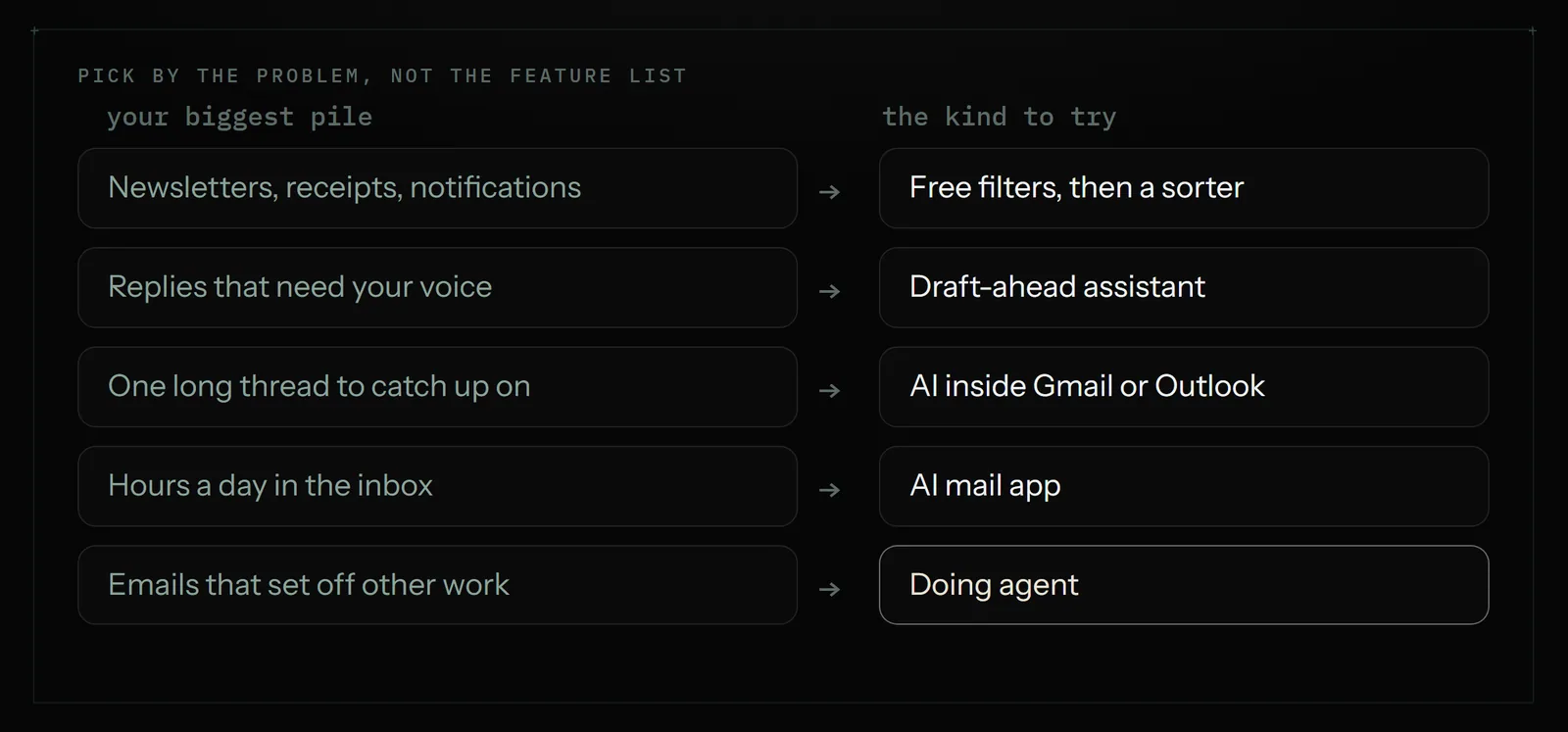
- Find the biggest remaining pile. Personal replies: a draft-ahead assistant or the AI in your mail. Fixed answers and trigger emails: a doing agent. Sheer volume and speed: an AI mail app.
- Trial one tool only. SaneBox and Fyxer are reported to have trials, Shortwave a free tier, and Astarii gives 3 free runs of up to 15 minutes with no card.
- Measure a week. If it did not save an hour, cancel it.
If the biggest pile is email that sets off other work, set up a first Astari on one job, such as Friday's invoices, put it on a schedule once the first reports look right, and check the plans when the free runs are used. If what you want is a wider look at assistants for calendar and errands too, the AI personal assistant guide sits next to this one.
Say it to an Astari
These are instructions you can give an Astari, word for word. It does the work in a browser, on a schedule if you want one, and asks you before anything goes live.
Questions
What is the best AI email assistant for a small business?
It depends on the pile that is biggest. For noise, free filters and then a sorter such as SaneBox. For replies in your voice, a draft-ahead assistant such as Fyxer or the AI inside Gmail or Outlook. For hours a day in email, Superhuman or Shortwave. For emails that set off other work, such as invoices into a sheet, a doing agent such as Astarii.
How much does an AI email assistant cost?
Gmail and Outlook filters and templates are free. SaneBox is reported at about $7 to $36 a month by plan. Superhuman Starter is reported at $30 a user monthly or $25 yearly, Fyxer at $30 or $22.50. Copilot Business is about $21 a user on top of Microsoft 365. Astarii starts at $29.99 a month with 3 free runs.
Is there a free AI email assistant?
Partly. Gmail gives free accounts Smart Compose, Smart Reply, filters and templates, and Outlook has rules and saved replies. Shortwave is reported to have a free tier. A free chat assistant will draft a reply if you paste the email in. Tools that draft or sort across your whole inbox are mostly paid, with trials.
Can an AI email assistant reply to emails automatically?
Some can. Most inbox assistants draft and leave sending to you. A doing agent such as Astarii can be told to reply to a type of email, for example anyone asking about pricing, on a schedule. Keep automatic replies to questions with one fixed answer, and review its replies for the first week or two.
Does an AI email assistant work with Gmail and Outlook?
Most work with both, but check. Gemini is for Gmail in Google Workspace and Copilot is for Outlook in Microsoft 365. SaneBox works with any provider. Superhuman and Fyxer support Gmail and Outlook. Astarii connects to Gmail or Outlook, plus Google Sheets, Docs, Calendar and Drive.
Is it safe to let an AI read my email?
It can be, if you choose on purpose. Read the permission screen when you connect, prefer tools that draft over tools that send, keep automatic sending narrow, and remember that no vendor can rule out prompt injection from text inside an incoming email. Refunds, complaints and legal matters should stay with a person.
What is the difference between an AI email assistant and an AI agent for email?
An email assistant works inside the inbox: it drafts, sorts and reminds. An AI agent for email does what the message asks outside the inbox too: it logs an invoice in a sheet, puts a booking on the calendar, signs into a supplier portal, then replies and reports what it did.
Can Astarii sort my inbox as email arrives?
No. Astarii is not an inbox app and does not file mail the moment it lands. A scheduled Astari can read new mail a few times a day and act on it, such as replying to price questions or logging invoices. For live sorting, use filters or a sorter such as SaneBox.
- Astarii product facts (llms.txt)
- Astarii pricing
- SaneBox pricing plans and history (PricingSaaS)
- SaneBox pricing (Toolradar)
- Superhuman pricing in 2026 (Inbox Zero)
- Superhuman Mail pricing in 2026 (Dupple)
- Shortwave pricing 2026 (CostBench free plan guide)
- Shortwave tier price rise, June 2026 (UsagePricing)
- Fyxer AI pricing 2026 (eesel)
- Fyxer pricing (Drag)
- Google Workspace pricing in 2026 and whether Gemini is included (Dupple)
- Gemini Workspace pricing 2026 (eesel)
- Microsoft 365 Copilot Business for small organizations (Office Watch)
- Microsoft 365 Copilot licensing and pricing 2026 (O365HQ)
- Lindy pricing
- Average employee loses one day a week to drafting emails (UC Today)
- Workplace communication statistics (EmailTooltester)
filed under AI agents explained