How to Automate Lead Generation for a Small Business (Without Buying a List)
Finding leads is four small jobs: find, check, log and contact. Software can do the first three every weekday morning. Here are five ways to set that up, cheapest first, and why a bought list costs more than it returns.

To automate lead generation for a small business, build your own list from public sources: a tool finds and checks 10 to 20 businesses each weekday, logs them in a sheet and drafts a first email you approve. Contact databases start free, connectors near $19.99 a month, and a browser agent such as Astarii from $29.99 a month. Skip bought lists.
For most small businesses, lead generation is a job that happens when there is time, which means it mostly doesn't happen. You know the routine: search for businesses that look like your best customers, open each website, find a name and a contact route, paste it into a spreadsheet, write a first email, and remember to follow up. It works. It is also an hour a day that nobody has.
This guide shows how to automate the repeatable parts without buying a list, which tools fit which part, and what to keep in your own hands. The last option, a browser agent, is what we make at Astarii, so it gets a full setup. If agents are new to you, start with the guide to AI agents for small business; scheduling explains how a weekday run works.
What "automated lead generation" means at small-business size
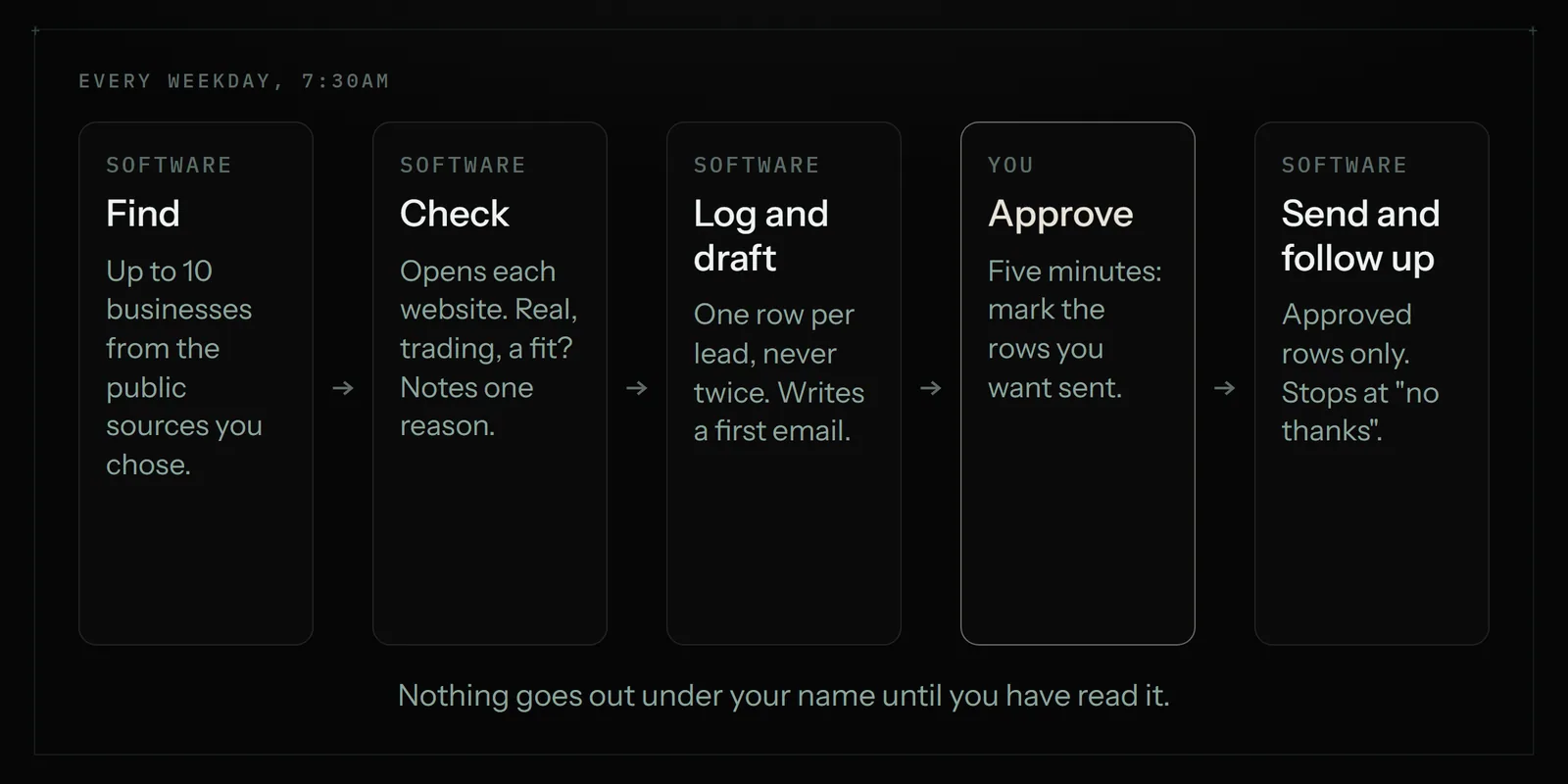
Most articles on this topic are written for sales teams with a CRM, a marketing platform and a budget for both. At the size of one to ten people, lead generation is four small jobs:
- Find. Spot businesses or people who fit: the right trade, the right area, the right size.
- Check. Open each one and confirm it is real, still trading and a fit. Note one specific thing about it.
- Log. Put it in one sheet with the source, the date and a status, so nobody gets contacted twice.
- Contact and follow up. Send a short, honest first message, then one or two follow-ups if there is no answer.
Jobs 1 to 3 are copying and checking. They are the same steps every day, which makes them good candidates for software. Job 4 is where your name is on the line, so the sensible setup automates the drafting and the remembering, and leaves the "send" decision with you until you trust it.
There is also an inbound half: people who fill in your contact form or email to ask about pricing. Automating that side is simpler and usually pays off first, so it gets its own section below.
Why not just buy a list?
A bought list feels like a shortcut. For a small business it usually costs more than it returns, for three reasons.
- It is stale and shared. The same file was sold to other buyers. Some addresses are dead, and the live ones have already had the same pitch from your competitors.
- It hurts your email. Google tells senders to keep the spam rate reported in Postmaster Tools below 0.10% and to avoid ever reaching 0.30%. Strangers on a bought list hit "report spam" far more often than people you picked one by one. Once your domain has a poor reputation, your quotes and invoices start landing in spam too.
- The law still applies to you. In the US, the CAN-SPAM Act covers business-to-business email as well as consumer email. The FTC's compliance guide puts the penalty at up to $53,088 for each separate email in violation, and says you stay responsible even when someone else sends on your behalf. Where a list came from is your problem, not the seller's.
The alternative is slower per lead and far better per reply: a short list you built yourself, from public sources, where each row has a reason to be there.
Five ways to automate it, cheapest first
Work down the list and stop at the first one that covers your need.
1. Free alerts and your own form
Set up Google Alerts for phrases that signal a buyer, such as "new restaurant opening" plus your town, and send your website's contact form straight into a Google Sheet. It costs nothing. It only catches what gets published or what comes to you, so it is a starting point, not a pipeline.
2. A contact database
Tools such as Apollo and Hunter sell access to contact data. Apollo's free plan includes 900 credits per seat a year, and its Basic plan is $49 per seat a month billed annually, with 30,000 credits a year. Hunter's free plan has 50 credits a month; Starter is $49 a month, or $34 a month billed yearly, with 2,000 credits a month, where a found email costs 1 credit and a verification half a credit.
These are strong when your customers are companies with staff pages and work email addresses: software firms, agencies, mid-sized offices. They are weaker for local trade. A database rarely knows that a cafe changed owners last month or that a new salon opened on Main Street.
3. A connector for the inbound half
Zapier, Make and n8n move data between apps that have an integration. A typical lead recipe: new form entry, add a row to a sheet, send a thank-you email, alert you. Zapier's Professional plan starts at $19.99 a month billed annually. Connectors are fast and reliable for this. They can't open a directory website and read it, so they don't help with finding. There is more in Zapier vs an AI browser agent.
4. A virtual assistant
A person can research leads with judgment, and can pick up the phone. Marketplace rates commonly run $10 to $20 an hour, so an hour of research each weekday is roughly $220 to $440 a month. Our virtual assistant vs AI agent comparison has the rates and sources. Choose a person when leads are high value and each needs real research or a call.
5. A browser agent
A browser agent does the research the way you would. It opens the directory, association member list or search results you name, visits each business's own website, reads it, and adds a row to your sheet. Astarii does this on a schedule in the cloud, so it can run every weekday at 7:30 with your laptop closed. Task memory means a scheduled Astari never does the same item twice, so it never re-emails a lead.
It is slower than a database lookup and it can misread a page, so it suits a steady 10 to 20 good leads a day, not thousands. That happens to be the volume a small business can follow up properly.
The options side by side
| Option | Finds new leads? | Best for | Weak spot | Typical cost |
|---|---|---|---|---|
| Google Alerts + form to sheet | Only what is published or comes to you | A first step for anyone | No research, no follow-up | Free |
| Contact database (Apollo, Hunter) | Yes, from its own data | Selling to companies with staff and work emails | Thin on local and very small businesses | Free tiers; Apollo Basic $49 per seat a month billed annually; Hunter Starter $49 a month |
| Connector (Zapier, Make, n8n) | No | Inbound: form to sheet to reply | Needs an integration at each step | Zapier from $19.99 a month billed annually |
| Virtual assistant | Yes, with judgment | High-value leads, phone calls | Cost per hour; needs managing | About $10 to $20 an hour |
| Browser agent (Astarii) | Yes, from sites you name | Local and niche leads on sites with no integration | Slower per lead; can misread a page | From $29.99 a month; 3 free runs |
| Bought list | In theory | Very little | Stale, shared, risky for your email and under the law | Varies |
Many businesses mix two: a connector for the contact form, and an agent or a database for finding.
Set up a weekday lead finder with a browser agent
Here is the whole setup with Astarii. Allow under an hour, most of it on step 1.
Step 1: Write down who counts as a lead
Be specific enough that a stranger could decide. "Independent cafes and restaurants within 15 miles of Columbus, open more than six months, not part of a chain" is a rule. "Local businesses" is not. Add your deal-breakers: already a customer, a competitor, a business that states "no sales contact" on its site.
Step 2: Pick two or three public sources
Good sources are pages where your customers list themselves for the public: a chamber of commerce directory, a trade association's member list, a city or county licence register, a "new businesses" page in the local paper. Read each site's terms first. Some forbid automated collection, and networks such as LinkedIn bar bots outright. Leave those as a manual step. The scraper vs browser agent guide covers what site terms and US court rulings say.
Step 3: Build the lead sheet
One Google Sheet, one row per business. The columns matter more than the tool.
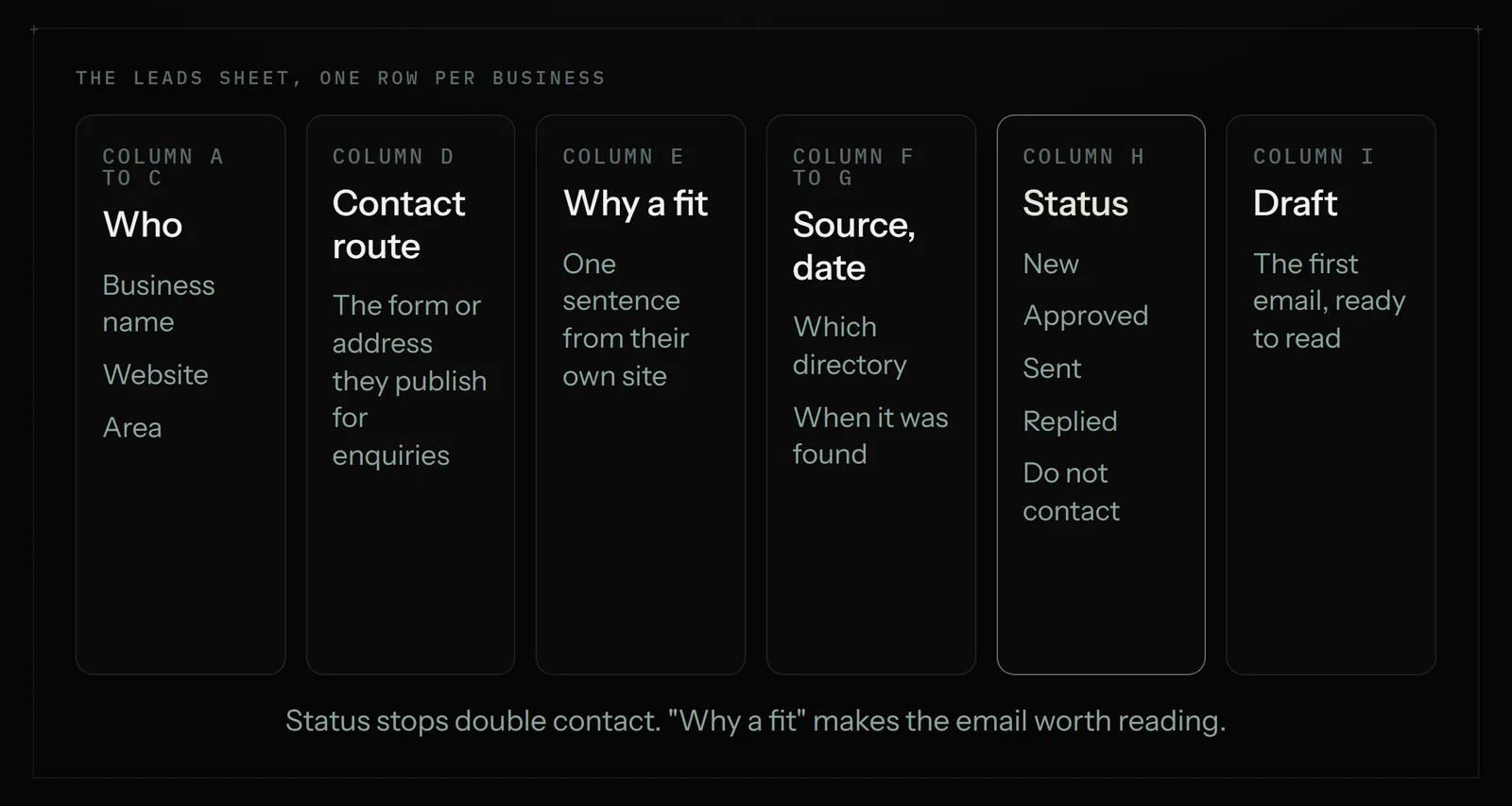
- Business, website, area. The basics.
- Contact route. The route the business itself publishes for enquiries: a contact form, a general address such as hello@, or a named person on its contact page. Skip personal addresses dug up from elsewhere.
- Why a fit. One sentence from their own site: "opened a second site in March", "menu says they cater events".
- Source and date found. So you can tell which sources produce customers.
- Status. New, Approved, Sent, Replied, Not a fit, Do not contact.
- Draft. The first message, ready for you to read.
Step 4: Connect the apps and describe the job
Connect Google Sheets, and Gmail or Outlook if you want it to send; Connections shows how. Then write the instruction the way you would brief an assistant: "Every weekday at 7:30, open the directories listed on the Sources tab and find up to 10 businesses that match the rules on the Rules tab and are not already in the Leads tab. Visit each one's website, fill in the row, and write a three-sentence first email in the Draft column. Do not send anything." If the steps are fiddly, you can show it once and have it repeat them. Your first Astari walks through both.
Step 5: Run it once and read every row
Check the first batch against the websites yourself. Wrong rows almost always trace back to a vague rule, so tighten the rule and run it again. One checked run teaches you more than a longer instruction.
Step 6: Schedule it, and keep "send" for yourself at first
Put the finder on a weekday schedule. Each morning, read the new rows and change Status to Approved on the ones you like. A second instruction sends only Approved rows and marks them Sent. After a couple of weeks of approving nearly everything unchanged, you can decide whether to loosen that. Many owners never do, and ten approvals take about five minutes.
A worked example: a commercial cleaning company
Take a four-person cleaning company that wants more office and restaurant contracts in one city. Its rule: offices with 10 to 50 staff and independent restaurants, inside the city limits, not already a customer. Its sources: the chamber of commerce directory and the county's public list of licensed food businesses.
Each weekday at 7:30 the finder adds up to 10 rows. A typical one reads: "Harbour Street Dental, harbourstreetdental.example, contact form on the site, moved into a larger unit in September per their news page, source: chamber directory, status New." The draft says who the company is, mentions the move, offers a free walk-round quote and gives a plain way to say no.
The owner approves seven or eight over coffee. If a run takes about 15 minutes, 22 weekdays come to about 330 cloud minutes a month, inside the 900 cloud minutes on Astarii's Pro plan. That is roughly 150 to 200 checked leads a month, which is as many as a four-person firm can quote for.
The first email, and the rules it has to follow
A good first email is short and specific. Here is a pattern that fits most trades:
Hi, I run Brightside Cleaning here in town. I saw on your site that you've moved into the larger unit on Harbour Street. We clean six practices nearby, usually three evenings a week. Would a free walk-round quote be useful this month?
If this isn't for you, reply "no thanks" and I won't write again.
Sam Carter, Brightside Cleaning, 12 Mill Lane, Columbus, OH 43004
That email also meets the main points of the CAN-SPAM Act for US senders:
- Honest "from" and subject. It says who you are and what the email is about.
- A valid physical postal address in the message.
- A clear way to opt out, honoured promptly. The law gives you no more than 10 business days; do it the same day. Mark the row "Do not contact" so the rule outlasts your memory.
- No harvested addresses. The Act treats sending to addresses collected by automated means from sites that say they don't share them as an aggravated violation. Using the contact route a business publishes for enquiries, and respecting any "no sales contact" notice, keeps you well clear of it.
On volume, the limit that matters is reputation. Google Workspace allows up to 2,000 messages a day per user, but ten to twenty well-chosen emails a day will do more for you than two hundred generic ones, and they keep your spam rate where Google wants it.
For follow-ups, two is plenty: one after four or five working days, one a week later, then stop. The structure in our invoice reminder templates adapts well, since both are polite nudges on a schedule.
The inbound half: answer enquiries fast
Leads who contact you first are worth more than any you find, and the usual way to lose them is a slow reply. Three things to automate:
- Form to sheet. Every enquiry becomes a row in the same Leads sheet, with source "website".
- A first reply. An Astari connected to Gmail or Outlook can take an instruction as plain as "reply to anyone asking about pricing" with your price sheet and a booking link. If you'd rather check tone first, have it write the reply for your approval.
- A morning summary. One email listing new enquiries, anything unanswered for two days and yesterday's replies to your outreach.
If all your enquiries come through one form and one inbox, a connector does the first two cheaply. Paid search is the other inbound route; the Google Ads starter guide covers a first campaign, and community routes such as Reddit can bring enquiries without any cold email at all.
What to keep for yourself, and when an agent is the wrong pick
- Phone calls and meetings. Astarii doesn't make calls. If your trade sells by phone, a person does that part.
- Thousands of contacts a week. A database with bulk export is faster and cheaper per record.
- Sites that forbid automated access. Respect their terms and do those by hand.
- Pricing, discounts and anything binding. Software can draft; you decide what you offer.
- A handful of dream clients. If you want five specific accounts, research and write to them yourself. That work deserves you.
Also be realistic about accuracy. An agent can pick the wrong contact page or misjudge a fit, which is why the approve step exists. For how saved logins and sign-in codes are handled when a source needs an account, see is it safe to let an AI agent log into your accounts.
What it costs
The free route (alerts, a form and a sheet) costs only your time. A contact database runs from free to $49 a seat a month at the entry tiers. A connector for the inbound side starts around $19.99 a month. A virtual assistant doing an hour a weekday is roughly $220 to $440 a month.
Astarii has 3 free runs of up to 15 minutes each with no card, enough to test one source and one batch of leads. After that, Pro is $29.99 a month with 900 cloud minutes plus 800 browser minutes, and Max and Ultra are $49.99 and $99.99. Minutes are a run's real length, and pools reset on the 1st. Details are on the pricing page.
If the copying step is the part you want to understand better, read automating data entry between websites and Google Sheets. The same sheet-and-schedule pattern runs a weekday competitor price check. To start, set up your first Astari and give it one directory and one rule.
Say it to an Astari
These are instructions you can give an Astari, word for word. It does the work in a browser, on a schedule if you want one, and asks you before anything goes live.
Questions
How do I automate lead generation for a small business?
Write a clear rule for who counts as a lead, pick two or three public sources such as a chamber of commerce directory, and keep one sheet with a status column. Then have a tool find and check 10 to 20 businesses each weekday, log them and draft a first email. Approve the emails yourself before they go.
Is it legal to send cold emails to businesses?
In the US, yes, if you follow the CAN-SPAM Act: an honest sender and subject line, a valid physical postal address, a clear way to opt out, and opt-outs honoured within 10 business days. The Act covers business-to-business email too. Canada, the EU and others are stricter, so check the rules where your customers are. This is general information, not legal advice.
Should I buy a lead list?
Usually not. Bought lists are stale and sold to several buyers, recipients report the emails as spam more often, and you remain responsible under the law for every message. The FTC's guide puts the CAN-SPAM penalty at up to $53,088 per email in violation. A short list you built yourself gets better replies.
What is the best free way to generate leads automatically?
Send your website's contact form into a Google Sheet and set Google Alerts for buying signals in your area. Apollo's free plan includes 900 credits per seat a year and Hunter's free plan 50 credits a month, which is enough to test a contact database before paying.
Can an AI agent find leads for my business?
Yes. A browser agent such as Astarii opens the directories and websites you name, reads each business's site, adds a row to your Google Sheet and can write a first email for your approval. Task memory means a scheduled Astari never emails the same lead twice. It does not make phone calls.
How many cold emails should a small business send per day?
Ten to twenty well-chosen ones is a sensible ceiling for most small businesses. Google Workspace allows up to 2,000 messages a day per user, but the real limit is reputation: Google asks senders to keep reported spam below 0.10% and never reach 0.30%.
How much does lead generation automation cost?
Alerts, a form and a sheet are free. Apollo Basic is $49 per seat a month billed annually and Hunter Starter is $49 a month. Zapier starts at $19.99 a month billed annually. A virtual assistant is about $10 to $20 an hour. Astarii has 3 free runs, then plans from $29.99 a month.
When should I not automate lead generation with an agent?
When you sell by phone, when you need thousands of contacts a week (a database is cheaper per record), when a source site forbids automated access, or when you are chasing a handful of dream clients that deserve your own research and writing.
- CAN-SPAM Act: A Compliance Guide for Business (FTC)
- 15 U.S. Code 7704: Other protections for users of commercial electronic mail (Cornell LII)
- Email sender guidelines (Google Workspace Admin Help)
- Gmail sending limits in Google Workspace
- Apollo pricing
- Hunter pricing
- Zapier pricing
- Astarii product facts (llms.txt)
filed under Marketing