AI Web Scraper vs Browser Agent: Collecting Data From Websites Without Code
A scraper hands you rows. A browser agent does the errand the rows were for. Here is which one a small business needs, what each costs, and what a site’s terms have to say about it.

An AI web scraper turns web pages into rows in a spreadsheet, and suits large pulls from public pages; free extensions exist and paid plans start near $19 a month. A browser agent such as Astarii, from $29.99 a month, signs into sites you use, collects a few dozen items on a schedule, updates your sheet and emails you. Check each site's terms first.
You have a list on a website and you want it in a spreadsheet. Search for a way to do that and you land in two camps that sound alike: AI web scrapers, which promise any page as a table in one click, and AI browser agents, which promise to do the whole job for you. They overlap at the edges, and they are priced and built for different work.
This guide sorts the two for a small business, with prices read in November 2026, the jobs each one wins, and the part most tool pages skip: what a site's terms and the law say about collecting its data. If you already know your data sits behind a login you use every week, setting up a first Astari takes a few minutes. For the wider list of jobs a helper can take, see the guide to AI agents for small business.
The short version
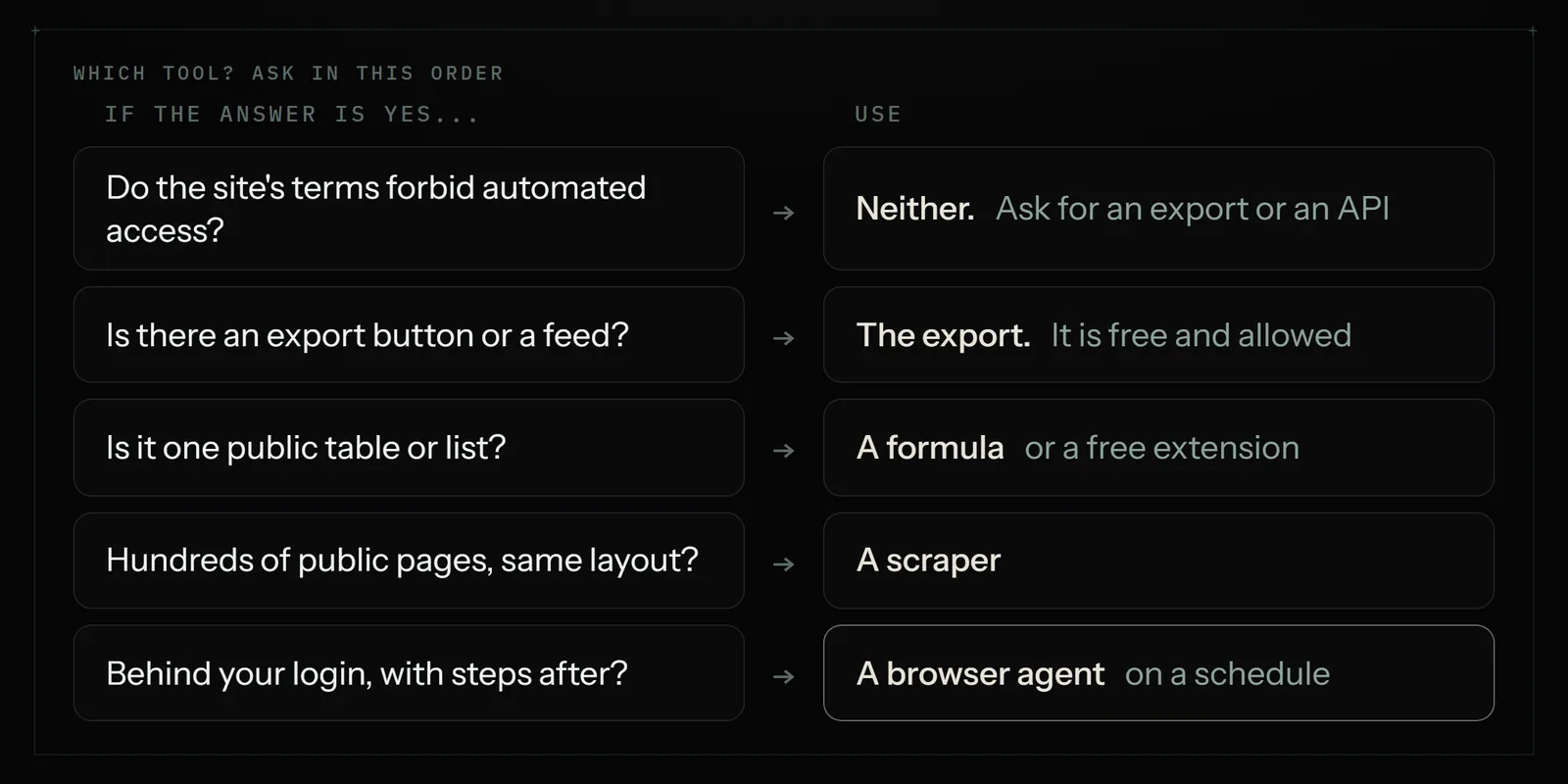
- A public table or list, once: a free Google Sheets formula or a free browser extension. Do not pay for this.
- Hundreds or thousands of public pages, same layout: a no-code scraper such as Browse AI, Octoparse or Thunderbit. Fast, cheap per row, built for volume.
- You have a developer, or you are feeding an app: a scraping API such as Firecrawl or Apify.
- A few dozen items on sites you sign into, on a schedule, with something done afterwards: a browser agent such as Astarii, from $29.99 a month.
- A site whose terms say no: neither. Ask for an export, a feed or an API instead.
The dividing question is simple. Do you want rows, or do you want a job done? A scraper hands you rows. An agent signs in, collects, compares with last time, updates your sheet and tells you what changed.
What each one is
A web scraper is software that reads a page's structure and copies the repeating parts (product name, price, rating, link) into a table. Older scrapers needed you to click each field and build a recipe. The AI kind looks at the page, suggests the columns and copes better when the layout shifts. Either way the output is the same: a CSV or a Google Sheet full of rows.
A browser agent is software that uses a browser the way you do. It opens the site, signs in with a saved login, clicks through pages, reads what is there and acts on it. Collecting data is one thing it can do in the middle of a longer job. It is slower per page than a scraper, because it is reading and deciding where a scraper is only extracting.
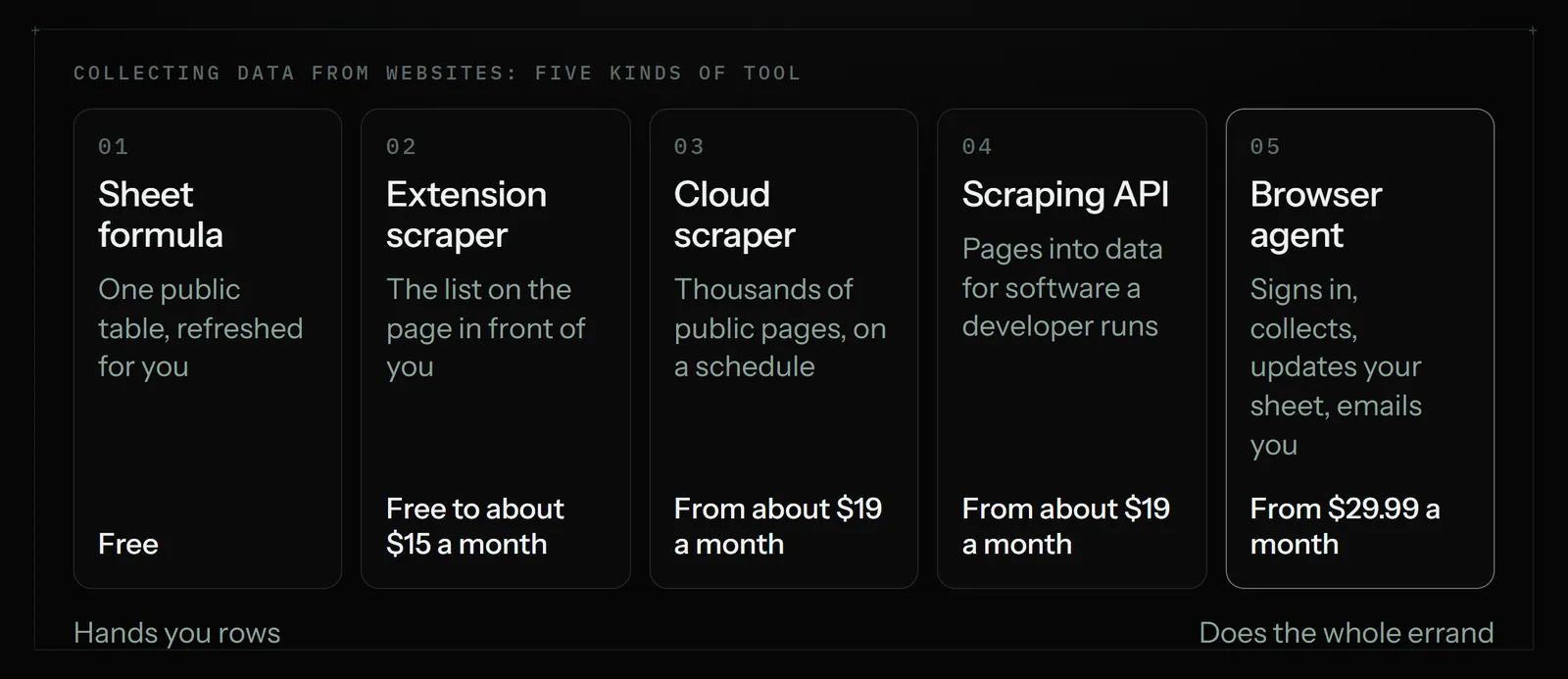
In practice the market has five kinds of tool, not two:
- Spreadsheet formulas. IMPORTHTML and IMPORTXML in Google Sheets pull a public table or value into a cell, free.
- Browser extension scrapers. You open the page, click the extension, and it turns the list in front of you into a table. Instant Data Scraper and Web Scraper's extension are free; Thunderbit adds AI column suggestions.
- Cloud scrapers. Browse AI and Octoparse run saved "robots" or tasks on their servers on a schedule and can watch a page for changes.
- Scraping APIs. Firecrawl and Apify are built for developers and for feeding other software. Powerful, and not aimed at an owner with a spreadsheet.
- Browser agents. Astarii and similar tools take an instruction in plain English and do the whole errand.
Scrapers and agents, side by side
| Tool | Kind | Entry price (Nov 2026) | Best for | Where it stops |
|---|---|---|---|---|
| Google Sheets import formulas | Formula | Free | One public table or value that refreshes by itself | Logins, pages you must click through, pages built by scripts |
| Instant Data Scraper, Web Scraper extension | Browser extension | Free (Web Scraper's cloud plans from $50 a month) | A list on the page in front of you, exported once | Running while you are away; anything after the export |
| Thunderbit | AI extension scraper | Free tier; Starter about $15 a month, 500 credits | Quick tables with AI-suggested columns, sub-pages | Volume on the small plans; multi-step jobs |
| Browse AI | Cloud scraper and monitor | Free 50 credits a month; Personal $48 monthly or $19 a month billed yearly | Watching pages for changes; scheduled extraction | Credits run out quickly at volume; acting on what it finds |
| Octoparse | Cloud scraper | Free plan; Basic $19 a month; Standard from $83 monthly or $69 billed yearly | Large public catalogues with paging, templates for well-known sites | Learning curve; cloud runs start on Standard |
| Apify | Scraping platform | Free with $5 of usage a month; Starter $19 a month plus usage | Ready-made scrapers for specific sites, at scale | Usage pricing takes reading; built with developers in mind |
| Firecrawl | Scraping API | Free tier; Hobby $19 a month, or $16 billed yearly | Turning pages into clean text for software and AI apps | Needs code or another tool to call it |
| Astarii | Browser agent | 3 free runs; Pro $29.99 a month | Small recurring jobs on sites you sign into, ending in a sheet and an email | Thousands of pages; minute-by-minute monitoring |
Prices for Browse AI, Octoparse, Apify, Firecrawl and Web Scraper were read on each vendor's own pricing page on 20 November 2026. Thunderbit's Starter credits come from its pricing page and its price from third-party guides, which agree on $15 a month or $9 billed yearly. Scraper pricing changes often and most of it is metered in credits, so check the page before you commit to a year.
Where a scraper is the better pick
Scrapers are the right tool more often than agent vendors like to admit. Pick one when the job looks like this:
- Volume. Five thousand product pages, a whole directory, every listing in a category. A scraper fetches pages in bulk and in parallel. An agent reading one page at a time would take hours and cost far more per row.
- One layout, repeated. When every page has the same fields in the same places, there is nothing to decide. Extraction is a solved problem; you do not need a model thinking about each page.
- Public pages. No login, no account, nothing to click through except "next page". This is the scrapers' home ground.
- Change alerts. Browse AI and similar tools can watch a page and tell you when a number moves. If "tell me when this changes" is the whole job, that is cheaper than an agent visit.
- A one-off. You need the list once, today. A free extension does it in two minutes and you never think about it again.
- Feeding software. If the rows go into a database or an app a developer maintains, an API such as Firecrawl or an Apify scraper fits their workflow better than a chat window.
If that is your job, stop here and use a scraper. The guide to automating Google Sheets covers the free import formulas, which handle more than most people expect.
Where a browser agent is the better pick
An agent earns its higher price when collecting the data is only the middle of the job.
- The data is behind your own login. A supplier portal, a marketplace dashboard, a wholesale price list, a booking system. An Astari signs in with a saved login. Saved passwords are encrypted in your browser before they are stored and are never shown to the AI.
- The site texts a code. When a sign-in asks for a code, the Astari pauses, asks you, and carries on from where it stopped. A scraper recipe usually just fails.
- Getting there takes steps. Pick a date range, open a report, choose a tab, expand a row. You describe the path in plain English or show it once.
- The page needs reading. "Find the delivery estimate somewhere on this page" or "work out whether this supplier ships to the UK" is a reading job. Fields are not always in neat columns.
- Something happens afterwards. The numbers go into your Google Sheet, get compared with yesterday's, and you get an email listing what changed. Astarii connects to Gmail or Outlook and Google Sheets to do that part directly.
- It must not repeat itself. Task memory means a scheduled Astari never does the same item twice, so a daily run adds only new rows and never re-emails a lead.
- It runs while you are busy. Scheduled in the cloud, in Astarii's own browser, with your laptop closed. See scheduling for the options.
The competitor price monitoring guide and the data entry guide each walk through one of these jobs from start to finish.
What a small job costs on each
Take a typical small-shop job: check 20 pages every weekday and log one row for each.
On a scraper, that is about 440 rows a month. It fits inside the entry plans in the table, and on tools that count credits by rows it may fit a free tier for a while. Each vendor counts credits differently (per row, per page, per run), so the only reliable test is to run the job for a week on the free tier and watch the meter.
On Astarii, plans are metered in minutes of run time. If the run takes about 10 minutes, 22 weekdays come to roughly 220 cloud minutes, out of the 900 cloud minutes on Pro at $29.99 a month. That estimate is arithmetic, not a measurement; your pages may be faster or slower, and the 3 free runs of up to 15 minutes each are there to time it.
Now change the job to 20,000 pages a month. The scraper is still a sensible monthly bill. The agent is the wrong tool: at even half a minute a page it would need about 10,000 minutes, far past any plan's allowance. Price follows design. Scrapers are built for many pages, agents for many steps.
What site terms and the law say
This section is general information for a US reader, not legal advice. For anything large or commercial, ask a lawyer before you start.
Public data and US hacking law. In hiQ Labs v. LinkedIn, the Ninth Circuit held, and reaffirmed in April 2022, that collecting publicly available data probably does not break the federal Computer Fraud and Abuse Act. That did not make scraping "legal" across the board. Law firms that followed the case note that it ended with a finding that hiQ had breached LinkedIn's User Agreement. Contract claims survived where the hacking claim did not.
Logged out and logged in are different. In Meta v. Bright Data, a federal judge ruled in January 2024 that Bright Data did not breach Meta's terms by scraping public pages while logged off, because the terms governed "your use" of the service. Commentators stress how narrow that is: it reads one company's terms, and it does not decide anything about data behind a login. When you sign in, you have agreed to the site's terms, and those terms often restrict automated access.
robots.txt is a request. The standard that defines it, RFC 9309, says its rules "are not a form of access authorization". It is the site telling crawlers what it would like. Honouring it is good manners and good evidence of good faith.
Personal data has its own rules. Names, emails and profiles are covered by privacy laws such as GDPR in Europe and state laws such as California's, whether or not the page was public.
An agent does not change any of this. A browser agent signing into your account is still you, as far as the site's terms go, and it is your account that gets suspended if the terms forbid it. Before you automate anything, with either kind of tool:
- Read the site's terms for the words "automated", "scrape", "robot" and "bot". Some marketplaces and job boards ban it outright.
- Prefer the front door. An export button, a CSV download, a feed or an official API is always the safer route, and often the faster one.
- Collect only what you need, and avoid personal data unless you have a clear lawful reason to hold it.
- Go at a human pace. A daily visit to 20 pages is nothing like 50,000 requests an hour. Sites notice the second kind.
- Treat a block as an answer. If a site puts up a challenge or blocks the visit, do not look for a way round it.
- Do not republish. Using a rival's prices to set your own is one thing. Copying their descriptions or photos onto your site is a copyright problem, however you collected them.
Eight common jobs and the pick
- A public price table from a trade body's site, refreshed daily: IMPORTHTML in Sheets. Free.
- Every listing in one category of a public directory, once: a free extension scraper.
- 3,000 product pages from a public catalogue, monthly: a cloud scraper such as Octoparse.
- "Tell me when this competitor's page changes": a monitor such as Browse AI.
- Stock and wholesale prices from a supplier portal you sign into, each weekday: a browser agent.
- Yesterday's orders from a marketplace dashboard into your sheet: first look for an export; if there is none, a browser agent.
- Fifteen local businesses a day, checked on their own websites and logged for outreach: a browser agent, as in the lead generation guide.
- Clean text from 500 articles for an app your developer is building: a scraping API such as Firecrawl.
How to set up either one
A scraper, in five steps.
- Open the page with the list and start the extension or paste the address into the tool.
- Accept or fix the columns it suggests. Delete the ones you will never read.
- Tell it how the list continues: a "next" button, page numbers or scrolling.
- Run it on two pages first and check ten rows by eye against the site.
- Export to a sheet. If you need it again next week, save the task and add a schedule.
An Astari, in five steps.
- Sign up at astarii.ai and describe the job in plain English: which site, which pages, which fields, which sheet.
- Save the site's login when it asks, and connect Google Sheets and your email.
- Run it once while you watch. Correct anything it misread in the chat.
- Say what to do with the result: add only new rows, flag changes, email a summary.
- Give it a schedule, such as every weekday at 7:30.
Many small businesses end up with both: a scraper for the big public pull once a month, and an agent for the small daily errand behind a login. They are not rivals so much as neighbours. The form filler comparison covers the same split for data going the other way, into web forms.
Where Astarii is not the pick
- Thousands of pages. Minutes of run time are the wrong meter for bulk extraction. Use a scraper.
- Alerts within minutes. An Astari runs on a schedule, a few times a day at most for this kind of job. A dedicated monitor checks more often for less.
- A developer pipeline. If the data feeds your own software at scale, a scraping API is the better fit.
- A single public table. A formula does it free and refreshes by itself.
- Sites that forbid automated access. No tool makes that acceptable. Ask the site for an export or an API.
Five mistakes to avoid
- Paying for a one-off. If you need the list once, a free extension is enough. Cancel nothing because you bought nothing.
- Scraping what you could export. Check the site's settings and reports pages for a download button first. Many dashboards have one two clicks away.
- Collecting every field. Forty columns you never read make the sheet harder to use and the job slower. Pick the five that drive a decision.
- Trusting the first run. Compare ten rows with the live site. Prices with currency symbols, "from" prices and sale prices trip up every kind of tool.
- Skipping the terms. Two minutes of reading is cheaper than a suspended account.
The bottom line
If you want many rows from public pages, buy a scraper, or use a free one. If you want a small job done on sites you sign into, on a schedule, ending in your sheet and your inbox, use a browser agent. Check the site's terms before either.
Astarii's free trial is 3 runs of up to 15 minutes each, with no card. That is enough to time your own job before you look at the plans, and the first-Astari guide shows what to type.
Say it to an Astari
These are instructions you can give an Astari, word for word. It does the work in a browser, on a schedule if you want one, and asks you before anything goes live.
Questions
What is the difference between an AI web scraper and a browser agent?
A web scraper copies the repeating parts of web pages into a table and is built for volume. A browser agent uses a browser like a person: it signs in, clicks through, reads, and then does something with what it found, such as updating a sheet and emailing a summary.
Is web scraping legal?
It depends on what you collect and how. US courts have said collecting public data probably does not break federal hacking law, but a site's terms, copyright and privacy laws still apply, and data behind a login is covered by the terms you agreed to. This is general information, not legal advice.
Can I scrape a website without coding?
Yes. Google Sheets import formulas pull public tables free, browser extensions such as Instant Data Scraper turn a list into a table in a click, and cloud tools such as Browse AI and Octoparse run saved tasks on a schedule. A browser agent takes the instruction in plain English.
How much does an AI web scraper cost?
Free tiers are common. On vendor pricing pages read on 20 November 2026, Octoparse Basic, Apify Starter and Firecrawl Hobby were each $19 a month, and Browse AI Personal was $48 monthly or $19 a month billed yearly. Most meter usage in credits, so cost grows with volume.
Can a web scraper get data from behind a login?
Some can, with setup, but it is where they are weakest: sign-in codes and changing pages break saved recipes. A browser agent such as Astarii signs in with a saved login and pauses to ask you when a site texts a code. The site's terms on automated access still apply to your account.
What is the best free web scraper for a small business?
For one public table, the IMPORTHTML formula in Google Sheets. For a list on the page in front of you, a free extension such as Instant Data Scraper. For a small scheduled job, the free tiers of Browse AI (50 credits a month) or Octoparse are worth a week's test.
Does robots.txt make scraping illegal?
No. The robots.txt standard, RFC 9309, says its rules are not a form of access authorization. It is a site's request to crawlers. Honouring it is good practice, and ignoring it can count against you if a dispute arises, but the binding rules are in the site's terms and the law.
When is Astarii the wrong tool for collecting data?
When you need thousands of pages, alerts within minutes, or a feed into software a developer maintains. Astarii plans are metered in minutes of run time, which suits small recurring jobs with several steps. For bulk extraction from public pages, a scraper costs far less per row.
- Browse AI: Pricing
- Octoparse: Pricing
- Apify: Pricing
- Firecrawl: Pricing
- Web Scraper: Pricing
- Thunderbit: Pricing
- Capterra: Thunderbit pricing
- Farella Braun + Martel: What recent rulings in hiQ v. LinkedIn and other cases say about the legality of data scraping
- Farella Braun + Martel: Major decision affects law of scraping and online data collection, Meta Platforms v. Bright Data
- Quinn Emanuel: What does the Meta v. Bright Data summary judgment ruling mean for web scraping?
- RFC 9309: Robots Exclusion Protocol
filed under Tools compared