No-Code AI Agent Builders for Small Business: What You Can Build Without a Developer
Most "best agent builder" lists mix three different products. Here is how to tell them apart, what each can build for a small business, what they cost this week, and where a builder is the wrong tool.

A no-code AI agent builder lets you set up software that does multi-step online work without code. Canvas tools such as Gumloop ($37 a month) and n8n suit people who like wiring steps. Describe-it agents such as Zapier Agents (free tier), Lindy ($29.99) and Astarii ($29.99) take plain-English jobs. Chatbot builders only answer website visitors.
Search for a no-code AI agent builder and you get lists of twenty platforms, most of them made for support teams or developers. If you run a small business, the question is narrower: which of these lets me hand off a real piece of weekly work without hiring someone to wire it up?
This guide sorts the builders into three kinds, shows what each kind can and can't build, and gives prices read on the vendors' own pages this week where we could. Astarii, which we make, is one of the options, and it takes a different route: there is no canvas to draw, you describe the job in plain English and watch the first run. Where another tool is the better pick, we say so. If AI agents are new to you, the guide to AI agents for small business covers the basics first.
What a no-code AI agent builder is
An AI agent is software that does several steps of online work toward a goal, makes small decisions along the way and reports back. A no-code builder is the screen where you set one up without writing code. That much every vendor agrees on. Under the label, though, there are three quite different products:
- Canvas builders. You drag boxes onto a board and connect them: a trigger, an AI step, an app action, a condition. n8n, Gumloop, Make and the workflow side of Zapier work this way. You can see every step, which is good for control and bad for your Saturday.
- Describe-it agents. You write the job in sentences, connect the apps or sites it needs and let the agent work out the steps. Zapier Agents, Lindy and Astarii sit here. Faster to start; you check the result rather than the wiring.
- Chatbot builders. You upload your FAQ, policies and pages, and get a bot that answers questions on your website. Chatbase, Botpress and Intercom's Fin are examples. Useful, but they answer customers. They don't go off and do work for you.
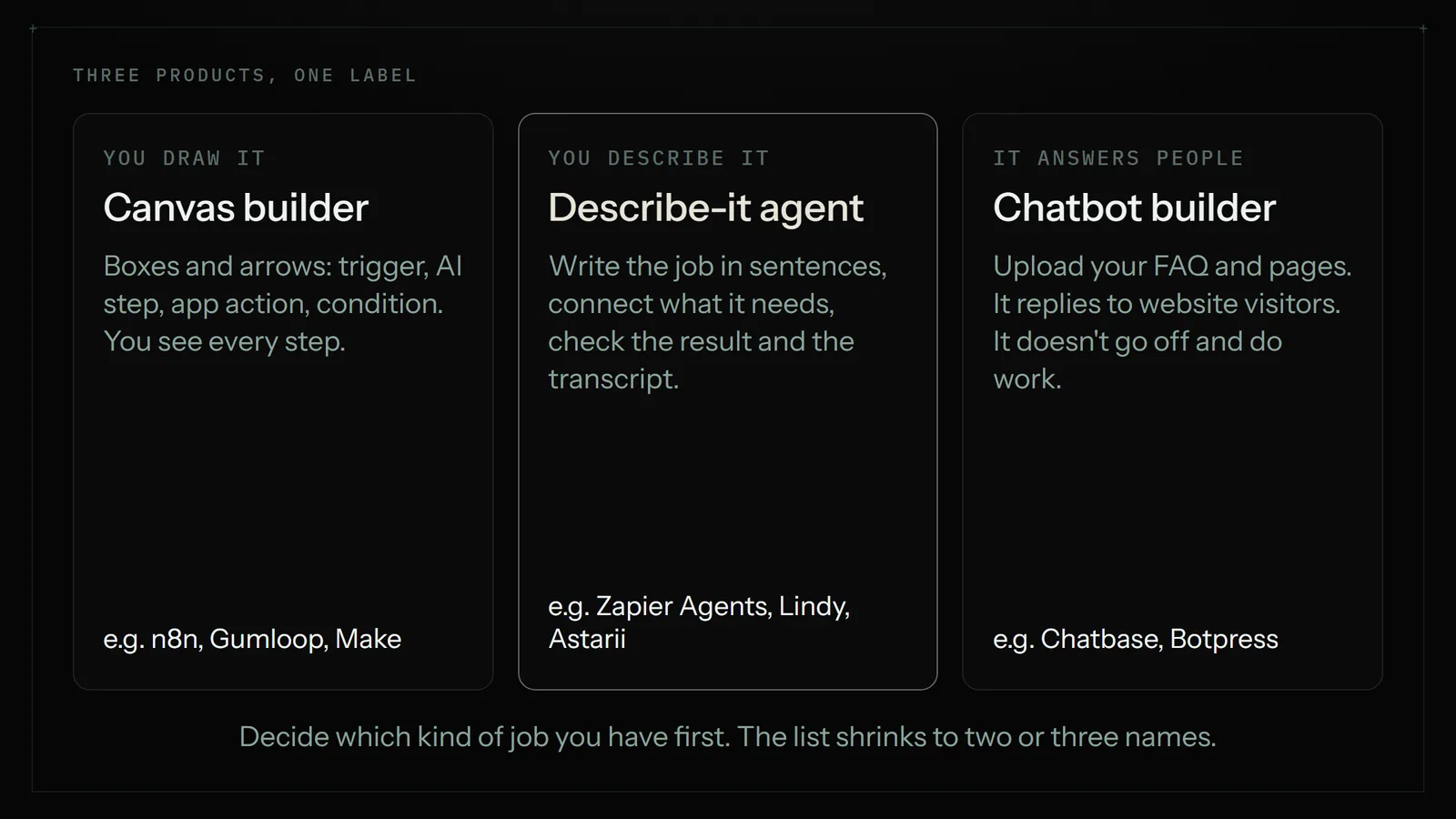
Most "best agent builder" lists mix all three, which is why they are hard to use. Decide which kind of job you have first, and the list shrinks to two or three names.
What a small business can realistically build
The jobs that work are repeated, have a clear finish line and happen on a screen. A useful test: could you write the job on one index card for a new assistant, and would you know at the end whether it was done right? Some examples that pass:
- Every Friday, copy new invoices from Gmail into a Google Sheet and email me the total. (See invoices from Gmail into a sheet.)
- Every weekday at 7:30, check five competitors' prices and log any change. (See competitor price monitoring.)
- Each morning, read new orders, flag anything unusual and send me a short list.
- When a contact form comes in, draft a reply from my pricing notes for me to approve.
- Once a week, sign into three dashboards, copy the numbers into a sheet and email a summary.
- Submit my product to two startup directories a day and keep a log.
Jobs that don't pass: anything that moves money on its own, phone calls, disputes, and work where you can't say what "done right" looks like. Those stay with a person. The 25 real agent examples post has a longer list sorted by job.
The main no-code builders and what they cost
Prices below are US dollars per month, read on each vendor's pricing page on 12 November 2026 unless the note says otherwise. Plans change often in this market, so check before you buy.
Zapier Agents
Zapier's agent product sits on top of its 9,000-plus app integrations. You describe the agent's job, give it apps and data sources, and it can also browse the web. There is a free tier with 400 activities a month, and paid Pro tiers that raise the limit (a third-party price check puts the entry Pro tier at about $50 a month). Agents are billed separately from regular Zapier workflows, which start at $19.99 a month on the Professional plan.
Good for: owners whose work already lives in apps Zapier connects to. Watch: the activity limit, and jobs on sites with no Zapier integration.
Lindy
Lindy builds assistants for inbox, meetings and follow-ups. Its pricing page now starts at $29.99 per user a month for 3,000 credits, with larger credit bundles above that and top-ups at $10 per 1,000 credits. New accounts start with $50 in free credits and no card. Every active user in a workspace is billed, so a team of three pays three seats.
Good for: email-heavy work. Watch: credits per task vary by model and steps, so estimate with a real week of work during the free credits.
Gumloop
Gumloop is a canvas builder made for AI workflows: you chain nodes for reading, summarising, scraping and app actions. Pro starts at $37 a month after a 14-day trial and includes 20,000 credits; extra usage bills at $0.005 a credit once you turn pay-as-you-go on.
Good for: people who like seeing every step and want strong AI blocks. Watch: the first afternoon is a learning curve, and each credit-hungry node adds up.
n8n
n8n is the most flexible canvas tool here, with AI agent nodes and hundreds of app integrations. It is free if you host it yourself on your own server, and its cloud plans charge per whole workflow run rather than per step. When we read the page on 10 November, cloud plans started at about $20 a month billed yearly; this week's page loads its prices in a way we could not read, so treat that figure as a guide.
Good for: a technical friend or a tinkering owner. Watch: "no-code" is generous. You will meet JSON and expressions sooner or later.
Microsoft Copilot Studio
If your business runs on Microsoft 365, Copilot Studio builds agents that work with your Microsoft data. It is billed in Copilot Credits shared across your organisation: a $200 monthly pack of 25,000 credits, or pay-as-you-go at about one cent a credit, according to several 2026 pricing guides (we could not read Microsoft's page directly). Answers that search your company data cost more credits each.
Good for: Microsoft 365 shops with someone to own it. Watch: it is built for organisations; a two-person business may find the setup heavy.
OpenAI's Agent Builder
OpenAI launched a visual Agent Builder in late 2025 as part of AgentKit. It was a developer tool billed through API usage, and OpenAI announced on 3 June 2026 that it is winding Agent Builder down; it leaves the platform on 30 November 2026. Skip it for new work. If you want ChatGPT to do online tasks, our post on what replaced ChatGPT agent mode covers the current options.
Relevance AI
Relevance AI lets you build agent "workforces" for sales and operations. Third-party guides list a Pro plan near $19 a month and a Team plan in the hundreds, but they also report the public pricing page changing during 2026, so ask for a quote. It leans toward sales teams more than a shop of three.
Astarii
Astarii skips the builder. You press New Astari, pick a ready-made one (Etsy Manager, Google Ads Manager, Job Hunter and others) or write your own job the way you would brief a person, and give it a sign-in if the job needs one. Then you run it once and watch: a live view of the browser shows each step. When the run does what you meant, you give it a schedule and leave it. It works in a real browser, so it can do jobs on sites that have no integration, and it connects to Gmail or Outlook, Google Sheets, Docs, Calendar and Drive directly.
A few things matter for trust: saved passwords are encrypted in your browser and never shown to the AI, a run pauses and asks you when a site texts a code, and the Etsy and Google Ads helpers propose changes or leave campaigns paused until you approve. Plans start with a free trial of 3 runs, then Pro at $29.99 a month (900 cloud minutes plus 800 browser minutes).
Good for: repeated work on websites you sign into, especially sites with no integration. Watch: it is not a website chatbot, and for a pure app-to-app rule with an integration on both ends, Zapier or Make is cheaper and faster.
Side-by-side comparison
| Tool | Kind | How you build | Starting price | Best fit |
|---|---|---|---|---|
| Zapier Agents | Describe-it | Instructions plus app connections | Free (400 activities); paid tiers above | Work inside apps Zapier connects |
| Lindy | Describe-it | Instructions, templates | $29.99 per user (3,000 credits) | Inbox and meeting follow-up |
| Gumloop | Canvas | Drag-and-drop nodes | $37 after a 14-day trial | AI-heavy workflows you want to see |
| n8n | Canvas | Nodes, some expressions | Free self-hosted; cloud about $20 | Tinkerers, technical helpers |
| Copilot Studio | Canvas and describe-it | Microsoft builder | $200 for 25,000 credits, or pay as you go | Microsoft 365 organisations |
| Chatbase, Botpress | Chatbot builder | Upload your content | Varies; see the round-up | Answering website visitors |
| Astarii | Describe-it, no builder | Plain-English job, watch the first run | Free trial (3 runs); Pro $29.99 | Sites you sign into, on a schedule |
How to choose in five questions
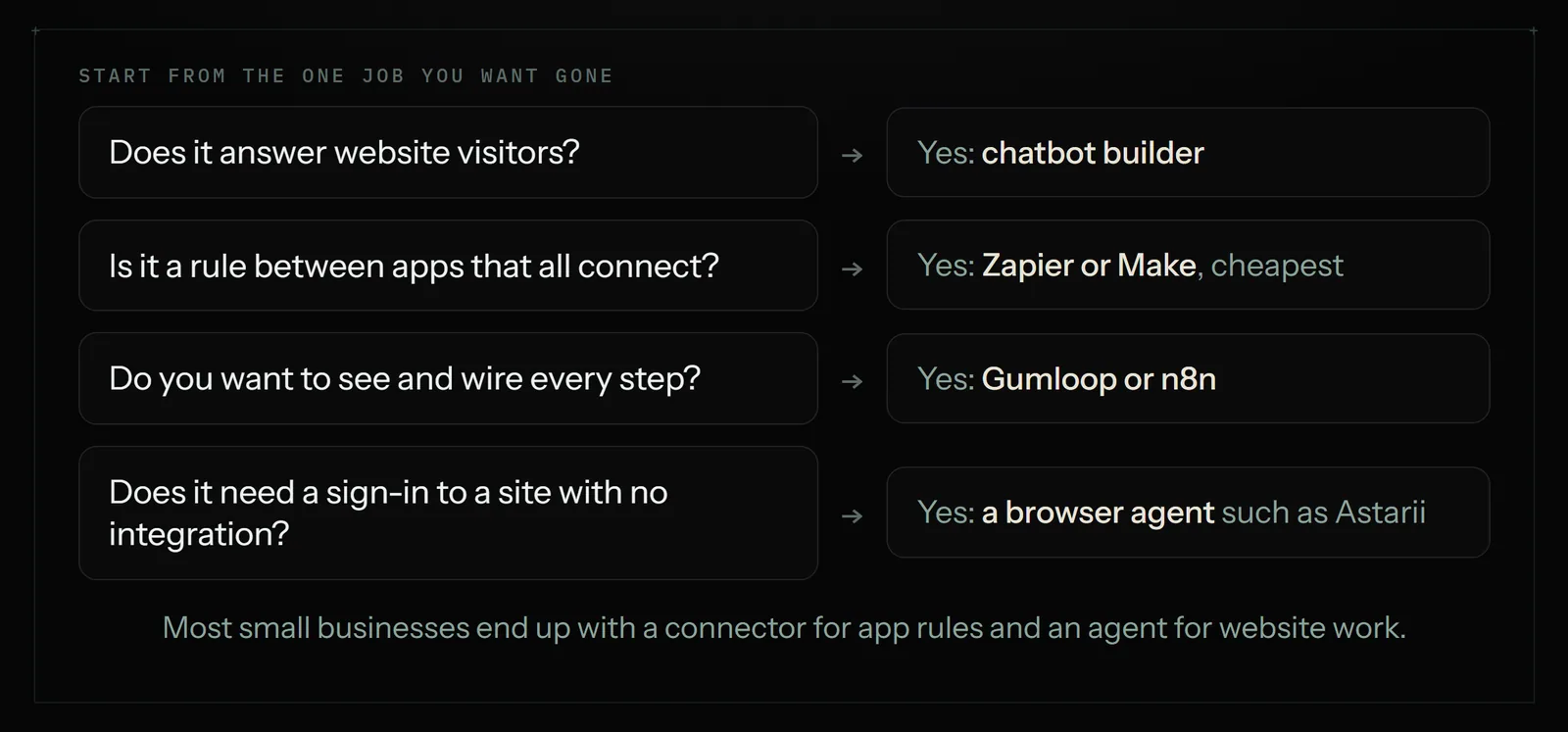
Answer these about the one job you most want gone, not about your business in general:
- Does the job answer people, or do work? If it answers website visitors, you want a chatbot builder. Stop here.
- Do all the apps in the job have an integration? If yes, and the job is rules (when X, do Y), a connector such as Zapier or Make is the cheapest tool. Our n8n vs Zapier vs Make comparison picks between them.
- Does it need a sign-in to a site with no integration? Supplier portals, marketplaces, dashboards and government forms often don't have one. That points to a browser agent.
- Do you want to see every step, or check the result? Canvas builders give you the wiring. Describe-it agents give you a transcript and the output.
- Who maintains it? If nobody on your team will open a canvas again in three months, choose the option you can fix by rewriting a sentence.
Worked example: the same job built two ways
Take a three-person bakery. Every Monday the owner signs into two supplier portals, checks the price of flour, butter and sugar, copies them into a sheet and works out whether to reorder now. It takes about 40 minutes.
On a canvas builder, you would add a weekly trigger, then look for an integration for each supplier portal. Neither portal has one, so you would add a scraping or browser node, point it at the login page, store the password in the tool, select the price on each page and map the fields into Google Sheets. It can work. Expect an afternoon to build, and a repair each time a portal changes its layout.
With a describe-it agent, the owner writes the job:
Every Monday at 7:00, sign into both supplier portals, find this week's price for 25 kg flour, unsalted butter and caster sugar, and add a row to the Prices tab of my Bakery sheet. If any price is up more than 5% on last week, email me the change.
Then she attaches the two portal sign-ins, presses Run and watches the first attempt. If it picks the wrong butter, she adds "the 10 kg block, not the 250 g pack" to the job. When a portal changes its layout, the agent reads the new page rather than following a recorded click path, though a big redesign can still need a clearer instruction.
At Astarii's Pro plan, a run like this is a few minutes, about 4 times a month, so it uses a small slice of the 900 monthly cloud minutes. The rest of the pool is free for other jobs.
Build your first agent in an afternoon
Whichever tool you pick, the same five steps decide whether your first agent sticks:
- Pick one job you did at least three times last month. One. A one-off is faster by hand.
- Write the brief like a note to a new assistant. Say when, where, how many and what "done" looks like. "Check up to 10 new orders" beats "check orders". Without a number, open-ended jobs keep going.
- Connect only what the job needs. Give it the one inbox label, the one sheet, the one sign-in. A separate, limited login is safer than your main account; our post on letting an AI agent log in safely explains why.
- Run it once and watch. Read the transcript. If it went wrong, find the step where it went off and say that specific thing in the brief. "Skip listings older than a week" beats "be more selective".
- Schedule it, then check weekly for a month. Keep approvals on for anything customers or money will see until you trust it.

Where no-code builders fall short
An honest list, because these are where first projects stall:
- Judgment calls. Agents follow instructions well and taste poorly. Refund decisions, pricing strategy and tricky customer emails stay with you.
- Sites that forbid automation. Some platforms' terms bar bots. LinkedIn and Indeed are examples. Read the terms of any site you point an agent at.
- Security on the open web. A page can contain text that tries to steer an agent. No vendor can rule this out, so keep banking and your main email out of reach and require approval for anything that goes live.
- Cost surprises. Credits, activities and minutes are measured differently by every vendor. Run a real week on a trial before you commit.
- Maintenance. Canvas workflows break when an app changes; describe-it agents drift when the brief is vague. Either way, someone owns it.
The bottom line
For a small business, "which no-code agent builder" is usually the wrong first question. Start with the job. If it answers customers, use a chatbot builder. If it is a rule between apps that all connect, use Zapier or Make. If you want to see every step and enjoy building, try Gumloop or n8n. If the work happens on websites you sign into and you'd rather describe it than draw it, that is what Astarii is for. You can start with three free runs on the pricing page, or read your first Astari to see the five-minute setup. For a broader round-up by job, see the best AI agents for small business.
Say it to an Astari
These are instructions you can give an Astari, word for word. It does the work in a browser, on a schedule if you want one, and asks you before anything goes live.
Questions
What is the best no-code AI agent builder for a small business?
It depends on the job. For rules between apps that all have integrations, Zapier or Make. For AI workflows you want to see step by step, Gumloop or n8n. For inbox work, Lindy. For repeated work on websites you sign into, Astarii, from $29.99 a month. For answering website visitors, a chatbot builder such as Chatbase.
Can I build an AI agent without coding?
Yes. Describe-it tools such as Zapier Agents, Lindy and Astarii take the job in plain English. Canvas tools such as Gumloop and n8n use drag-and-drop boxes, though n8n expects some comfort with data fields and expressions once workflows get bigger.
Is there a free AI agent builder?
Zapier Agents has a free tier with 400 activities a month. n8n is free if you host it on your own server. Lindy starts accounts with $50 in free credits, Gumloop has a 14-day trial, and Astarii has a free trial of 3 runs of up to 15 minutes, with no card.
How much does a no-code AI agent cost per month?
Paid plans for one person mostly sit between $20 and $50 a month: Lindy $29.99 per user, Gumloop $37, n8n cloud about $20 billed yearly, Astarii Pro $29.99. Microsoft Copilot Studio is sold in $200 packs of 25,000 credits. Usage limits differ a lot, so test a real week first.
What is the difference between an AI agent builder and Zapier?
Classic Zapier runs fixed rules: when this happens in one app, do that in another. An agent builder adds an AI that reads, decides and takes several steps toward a goal. Zapier now sells both, with Agents billed separately from regular workflows.
Can a no-code AI agent work on websites without an integration?
Only if it can use a browser. Canvas tools need a scraping or browser step for sites with no integration, which takes setup and breaks when pages change. Browser agents such as Astarii sign in and work on the page the way a person does, then report what they did.
Is OpenAI Agent Builder still available?
OpenAI launched Agent Builder in late 2025 as a developer tool. On 3 June 2026 it announced a wind-down, and Agent Builder leaves the OpenAI platform on 30 November 2026. It is not a good choice for new projects.
What should I not hand to an AI agent?
Payments, refunds, disputes, phone calls and judgment calls such as pricing strategy. Keep your bank and main email out of reach, and require approval for anything that customers or money will see.
filed under AI agents explained