AI Personal Assistant for a Small Business Owner: What It Can Take Off Your Week
"AI personal assistant" covers four different kinds of software. One writes, one plans your calendar, one sorts your inbox and one does the online errands. Here is which takes what off your week, what each costs, and what should stay with a person.

An AI personal assistant for a small business owner is one of four kinds: a chat assistant such as ChatGPT ($20 a month) for writing, a calendar planner such as Reclaim or Motion, an inbox assistant such as Superhuman or Fyxer, or a doing agent such as Astarii, from $29.99 a month, for repeated online errands. Phone calls and judgment stay with people.
An AI personal assistant sounds like one thing. In practice it is four different kinds of software sold under the same name, and they take very different jobs off your week. One writes. One plans your calendar. One sorts your inbox. One goes and does the online errands for you. A small business owner who buys the wrong kind ends up with a clever chat window and the same to-do list.
This guide sorts the four kinds by the job each one actually removes, with this week's prices (November 2026), a worked week for a one-person business and a plain list of what should stay with a person. Astarii, which we make, is the fourth kind: an agent that does repeated online work on sites you sign into. For the other three kinds, we name the tools that fit better. If you are new to the idea of agents, the guide to AI agents for small business is the place to start, and Astarii's Gmail, Outlook, Calendar and Sheets connections are described in the docs.
Four kinds of AI personal assistant
Search for "AI personal assistant" and the lists mix voice assistants on your phone, chat apps, calendar tools and email add-ons. For running a small business, the useful split is by what the software does without you:
- A chat assistant (ChatGPT, Claude, Gemini). You ask, it answers or drafts. It writes the email, plans the week and reads the contract. You still send, click and file.
- A calendar planner (Motion, Reclaim). It moves your tasks and focus time around meetings, so the plan fits the hours you have.
- An inbox assistant (Superhuman, Fyxer, the AI inside Gmail or Outlook). It sorts mail, drafts replies in your voice and nudges you about threads waiting on an answer.
- A doing agent (Astarii, Lindy). You describe a job in plain English and it does the online steps: signs into a site, fills a form, updates a sheet, sends the email, on a schedule, then reports what it did.
The fifth option is still a person: a virtual or executive assistant. They answer the phone, make judgment calls and handle things nobody wrote down. Software of all four kinds is weak exactly there.
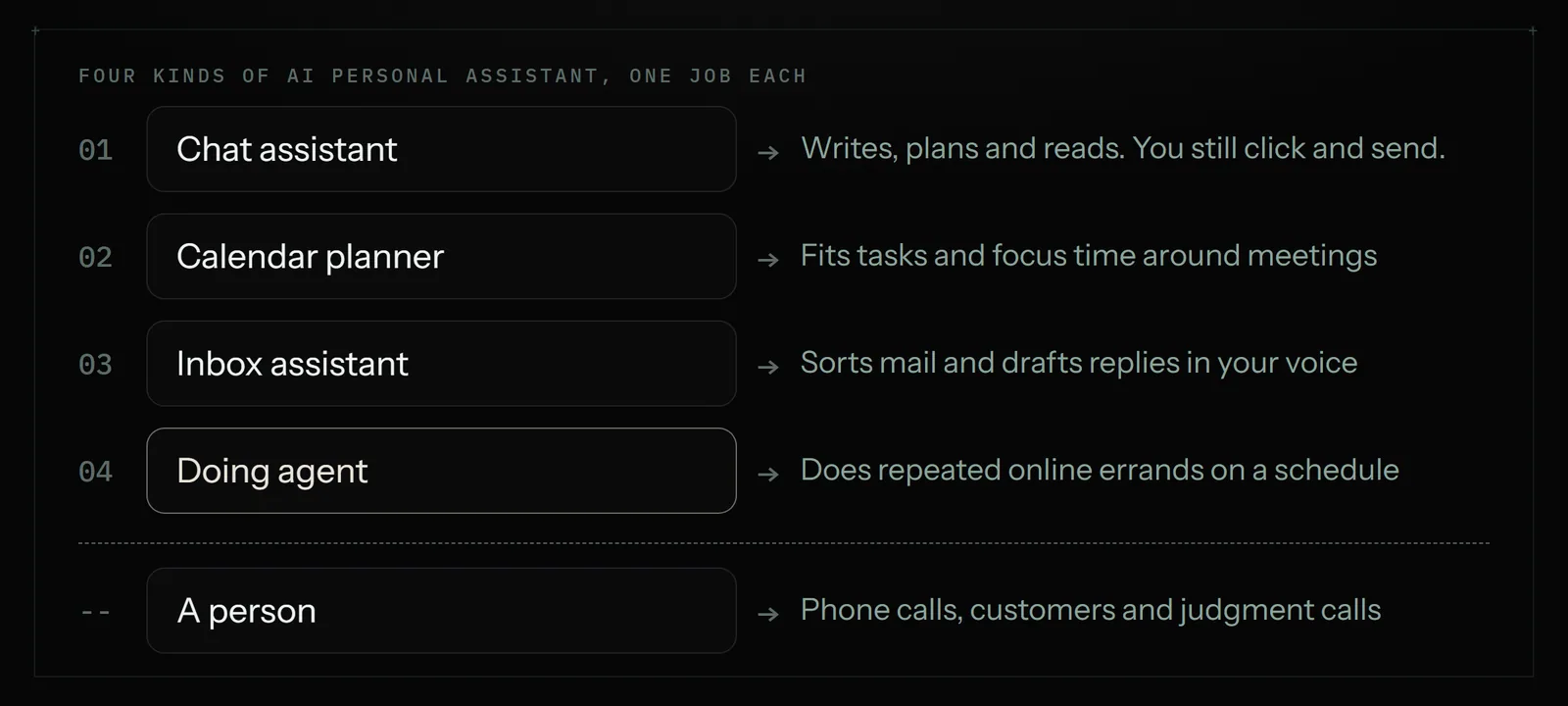
The four kinds side by side
Prices below are what each tool charged or was reported to charge this week. Several come from recent pricing guides rather than the vendors' own pages; the sources at the end say which. Check the vendor's page before you buy.
| Kind | Examples | Price (Nov 2026) | Takes off your week | Does not do |
|---|---|---|---|---|
| Chat assistant | ChatGPT Plus, Claude Pro, Gemini | $20 a month each; free tiers | Writing, planning, reading files, thinking out loud | Click, send or file anything on its own |
| Calendar planner | Motion, Reclaim | Reclaim free (Lite), Starter about $10 a user (yearly); Motion reported from about $29 a month for one person (yearly) | Fitting tasks and focus time around meetings | Do the tasks it schedules |
| Inbox assistant | Superhuman, Fyxer, Gemini in Gmail, Copilot in Outlook | Superhuman reported from $25 a user (yearly); Fyxer reported from about $22.50 (yearly) to $50 | Sorting mail and drafting replies in your voice | Work in the portals and sites the email points to |
| Doing agent | Astarii, Lindy | Astarii from $29.99 a month (3 free runs); Lindy from $29.99 a user | Repeated online errands: portals, forms, sheets, follow-ups, on a schedule | Phone calls, payments you have not approved, judgment calls |
| A person (VA or EA) | Marketplace freelancer, US agency | About $10 to $20 an hour on marketplaces; about $36 to $39 an hour at a US agency | Calls, customers, anything new or delicate | Work at 6am every day without being paid for it |
Two things stand out. First, the software is cheap next to a person: even three tools together cost less than four hours of agency time a month. Second, none of the first three kinds does the work itself. A chat assistant writes the supplier email; a planner finds you 30 minutes to send it; an inbox assistant drafts the reply when they answer. You still sit down and do it. Only the fourth kind, and a person, takes the job away.
First, find what fills your week
Before you pick a tool, spend 20 minutes on last week. Open your sent mail, your calendar and your browser history and write down every job you did more than twice. A typical owner's list has four groups:
- Calendar. Booking calls, moving them, finding time for the work that keeps getting pushed.
- Inbox. Answering the same questions, chasing replies, filing invoices and receipts.
- Online errands. Signing into a supplier portal to check an order, copying numbers from a dashboard into a sheet, filling the same form for each new customer, renewing a listing.
- People. Phone calls, a customer who is upset, a supplier negotiation.
Put minutes next to each. The group with the most minutes decides which kind of assistant you buy first. Most owners find the errands group is bigger than they thought, because each one is "only ten minutes" and there are twelve of them. The 30-minute audit for repetitive tasks walks through this in more detail.
Calendar: a planner, or the calendar you already have
If your problem is that the week fills with meetings and the real work never gets a slot, a calendar planner is the right buy. Motion and Reclaim both take a task list and place the tasks in the gaps around meetings, then reshuffle when something moves.
- Reclaim has a free Lite plan with one calendar and one booking link. Starter is about $10 a user a month on a yearly plan, about $12 monthly, and adds a second calendar and task management.
- Motion has no free plan, only a trial. Pricing guides put a single user at about $29 a month on a yearly plan and $49 monthly, with team seats lower per person. One guide notes seat minimums that the pricing page does not spell out, so read the checkout carefully.
If you mostly need people to book you without the back-and-forth, a free booking link (Google Calendar's own, or Reclaim Lite) may be all you need. Skip the planner if your week has few meetings; it has little to move.
Where a doing agent fits on the calendar side is narrower: Astarii can connect to Google Calendar and work inside it as part of a bigger job, for example reading tomorrow's appointments each evening and emailing each client the details from your sheet. It is not a time-blocking planner, and we would not pick it over Motion or Reclaim for that.
Inbox: drafting and sorting
An inbox assistant earns its price when you get more mail than you can read. It sorts the noise away from the threads that matter, drafts replies that sound like you, and reminds you about anything waiting on an answer. The AI email assistant comparison sorts these tools by drafts, sorting and follow-ups.
- Gemini in Gmail and Copilot in Outlook come with Google Workspace and Microsoft 365 business plans or add-ons. If you already pay for one of those, try the built-in drafting and summaries for a week first.
- Superhuman is a faster email app with AI drafting and reminders. Pricing guides list Starter at $25 a user a month on a yearly plan, $30 monthly, and Business at $33 yearly, $40 monthly.
- Fyxer sits in Gmail or Outlook, sorts mail into folders and leaves drafted replies. Guides list about $22.50 a user yearly or $30 monthly for Starter, with a 7-day trial and no free plan; one guide reports a repricing in September 2026, so check its page.
The limit of all of them: they live inside the inbox. When the email says "your invoice is ready, sign in to view it", or "please update your details on our portal", the inbox assistant stops at the link. Following the link, signing in, downloading the invoice and putting it in your sheet is a doing job. That is where an agent picks up. The guide to getting invoices from Gmail into a sheet every Friday shows that job end to end, and the invoice reminder templates cover the follow-up side.
Online errands: the part a doing agent takes
Errands are the online jobs between the calendar and the inbox: the supplier portal, the shop dashboard, the form you fill for each new client, the weekly numbers you copy into a sheet. They are small, they repeat, and no chat assistant does them for you.
A doing agent such as Astarii works in a real browser. You describe the job in plain English, or show it once, and it opens the sites, signs in with saved logins, clicks, types, uploads files, updates spreadsheets and sends emails, then reports what it did. It can run on a schedule (every weekday at 7:30, every Friday) in the cloud with your computer off, or in your own Chrome or Brave through the extension. Task memory means a scheduled Astari does not do the same item twice: it will not re-email the same lead or log the same invoice again.
Good errands for an agent have three things in common: the steps are the same each time, the finish line is clear, and a mistake is easy to spot and undo. Examples from owners' lists:
- Every morning, check yesterday's orders and email yourself anything that needs attention.
- Every Friday, put the week's invoices from Gmail and two supplier portals into a sheet.
- Every weekday, log five competitors' prices and flag any change (the competitor price monitoring guide covers this).
- Every Monday, collect last week's numbers from the dashboards you log into and email a summary (see automating weekly reports).
- For each new row in the client sheet, fill in the same booking or registration form.
The safety rules matter more here than for the other kinds, because the agent acts. With Astarii, saved passwords are encrypted in your browser before they are stored and are never shown to the AI. When a site texts a sign-in code, or a step needs a decision, the run pauses and asks you, then carries on from where it stopped. The ready-made Etsy Manager proposes every change to a live shop and makes it only when you approve, and the Google Ads Manager starts everything it creates paused. The post on letting an AI agent log into your accounts covers how to set limits.
Where another doing agent may suit you better: Lindy is built around per-seat team workspaces, which can fit a company where several people share one assistant. Astarii is priced per account by run minutes and leans on working in a real browser, which fits sites with no integration.
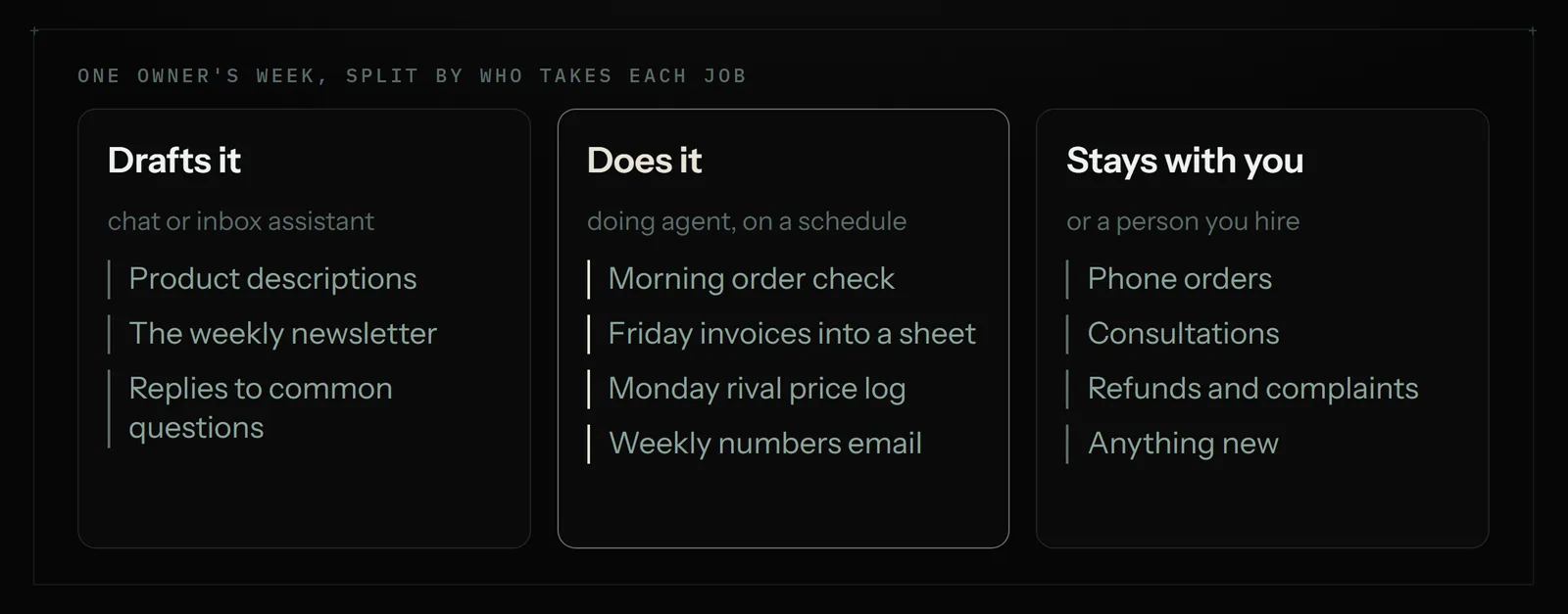
Calls and judgment stay with people
Be plain with yourself about this part. None of the four kinds answers your phone, talks a customer down or decides whether to give a refund. Astarii does not make or take phone calls. For calls you have two honest options:
- An AI receptionist such as Frontdesk (My AI Front Desk), from about $99 a month, answers calls, books appointments and takes messages. It is a different product from everything above; the round-up of AI agents by job compares it.
- A person. A virtual assistant from a marketplace at roughly $10 to $20 an hour, or a US agency such as Time etc at $390 a month for 10 hours. The virtual assistant vs AI agent comparison shows how owners split one list between them.
Also keep these for yourself or a person: payments and refunds, anything legal, a customer complaint, a first conversation with a new supplier and anything you have never done before. Software is good at the tenth time, not the first.
A worked week: a one-person bakery that sells online
Here is how one owner's list splits. The minutes are the owner's own estimates from a week's audit, not a measured result, and yours will differ.
| Job | Minutes a week | Who takes it | How |
|---|---|---|---|
| Writing product descriptions and the weekly newsletter | 90 | Chat assistant | Drafts from notes; owner edits and sends |
| Answering "do you deliver to..." emails | 60 | Inbox assistant or agent | Drafted replies from a short FAQ; owner approves |
| Checking overnight orders across two sites | 70 | Doing agent | 7:30 every weekday: reads orders, emails a summary |
| Supplier invoices into the bookkeeping sheet | 45 | Doing agent | Fridays: Gmail plus the flour supplier's portal, new rows only |
| Logging two rival bakeries' prices | 30 | Doing agent | Mondays: checks both menus, flags changes |
| Booking tasting calls | 40 | Booking link | Free calendar booking page |
| Phone orders and a wedding-cake consultation | 120 | Owner | Stays with a person |
Of about seven and a half hours of desk work, roughly four can move to software, and the owner still reads and approves the outputs at the start. The cost: ChatGPT Plus at $20 and Astarii Pro at $29.99 a month, about $50 together, with the booking link free. The phone work stays where it was. That is a realistic result for a first month: not an empty week, but the repeated parts gone and the person-shaped parts left.
How to start in five steps
- Pick one job. The one with the most minutes and the clearest finish line. Not the most interesting one.
- Write it down as you would brief a new hire. Which sites, which sheet, what counts as done, what to do when something looks wrong.
- Try it on a free tier first. ChatGPT, Claude and Reclaim have free plans; Astarii gives 3 free runs of up to 15 minutes with no card. Your first Astari walks through the setup.
- Watch the first week. Read every report. Approve anything that goes out. Fix the instruction, not the output.
- Schedule it, then add the next job. Once a job runs clean for a week, put it on a schedule (how scheduling works) and go back to your list.
Which one to get first
If you only buy one, get a chat assistant: at $20 a month it helps with almost every group on your list, even if it does none of the clicking. If your audit shows more than two hours a week of repeated online errands, add a doing agent next; that is usually the biggest single block of time an owner can hand off. Buy a calendar planner or an inbox assistant only when meetings or mail volume are the actual problem. And if the biggest block is the phone, the answer is a receptionist service or a person, not anything on this page.
To try the doing side, Astarii's plans start at $29.99 a month, with 3 free runs to try first. For more jobs owners hand off, see the 25 real AI agent examples and the plain explainer on AI employees.
Say it to an Astari
These are instructions you can give an Astari, word for word. It does the work in a browser, on a schedule if you want one, and asks you before anything goes live.
Questions
What is the best AI personal assistant for a small business owner?
It depends on what fills your week. For writing and planning, a chat assistant such as ChatGPT Plus or Claude Pro at $20 a month. For a crowded calendar, Reclaim or Motion. For heavy email, Superhuman, Fyxer or the AI built into Gmail or Outlook. For repeated online errands on sites you sign into, a doing agent such as Astarii, from $29.99 a month.
Can an AI personal assistant answer my phone?
Not the four kinds in this guide. Chat assistants, calendar planners, inbox assistants and doing agents, Astarii included, do not take calls. For phones, use an AI receptionist such as Frontdesk, from about $99 a month, or a virtual assistant.
How much does an AI personal assistant cost?
Chat assistants cost about $20 a month and have free tiers. Reclaim has a free plan and Starter at about $10 a user a month yearly; Motion is reported from about $29 a month yearly. Superhuman is reported from $25 a user and Fyxer from about $22.50. Astarii starts at $29.99 a month with 3 free runs.
Is an AI personal assistant cheaper than a virtual assistant?
Yes, by a wide margin for repeated work. A marketplace virtual assistant is roughly $10 to $20 an hour and a US agency such as Time etc about $36 to $39 an hour. Two or three AI tools together usually cost $50 to $100 a month. A person is still the better pick for calls, customers and anything new.
Can an AI assistant manage my calendar and email?
Calendar planners such as Motion and Reclaim place tasks around meetings, and inbox assistants sort mail and draft replies. Astarii connects to Gmail or Outlook and Google Calendar and can work inside them as part of a bigger job, such as emailing tomorrow's clients their appointment details, but it is not a time-blocking planner.
What tasks should I give an AI personal assistant first?
Pick the job with the most minutes a week and a clear finish line: the morning order check, invoices into a sheet every Friday, weekly numbers from dashboards you log into, or the same form filled for each new client. Watch the first week of reports before you put it on a schedule.
Is it safe to let an AI assistant sign into my accounts?
Limit what it can reach and keep approvals on. Astarii encrypts saved passwords in your browser and never shows them to the AI, pauses and asks you when a site texts a sign-in code, proposes Etsy shop changes for approval and starts Google Ads campaigns paused. Keep banking and payments for yourself.
Do I need more than one AI assistant?
Many owners end up with two: a $20 chat assistant for words and one tool for the biggest time block, often a doing agent for online errands. Add a planner or inbox assistant only if meetings or email volume are the real problem.
- Astarii product facts (llms.txt)
- Astarii pricing
- Motion pricing plans in 2026 (Morgen)
- Motion pricing, October 2026 (Dupple)
- Reclaim AI pricing guide (SchedulingKit)
- How much does Reclaim cost? (Hackceleration)
- Superhuman pricing in 2026 (Inbox Zero)
- Fyxer AI pricing 2026 (eesel)
- Fyxer AI pricing 2026: plans, seats, trial (Carly)
- ChatGPT pricing in 2026 (eesel)
- Time etc plans and pricing
- Lindy pricing
- My AI Front Desk pricing
filed under AI agents explained